Customer Ratings & Reviews












- Model:
- ADO951800F147
- SKU:
- 6366190
to a friend
Customers are saying
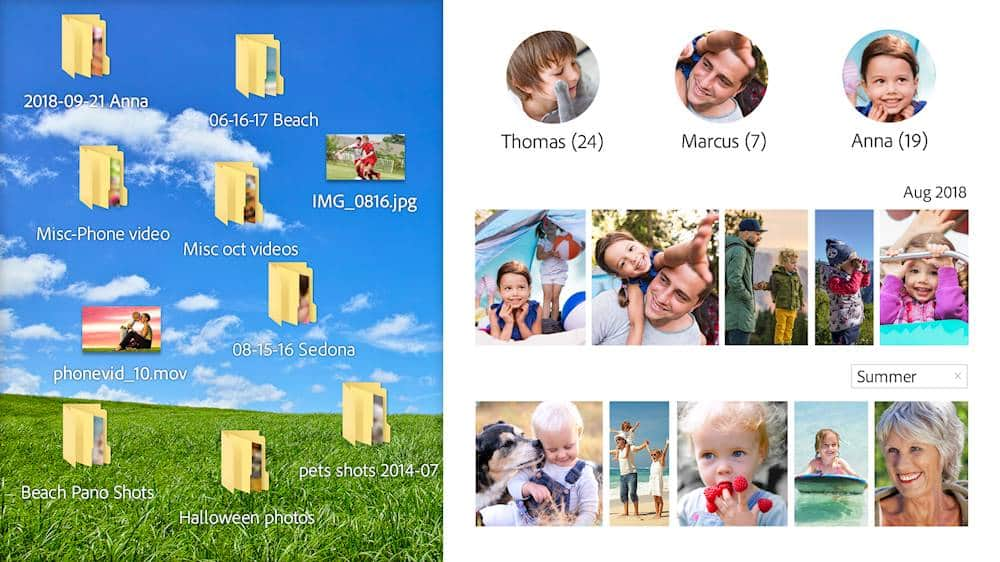
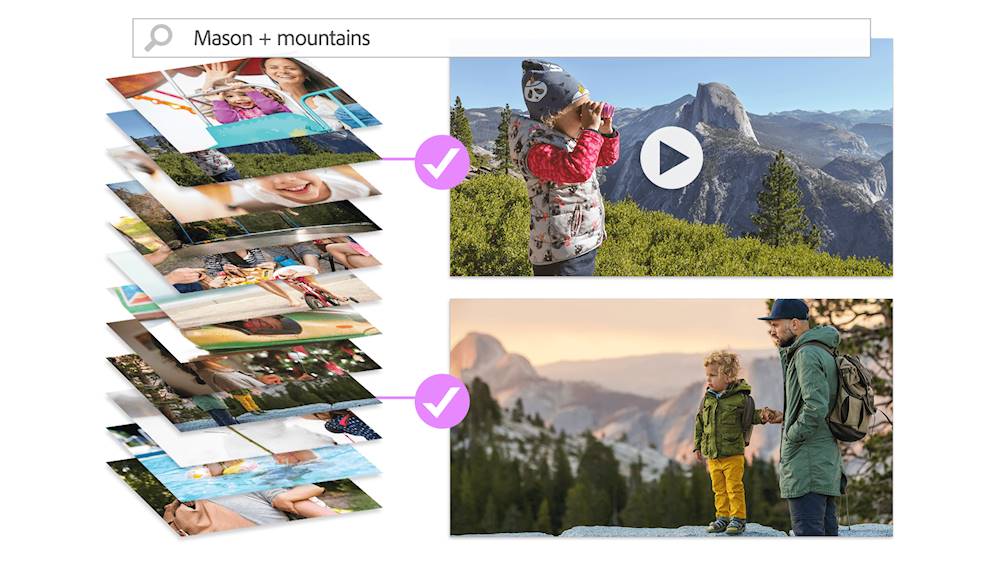
Customers recognize Premiere Elements 2020 as a user-friendly video editing software with an intuitive layout and smooth transitions. They appreciate its affordability compared to Adobe Premiere. While some users find the installation process time-consuming, many acknowledge the software's smart tags and face recognition features.
This summary was generated by AI based on customer reviews.
Shawshank
||Posted . Owned for 3 weeks when reviewed.This reviewer received promo considerations or sweepstakes entry for writing a review.Good stuff, I’d highly recommend this game. Brought back memories from when I was doing time in Shawshank and I used a spoon to tunnel out of the jail cell.
I would recommend this to a friend- Pros mentioned:Ease of use, Video editing

Easy to use video editing!
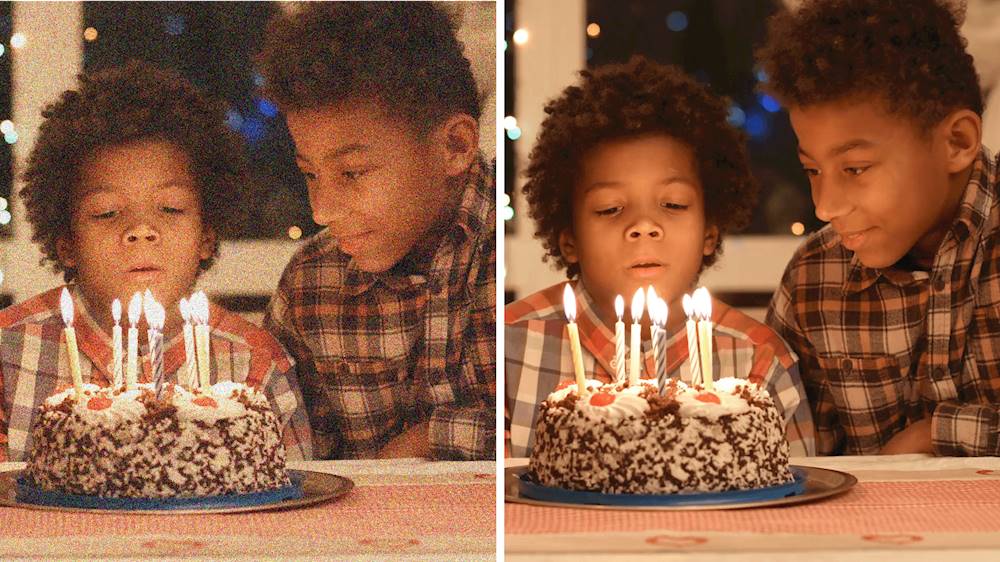
|Posted .This reviewer received promo considerations or sweepstakes entry for writing a review.Great piece of software that allows to edit, convert and touch up videos. It has several features that allows to do that easily, in example it has something called sense ai, basically artificial intelligence that detects faces or certain things in videos that allows you to automatically sort and or group videos based on common things like faces. I like the easy to use interface, you can either use the "wizard" which is how the app launches, or you can just from there choose the video editor, that gives you more of a manual way to work on videos. One can touch up videos, in example videos with low light, or grainy, the software allows you to touch them up for better clarity and viewing. Can also convert to different formats, you can also burn them to dvd;s (if someone still uses those). I have been able to successfully touch up many of my low light videos taken with my phone and saved them on my handy USB for family viewing. Highly recommend this to anyone wanting to touch up, edit videos in an easy way!
I would recommend this to a friend - Pros mentioned:Video editing
Not what I expected.
|Posted .This reviewer received promo considerations or sweepstakes entry for writing a review.Adobe Premiere Elements 2020 - Mac|Windows Summary: A video companion editing tool by Adobe. Pros: * The effects are nice and the product is definitely appreciable for video projects. * There is a free trial. Cons: * The download and installation is slow (installed from and onto NVMe PCIe M.2 SSD). * Start-up is a bit cludgy which is tough for people accustomed to using their phone and available mobile apps to quickly apply filters and effects. * If you use the Premier Elements banner to start projects, it isn't so bad. But as a former and avid Photoshop 7 user, I found the interface confusing and difficult to use. Admittedly, these are different products with different focuses. * The navigation doesn't distinguish between the products you need to actually have in order to create specific content. One thing I wanted to do is be able to improve pictures of substandard quality. But, I need Photoshop Elements for that. Use: * I've edited a few video clips and performed some effects on them. It got the job done. * The video editing tools and effects are nice. Again, I am just not sure about the interface. I also don't enjoy using the app. * I thought I was also getting photo editing features, but that is a separate product that is accessible through the Premier Elements application portal (this was my misunderstanding). I've shared screen shot captures of video effects with before/after side-by-side. Bottom Line: I love Adobe products. I still use Photoshop 7 because it remains a powerful product for its focus. I am less inclined to pay up for subscriptions on software, which is why I thought this program might be a good find. This is exclusively VIDEO EDITING software. A more frequent user of desktops might get more use of out of this application since the controls are better suited to larger screen real estate, but I'd wager most people would be better served downloading whatever apps you need on your mobile phone or tablet to do the equivalent (most capability is available in the mobile offerings). I feel this is still a product more suited to advanced users with frequent needs for large video edits. In an age of Instagram of quick sharing, I feel like this product is definitely more niche. As a result, I cannot recommend this for more casual users. DOWNLOAD THE TRIAL AND USE IT FIRST! The price point certainly isn't prohibitive, but it may offer more than you need. I cannot recommend this product for photo editing since it isn't equipped for that purpose.
No, I would not recommend this to a friend Scalable, user-friendly software!
|Posted .This reviewer received promo considerations or sweepstakes entry for writing a review.Just in my brief time using Premiere 2020, I am already feeling like this is going to be incredible for my workflow and usage. Something that stands out to me is that they have worked hard in this iteration to make it so that anyone from a stark beginner to a pro/prosumer level can use this software and be able to accomplish great results. There are built in tutorials, helpful walkthroughs, and there are three different platforms for editing: Quick, Guided, and Expert. I explored each of these settings and found that, depending on my project, I would be happy to go between using any of these. Like iterations in the past, however, this software does require good hardware to run it if someone has expectation of the best performance. My current setup is a more "Gamer" focused custom computer consisting of an Octacore I7 9700K (certainly less than spectacular with a content creation focus as compared to its AMD counterparts, the Ryzen 3700X and 3900X), 16GB DDR4 3000mHz dual channel RAM, a 1TB Crucial P1 NVMe SSD, and a 2080 Super graphics card. All of this together resulted in incredible render times in my projects and snappy performance; all of which is highly demonstrative of a much more streamlined and less power hunger software than past iterations. Overall, I think Premiere 2020 Elements is going to please the overwhelming majority of users. I know I am looking forward to trying it on my MacBook Pro next!
I would recommend this to a friendEverything it needs to be, and then some
|Posted .This reviewer received promo considerations or sweepstakes entry for writing a review.If you're like me, you have many folders on your PC each with hundreds of photos and video clips taken with various smartphones and other cameras. You may even have most of those folders and photos organized and cataloged based on event or date taken, and think you've done a pretty great job of keeping memories accessible for the future. But if, again, you're like me, those folders are full of dozens of shots or clips that don't rise to the level of "best," and scrolling though every single picture as you remember important events and dates ends up kind of being a slog, where you infrequently remark "Oh, what a cute shot" and otherwise scroll through duplicates and triplicates of shots, some blurry and others with people's eyes closed of looking elsewhere. That's why it's so amazing that Adobe Elements includes a top-notch media organizer, with an ":auto curate" function that scans your photos and chooses the best ones. The auto curate function is customizable to display as few as 10 and as many as 500 shots from your library, and while it isn't always perfect, it does an excellent job of choosing well-laid out photos where people are in-focus and looking ideal for being made into memories. The media organizer is something of an entree into the world of Adobe Elements (or at least, I chose to use it before moving on to using Premiere Elements for video creation). Once I got through with adding files and folders to the library and using Adobe's AI to auto curate my media, I moved on to the video editor. And about Premiere Elements, I have this to say: If you've used video editing software at any point in the past and gained even a bit of comfort with it, Premiere will feel like slipping on your most comfortable pair of slippers. The editing window comes with a main view screen and a lower section of timelines, and automatically includes 3 video tracks, 3 audio tracks, and music and voice tracks. The upper-left of the screen allows you to add media to the project, and once added, the items can be dragged and dropped onto the timeline. I do have one quibble here: remember the organizer with it's auto curate function I was so jazzed about? Well the Add Media dialog box lets you pull in pictures you've organized, but it doesn't let you see just the curated shots. Adding shot you loved from the auto curate function requires extra steps, and that's a bit sad. Again, using Premiere Elements is all very intuitive, with mostly expected keyboard shortcuts, like the space bar to play/pause the preview window, home to go to the beginning, etc. Within about 15 minutes of firing up the software I had a "first day of school" video that would delight the grandparents to see, fully rendered with custom music, title card and transitions. Give me another couple hours and I could make each of my kids a "this is your life" video that would embarrass the heck out of 'em come high school graduation time. For what it is and does, and all the fun things I have yet to discover about it, Premiere Elements (and the Organizer) gets a big thumbs up from me.
I would recommend this to a friendUser friendly but system hog.
|Posted .This reviewer received promo considerations or sweepstakes entry for writing a review.I am dating myself here but the last Adobe I purchased was with windows XP and it was illustrator. That required almost a class to learn how to use. This program is completely divergent from that. The user interface was easy to navigate. Pull downs and options were user friendly. Ability to pick and choose what you want to do is light years from what I previously had with Adobe. The only con is that this program is an absolute system hog. Although I was combining and editing 4k video which in itself is a huge undertaking, the clips where only 2 to 3 mins long and I had 3 segments. It took about 2 hours to finalize my final video. My system met the minimum, but if you are going to use this for 4k video I would recommend a super beefed up PC to help with the processing. It handled photos pretty easily. Also the download took a while and install took a while as well. Other than the system issue that I had I would recommend this product for it's ease of use and range of capabilities.
I would recommend this to a friendBuggy Upgrade - Need Better QA
|Posted .This reviewer received promo considerations or sweepstakes entry for writing a review.I tried upgrading from Premiere Elements 2018 because only 2020 supports MacOS Catalina. However, the 2018 uninstaller would not run on Catalina, and the 2020 version does not offer to uninstall it either. So I went ahead and uninstalled 2018 using AppCleaner. Not sure if that caused an issue, but while I got Elements 2020 to work, I could not get Elements 2020 Organizer to work. Every time I launched Organizer, I'd get errors and then it would crash. Worse yet, the error messages made no sense. For example, see attached with the error message asking "Last attempt to open the catalog was unsuccessful. Do you wish to retry with the same catalog or open different catalog?" But the response choices are "Yes" or "No," and neither is a clear answer to the question. Other errors, though not as bad, were also not well described. So I skipped trying to use Organizer and launched the core app itself. Though most of the functionality is fine, I did run into some odd behavior in Expert mode. I added a title to one of my scenes. I wanted to replicate the title's format to another scene so I copied/pasted it to another point on the timeline. I went ahead and edited the text of the copied title, but when I did that, the original title's text changed to that of the copied one's. I can't imagine anyone needing the exact same title across different scenes so often that the titles would be linked like that. I would have expected copy/paste to simply create a new title based on the format of the old one. Lastly, I found the UI to have a dated look to it including the fonts, dialogue box shadows and more. My advice is wait for a better upgrade if you can.
No, I would not recommend this to a friend- Pros mentioned:Features, Video editing
Great quality
||Posted . Owned for 3 weeks when reviewed.This reviewer received promo considerations or sweepstakes entry for writing a review.I'm very happy with this editing software. I bought it on sale for half price, and it was well worth the money. There's a bit of a learning curve, much of which can be found in YouTube video tutorials. Video editing is easier, uploading is faster, and the features are very close to the Adobe Premier subscription levels. You can do quick, guided and expert level editing. I'm very happy with this purchase.
I would recommend this to a friend - Pros mentioned:Ease of use, Features
Excellent for beginners
||Posted . Owned for 3 weeks when reviewed.This reviewer received promo considerations or sweepstakes entry for writing a review.This product is excellent for beginners, its got three modes, basic, guided and expert, lots of new things to learn usomg the guides mode. It also comes with the organizer wich helps keep all your video, image files organized, overall great product.
I would recommend this to a friend - Pros mentioned:Ease of use
Premiere by Adobe
||Posted . Owned for 2 months when reviewed.This reviewer received promo considerations or sweepstakes entry for writing a review.This program has had its challenges. My time is limited do to family and a full-time job but honestly I would create videos for a living if I could!! I have used only one other program and this Adobe Premiere has it beat, hands down!! I’m sure there are better and cheaper ones out there but for this beginner, this one is perfect!!
I would recommend this to a friend - Pros mentioned:Ease of use, Features
Easy to use
||Posted . Owned for 4 months when reviewed.This reviewer received promo considerations or sweepstakes entry for writing a review.Easy to edit videos right out of the box. More features than I know what to do with, but the basics make it very simple.
I would recommend this to a friend - Pros mentioned:Ease of use, Interface, Video editingCons mentioned:Stability
Easy and intuitive but some stability issues
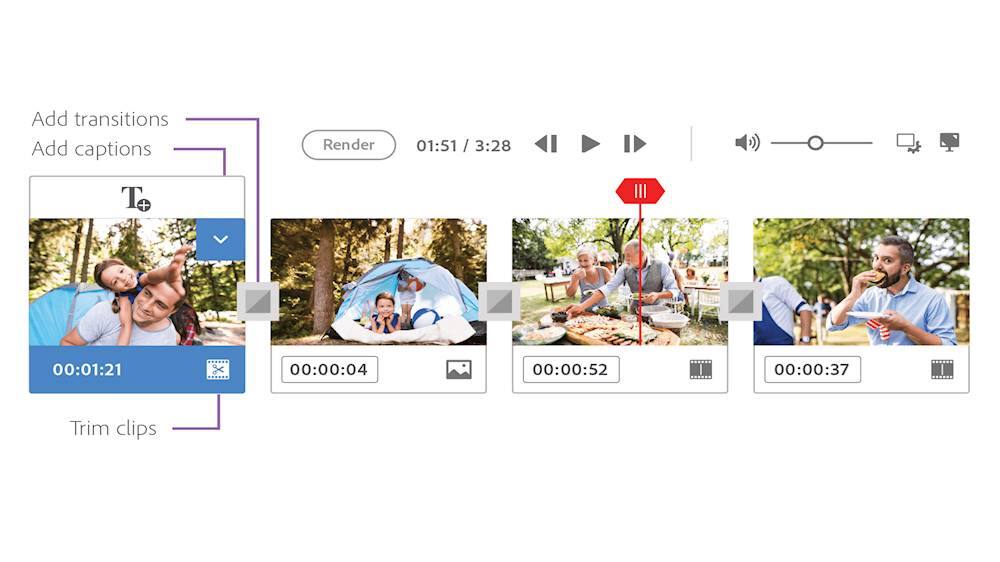
|Posted .This reviewer received promo considerations or sweepstakes entry for writing a review.Premiere Elements 2020 is a nice home video editor with an easy to navigate user-friendly interface and tons of creative content that allows anyone to add Hollywood-like effects to their projects. I find it fun and easy to use but not without some issues. The Premiere Elements workflow begins with the Home screen. The Home screen contains shortcuts for project ideas like slide shows and collages along with shortcuts to the organizer, photo editor and video editor. The photo editor shortcut is only useful if you own Photoshop Elements. If running Premiere Elements only, the shortcut opens an offer to purchase Photoshop Elements. The same is true with some of the auto-creations that the program occasionally generates from existing media and displays on the Home screen. Launching the video editor presents three editing options: quick, guided and expert. Quick offers quick and easy editing through a storyboard interface. Guided offers guided editing and tasks via wizards utilizing the timeline. Expert mode is the traditional timeline for more experienced users who want access to all of the features without any guidance. You don't have to be a literal expert to use expert mode. Anyone with experience using a timeline based editor should find Premiere's timeline to be familiar and intuitive. For those who have never used a timeline editor before, Premiere's is probably one of the easiest to use for learning. Everything is logically arranged and easy to find. The Organizer is very helpful for organizing photo and video files by location, people events or date. The organizer can automatically sort media into a catalog by specific attributes or locations using smart tags and the media's metadata info. The smart tags are pretty accurate and locations can also be added manually for media that wasn't taken with a smartphone or GPS enabled camera. Once location is recorded, photos can be viewed and accessed from a dynamic world map similar to tablets and smartphones. If you have disorganized folders filled with media taken at different times and at different locations, the organizer is a great help for getting everything sorted in a more logical manner. Movie creation is simple and easy for beginners and advanced users alike. I like that there are options for any skill level. Even someone who has never touched a video editor before can make a decent looking movie containing creative effects and transitions with relative ease. The menu driven wizards of the quick and guided modes allow for easy, program-assisted editing. They make movie creation as simple as dragging and dropping media and selecting additional wizards for adding effects, transitions and other content. There are numerous themes available for different events including birthdays, travel, graduations, anniversaries, weddings and other special events. Moderate and experienced users can also benefit from wizard-driven tasks to automate portions or entire projects. Individual elements of the project can be changed even in guided mode. For example, most of the bundled music is pretty generic and bad. If nothing else, most users will likely want to change that at bare minimum. For experienced users, the familiar timeline editor offers three default tracks each for audio and video along with a voice narration track and music track. The timeline interface is simple and intuitive to use. That doesn't mean it's incapable of more advanced editing. Everything is just very well designed and organized. I like that tools are readily available without the need to drill down through countless sub-menus. That makes Premiere Elements perfect for home use. Not only is it easy for beginners but more advanced users will also find the tools are there to make really nice projects. Premiere Elements 2020 is new and it shows. It's pretty unstable right now, at least on my machine. I'm running Premiere on a Windows 10 Pro laptop with a dedicated Nvidia graphic card with CUDA, Intel i7 processor, 8GB of RAM and 512GB SSD. The laptop has very low resource usage thanks to limited background processes. I keep it lean and lightweight specifically for resource-intensive programs like this. I've encountered several crashes, particularly when creating slideshows and some automated projects. It also sometimes takes quite a while to generate previews for complex projects. So far, I haven't yet had any problems with rendering. The laptop I'm using is an older machine but I've had no problems running a recent version of Vegas and a slightly older version of Premiere Elements on the same machine. I'm sure these issues will be addressed with patches down the line but just be aware they may appear, especially on older machines. Another issue is a relatively minor one and that's the forced integration with Photoshop. Clicking on Premiere project links actually launches the desired task in Premiere. Clicking Photoshop project links opens web tutorials and offers to purchase Photoshop Elements. There are icons to identify which product the project was created in but they're tiny and sometimes a project looks like it could be Premiere but is actually Photoshop. This has been around in the Elements Home screen forever so I doubt it'll ever go away but it's a bit annoying if you don't own both products. Without the crashing, I'd easily rate Premiere Elements four stars at minimum. Due to the amount of crashes I've experienced so far however, I can't go higher than three stars until it runs more stable. I would still recommend it because it's a new release and I expect the issues will be resolved in the near future.
I would recommend this to a friend - Pros mentioned:Price
Premiere Elements & Premiere Pro
||Posted . Owned for 3 weeks when reviewed.This reviewer received promo considerations or sweepstakes entry for writing a review.This is a solid product that is very stable. I have also used Premiere Pro and taught editing classses using both of these products. The main advantage of Premiere Elements is low price and no monthly subscription fees. Elements does not have all the bells and whistles compared to Pro but take a look at it to see if it will do what you need. I have edited with Final Cut, Avid, Media 100, etc. The Premiere interface just works without problems.
I would recommend this to a friend - Pros mentioned:Ease of use
A Good Program
||Posted .This reviewer received promo considerations or sweepstakes entry for writing a review.I needed something in a hurry, and this program worked out for me. I had another program that got buggy after its most recent update. I needed something quick to make a training video for an upcoming seminar. Best Buy had it in stock. This was easy to learn, did what I needed and did it without problems.
I would recommend this to a friend - Pros mentioned:Ease of use
Great video editing software
||Posted . Owned for 3 weeks when reviewed.This reviewer received promo considerations or sweepstakes entry for writing a review.Easy to use and you can add professional transitions to your videos.
I would recommend this to a friend - Pros mentioned:Ease of use
Easy to use. Great product for beginners
||Posted . Owned for 1 month when reviewed.This reviewer received promo considerations or sweepstakes entry for writing a review.I just need to edit, combine my kid's videos to share on Facebook or YouTube. This software is easy to use, add text, chop unwanted minutes or seconds, add screen effect, etc. I'm happy with it. One thing to note though is that I don't know if it can keep 4K HD files. I recorded 4K videos but after editing, I find the software does not allow 4K file saving.
I would recommend this to a friend - Pros mentioned:Ease of use
Professional video tools for the amateur.
||Posted . Owned for 3 weeks when reviewed.This reviewer received promo considerations or sweepstakes entry for writing a review.Upgraded to 2020 from version 12. So glad I did! Much easier to use, many of the bugs have been fixed and the tools are robust and powerful. Ample self-help videos and tutorials online. I recommend this product.
I would recommend this to a friend - Pros mentioned:Ease of use
Great
||Posted . Owned for 4 months when reviewed.This reviewer received promo considerations or sweepstakes entry for writing a review.I’m a beginner in video editing and that has worked pretty well and very user friendly. Wish it had more editing options though
I would recommend this to a friend - Pros mentioned:Price
Great alternative to Premier Pro
||Posted . Owned for 1 month when reviewed.This reviewer received promo considerations or sweepstakes entry for writing a review.Adobe Premiere Elements 2020 - Mac|Windows is a great alternative to Premier Pro and at a better price point. It may not have all the bells and wistles of Premier Pro, but it's a great program fro the average user.
I would recommend this to a friend - Pros mentioned:Ease of use
Great software
||Posted . Owned for 3 weeks when reviewed.This reviewer received promo considerations or sweepstakes entry for writing a review.I've been using this t edit together home videos and it has been very easy.
I would recommend this to a friend