Customer Ratings & Reviews
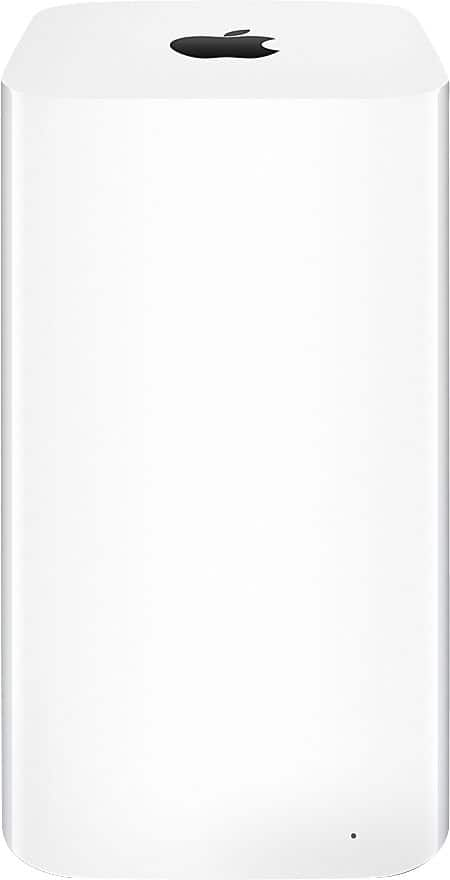
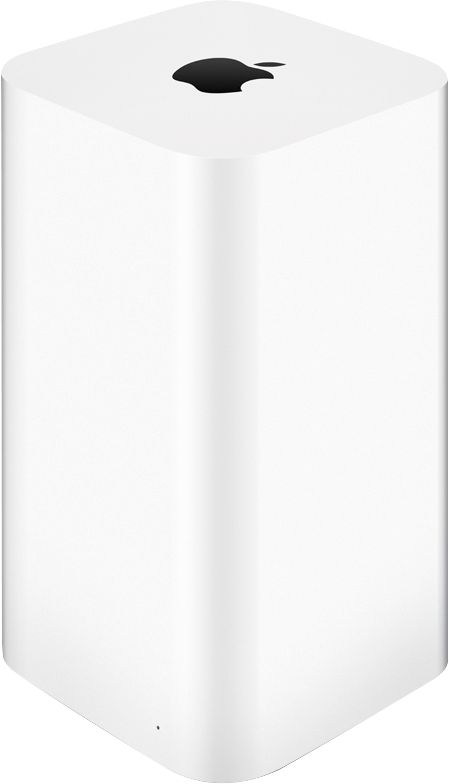
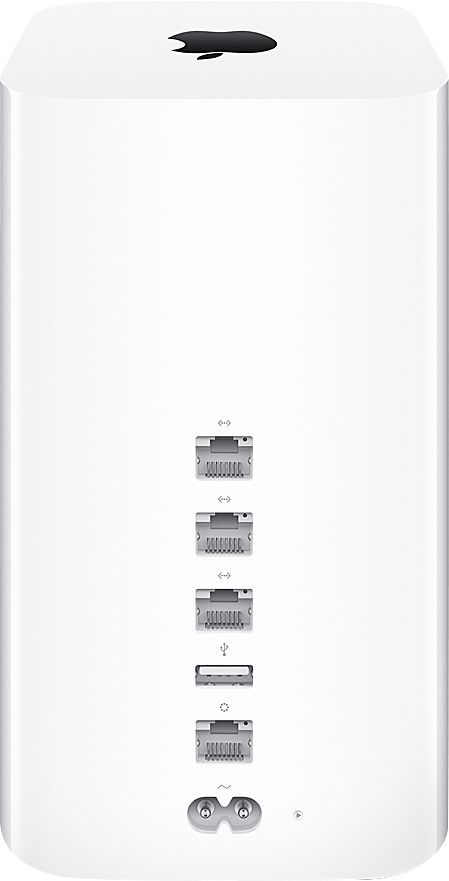

- Model:
- GCRF ME918LL/A
- |
- SKU:
- 3789002
Customer reviews
Rating 4.5 out of 5 stars with 335 reviews
(335 customer reviews)Rating by feature
- Ease of Use4.7
Rating 4.7 out of 5 stars
Customers are saying
Customers appreciate the Geek Squad Certified Refurbished Extreme Wireless Base Station's ease of use, range, and performance. Many also highlight the simple setup process and strong signal, resulting in excellent WiFi coverage throughout their homes. The refurbished condition is frequently praised, with many units arriving in excellent shape and functioning as new. Positive feedback also mentions the product's affordability compared to buying new.
This summary was generated by AI based on customer reviews.
Rated 1 out of 5 stars
DOA
||Posted .This reviewer received promo considerations or sweepstakes entry for writing a review.Read reviews and decided to take a gamble with a "reconditioned" AirPort Extreme. As per most, this unit was D.O.A. Didn't work at all. Spent an hour at local Best Buy store trying To return. Don't waste your time. Just spend a few more $ and buy a new one.
No, I would not recommend this to a friendRated 1 out of 5 stars
don't buy refurbish products from bestbuy
||Posted .This reviewer received promo considerations or sweepstakes entry for writing a review.bought my refurbished airport extreme from best buy but died within 8 months. Geek Squad is no help at all. Now I have an expensive paperweight on my desk. Definitely NOT a "BEST BUY" at all.
No, I would not recommend this to a friendRated 1 out of 5 stars
Not good
||Posted .This reviewer received promo considerations or sweepstakes entry for writing a review.Just like the other reviews, mine arrived and it never worked. When to Best Buy store and not even the guys on geek squad knew what the problem was.
No, I would not recommend this to a friendRated 1 out of 5 stars
Did not work
||Posted .This reviewer received promo considerations or sweepstakes entry for writing a review.This product did not work, was told I couldn't return it to Best Buy. Have to drive an hour to return to Apple store
No, I would not recommend this to a friendRated 1 out of 5 stars
Product did not work
||Posted .This reviewer received promo considerations or sweepstakes entry for writing a review.Supposedly refurbished - did not work. Ordered directly from Apple - worked like a champ.
No, I would not recommend this to a friend- Pros mentioned:Range, Setup
Rated 5 out of 5 stars
Amazing Router
Posted .This reviewer received promo considerations or sweepstakes entry for writing a review.My house is about 1650 square feet and I have never really had a problem covering it with a standard router until recently. Maybe my old router had gone bad, maybe there was more interference in the area, but I remember back to when I was a Geek Squad Agent, I always had great luck installing Airport Extreme routers for my clients, and when it was time for me to get a new router, I figured it was time to go with a top of the line router. The Apple Airport Extreme not only covers my whole house, upstairs, downstairs and my back yard, but my devices all have strong connections with great bandwidth. Its a night and day difference. Setup was easy (did it with my iPhone) and I couldn't be happier. The price break you get with the refurb is also a plus!
I would recommend this to a friend - Pros mentioned:Setup
Rated 4 out of 5 stars
Excellent
Posted .This reviewer received promo considerations or sweepstakes entry for writing a review.I live in 800Sq apartment, I had netgear N600, but still have a blind spot So I decide to buy Acus AC1750 as an upgrade, and guess what not better than the netgear ( I changed all the setting as ASUS suggested) still didnt work Then I decide to buy apple as my friend suggested, I can get decent signal in that blind spot but only the 2.5mhz The only resaon I gave it 4 out of 5, cause this is expensive even the refurb one 2nd the unit was not resetted when I pluged for the first time I was asked to enter password, which made thout that the unit was not event tested, but the rest was so easy 3rd the setup is so esay but only when u have an apple device
I would recommend this to a friend Rated 4 out of 5 stars
Good deal, but not recommended unless tech savvy
Posted .This reviewer received promo considerations or sweepstakes entry for writing a review.As other reviews say, it comes in a brown box, no instructions, set up for someone else's network. So far, so good with mine after one week and some setup time. If you are not tech savvy, I recommend just paying the extra to buy a new one. I spent over an hour getting it set up, including googling to figure out the problems, and simultaneous problems with my cable internet going down at the same time (Murphy's Law). Here is a summary so maybe you won't have to spend as much time. 1. Before taking your current network offline to install the AirPort, download the AirPort Utility from the Apple iOS app store or use the airport utility included with a Mac. This will be used later to set it up. 2. Factory default reset. Press and hold with a pen or straightened paperclip the tiny reset button on the bottom back of the unit. While continuing to hold the button, reconnect the power cord. Keep holding the reset button until you see the tiny status light on the front start to flash amber rapidly, which should occur after about six seconds. It takes a bit of dexterity to push the button and plug in at the same time. Another person could help. The Apple support web site has more info. https://support.apple.com/ 3. Use the AirPort Utility to set it up. It pretty well guides you through it. There is probably more help on this on the Apple web site, but I did not use it. Things seemed to be all OK after this step, but after about 1/2 hour of use we had connectivity problems. See the next step. 4. I had problems with the "Internet" in the AirPort utility showing "Connection" as "Disconnected" a short time after repeated soft resets of the AirPort using the utility. In other words, it was indicating that the cable modem the router is connected to was not connected to the internet. Checking the cable modem showed that it was connected. Some more googling showed that there have been problems with some cable internet providers and IPv6. To solve this problem, use the AirPort Utility, tap/click on the router icon and tap/click "Edit". In the iOS utility, tap "IPv6", then "Configure IPv6", then set to "Link-local only" (default is "Automatic"). This turns off IPv6 through your internet service provider but keeps in for your local network. You can research this if you want, but seeming experts say there are security issues using IPv6 and my speed tests show there is no impact to performance. 5. Enjoy your new router! If your situation is like mine, you should be up and running. I expect these steps may change in the future as technology changes, but hopefully this will help some people save some time in the meantime.
I would recommend this to a friend- Pros mentioned:Ease of use
Rated 4 out of 5 stars
NICE FOR THE PRICE
Posted .This reviewer received promo considerations or sweepstakes entry for writing a review.I got it in a plain box with no Apple stuff along with it. As some others have said, the router just seems to be a return, not a refurb. Mine came setup for Rudy's WI-FI network. That's not me! So I plugged it in and opened Airport Utility. Restored it to default settings, then used the Airport Utility to copy over the settings from the Time Capsule I was replacing and BOOM, BANG!!!! It was on line and working in less than 10 minutes. An Apple expert probably could have had it up and running in less than 2 minutes. EASY PEASY, just the way I like it! Let's see if it lasts.......
I would recommend this to a friend Rated 5 out of 5 stars
G8t prod; caution buying refurb'd from Best Buy
Posted .This reviewer received promo considerations or sweepstakes entry for writing a review.Not reset or tested by Best Buy - highly disappointed. Came configured for "Kevin's Network". Clearly this was an untested product. Box did not contain instructions -- though they were easy to find on WEB. Once I did the reset, product works great. Caution when you buy things from Best Buy. Prices are very good, but they are unreliable! Contacted Best Buy and they were useless.
I would recommend this to a friendRated 1 out of 5 stars
Second attempt at reviewing this item
Posted .This reviewer received promo considerations or sweepstakes entry for writing a review.Since my first review was not even allowed to be posted by Best Buy's moderators, I'm giving this a second try to warn consumers about the pitfalls with this item. I delve into the support related because I feel with a refurbished item all aspects of the support, initial working condition, and ongoing working condition is part of the product they're selling. For those of you that don't want to read the entire frustrating, awful journey, let me sum it up for you - expect that the item you receive may not actually be refurbished (or at best, refurbished poorly) and you will receive zero support without sending the item back. Online and in store staff will direct you to a pay-per-visit in home support option or sending the item back and losing a week or more of time. Now, the details. I received the item within a reasonable amount of time. I've not previously had any issues with BestBuy.com, but this was my first experience with a refurbished one. When the item arrived, it was packaged in a plain brown box. This I expected. However, there were no instructions whatsoever. Thankfully, I work in IT and Apple makes products that are typically fairly easy to set up, so I looked it up online and proceeded. The first problem is that I was shocked to discover that the router had the previous owner's information in it. His settings, his name, everything. This means that Best Buy did not even do a factory reset on the item that was to be refurbished. Let that be a lesson to everyone - do not -ever- send an item back that you haven't wiped your data from. You have no idea who might get it. I still proceeded onwards after performing a reset on my own. After about 15-20 minutes of tinkering, I applied my settings and... the router died completely. No lights, no response, nothing. It was warm to the touch, and at this point my suspicion was that the previous owner probably returned it for this exact issue. Do I know that for certain? No. But given that a factory reset wasn't even performed, how could Best Buy possibly have tested it to ensure it was working properly? At this point, I contacted online support. After stating my problem and that the router was refurbished, support immediately said they couldn't assist me further and directed me to make a home appointment. Instead I took it into the local store. They also refused to look at it and said my only option was to send it back for a refund or replacement. I asked whether I could have a home visit as indicated by the online support tech and they said I would be charged for it. I protested, as this would have resulted in the router being MORE EXPENSIVE than if I had purchased it new! The moral of this story? You might get lucky. You may get a router that works well and has no issues. However, be -very- aware of what you're getting into. I received zero support on an item that was not even reset to default settings, which means it wasn't tested. Upon expressing my concerns, my option was to get a refund or to buy a new item for the difference - exactly the scenario I was attempting to avoid by purchasing a refurbished item. I'm extremely disappointed in the level of service provided for an item that was to be professionally refurbished. Not a single person I talked to online or in store was willing or able to even look at the item or attempt any sort of troubleshooting and would charge me for an in-home visit on an item that they were responsible for ensuring worked in the first place.
No, I would not recommend this to a friend- Pros mentioned:Range
Rated 5 out of 5 stars
Simply the very best
Posted .This reviewer received promo considerations or sweepstakes entry for writing a review.Incredibly simple to set up, just enter a password. Ours is a single floor range and coverage goes beyond the exterior walls and out about 75+ yards across the street to the neighborhood park. Our old Belkin constantly dropped connection and we had to turn off the WiFi on our phones and turn back on. Never happens now. Set it up and forget it. Looking forward to setting up a printer or hard drive. We are an Apple household but I did thorough research on ALL router reviews before settling on this one, based on privacy, dependability and price $99 refurbished).
I would recommend this to a friend - Pros mentioned:Ease of use, Speed
Rated 5 out of 5 stars
Awesome!
Posted .This reviewer received promo considerations or sweepstakes entry for writing a review.Just what I ordered and it works great! Very fast and set up was a breeze!
I would recommend this to a friend - Pros mentioned:Ease of use, Range
Rated 5 out of 5 stars
Great home router, wifi
Posted .This reviewer received promo considerations or sweepstakes entry for writing a review.Easy setup. Works great. Great range. Highly recommended
I would recommend this to a friend - Pros mentioned:Speed
Rated 4 out of 5 stars
Works well
Posted .This reviewer received promo considerations or sweepstakes entry for writing a review.Works great, good speeds, better than the 4th Gen. One feature that was removed in this model is the SNMP which allows you to monitor bandwidth usage on your network, which unfortunately was a deal breaker for me, why Apple, it was such ha great feature.
I would recommend this to a friend - Pros mentioned:Performance
Rated 5 out of 5 stars
Good as a new one at a big discount.
Posted .This reviewer received promo considerations or sweepstakes entry for writing a review.I was hesitant to buy a refurbished router because I was unsure if it would be as good as a new one. Let's just say that yes, it works just as a new one and I saved by buying this refurbished one.
I would recommend this to a friend - Pros mentioned:Speed
Rated 5 out of 5 stars
Great Wireless Router
Posted .This reviewer received promo considerations or sweepstakes entry for writing a review.This Apple Wireless router was easy to set up. It just works. It's fast with great speed and never needs to be rebooted. Very solid product. Allows you to wake up your Apple TV and computer wirelessly.
I would recommend this to a friend Rated 5 out of 5 stars
Wifi signal has improved considerably
Posted .This reviewer received promo considerations or sweepstakes entry for writing a review.Made this my new base station, and extend my network with my old time capsule have great signal in and around home. Couldnt be easier to connect. Love apple products!!!
I would recommend this to a friendRated 3 out of 5 stars
Good appearance, but fluctuating signal
Posted .This reviewer received promo considerations or sweepstakes entry for writing a review.I purchased this item and return it. In terms of appearance, it was so good. There were invisible minimal scratches, new cord was provided, and no grease outside (contrary to others' review). Also, stable and non-dropping signal satisfied me. However, fluctuating signal made me return this item. I'm using 100/10 internet service, but the range of wireless speed streched 5Mbps to over 100Mbps.
No, I would not recommend this to a friend- Pros mentioned:Speed
Rated 5 out of 5 stars
Totally cool one
Posted .This reviewer received promo considerations or sweepstakes entry for writing a review.Had a better previously and when I switched to this router .... the speed was amazing..
I would recommend this to a friend
People also viewed
- $218.00Your price for this item is $218.00$236.00The comparable value for this item is $236.00
- $151.19Your price for this item is $151.19$158.53The comparable value for this item is $158.53
- $139.99Your price for this item is $139.99
- $104.46Your price for this item is $104.46
- $74.49Your price for this item is $74.49
- $242.00Your price for this item is $242.00
- $179.00Your price for this item is $179.00
- $115.67Your price for this item is $115.67
- $149.99Your price for this item is $149.99$169.99The comparable value for this item is $169.99
- $133.38Your price for this item is $133.38$133.63The comparable value for this item is $133.63
- $149.99Your price for this item is $149.99$182.99The comparable value for this item is $182.99
- $199.00Your price for this item is $199.00
- $33.75Your price for this item is $33.75$34.00The comparable value for this item is $34.00
- $115.34Your price for this item is $115.34
- $114.00Your price for this item is $114.00
- $219.00Your price for this item is $219.00
- $164.99Your price for this item is $164.99$184.99The comparable value for this item is $184.99
- $233.60Your price for this item is $233.60
- $350.61Your price for this item is $350.61