Customer Ratings & Reviews

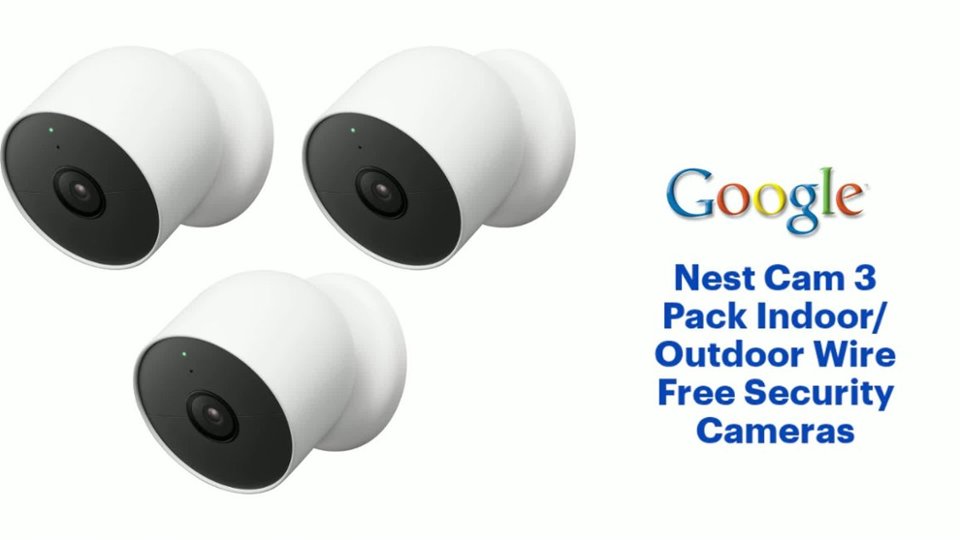
- Model:
- GA02077-US
- SKU:
- 11201934
Rating by feature
- Value
Rating 4.0 out of 5 stars
- Quality
Rating 4.3 out of 5 stars
- Ease of Use
Rating 4.3 out of 5 stars
Not as expected
||Posted . Owned for 2 weeks when reviewed.This reviewer received promo considerations or sweepstakes entry for writing a review.The color and sound are good. However it does not have a large range of motion so we could not see our entire yard. It kept going into night mode during the day.
No, I would not recommend this to a friendBrand response from Nest Support
Posted .Hi Coco59. The field of view for your Nest Cam Battery is a 130° diagonal wide-angle view. We suggest checking out the following link to learn more about optimizing your camera's view: https://support.google.com/googlenest/answer/9208999?hl=en-IN&sjid=10251953447349363858-NC#zippy=%2Cgive-your-camera-a-clear-view%2Cbattery-powered-cameras
Here are some steps you can take to adjust your night vision settings: https://support.google.com/googlenest/answer/9249162?hl=en-AU&sjid=10251953447349363858-NC#
Good cameras
||Posted . Owned for less than 1 week when reviewed.This reviewer received promo considerations or sweepstakes entry for writing a review.Very easy to install and set-up. The video is good quality during the day & at night.
I would recommend this to a friendNest Cam
||Posted . Owned for 3 weeks when reviewed.This reviewer received promo considerations or sweepstakes entry for writing a review.Great product. Easy install. They are great for short term rentals!
I would recommend this to a friendWorks great, easy to install.
||Posted . Owned for 2 weeks when reviewed.This reviewer received promo considerations or sweepstakes entry for writing a review.Installed in my garage - very easy to do. Works great with my Google video doorbell.
I would recommend this to a friendreturned
||Posted . Owned for 2 weeks when reviewed.This reviewer received promo considerations or sweepstakes entry for writing a review.They were bigger and heavier than I thought so I returned them. Not saying they bad because I never used.
I would recommend this to a friendBrand response from Nest Support
Posted .Hi Abcd, thank you for the feedback on the Nest Cam's dimensions and weight. We're sorry to learn that you returned the device. If you decide to give it another go and need assistance with the Nest Cam in the future, you can contact us on our Google Help page anytime. You can reach our help page here: https://support.google.com/googlenest/gethelp
It's ok.
||Posted . Owned for 1 month when reviewed.This reviewer received promo considerations or sweepstakes entry for writing a review.Its ok . The quality is not that great. If you dont need any detail on the video its good.
I would recommend this to a friendBrand response from Nest Support
Posted .Hi there, BishalS. Thanks for the feedback you shared about the Nest Cam (indoor, wired). We appreciate that you find the device good, but we’re sorry to hear the video quality is below your preference.
You can adjust the video quality settings so you can choose how much your internet connection gets used by the Nest camera to stream live video. The higher quality setting is, the more bandwidth is used. But no matter which option you pick, both your camera and the app will automatically adjust its resolution to work with the available bandwidth. Here’s how:
- Open the Home app.
- Touch and hold your device's tile.
- At the top right, tap Settings.
- Choose Video.
- Under “Video quality,” choose Max or High
For more help, feel free to visit us anytime at the following link: https://support.google.com/googlenest/gethelp
Worth the cash
||Posted . Owned for 1 month when reviewed.This reviewer received promo considerations or sweepstakes entry for writing a review.It's great to tell the difference between a package a person or an animal.
I would recommend this to a friendGood camera for outdoor
||Posted . Owned for 2 weeks when reviewed.This reviewer received promo considerations or sweepstakes entry for writing a review.Battery life is less.so I had to buy a cable to connect it.
I would recommend this to a friendBrand response from Nest Support
Posted .Hi SMTE, thanks for sharing your feedback with us about the Nest Cam (battery). We understand that having to connect the camera with a cable for continuous power can be convenient for you. If ever you want to consider running the camera off the battery again in the future, you can extend its battery life by adjusting video quality, length of video clips, time between recorded events, and using activity zones to monitor specific areas. That way, you don’t have to charge the battery more often than you should.
We have help always available for your support needs, just let us know anytime here if you need one: https://support.google.com/googlenest/gethelp
Love these cameras!
||Posted . Owned for 9 months when reviewed.This reviewer received promo considerations or sweepstakes entry for writing a review.I purchased one and loved it so I ended up purchasing a double set. We are considering purchasing another set. We didn't purchase the service to continously record but we do get notified for any movement and we can save the recording. It only keeps 3 hrs then deletes.
I would recommend this to a friendGood camera
||Posted . Owned for 3 weeks when reviewed.This reviewer received promo considerations or sweepstakes entry for writing a review.I like it and easy to install. Battery last a very long time
I would recommend this to a friendGreat product
||Posted . Owned for 11 months when reviewed.This reviewer received promo considerations or sweepstakes entry for writing a review.Great product!! Highly recommend easy set up good quality
I would recommend this to a friendi c u
||Posted . Owned for 1 month when reviewed.This reviewer received promo considerations or sweepstakes entry for writing a review.great picture quality and real time viewing, I would recommend this product
I would recommend this to a friendExellent!!
||Posted . Owned for 2 months when reviewed.This reviewer received promo considerations or sweepstakes entry for writing a review.I like, the color is perfect!! The battery, it could get better!
I would recommend this to a friendTwo subscriptions
||Posted . Owned for 3 weeks when reviewed.This reviewer received promo considerations or sweepstakes entry for writing a review.Cameras are good, but don’t connect to the nest app.
No, I would not recommend this to a friendBrand response from Nest Support
Posted .Hi there, Winston. Thank you for posting your review. We're glad to hear that you're having a good experience with the Nest Cam (battery). We want to understand better how we can help improve your overall experience with using the Google Home app. Please reach out to our dedicated team of specialists on our Google Help page for immediate support here: https://support.google.com/googlenest/gethelp
Works as expected
||Posted . Owned for 3 weeks when reviewed.This reviewer received promo considerations or sweepstakes entry for writing a review.Works as expected and will definitely buy another one in the future.
I would recommend this to a friendGreat
||Posted . Owned for 1 month when reviewed.This reviewer received promo considerations or sweepstakes entry for writing a review.It’s a great outdoor camera for DIY it’s easy to put up and setup
I would recommend this to a friendThe best of the best
||Posted . Owned for 1 month when reviewed.This reviewer received promo considerations or sweepstakes entry for writing a review.This camera is very frendly to install and to setting.
I would recommend this to a friendWorking as advertised, short battery life
||Posted . Owned for 1 month when reviewed.This reviewer received promo considerations or sweepstakes entry for writing a review.The cameras have worked as advertised and only complaint is battery life seems short.
I would recommend this to a friendCamera
||Posted . Owned for 3 months when reviewed.This reviewer received promo considerations or sweepstakes entry for writing a review.Excellent outdoor camera, good quality,can see everything when am outside off home
I would recommend this to a friendGood camera, needs better resolution.
||Posted . Owned for 1 month when reviewed.This reviewer received promo considerations or sweepstakes entry for writing a review.The camera is pretty good. Wish the resolution was a bit better. I have a Nest Hello Doorbell that seems to have better camera.
I would recommend this to a friendBrand response from Nest Support
Posted .Hi Bman, we appreciate you sharing your feedback on your Nest Cam (battery). We're sorry to hear that your experience with the resolution of your device didn't meet your expectations. Your feedback on improving the resolution is appreciated and rest assured that we'll relay this to the right team for future improvements. If you need further assistance or have additional questions, please feel free to contact us on our Google Help here: https://support.google.com/googlenest/gethelp