Customer Ratings & Reviews
- Model:
- OFFICEJET PRO 9135E/404M0A#B1H
- |
- SKU:
- 10747593
Customer reviews
Rating 4.3 out of 5 stars with 409 reviews
(409 customer reviews)Rating by feature
- Value4.3
Rating 4.3 out of 5 stars
- Quality4.3
Rating 4.3 out of 5 stars
- Ease of Use4.2
Rating 4.2 out of 5 stars
to a friend
Rated 2 out of 5 stars
Not the HP Products I relied on once upon a time!
||Posted . Owned for 1 month when reviewed.This reviewer received promo considerations or sweepstakes entry for writing a review.Disapointed in this model of HP printers. After 20 years of using HP at home and in my business, this model has been nothing but a challenge. Also, I do not like having to use the HP Smart app to print everything. Sorry I bought this printer
This review is from HP - OfficeJet Pro 9135e Wireless AI-Enabled AiO Inkjet Printer w/ 3 Months of Instant Ink (+1 Bonus Month of Ink w/ Code) - White
No, I would not recommend this to a friendRated 2 out of 5 stars
Not for my small business.
||Posted . Owned for 1 week when reviewed.This reviewer received promo considerations or sweepstakes entry for writing a review.Most Printers allow Microsoft Word to set up the type of Document being used. You have to assign a tray and the type of paper, envelope size, etc that you are using. Lot of effort that should not be necessary. Jammed several times. purchased another printer for back up. I think I will have to return and buy something less cumbersome to work with.
This review is from HP - OfficeJet Pro 9135e Wireless AI-Enabled AiO Inkjet Printer w/ 3 Months of Instant Ink (+1 Bonus Month of Ink w/ Code) - White
No, I would not recommend this to a friendBrand response from HP Team
Posted .Dear LarryH,
Apologies for the bad experience.
We'll like to help. Here's a detailed video on fixing paper jam issues:
 https://www.youtube.com/watch?v=8tdq2jYveFo
If a 2nd Device needs to be added, this resource will be useful:
 https://www.youtube.com/watch?v=dq4pjCA-xSo
Hope that helps!
Sincerely,
Teo
Rated 1 out of 5 stars
Ink cartridge issue
||Posted .This reviewer received promo considerations or sweepstakes entry for writing a review.Ink cartridge loading issue, returning to geek squad to take a look. Brand new out the box haven't being able to use
This review is from HP - OfficeJet Pro 9135e Wireless AI-Enabled AiO Inkjet Printer w/ 3 Months of Instant Ink (+1 Bonus Month of Ink w/ Code) - White
No, I would not recommend this to a friendRated 1 out of 5 stars
WARNING!! DO NOT PURCHASE THIS OR ANY OTHER HP PR
||Posted . Owned for less than 1 week when reviewed.This reviewer received promo considerations or sweepstakes entry for writing a review.Called for technical support and was advised that the issue was with the operating system and that I should CALL MICROSOFT!! Who is the manufacturer??? If I was foolish enough to call Microsoft, what are the chances that Microsoft would immediately say I need to call HP???? I'm soooooooo disappointed; I'll be returning this and purchasing a Brother or Epson --- nothing personal... just business!!
This review is from HP - OfficeJet Pro 9135e Wireless AI-Enabled AiO Inkjet Printer w/ 3 Months of Instant Ink (+1 Bonus Month of Ink w/ Code) - White
No, I would not recommend this to a friendRated 1 out of 5 stars
Won't stay connected to WIFI
||Posted . Owned for 4 months when reviewed.This reviewer received promo considerations or sweepstakes entry for writing a review.Won't stay connected to WIFI. Tried Everything! I have updated all software, have updated hardware and it still won't stay connected. Turns off and on by itself. If I try to turn it off, it sometimes takes 3-5 minutes to turn off and then reboots by itself and still won't stay connected to WIFI.
This review is from HP - OfficeJet Pro 9135e Wireless AI-Enabled AiO Inkjet Printer w/ 3 Months of Instant Ink (+1 Bonus Month of Ink w/ Code) - White
No, I would not recommend this to a friendRated 1 out of 5 stars
Not ready for Win 11- Snapdragon
||Posted .This reviewer received promo considerations or sweepstakes entry for writing a review.Total nightmare - stay away from Windows Snapdragon and HP. Between MS-HP, someone screwed up a driver and I've spent hours online on tech and chat support. One person said, "The device doesn't support 2 sided auto printing' and, yet, it says it right in the BestBuy listing. There's a reason I buy Apple - US based English speaking and phone support. Good riddance, Snapdragon not ready for prime time. Oh, HP, you tried to upcharge me with your friend service on the weekend, yeah, that's a hard 'no',, I'll be switching to Mac and Epson/Canon. Peace, out.
This review is from HP - OfficeJet Pro 9135e Wireless AI-Enabled AiO Inkjet Printer w/ 3 Months of Instant Ink (+1 Bonus Month of Ink w/ Code) - White
No, I would not recommend this to a friendRated 1 out of 5 stars
Dud. Let's see if HP comes through
||Posted . Owned for 1 week when reviewed.This reviewer received promo considerations or sweepstakes entry for writing a review.During set up it wouldn't recognize the yellow print cartridge. By the end of my 45 minutes on the phone with tech support it wouldn't recognize any of the cartridges. Now HP is sending me a new one. But it won't arrive until 3 weeks from now. This is on top of a disastrous set up attempt with the 7301 Eco Tank model. I'm either cursed or HP printers are something to run away from.
This review is from HP - OfficeJet Pro 9135e Wireless AI-Enabled AiO Inkjet Printer w/ 3 Months of Instant Ink (+1 Bonus Month of Ink w/ Code) - White
No, I would not recommend this to a friendRated 1 out of 5 stars
Horrible
||Posted . Owned for 1 week when reviewed.This reviewer received promo considerations or sweepstakes entry for writing a review.Setup was horrible, HP wants all your informationan and wants you to setup an account to just do basic things. Installed on a windows 11 unit. Took forever. Worst install i have seen. I have setup 100s of small desktop all in ones. The process for this unit is ridiculously over complicated. I would never recommend to a friend or customer to go this route.
This review is from HP - OfficeJet Pro 9135e Wireless AI-Enabled AiO Inkjet Printer w/ 3 Months of Instant Ink (+1 Bonus Month of Ink w/ Code) - White
No, I would not recommend this to a friendRated 1 out of 5 stars
HP 935e Printer
||Posted . Owned for 2 weeks when reviewed.This reviewer received promo considerations or sweepstakes entry for writing a review.Unfortunately the quality of HP printers has significantly eroded. The 9135e didn't work from the time I took it out of the box. Setup software in the unit had an error in recognizing the ink catridges no matter how many times I tried OR how many cartridges I got from HP to try and make it work. Finally gave up and returned it
This review is from HP - OfficeJet Pro 9135e Wireless AI-Enabled AiO Inkjet Printer w/ 3 Months of Instant Ink (+1 Bonus Month of Ink w/ Code) - White
No, I would not recommend this to a friendRated 1 out of 5 stars
Printer
||Posted . Owned for 1 week when reviewed.This reviewer received promo considerations or sweepstakes entry for writing a review.Out of the box it said the ink cartridges were missing or broken! Had to return for refund.
This review is from HP - OfficeJet Pro 9135e Wireless AI-Enabled AiO Inkjet Printer w/ 3 Months of Instant Ink (+1 Bonus Month of Ink w/ Code) - White
No, I would not recommend this to a friendRated 1 out of 5 stars
Thus printer is a disaster
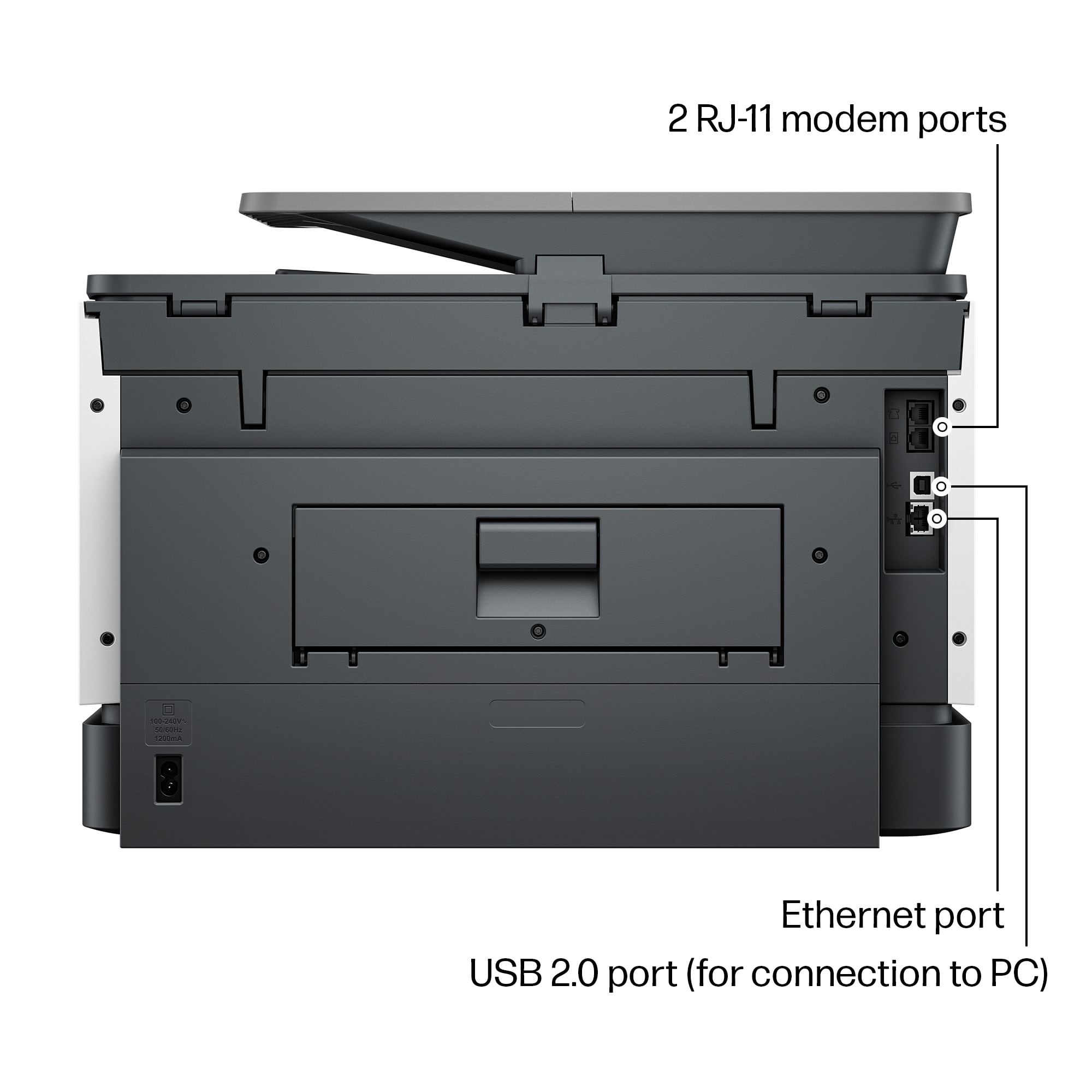
Posted .This reviewer received promo considerations or sweepstakes entry for writing a review.First the good news. The HP OfficeJet Pro 9135e is fast. Now the bad news. The positive reviews can’t be trusted. The truth is, this printer is so poorly designed that it shouldn't even be on the market. It’s a cheap looking, ugly, square-cornered box. It’s noisy unless you use Quiet Mode, which slows it down. Worst of all, there’s no way to stop a print job in progress. You can’t leave envelopes or labels in Tray 1. If you do, the printer will grab them every time it runs out of letter paper in Tray 2, creating a huge paper jam. If Tray 1 is empty when the paper in Tray 2 runs out, the printer ought to continue printing when more paper is loaded. It won’t. The user has to intervene by pressing buttons on the control panel. 1. Printer runs out of paper in Tray 2 and stops printing. Control panel displays an “Out of paper” message. DO NOT press “OK.” 2. Load paper into Tray 2, and close the drawer. 3. The message on the control panel changes to, “Did you change the paper?” Press “OK.” This message persists for only a few seconds, so be sure to press “OK” immediately. If the message doesn’t appear, open and close the paper drawer until it does. 4. Control panel displays the “Out of paper” message again. This time, press “OK.” Printing will resume. If the user fails to follow this procedure exactly, the printer will stop printing after the current job completes and won’t print anything more. The control panel will continue to display an “Out of paper” message even though paper has been fully loaded. The only way to get the printer to start printing again is to reset it by unplugging it and plugging it back in or by turning it off with the power button and waiting for it to boot. The same remedy applies when it refuses to print after a software update. Unplug it and plug it back in, or turn it off and wait for it to boot. It shouldn’t need updates in the first place. The product should have been finished before it was brought to market. The updates improve the printer’s performance not one iota anyway. This printer turns pressing an application’s Print button into an adventure. The user never knows whether it’s going to print or not. When it doesn’t, no explanatory message appears on either the control panel or the computer screen. Nothing will print, but the user doesn’t know why. The baffled user has no recourse but to reset the printer. When he/she presses the power button to turn it off, the notification, “Error printing” may appear. How helpful! Sometimes, it loses contact with the wireless network. When it does, and the user tries to print, the notification, “Printer offline” appears on the computer screen. In this case, pressing the power button to reset it won’t work. The power button has no effect at all. The printer has to be unplugged and plugged back in to get it to print. You can avoid the wireless connectivity problem by connecting the printer to your router by an Ethernet cable or to your computer by a USB cable (neither supplied). Do this after the initial WiFi setup. However, even after the printer is connected to the router or computer, it frequently refuses to print. There’s never any apparent reason except that the software controlling the printer is defective. Every time the printer balks, the user has to press the power button and wait while the printer shuts down and reboots before it finally starts to print again. HP’s warranty is worthless. If you’re fed up with struggling with this printer, and you think you’ll get a better one if you return it to HP, you’ve never been more mistaken. The “replacement” you’ll receive will have no ink and no printhead. If you try to install the ink and printhead from your original printer in the “replacement,” you’ll find that you can’t. The “replacement” lacks not just ink cartridges and printhead. It’s also missing the mechanism that holds them in place. It’s a useless shell. If you’re foolish enough to buy this printer after reading this and other negative reviews, you will get exactly what you deserve for your foolishness: a horrible printer. Be sure to buy it form a retailer that offers a generous return window.
This review is from HP - OfficeJet Pro 9135e Wireless AI-Enabled AiO Inkjet Printer w/ 3 Months of Instant Ink (+1 Bonus Month of Ink w/ Code) - White
No, I would not recommend this to a friendRated 1 out of 5 stars
Unknown
||Posted . Owned for 1 week when reviewed.This reviewer received promo considerations or sweepstakes entry for writing a review.There was a problem with the printer and the ink was producing an error that resulted in an hour setup and call with hp. Hp is sending another printer but it will take 7-10 days and I had to pay a $1 deposit. Hopefully, second time is a charm.
This review is from HP - OfficeJet Pro 9135e Wireless AI-Enabled AiO Inkjet Printer w/ 3 Months of Instant Ink (+1 Bonus Month of Ink w/ Code) - White
No, I would not recommend this to a friendRated 1 out of 5 stars
Worst Printer Ever
||Posted . Owned for 3 months when reviewed.This reviewer received promo considerations or sweepstakes entry for writing a review.The worst printer you could ever buy. I have been having issue after issue since I bought it. Don't waste your money or time getting this printer.
This review is from HP - OfficeJet Pro 9135e Wireless AI-Enabled AiO Inkjet Printer w/ 3 Months of Instant Ink (+1 Bonus Month of Ink w/ Code) - White
No, I would not recommend this to a friendRated 1 out of 5 stars
Failed
||Posted . Owned for 3 weeks when reviewed.This reviewer received promo considerations or sweepstakes entry for writing a review.Printed one document...then completely quit working. Could not power on at all.
This review is from HP - OfficeJet Pro 9135e Wireless AI-Enabled AiO Inkjet Printer w/ 3 Months of Instant Ink (+1 Bonus Month of Ink w/ Code) - White
No, I would not recommend this to a friendRated 1 out of 5 stars
Trash
||Posted .This reviewer received promo considerations or sweepstakes entry for writing a review.Jammed every third page. Would not buy this again, waste of money.
This review is from HP - OfficeJet Pro 9135e Wireless AI-Enabled AiO Inkjet Printer w/ 3 Months of Instant Ink (+1 Bonus Month of Ink w/ Code) - White
No, I would not recommend this to a friendRated 4 out of 5 stars
Good printer. Lousy philosophy.
|Posted .This reviewer received promo considerations or sweepstakes entry for writing a review.HP printers do a good job at their primary function. I haven't had any issues with them as far as them just being printers (or scanners or copiers). My biggest gripe is just the philosophy behind the company and how expensive it is to replace the ink. This isn't new news but with recent remarks stating their whole goal is to DRM all of their ink and push everyone into subscriptions, I'm just not a huge fan. As far as the printer goes, it was pretty easy to set up. I ran into a hiccup that just sort of resolved itself when setting up the wifi settings. You do everything from the app which gave me the option to skip logging in (surprising) but I already had an HP account so I logged in anyways. You follow the steps to insert paper (they say to insert paper into the bottom tray, but the bottom tray is labeled 2 which just irks me), insert the ink that's included, print out a test/calibration page and connect to wifi. I tried over and over to connect to my wifi and kept getting an error message. Google told me that I could resolve it by changing a setting on my router but I eventually just bypassed the setup on the printer and printed out a wifi connection page that said all of my wifi details were correct and that it was receiving an IP. So who knows what that was about. It took a little bit of time but eventually my phone and computers started seeing the printer on the network. So the hiccup didn't really stop anything but it was annoying at the time. Usage is nice and simple. Most devices just see the printer on the network and allow me to print straight away. I don't need any extra drivers or anything. Just select the printer and use the device's print dialog to send it. The copy screen is displayed up front on the printer's screen so it's easy to access and you can just insert some papers into the tray or lift the top and then copy with minimal effort. Scanning will definitely depend on your setup. You can set some things up inside the printer to send any scans to a network drive. Or even email them to you. I think the easiest way to go about it (since USB thumb drives are so cheap and everywhere) is to just insert a USB drive into the port on the front and tell the scanner to send the scans there. No extra setup required. Just works. Print quality is quite nice. I haven't used anything but standard paper and thicker stock standard paper and the prints look good. Images print out nicely. I'm not sure it'll replace a professional photo style printer or anything but it gets the job done. Copy/scanning quality is also top notch. I haven't seen a ton of improvements on this front for many years. This one doesn't disappoint. My favorite thing about this printer (and past HP printers I've used) is just needing wifi and that's it. Being able to plug it into power without worrying about connecting a network cable or powering on a PC it's connected to is just so nice. Being able to print from any device without a lot of extra steps (i.e. not needing extra drivers on most devices) is very nice. Like I said, HP printers are good printers. I'm just not a fan of how much they price gouge their ink and how gung-ho they are on getting everyone to subscribe to their ink subscription plan. Their subscriptions are based on how many pages you print and they charge you every month no matter if you hit this number or not but they only send you a new set of inks if they detect that you're running low. I'm just not a fan of their ink policy even if I enjoy using their printers. Bottom line, if you need a printer for the office and you're confident you'll save money on an ink subscription, this might be the printer for you. It does it's job correctly, just be ready for the cost of ink as you move forward.
This review is from HP - OfficeJet Pro 9135e Wireless AI-Enabled AiO Inkjet Printer w/ 3 Months of Instant Ink (+1 Bonus Month of Ink w/ Code) - White
I would recommend this to a friendRated 1 out of 5 stars
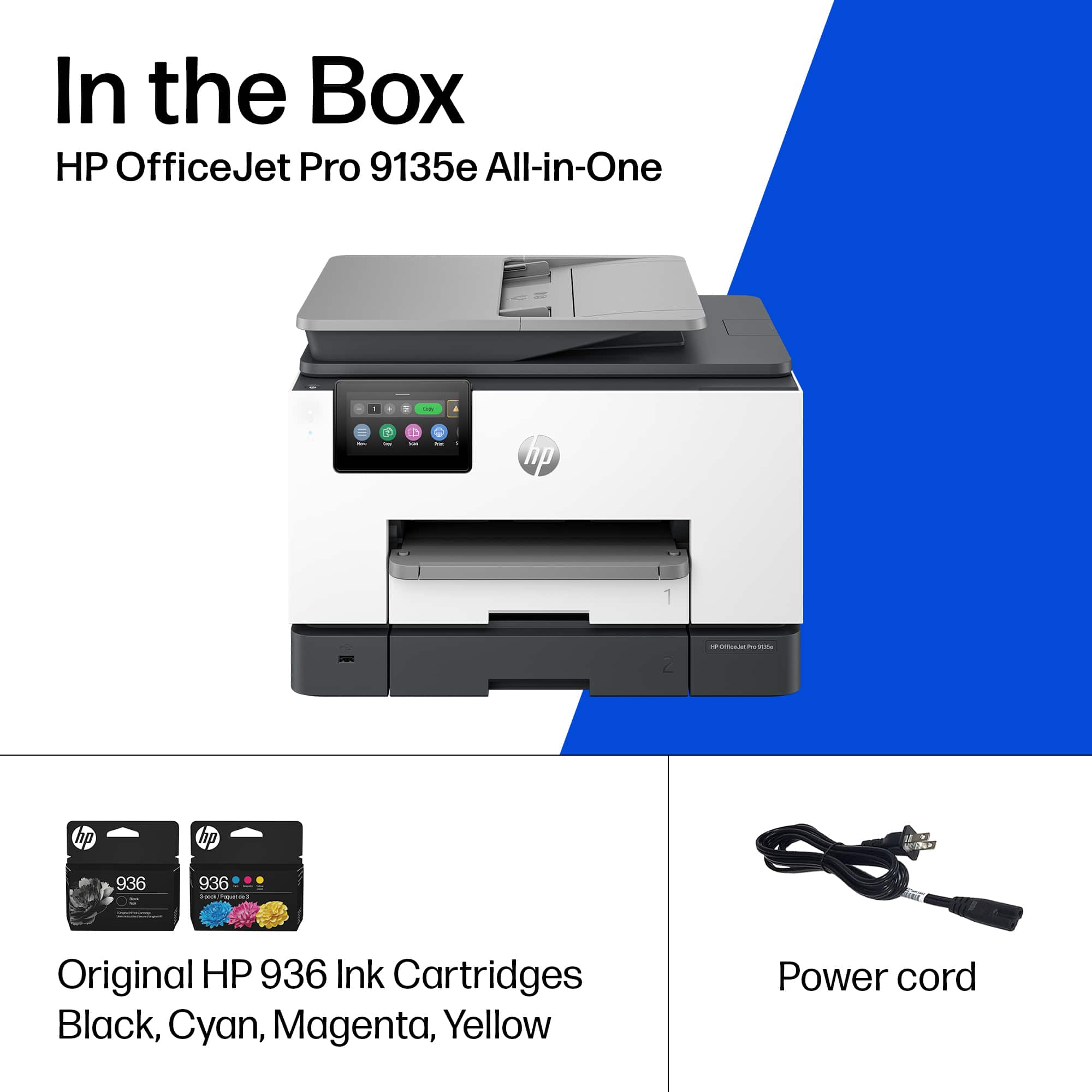
Missing power cord -- no idea how it works
||Posted . Owned for less than 1 week when reviewed.This reviewer received promo considerations or sweepstakes entry for writing a review.Missing power cord. Best Buy's customer service is not helpful. I am returning this tomorrow!
This review is from HP - OfficeJet Pro 9135e Wireless AI-Enabled AiO Inkjet Printer w/ 3 Months of Instant Ink (+1 Bonus Month of Ink w/ Code) - White
No, I would not recommend this to a friendRated 1 out of 5 stars
Terrible Printer.
||Posted . Owned for 3 weeks when reviewed.This reviewer received promo considerations or sweepstakes entry for writing a review.It it not user friendly. It does not scan properly and only does one page at a time into a USB. And it prints the second side page upside down. Not a good printer.
This review is from HP - OfficeJet Pro 9135e Wireless AI-Enabled AiO Inkjet Printer w/ 3 Months of Instant Ink (+1 Bonus Month of Ink w/ Code) - White
No, I would not recommend this to a friendRated 1 out of 5 stars
Anonymous
||Posted . Owned for 1 week when reviewed.This reviewer received promo considerations or sweepstakes entry for writing a review.Took 2 hours with HP tech support to set up. Slow to print.
This review is from HP - OfficeJet Pro 9135e Wireless AI-Enabled AiO Inkjet Printer w/ 3 Months of Instant Ink (+1 Bonus Month of Ink w/ Code) - White
No, I would not recommend this to a friendBrand response from HP Team
Posted .Hi,
Apologies for the bad experience.
We'll like to help. Here's a detailed unboxing & setup video:
 https://www.youtube.com/watch?v=_9dfvlwFz1Y
We'll like to suggest doing a Firmware update to improve the overall reliabiity of the printer. This resource will show how it's done.
Update Printer Firmware (via Control Panel):
 https://www.youtube.com/watch?v=HDzj0LkNIPY
If a 2nd Device needs to be added, this resource (example) will be useful:
 https://www.youtube.com/watch?v=dq4pjCA-xSo
Hope that helps!
Sincerely,
Teo
Rated 5 out of 5 stars
Easiest/Fastest printer I have ever used - period
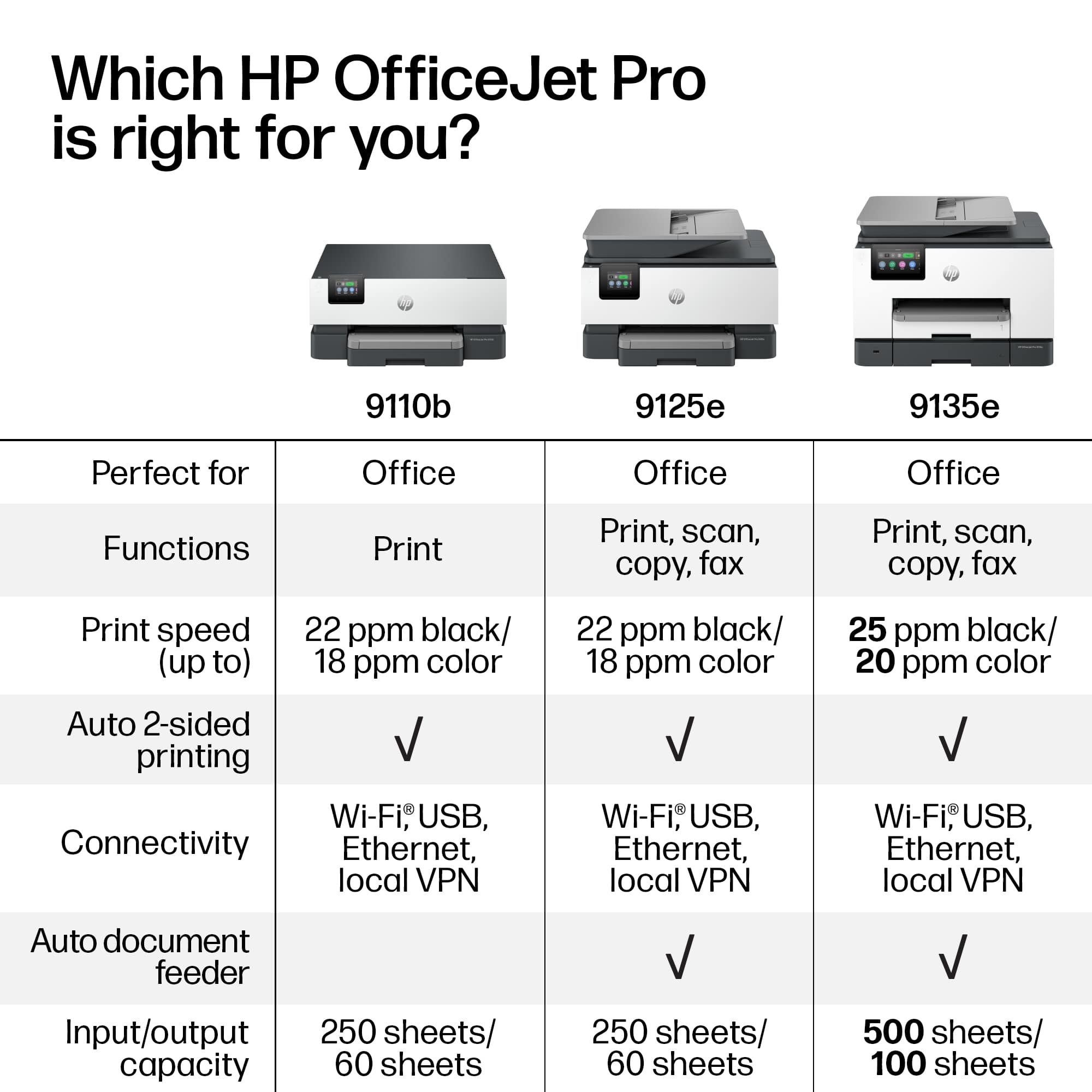
|Posted .This reviewer received promo considerations or sweepstakes entry for writing a review.THIS…. Is the HP Office Jet Pro 9135e and has proven to me that printing….doesn’t have to be so bad after all. From opening the box to printing my documents, I spent no more than 10 minutes! A fraction of the time, and better yet, absolutely zero curse words involved! Taking the printer out of the box, you are instructed through a simple paper to go online using a QR code which takes you step by step in the manual setup process such as inserting the ink and removing the protective bits and pieces. Once the manual work is done, you are prompted to download the HP app if you don’t already have it and BOOM it pops up in the app and almost instantly connects to your network. I was easily able to immediately print papers and photos as well as scan and copy documents through the touch screen interface. Seriously, this printer has… a nice snappy screen? As far as printing on your desktop/laptop, there is a dedicated desktop app that is as effortless as the app and gives you some more options but…none that I was missing in the mobile app. As far as metrics are concerned, it prints at 25 ppm black and 20 ppm color which translates to fast enough. I didn’t clock the time on it but it printed faster than I could find the next document to print and allows you to que prints if it is a rather involved print. It printed photos well, and only showed some scanning lines on full page images. I really enjoyed the large 250pg storage and double sided printing and scanning for my lecture notes and slides. HP touts their built in wolf pro security features, which is not something that I am nessicarly worried about. That being said, apparently, HP will brick your printer if you don’t use HP branded ink moving forward for reasons that are not entirely logical. This bums me out as paying $50 every couple months when I am currently paying around half or less of that for ‘security’ features I am not interested in. This is at home in my office, HP states that the reason is that non HP branded ink is banned is due to the fact that you can have a security breach on unauthorized cartridges containing malware….sure. Anyways, back on track here, the printer does use 40% recycled plastic making this printer which is something I want to see more of. To round this out, I would look at the cost for ink vs the amount you use the printer to see if this one is cost effective for you…if it is then I have to say this is by far the best printer I have ever used with a screen that is exceptionally way to good for this printer. Seriously, the engineers and app devs are on a MISSION at HP to make the best printer ever, and it is obvious they use the products they make as every bug or flaw that could pop up…just doesn’t exist. The best part of the whole thing is, when you buy this at best buy… you never have to worry about getting a bad product, Best Buy has an excellent return policy and even better customer service, so you never have to worry about buying a product that you don’t like… so why not test it out?!
This review is from HP - OfficeJet Pro 9135e Wireless AI-Enabled AiO Inkjet Printer w/ 3 Months of Instant Ink (+1 Bonus Month of Ink w/ Code) - White
I would recommend this to a friend