Customer Ratings & Reviews
- Model:
- HDM1H
- SKU:
- 6493177
Rating by feature
- Value
Rating 3.9 out of 5 stars
- Quality
Rating 4.3 out of 5 stars
- Ease of Use
Rating 4.3 out of 5 stars
Customers are saying
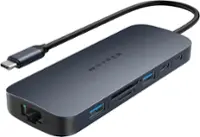
Customers recognize the HyperDrive Dual 10 Port USB-C Hub as a great computer accessory due to its ease of use, connectivity, compatibility, and HDMI support for an additional monitor. However, some customers have expressed concerns about the device's heat, price, refresh rate, cable length, and power.
This summary was generated by AI based on customer reviews.
- Pros mentioned:Compatibility, Ease of use

Easy setup, really simplifies the docking process
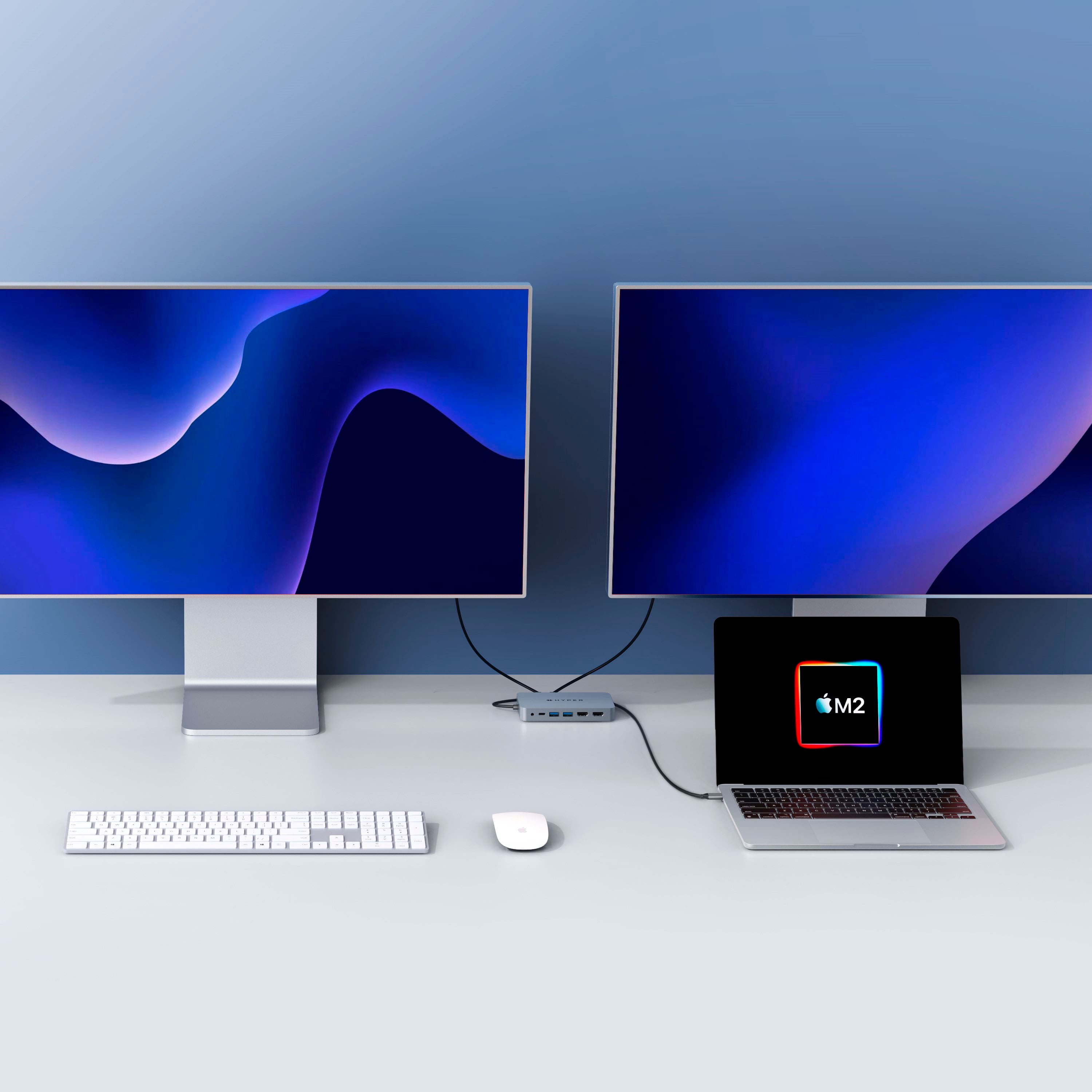
|Posted .This reviewer received promo considerations or sweepstakes entry for writing a review.A major issue that MacBook users have been vocal about recently is compatibility of the MacBook with extending desktop across the built-in monitor and 2 additional monitors. This dock/dongle/hub addresses those compatibility issues in the most simplified way I've seen. It connects via only one USB-C port to both power and two monitors via HDMI. It further allows peripherals (keyboards, mice, HDDs, other hubs) to connect via USB-A ports, which aren't found on Mac laptops anymore. The hub arrived in basic packaging with simple instructions for connection to the Mac. I connected to USB-C power supply and connected the HDMI cables. Then I connected it to my Mac via one of the 3 USB-C ports. The instructions then suggest you launch the included app from the Mac desktop, which then walked me through setting up the screen recording settings so that the double extended feature would work. I can report it was very easy to setup and after setup, the settings (monitor location) persist after disconnection and reconnection and computer restart. That had not been my experience with at least one competitor hub, so that's a relief with this one. Additionally, I can report that both charging and hub features persist across all 3 compatible ports on my MacBook Pro 14", which is a further relief. Since it only consumes one USB-C, additional USB-C devices can be connected either to the machine or via the one (1) hub USB-C connection. Additionally, though the MacBook Pro includes an SD multi-port, these are reproduced on the hub should you prefer to connect those cards in that way. Finally, the device looks great and fits nicely on my desk. The cord is much more bendable and thinner than competitive hubs, which allows for positioning either next to or behind the docking location. Overall, this is the best hub I've tried for the MacBook, and I'm very happy to use it when "docking" my Mac on my desk at home. I'd recommend this for any MacBook user for both their home and office to simplify getting up on multi-screen workflow arrangements.
I would recommend this to a friend Useful but check compatibility
||Posted . Owned for 1 week when reviewed.This reviewer received promo considerations or sweepstakes entry for writing a review.The device worked but with the HP laptop it wasn't receiving the duap monitors. It also doesnt charge the laptop.
No, I would not recommend this to a friendDoesn't work well with my MacBooks/Dell monitors
||Posted . Owned for 1 week when reviewed.This reviewer received promo considerations or sweepstakes entry for writing a review.I bought this to be able to plug and play two separate MacBooks to my monitors. This doesn't always recognize my monitors. I have to constantly unplug and plug back in my HDMI cables for both monitors to get them to recognize it. Also, my mouse lags when plugged into the dock; to fix this I plugged directly into my MacBook using a USB adapter.
No, I would not recommend this to a friend- Pros mentioned:Ease of use, Hdmi
A Big Punch in a Small Case
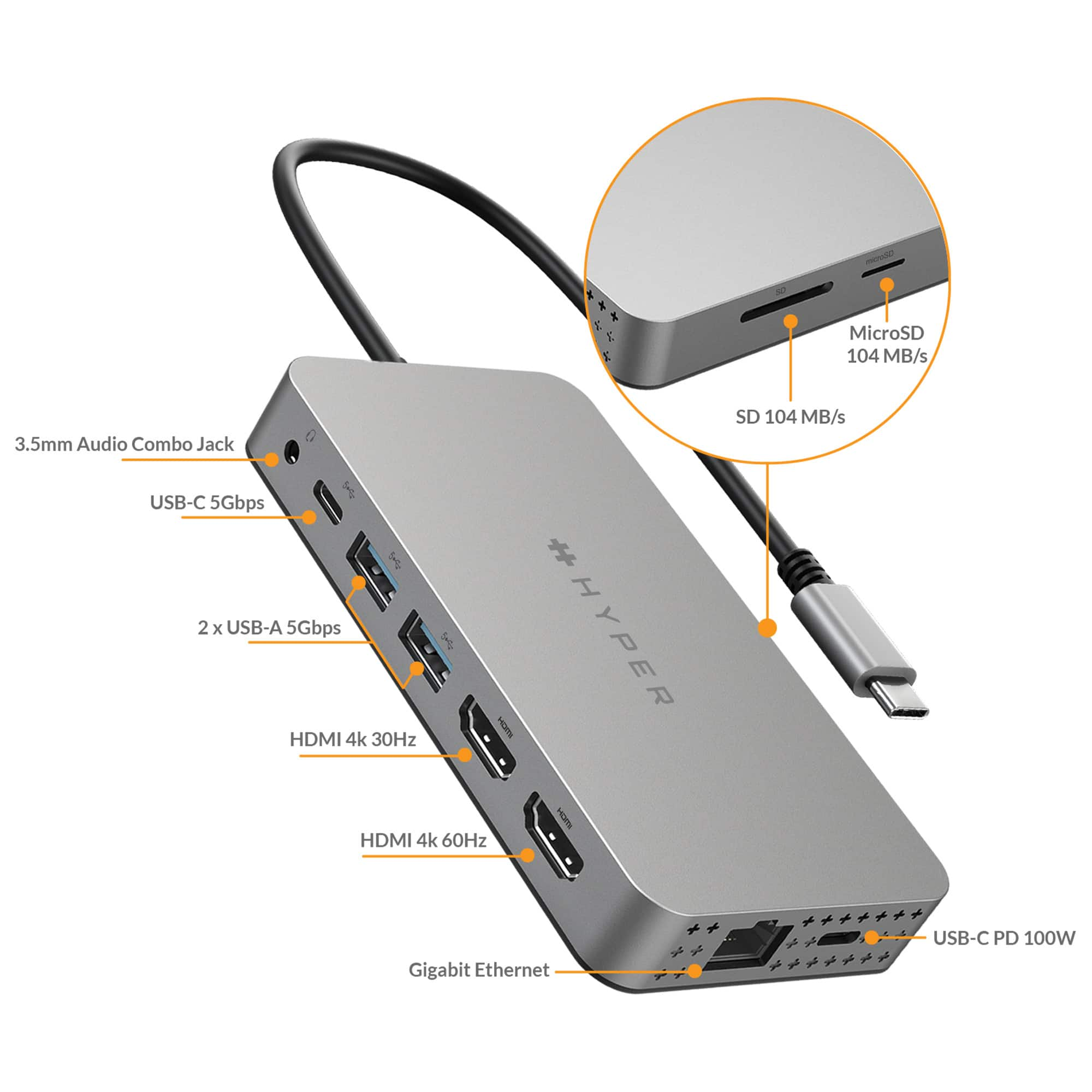
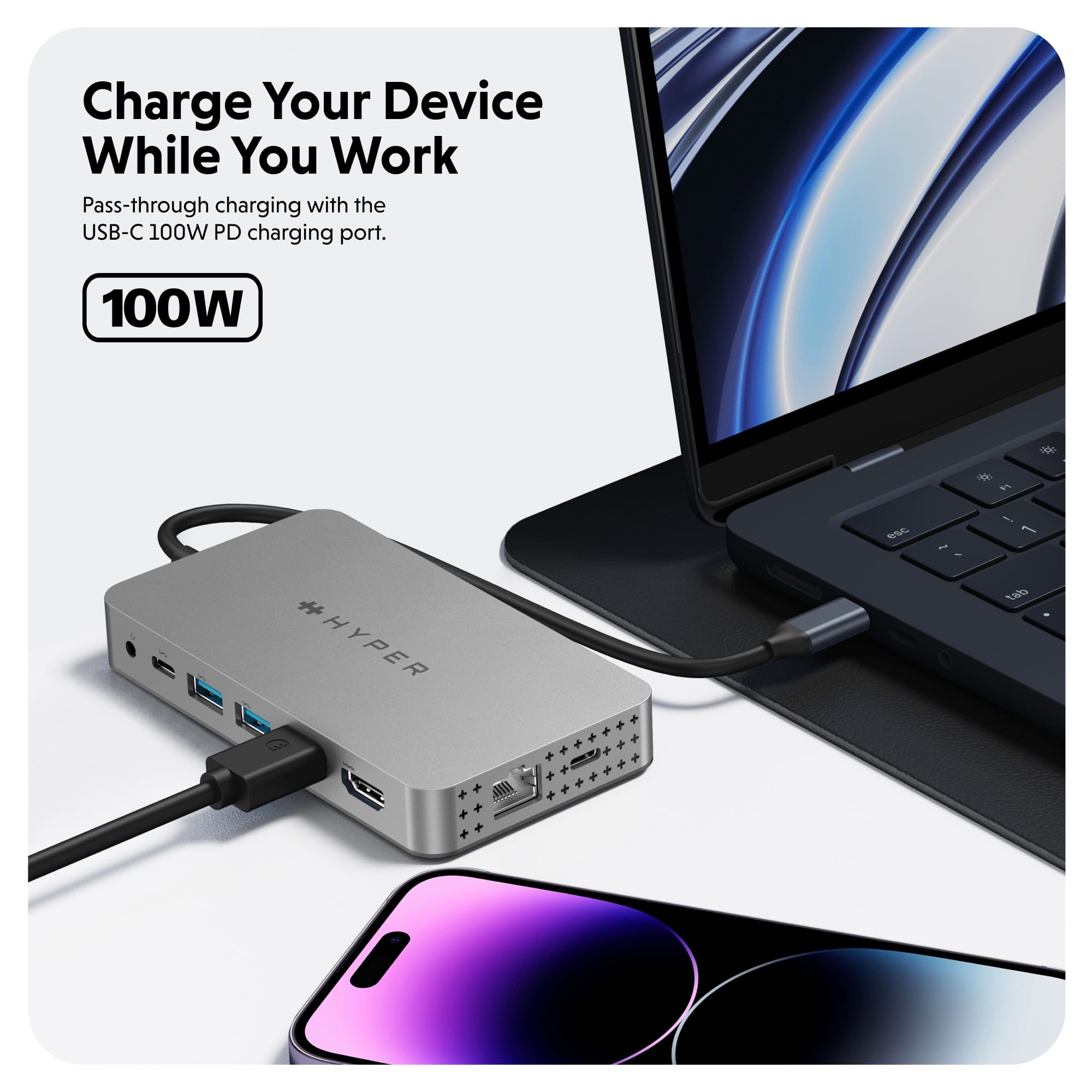
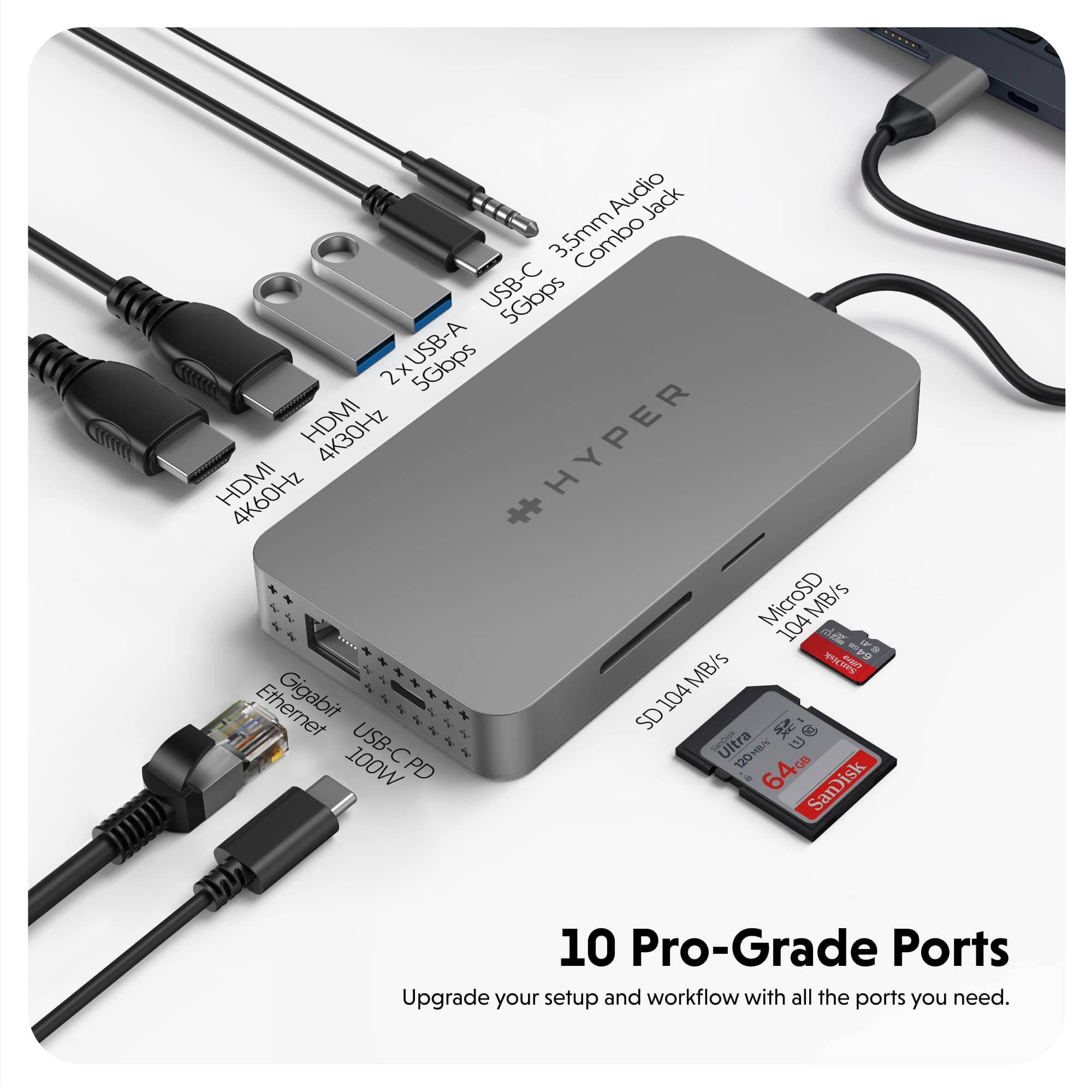
|Posted .This reviewer received promo considerations or sweepstakes entry for writing a review.I have been looking for a good USB-C dock for my Mac, and this hub is amazing. First off, despite saying it is for Macbook Pro Air, it works with my PC as well, so I can assume it will work with any device with USB-C. It has a total of 10 ports: 2 x 4k HDMI (one is 60Hz, one is 30Hz), SD/micro SD slot, 2 x USB-C ports, 2 x USB-A ports, a 1Gb Ethernet port, and a 3.5 MM audio jack. One of the USB-C ports fuels 100W of power, which is great for charging your phone or other devices. All of the USB ports (A and C) support 5Gb data transmission for lightning fast data transfer. I did not need to install drivers or anything for this to work on either computer, as advertised, I just plugged it in and I was able to start plugging in accessories including monitors. I did, however, have to install drivers for one of my new monitors, but that would have been the case with or without the Hyper Hub. I use this to make my workstation ultra portable when I need to go, but quick to set back up to full capacity when I return home. The only device I connect directly to my computer s my wireless mouse, as that is likely to travel with me when the computer does. When I get home, I just plug it back in to the USB-C port on my computer, and it is instantly back connected to my dual monitors, drawing tablet, wired gaming controller, a wired Internet connection, and my hard drive for backing up my data.
I would recommend this to a friend - Pros mentioned:Connectivity, Ease of use
Awesome Little Compact Hub
|Posted .This reviewer received promo considerations or sweepstakes entry for writing a review.I see a lot of the reviews about this item being used for Mac but I'm reviewing this for use with pc since Windows is the only OS I use. To start, I plugged this little hub into the usb-c port on my Alienware gaming pc which is connected to and external monitor and it popped up instantly. Also there was no software to install. It automatically found the drivers it needed in order to be recognized. Very quick and easy. My Alienware gaming laptop only has 1 usb-c port so I was very happy to get the extra 2 slots to charge my phone and or us a controller or mouse. I even went as far as to connect my surface pro X through usb and it worked without any problems. The regular usb-a ports work as intended as well. When testing out the ethernet port I had no problem connecting. Just had to click on my network name as usually and type in my pass key and connected right away. This little hub is perfect for travel and has everything need like a regular docking station. The only difference I can tell is that other docking stations need to be plugged into an outlet for power but this one connects through a usb-c port which is not bad. It just depends on preference from the consumer when buying. Either way, you can't go wrong with whatever you choose. I would definitely recommend this awesome little compact hub if your looking to connect more devices or setting up multiple displays.
I would recommend this to a friend - Pros mentioned:Overall performanceCons mentioned:Refresh rate
Same limitations as other hubs
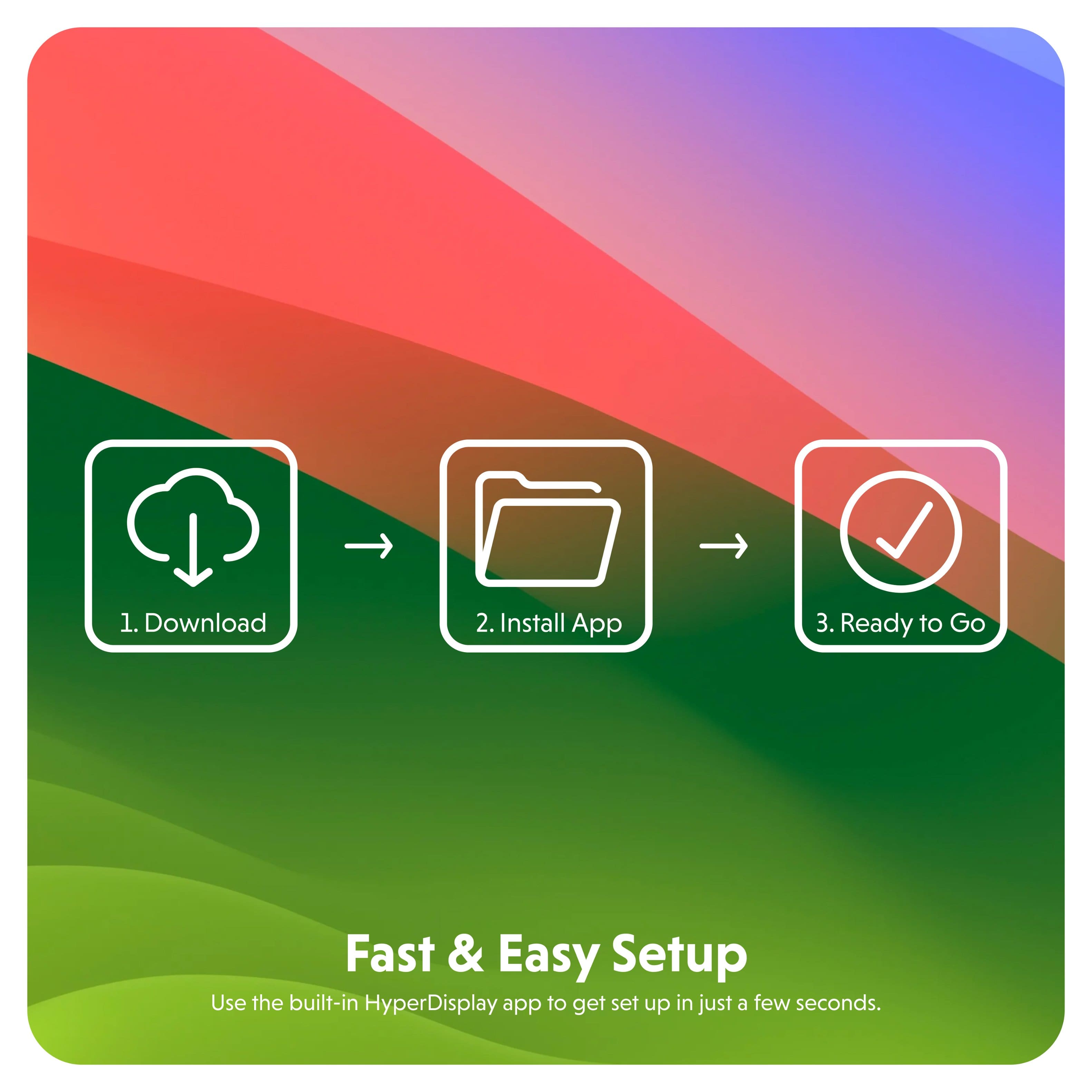
|Posted .This reviewer received promo considerations or sweepstakes entry for writing a review.So, unfortunately this hub suffers from the same handicap that other Mac-oriented hubs face. I suspect it's a limitation on Mac, and less a limitation on USB-C; because in order to get the 2nd screen to work, the hubs I've used seem to create a virtual screen in software (inside the USB hub itself). This is evident when you're required to grant the device software permission to record the screen. It then relays this recorded screen out to your HDMI screen. The affects of this means it can be a bit wonky to setup, and requires the installation of additional software. Image quality may also suffer. Hyper's USB hub is not much of an exception here. Though, it was easy to setup. You plug it in and a drive shows up on the desktop which includes the app to install. App installation was very quick and smooth. Once you install it, the 2nd screen will work. You can use one HDMI port without the software. Also, curiously, either port seems to be able to function as the software HDMI screen. It seems whatever port is connected first uses pure HDMI, and the 2nd screen connected uses the emulated software HDMI. This is important, because that software/emulated screen is the one that has limitations. It can do 4k, but only at 30hz. That's right, a 2nd 4k screen is limited to 30hz. Lower resolutions will be able to achieve 60hz. If you only have one 4k screen, make sure to connect that first. The software screen also seems to have trouble with anti-aliasing. On my 1080p screen, the dock icons and the notification dots have very pixelated edges. This is annoying, but I've gotten somewhat used to it already. But I can see it being very irritating for some. Hopefully this can be fixed with a software update. Otherwise, this is a pretty nice device, and it even includes software for Windows, so it will even work on a Windows machine. The USB, 3.5mm Audio, Ethernet and USB-C power work great. I just really dislike these emulated software 2nd HDMI ports and was hoping this hub would be different. Sadly it is not, and it's probably not entirely the fault of Hyper, it's probably a limitation of Macs.
I would recommend this to a friend - Pros mentioned:Compatibility
An absolute essential for your Mac
|Posted .This reviewer received promo considerations or sweepstakes entry for writing a review.Works with Mac as well as PC. This version is really tailored towards the Mac Book/Air/Pro and it does a great job with those. Two monitors connect to my M1 Macbook Pro seamlessly. The hub itself has two Thunderbolt 4 USB C ports and two HDMI ports for maximum compatibility. Two USB 3.0 ports, a headphone jack, a network plugin, and a micro sd and full-size SD reader round out the 10 total available ports on this monster. The best part for me is the driver-less setup. Even my Chromebook recognizes the SD card readers on the hub. One con for me though is the material used. Instead of the aluminum shell I've come to expect and appreciate from Hyper, this time they opted for plastic. All plastic. The result feels cheap and under-premium. So far, it does not get hot, but I prefer the heat dissipation of aluminum over plastic any day. One other thing that would really help if you're listening Hyper: how about instead of soldering the USB C connector cable to the hub, why not use a USB C to USB C cable to allow disassembly for travel. Not only would that help save space, it would actually help preserve the connection as the connector cable would not risk getting bent and eventually shorting out while in travel. Just a thought
I would recommend this to a friend - Pros mentioned:Compatibility, Hdmi
Something so small packed with a variety of ports
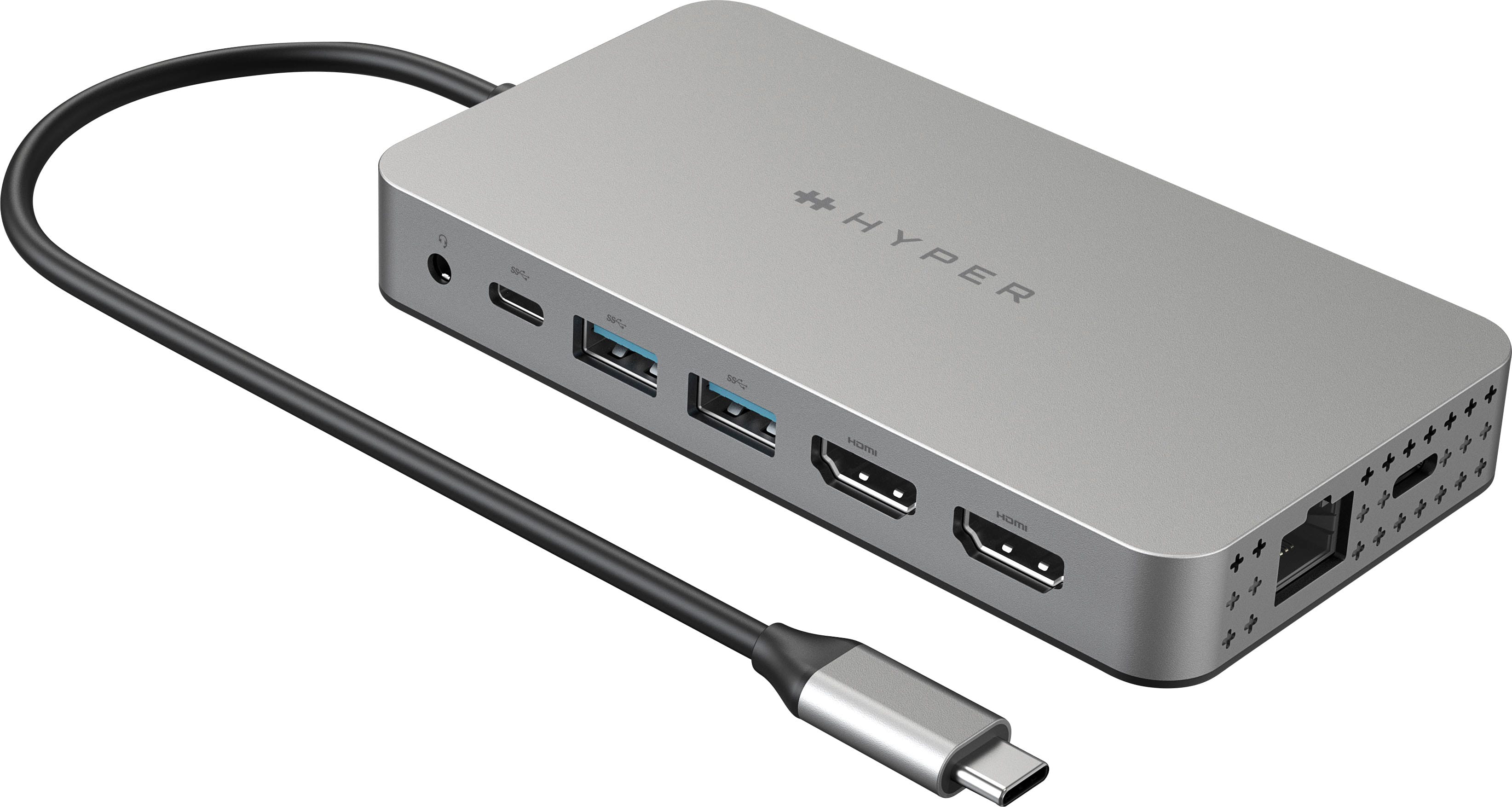
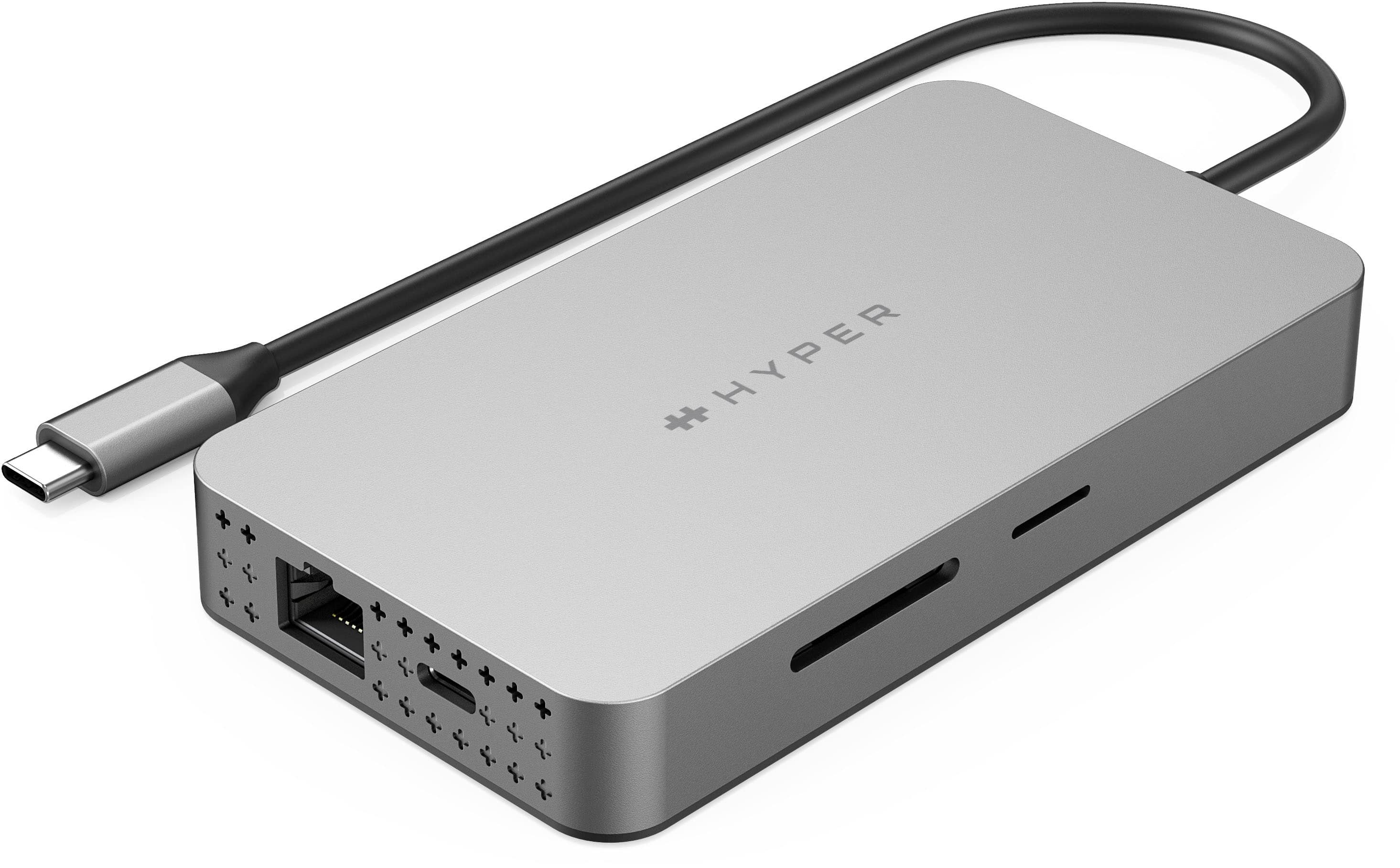
|Posted .This reviewer received promo considerations or sweepstakes entry for writing a review.Out of the box this hub has the look of a brushed or satiny aluminum casing and quite is eye catching. All of the ports are lined up along each side and end, conveniently spaced so multiple plugs can be in place at once and no more spider web of cords all over the desk. Along the one side it has a 3.5mm audio jack, USB type C 5 Gigabytes per second for data transfer, 2 USB type A with 5 Gigabytes per second for data transfer, then you have one 4k HDMI at 30Hz, and another 4k HDMI at 60Hz. On the bottom end is the Gigabyte ethernet port and beside it a USB Type C 100 Power port. On the opposite side it has a MicroSD slot at 104 megabytes per second for data transfer rate, and last but not least a Sandisk slot with 104 megabytes per second for data transfer as well. One of the unique features of this hub is it allows you to connect two 4k monitors to your M1/M2 MacBook, MacBook Pro/Air and IMAC, laptop or personal computer. Simply plug and play! The data transfer rates are excellent and there's no lag between monitors when connecting either. Overall a really nice hub!
I would recommend this to a friend - Pros mentioned:Ease of use, Hdmi
Dual Monitor support for Mac - Enough to buy. Good
|Posted .This reviewer received promo considerations or sweepstakes entry for writing a review.I was excited about this 10 in 1 Hub to see how it works. Believe me it just blown away, best hub I have even seen so far, there are some other brands offer the similar products but those have some disadvantages, do not want to discuss about those here. This has 10 Ports. Two HDMI Ports both supports 4K content but one is 60Hz and another one is 30hz rate. Two USB-A ports, One USB-C port, Sd and micro Sd slots, Ethernet port, standard 3.5mm audio jack and one USB-C for power. All ports are nicely placed on the hub, looks classy. The main part what I liked was dual monitor support for Mac books, this has been a big problem since so long, this works seamlessly you can connect two monitors for your Mac. Max power 100W. Video quality is good that means 4K ports working great. I do not see any negatives for this, they covered all ports especially USB-C my favorite. So no complaints. Very easy to use, no help required. Worth for the money. I would definitely recommend this product if you are a apple user, trust me you will like it.
I would recommend this to a friend - Pros mentioned:Connectivity, Ease of use
An extension for the extended world
|Posted .This reviewer received promo considerations or sweepstakes entry for writing a review.The fact that this uses USB-C told me that this was going to have some speed and flexibility to it. With two HDMI outputs, one for 8K and one for 4K, it does act as a monitor splitter. Useful for someone who works from home or has multiple screens. Some of us don't necessarily need that. I already have three screens but what's two more. What I mainly use it for is the USB outlets. Giving me more USB outlets. I can hook up more things now. I have multiple cameras multiple microphone's for all of my filming and streaming projects. The more you can do with your computer the better. With multiple laptops, multiple screens and video formats. This is definitely a useful splitter. I know this marks itself as only for Apple use or it promotes Apple use, but it definitely works with regular PC and Windows 11 as well. I've used it for both and it works seamlessly, both as a monitor splitter extender and as a USB extender. Simple connection. No extra hookups or software needed. Pretty much plug and play right out of the box.
I would recommend this to a friend Good USB-C hub with dual monitor support
|Posted .This reviewer received promo considerations or sweepstakes entry for writing a review.The Hyper - Dual 4K HDMI 10-in-1 USB-C Hub allows my MacBook Pro M2 and MacBook Pro M1 14” the ability to use dual monitors. When I use other USB-C hubs with my MacBooks, both monitors will appear but one of them will be mirrored to my MacBook. I was not able to use the two monitors separately with other USB-C hubs. The ability to use two monitors separately is a feature that sets this hub apart from the others. I was able to have content on my MacBook, then display different content on each of the monitors separately. When you plug the USB-C hub into your laptop it has a preinstalled drive that will appear on the desktop. Opening up the drive will allow you to download the required app for Mac or Windows. After installing the Mac application, I was up and running with dual monitor support. I did run into few quirks. I had a browser window opened on my second monitor while playing a YouTube video. When I received a notification, the browser disappeared but I was still able to hear the YouTube video playing in the background. I’m not sure what cause this, but I hope a future update can correct this issue. The hub also has a headphone jack. I use it for plugging in my external desktop speakers. I did not hear any sound when I clicked on the Mac speaker icon and selected the Hyper audio. The only way I was able to hear any sound was by selecting USB device instead. Overall, it’s a good hub that allows for dual monitor support but it does have a few kinks to iron out.
I would recommend this to a friend- Pros mentioned:Hdmi
It Works
|Posted .This reviewer received promo considerations or sweepstakes entry for writing a review.The Hyper Dual 4K HDMI 10-in-1 USB-C Hub has performed okay. Unboxing it you get the hun. It’s connection is USB C. It’s supposed to work for both Windows and Apple devices. On my Windows laptop, I followed the instructions. You plug I. The hun and navigate to its internal storage. Install the drivers, and it will be sure you have an external display connected. I had no issues using it with my Microsoft Windows laptop. On my Apple MacBook Pro, I got it to work only a few times. Once it was connected, if I disconnected it then reconnected it, the usb hub would not work. I tried reinstalling the drivers and restarting my device, but that didn’t work. I do not know if it’s a device issue or driver issue regarding my Apple device, but hopefully I can get it fixed. When the Hyper Dual 4K HDMI 10-in-1 USB-C Hub is working, it’s great. The display is crispy, all it the ports work and transfer data very fast, and it also chargers my device up nicely. I can recommend this product to to others in hopes that it will start to work for my Apple device.
I would recommend this to a friend - Pros mentioned:Ease of use
Decent port replicator. A little glitchy at times
|Posted .This reviewer received promo considerations or sweepstakes entry for writing a review.When I found out this port replicator worked with Apple Silicon Macs I was quite enthused. Prior to getting my 16" M1 Macbook Pro I worked on a Mac with a 4 external monitor setup, USB A, a 3.5mm jack, DisplayPort, and an SD care reader at the ready. It gave me everything I could have ever asked for at the time. Apple Silicon Macs are great and having used my new laptop for a while now I'd never go back. That said, the vast difference in available ports left me at a fork in the road. To set up my new laptop the same way as my old computer I would either have to a) buy a bunch of expensive new equipment or b) find a port replicator that would be powerful enough to drive my old equipment. That turned out to be more difficult that one would think. Of the four external monitors I own, only one supported DisplayPort. That one hooked up to my old Mac directly via a Thunderbolt port. Then I had one hooked up to the built in HDMI port and a USB A hub in one of the USB A ports to which I connected two USB A to HDMI display adapters. The remaining Thunderbolt port was used with a Thunderbolt to ethernet adapter while the remaining USB A port connected my external backup drive. It wasn't pretty but it worked, though I all too often I wished I could take my old Mac with me someplace then abandoned the idea when I though of having to unhook and rehook up all that stuff. The M1 presented a new host of problems. Namely that the only USB ports on it were USB C. And there were only 3 of them. Out of necessity I invested in a USB C to DisplayPort cable, but the thought of how much it would cost to buy the remaining equipment required to get my setup working the same way made me queasy. That's why I was so happy when I saw this port replicator come to market. My current setup has two of my monitors hooked up to the built in HDMI ports, my DisplayPort monitor connected to the 5Gbps USB C port, one of my old USB A to HDMI display adapters in one of the USB A ports, my external backup drive connected to the other USB A port, ethernet cable to the built in RJ45 jack, and a power adapter connected to the USB C power delivery port. Everything works (Most of the time. I'll get to that in a sec) and the best part is I only have to connect one USB cable to my computer now. With the excellent battery life my M1 gets, I'm overjoyed to be able to simply disconnect and be only my way in the blink of an eye. The only issue I've had thus far has been that the built in HDMI ports can be intermittently finicky. Sometimes when resuming from sleep or simply the screens being blanked, one or both will show nothing but full screens of multi-color "snow". The only remedy I've found is to unplug the HDMI cable(s) and replug it(them) in which is sort of a hassle since I keep this device shoved back behind my monitor stands. this does not happen with my DisplayPort monitor or the one I have hooked up via USB A to HDMI. I even used the setup with just the 2 HDMI ports connected and nothing else just to make sure it wasn't the stress of all I had connected and it still happened. This is why I'm giving a 3 star rating. As a spoiled Mac user I want things to "just work" 100% of the time and while I enjoy the convenience and flexibility this product provides me, it "just works" up to a point.
I would recommend this to a friend - Pros mentioned:Hdmi
A "Must Have" for PC/MAC USB C laptop owners
|Posted .This reviewer received promo considerations or sweepstakes entry for writing a review.Turn your laptop into a full-blown multi-headed workstation! Laptops these days are coming with minimal connections - a lot with just USB C connections, others with USB C plus one or USB A and no HDMI connection. Plug this gem into your USB port, and your power brick into this USB hub and you'll have all the outputs you could need/want! 2x USB C,2x USB A, 2x HDMI (4k/60hz), Ethernet, SD card and MicroSD card slots. On Macbook at the office I was able to hook up two external 4k monitors at 60hz refresh rate with zero issues. I could not use the built-in monitor at the same time as the two externals, but hey, I'm definitely not complaining! Additionally I could leave everything that was hooked up to the hub and just disconnect one plug when I left for the day, giving me a quick disconnect, and easy hookup again the next day when I got back in with my laptop. It's small enough to fit in your pocket if you need to take it with you, or of course into your laptop bag. Works well with PCs, Macs, Linux-based PCs and Chromebooks. I was also able to hook up this to my phone and plug mouse, keyboard, and monitor up for use with DEX (Samsung phone) on my monitor. Definitely a great device to have !
I would recommend this to a friend A superior hub, but questionable HDMI
|Posted .This reviewer received promo considerations or sweepstakes entry for writing a review.First impression: My first impression of the Hyper - Dual 4K HDMI 10-in-1 USB-C Hub is that it is a well-made USB hub with a large number of ports. Having the full SD port is also nice. I have quite a few hubs, and all of them have Micro SD, but only 1 other has a full SD slot. I also like the ventilation ports, although fully loaded, it never got hot. Test: I tested this hub with my Dell Latitude 5430 laptop, my Intel-based 2018 MacBook. The Latitude didn’t like the software, but all of the other ports worked great. I plugged the hub into it, and it immediately loaded up and the laptop and dual 4K monitors displayed the Hyper logo. I installed the software and I set all 3 screens as extended. The two 4K monitors did great, but the Latitude display started glitching. Not only did the screen start glitching, but it also started jumping around. I unplugged the hub, but the screen continued to do this. I killed the process and the screen stopped acting up. This is my main work laptop, so I didn’t try it again. To be fair, I also didn’t try it on another Windows computer, so I don’t know if it was a Windows problem, a Hyper software issue, or just my laptop. As long as I don’t need the HDMI ports, the hub works great. So as an IT engineer, this is my new hub that I will carry in my laptop bag, as I never need HDMI ports when working on a client’s computers. It's advertised as being compatible with my Intel-based 2018 MacBook pro, so I tried it out. I didn’t try the HDMI ports, as I don’t use external monitors with my MacBook. I did test every other port and they all worked great. I put in a full-sized SD card with 6GB worth of RAW images files from my DSLR. It transferred all 6GB to my MacBook pro in under 30 seconds. This is significantly faster than my current (now my ex) hub. Conclusion: I really like this hub and it is now my full-time hub that I will carry in my laptop bag. It has 10 ports including the 2 HDMI ports. For me, all ports worked great and were fast except for the HDMI ports. I only tested those on 1 laptop, so I didn’t do a comprehensive HDMI test. This is an expensive hub, but is the HDMI ports work, then it is worth it in my opinion, especially if you regularly need a good hub for servicing clients. Despite the issues I had with the monitor ports, I highly recommend this hub.
I would recommend this to a friend- Pros mentioned:Hdmi
Great Dock
|Posted .This reviewer received promo considerations or sweepstakes entry for writing a review.Really love this 10 in 1 USB-C Hub for my MacBook Pro. When you connect it, you immediately get a drive with software to install. Once installed, everything worked! Two HDMI ports allow you to connect two additional independent screens to your Mac. Additionally, there is an ethernet port, 2 USB-A ports, a USB-C port, a SD and micro SD card slot, and an audio port. There is an additional USB-C port that you can plug your charger into so your computer charges when plugged into the hub. Docking and undocking uses just one USB connection and is simple and easy. Very small and compact. It does not come with a charger but your USB-C charger will plug in. I had no issues with this and the screen immediately began working. The two screen you can add are in 4K with outstanding resolution. When I first Connected, the software and drivers automatically updated making startup very simple. If you have a mac where multiple displays can be cumbersome to add, this is a great product to ensure you get multiple displays. Hubs have improved a lot over the past few years and this was worth the upgrade.
I would recommend this to a friend - Pros mentioned:Hdmi
None Can Compare
|Posted .This reviewer received promo considerations or sweepstakes entry for writing a review.I absolutely love this 10 in 1 hub. This hub makes work, effortless with out being very bulky. All ports are extremely fast and work properly. This hub does not slow down any of the processes such as transferring data or projecting images via HDMI. I highly recommend this device for anyone who needs something more than a USB C type port. Using this hub for work, and for school work has been an essential part of my efficiency. The multi use purposes of this hub is on comparable to anything else. This hub stands alone in its own tear. I highly recommend this hub for anyone who needs fast and efficient use. this habit suitable for a student, personal use, or a work force hub. This hyper 10 in 1 delivers uncomparable 4K quality to a 4K TV or display. Personally, there is no substitute for this device. The user will notice a massive difference in speed and quality compared to other products. I highly recommend this product and have no negative remarks in regards to this product. I suggest anyone purchase this product who needs multi use purposes.
I would recommend this to a friend - Pros mentioned:Hdmi
Transformational
|Posted .This reviewer received promo considerations or sweepstakes entry for writing a review.I have an M1 Macbook Air that is great for being portable but I've always wanted to have a larger screen (or two) for when I'm working at home. This is a perfect solution. Not only was I able to add one external monitor, but I added a second without any issues. What was also impressive was when I switched out another hub that also allowed me to have wired ethernet, this hyper usb-c hub also increased the connection speed over that older one. I went from around 800 mbps to over 900 mbps for download speeds and I was getting upload speeds near 300 mbps where the old unit was barely 200 mbps. I had no issues connecting an external drive to this as well. Access to this external drive is seemingly faster than the old hub. There is also an instruction booklet with pictures for how to set up if you are uncomfortable doing so. I was impressed also by the quality of construction of the Hyper hub. This has some weight to it and is really well matched to my macbook air in color and design.
I would recommend this to a friend - Pros mentioned:Hdmi
many ports-flexible, some loose
|Posted .This reviewer received promo considerations or sweepstakes entry for writing a review.Ten in one hub for your macbook including multiple HDMI, USB A, USB C, 3MM headphone, micro SD card slot, SD card slot, and more. The device is plug and play and easy to setup the first time. It comes with directions that are easily understood. I got this hub to expand my macbook ports and possibly monitors. You can use the hub to extend your monitor for up to 2 additional monitors/tvs in 4K. (without additional software download). I only tried it with a smaller monitor so did not get the full 4K effect but it works find on regular definition. It includes multiple USB ports to expand your laptop/macbook when space is limited. Most likely there are more ports than you are going to need, but it's small enough in size and not too bulky. The USB port on mine seemed a bit loose but worked ok. There may be long term use issues w/ connection. (reason why 3 start instead of 4) It also allowed me to send info/files from a windows laptop to a macbook instead of by email like I would typically (so saves a step). All in all a good product, quality could be better. Many port options probably more than you'll need. I would recommend it but there may be smaller options with fewer ports to meet your needs at a lower price.
I would recommend this to a friend Not an easy set-up at all
|Posted .This reviewer received promo considerations or sweepstakes entry for writing a review.I gave this 4 stars because this was not easy an easy set-up to have dual screen monitors working. I tried looking up videos to help me out, but nothing was helpful. If you are buying this specifically to set-up 2 monitors, beware that you may run into some issues getting it started. I consider myself pretty tech savvy, but not a tech expert and I am still having a difficult time setting up 2 displays. I went out and bought a 4k HDMI just to make sure that was not the problem, but still nothing. If I can figure that part out, I would give it 5 stars, but until then 4 stars is pretty generous. Outside of trying to connect 2 monitors, this thing is pretty nice. I love the usb connectors and usb-c connectors available. I also really like that there is 2 HDMI ports when I do get the 2 displays function up and working. I do wish that the cord attached was a little longer, but that is not too big of a deal. This feels sturdy and well made so I will assume that this will last a very long time. I didn't mention it before, but I own 2 Mac pros, a mac air and an iPad, plus an HP desktop and none of those would work with this. I must be doing something wrong so I will continue watching videos until I figure it out. I really hope I do because this would be perfect to connect more than 1 display when doing homework and research papers for school.
I would recommend this to a friend