Customer Ratings & Reviews
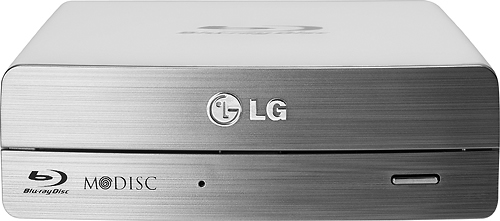
- Model:
- BE14NU40
- |
- SKU:
- 6697151
Customer reviews
Rating 4.3 out of 5 stars with 319 reviews
(319 customer reviews)to a friend
Customers are saying
Customers find value in the 14x External USB 3.0/2.0 Blu-ray Disc Drive's ease of use and excellent performance, with many praising its compatibility across various operating systems and quiet operation. While some users mentioned the size could be improved and the included software is outdated, the positive feedback on picture quality and speed outweighs these concerns. The drive's affordability is also frequently cited as a significant advantage.
This summary was generated by AI based on customer reviews.
Rated 5 out of 5 stars
Very well Made Blu ray drive
||Posted .This reviewer received promo considerations or sweepstakes entry for writing a review.I use this with my gaming/HTPC and it blends perfectly with the rest of my equipment in my Bello PR45 Cabinet . IF i pause a movie it takes no time for this to start back up with no delay. Def recommend this Blu Ray drive
I would recommend this to a friendRated 5 out of 5 stars
excellent replacement
||Posted .This reviewer received promo considerations or sweepstakes entry for writing a review.my internal labtop drive was not functioning write so i replace it with this portable drive which have capablity to burn Blueray discs though its big size.
I would recommend this to a friendRated 5 out of 5 stars
LG - 16x External USB 3.0/2.0 Blu-ray Disc Double-
||Posted .This reviewer received promo considerations or sweepstakes entry for writing a review.I bought the Asus all in one which did not have a dvd/cd player so I bought the external drive for the purpose of making movies and playing music from my favorite cd collection. The product works very well and does the job. I highly recommend it.
I would recommend this to a friendRated 5 out of 5 stars
Works well for both Blu-Ray and non Blu-Ray DVDs
||Posted .This reviewer received promo considerations or sweepstakes entry for writing a review.Make sure you install the enclosed set-up software and region is selected so Blu-Ray DVDs will play.
I would recommend this to a friend- Pros mentioned:Compatibility, Speed, Usb
Rated 5 out of 5 stars
Best BluRay burner
||Posted .This reviewer received promo considerations or sweepstakes entry for writing a review.Purchased this LG BluRay burner for multiple purposes. Blu Ray demo reels, BluRay marketing videos and Powerpoints, photo and data archival BDs using the new long life M*DISK media. Unit connected directly to my Mac. (2011 17" MacBook Pro) Used Apple Disk Utility natively to burn ISO files to BLuRay. (no extra software or driver needed) BluRay playback via Leawo Blu-ray player, Ripped clips via MakeMKV, Aurora Blu-ray copy, iSkySoft (& Wondershare) Video convertors all worked perfectly. Quite, fast, well made and compatible. Did not connect to WinTel PC, but software was provided for the purpose. Highly recommended!
I would recommend this to a friend - Pros mentioned:Ease of use, Speed
Rated 4 out of 5 stars
Very happy with my purchase
||Posted .This reviewer received promo considerations or sweepstakes entry for writing a review.I bought this external drive to use with my Mac. Very easy to set up. Very easy to use. I play cd's and dvd's all the time. Burning cd;s are blazing fast, I can burn a 60 min cd in about 4 to 5 minutes. And most of all this unit is pretty quiet. I can barely hear it running. I would give it 5 stars but I have not burned any dvd;s yet.
I would recommend this to a friend - Pros mentioned:SpeedCons mentioned:Software
Rated 4 out of 5 stars
Good for recording and playing Blu-Ray
||Posted .This reviewer received promo considerations or sweepstakes entry for writing a review.I bought this to download blu-ray movies to hard drive it works great for that. I wished that it didn't need a power source other than the USB 3.0. The cord is a little on the short side so it needs to be close to computer. The software supplied is out dated and when you go to update it they want you to purchase it. I was able to use vlc for playing it. The playing and recording came out with a great picture. I have not burned a blu-ray yet, so not sure how that works.
I would recommend this to a friend - Cons mentioned:Software
Rated 4 out of 5 stars
Does what it's supposed to do
||Posted .This reviewer received promo considerations or sweepstakes entry for writing a review.This drive works well and is quiet during operation. My only issue is that you need the software/driver installation disc that comes with the product to set up the drive. Why is this an issue? Because the disc in my box was warped, and while I would have preferred to download the necessary set-up software/drivers, I could not because LG didn't offer it. I had to return to the store and exchange the drive to get a usable disc. There was no hassle with the exchange and it was no big deal, but I would've preferred to save myself a 2nd trip to Best Buy.
I would recommend this to a friend - Pros mentioned:SpeedCons mentioned:Software
Rated 4 out of 5 stars
Fast Drive/Won't play Bluray movies on my computer
||Posted .This reviewer received promo considerations or sweepstakes entry for writing a review.The drive works great as a burner. It is easy to setup and is a fast burner on all disc formats. The PowerDVD software included with the drive is outdated and does not have the proper decrypting capability to play current Bluray movies on my computer. You will need to go and purchase more up to date software in order to be able to watch Blurays.
I would recommend this to a friend - Pros mentioned:Speed
Rated 5 out of 5 stars
SURPRISINGLY THE BEST BURNER EVER!
||Posted .This reviewer received promo considerations or sweepstakes entry for writing a review.If I could give this burner 10 STARS I would, LG hit a homerun with this product, the scored the winning touchdown when they made this BluRay Burner. It's unbelievably fast, It Burns, Copy and Rip BluRay Disc for your personal use. I've copied almost 600 BluRay movies to an external driver and play them on my TV, no more getting up to change disc, or deciding what to watch, they are all right there, or I can let them play one after the other. The only draw back is the FREE software they bundle with the drive, it's three version below the current software available from CyberLink LG provide version 10, which is good enough to get you started, but they latest version is so much better. So my opinion. The best software for ripping BluRay Disc is from a software maker called: AnyMP4 Tool Kit. But if you are looking for a great buy, for a great price, this is it, It can also be used as a 3D BluRay Player if you have a 3D Television. I do suggest watch the price. after I purchased this, the price dropped by $20, but at any price and in comparison to other models, this is by far the best.
I would recommend this to a friend - Pros mentioned:Ease of use, Usb
Rated 5 out of 5 stars
Seems to work so far
||Posted .This reviewer received promo considerations or sweepstakes entry for writing a review.Havent attempted to burn anything with this yet so Ill just discuss my initial thoughts after installing it. Installed easily, just plug it in, insert into a usb 3.0 port and you are good to go. I had to go to the LG site to get updated firmware but other than that it was a breeze. Included software installs quickly. Only gripe is that upon every restart the drive attempts to install some software and it causes startup time to be slowed down. OVerall a great drive for my Samsung AIO that did not come with a disc drive. Id recommend it to anyone needing a solution to a computer without an included drive.
I would recommend this to a friend - Cons mentioned:Software
Rated 2 out of 5 stars
Software is so stripped down it's next to useless
Posted .This reviewer received promo considerations or sweepstakes entry for writing a review.If you reject my negative review of this product a second time, I would appreciate an explanation as to why. I have spent more than 2 hours preparing the original review, and about an hour on this one. At least give me the common courtesy of explaining why it got censored if it happens again. Either way I also intend to post a review at www.ripoffreport.com where it won't get censored at all. Thanks. I would NOT recommend the LG BE14NU40 Blu-ray rewriter because the software it’s bundled with is so stripped down in functionality that it’s next to useless. I’d have to spend another $187.79 to upgrade its five Cyberlink software packages to get all of it to be fully functional! That’s more than the original cost of the product which is currently at $149.99 at Best Buy. I’m using it with a Toshiba P855-S5200 laptop that I purchased at Best Buy just a few months ago. According to the Cyberlink BD Advisor software that came with this device, my laptop will support the use of this device and its software except for the 3D features. The only reason I didn’t give this product a 1-star rating is because when it converts a DVD to the MPEG-2 format, it is blazing fast. From the time I plugged the DVD into the unit, until the time it created the MPEG-2 file, it took less than one minute, even for a DVD that was 1.5 hours long. So I bumped it from a 1-start to a 2-star for that reason. Had the software been fully functional out of the box, I would have given it a 4-star rating. I’m giving it a 2-star rating for the following reasons: - difficult software installation - PowerBackup software won’t finalize Blu-Ray BD-R discs without spending $20 for an upgrade. - PowerBackup software has a fixed burn rate of 10X. Out of the box, you can’t change it. I have 4X BD-R’s so I couldn’t use this software with my Blu-ray discs without first paying for the $19.95 software upgrade. - PowerProducer software will convert DVD’s only to the MPEG-2 format. Virtually ALL of the toolbar settings are disabled. It MAY be able to convert to AVI, MP4, etc., but out of the box you’re stuck with MPEG-2, with no control over the quality or enhancements (i.e. brightness) settings. Activating all the toolbar settings cost an extra $57.99! - Device will not read 30 – 40% of the DVD’s of my home movies that I want to convert to digital files (PowerProducer). I had to put those DVD’s into my internal DVD reader where PowerProducer did successfully convert all of them to MPEG-2 files, but at a significantly slower rate. - nagware prompts you to register the software nearly every time you open it up and I couldn’t find a way to shut it off. - The “USB Fast” tool has one of the most confusing user interfaces I’ve ever seen. I still can’t tell if it’s turned on or off. Here’s a breakdown of how much it costs to upgrade each of the five Cyberlink software packages to get all of the software to be fully functional: YouCam $34.95 PowerDVD $39.95 Power2Go $34.95 PowerProducer $57.99 PowerBackup $19.95
No, I would not recommend this to a friend - Pros mentioned:Usb
Rated 5 out of 5 stars
Works like a charm
||Posted .This reviewer received promo considerations or sweepstakes entry for writing a review.I bought this to rip my own blu-ray collection. I had been using a much smaller LG blu-ray drive, so I felt comfortable with the brand. That drive is still running well. Now this one is running right beside it. This drive is very quiet. It is USB3, so it's quick. I have been very pleased with it (probably 30 rips in).
I would recommend this to a friend - Pros mentioned:Usb
Rated 4 out of 5 stars
Seems To Do The Job
||Posted .This reviewer received promo considerations or sweepstakes entry for writing a review.I bought this LG BE14NU40 14x external Blu-ray Disc drive simply because I wanted an external drive to get software onto my new laptop, and one that was fully featured to cover any future needs I might have. I simply plugged it in to power, attached it to my laptop via USB, and it was good to go for installing software from DVD-ROM discs. After I was finished I unplugged the USB connector. The only problem that arose is that some days later, I went back to install additional software and the laptop would no longer recognize the drive (i.e., "USB device not recognized"). The solution involved unplugging the drive from the power and letting it sit idle for a minute, then plugging it back into power, allowing it essentially to reboot. I haven't used this drive for anything other than installing software so far, but it does that just fine.
I would recommend this to a friend - Pros mentioned:Ease of useCons mentioned:Size
Rated 4 out of 5 stars
Works well but it is REALLY BIG!
||Posted .This reviewer received promo considerations or sweepstakes entry for writing a review.Wanted an external drive that was powered. This was the only one available at Best Buy. Works well and was easy to install but it is huge! I don't know why they had to make it so large. You certainly will not carry this one around with you.
I would recommend this to a friend - Pros mentioned:Ease of use, Speed
Rated 5 out of 5 stars
The best bluray burner I could find!
||Posted .This reviewer received promo considerations or sweepstakes entry for writing a review.After a lot of research I took the plunge and purchased this bluray burner. It works great and was easy to use straight out of the box. I just plugged it in to my mac and it worked perfectly. I have a mac pro running the latest OS X and works great! Super fast speeds!
I would recommend this to a friend - Pros mentioned:Compatibility, Ease of use
Rated 5 out of 5 stars
Installed on Mac
||Posted .This reviewer received promo considerations or sweepstakes entry for writing a review.Simple plug & play, added Toast12 Titanium to do all my work. Very easy to install. I wasn't sure if it was compatible with my Mac, but works fine.Open/shut button the bottom of the tray is a little of an inconvience but not too bad.
I would recommend this to a friend - Pros mentioned:Speed
Rated 4 out of 5 stars
Great external drive
||Posted .This reviewer received promo considerations or sweepstakes entry for writing a review.Currently using this drive to backup years worth of pictures from our laptop (which does not have an internal drive) to CD. The speed is great, and we are getting high quality results.
I would recommend this to a friend - Pros mentioned:Performance, Speed
Rated 4 out of 5 stars
Very Fast
||Posted .This reviewer received promo considerations or sweepstakes entry for writing a review.I purchased this to transfer lots of data and it has worked great; its very fast and the blue ray software works great also.
I would recommend this to a friend - Pros mentioned:Ease of use
Rated 5 out of 5 stars
Excellent BlueRay Burner
||Posted .This reviewer received promo considerations or sweepstakes entry for writing a review.This LG Writer is an excellent product.............was easy to install the included software and is whisper quiet! Would highly recommend.
I would recommend this to a friend