Customer Ratings & Reviews




- Model:
- EYU-00001
- SKU:
- 10216138
Rating by feature
- Value
Rating 4.3 out of 5 stars
- Quality
Rating 4.7 out of 5 stars
- Ease of Use
Rating 4.7 out of 5 stars
Pen
||Posted . Owned for 1 month when reviewed.This reviewer received promo considerations or sweepstakes entry for writing a review.I'm liking this pain very much it's very very beautiful color lightweight very resistant good quality inn affordable price thank you Best Buy like always
I would recommend this to a friendPen
||Posted . Owned for 2 weeks when reviewed.This reviewer received promo considerations or sweepstakes entry for writing a review.The pen is light, writes really well and I love that it has an eraser in the back, its a lot more comfortable that way.
I would recommend this to a friendGreat product, but somewhat pricey
||Posted . Owned for 1 month when reviewed.This reviewer received promo considerations or sweepstakes entry for writing a review.Pricey, but I waited for a sale to buy this product. I love using it with my Microsoft Surface Pro 6. It really works great and offers a ton of options. Works great in PowerPoint presentations. Great product.
I would recommend this to a friendMy review
||Posted . Owned for 2 weeks when reviewed.This reviewer received promo considerations or sweepstakes entry for writing a review.the Microsoft Surface Pen was well-regarded as a high-quality stylus that complemented various Surface devices, such as the Surface Pro and Surface Book. It provided an excellent digital writing and drawing experience, making it a popular choice among artists, designers, note-takers, and anyone who needed precise input on their Surface device. The Surface Pen offered pressure sensitivity, tilt functionality, and low latency, allowing for natural and responsive pen input. Its integration with Microsoft's software, such as OneNote and Microsoft Office, made it convenient for note-taking and creative work. The ability to use the eraser end as an actual eraser was also appreciated by users. Moreover, the Surface Pen's sleek design and customizable button features added to its overall appeal. Users could configure the pen's buttons for specific functions, enhancing productivity and workflow. Overall, the Microsoft Surface Pen was considered one of the best stylus options available for Surface devices, providing a seamless and enjoyable digital writing and drawing experience. However, I recommend checking for more recent reviews to ensure there haven't been any significant changes or updates since my last knowledge update.
I would recommend this to a friendPricey pen, but works great!
||Posted . Owned for 1 month when reviewed.This reviewer received promo considerations or sweepstakes entry for writing a review.A must have for any Surface user. Pricey though! Good feel, but make sure it is compatible with your Surface model.
I would recommend this to a friendExactly what I needed
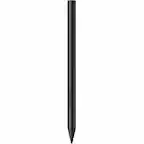
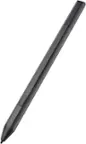
||Posted . Owned for 3 weeks when reviewed.This reviewer received promo considerations or sweepstakes entry for writing a review.Works great, I have had no issues with it and I use it everyday. The weight of the pen feels great to write with and The matte black is nice too.
I would recommend this to a friendA must have
||Posted . Owned for 4 months when reviewed.This reviewer received promo considerations or sweepstakes entry for writing a review.The perfect compliment to the Microsoft surface. It’s convenient and always on point. Real help with navigating screens and writing.
I would recommend this to a friendLove this Surface Pen
||Posted .This reviewer received promo considerations or sweepstakes entry for writing a review.This pen was easy out of box connection. Works great with smooth, consistant lines and has pen top eraser. Great companion to the Surface laptop which this pen was puechased with.
I would recommend this to a friendBrand response from MicrosoftOutreachTeam
Posted .Hi there,
Thanks for calling out some of your favorite features of the Surface Pen. We're glad you're impressed with the smooth connection, paperless design, and eraser button for easy editing. We hope you continue to enjoy all this great tool has to offer!
Cheers,
Jessica
Surface Customer Care
Surface Pen
||Posted .This reviewer received promo considerations or sweepstakes entry for writing a review.Easy to use. Very comfortable in my hand. And has good weight. It sync quickly with the Surface Pro and quick response times when using it to draw or write across the screen. Very smooth feel to it.
I would recommend this to a friendGood quality
||Posted . Owned for 2 months when reviewed.This reviewer received promo considerations or sweepstakes entry for writing a review.Good quality. Does the job. I t is very LIGHT AND COMFORTABLE WHEN DRAWING
I would recommend this to a friendNot very sturdy
||Posted . Owned for 1 month when reviewed.This reviewer received promo considerations or sweepstakes entry for writing a review.I've had this pen for a couple of months. I use it 2 to 3 times a week for note taking and the rubber covering the tip is already fraying and coming off. I'm afraid I'll be replacing it soon but for $80, I would have hoped it would last a bit longer doing what it was made to do. Overall the pen feels great, heavy and of very high quality, but some corners were apparently cut in designing the tip which is going to be the part making the most direct surface to surface contact. Overall, it syncs up easily and is extremely user friendly. Just very poor durability but if you're fond of writing or doodling graphs, its the only option that I'm aware of.
I would recommend this to a friendBrand response from MicrosoftOutreachTeam
Posted .Hello,
Thank you for taking the time to provide your honest feedback about Surface Pen. What you've described is not what we've come to expect from our devices, and we'll be sure to pass this information along to the rest of our team. Thank you again for sharing.
Kindly,
Heather
Surface Customer Care
Great pen for Surface Pro 7+ and others
||Posted . Owned for 1 month when reviewed.This reviewer received promo considerations or sweepstakes entry for writing a review.Great feel. Nice weight. Nicely faceted on one side and round on the other side. Eraser is really nice.
I would recommend this to a friendThis is a must to go with the surface
||Posted . Owned for 1 year when reviewed.This reviewer received promo considerations or sweepstakes entry for writing a review.Unless you have a surface mouse, you should get a pen to use with it. I use my tablet for a lot of school stuff, and I cannot imagine how hard it would be to use without the pen. I have used this pen for about a year now and it is still working great with the same battery. I did notice that the tip of the pen seems to be exposed a bit. There is a small piece of rubber at the tip that was supported with a bit of plastic right up to the end. Some of that plastic must have cracked off because now the tip is mostly rubber with a tiny bit of plastic remnants. I am pretty gentle with this pen, just for reference. Overall, I would still get it because it is still useful and it does what it needs to do.
I would recommend this to a friendMore Useful than Expected
||Posted . Owned for 1 week when reviewed.This reviewer received promo considerations or sweepstakes entry for writing a review.Works very well, and have found myself using it more than I originally anticipated. I find it a very convenient way to take notes in OneNote. I do not use it for art at all. I also have not found it any easier to work with when editing photos with Lightroom than just using a mouse as I've gotten used to. It does work better than your finger in terms of photo editing, in my opinion. One item of confusion, for me, was that using the eraser to open the set program was not working for me. I found that the pen has to be connected via Bluetooth for that function to work. I have also found the pen a little slow to respond with I pull it from the magnetic side of the Surface, if that makes sense.
I would recommend this to a friendMicrosoft surface pen stylet
Posted .This reviewer received promo considerations or sweepstakes entry for writing a review.I loved this idea so much i use it in my day to day life and its absolutely perfect!
I would recommend this to a friendGreat Pen
||Posted . Owned for 2 weeks when reviewed.This reviewer received promo considerations or sweepstakes entry for writing a review.Love this pen more than I expected. It is much better than Samsung's tab s6 in two respects. First it is much thicker and easier to hold. Second, no buttons so there aren't any accidently touches that cause unwanted features to pop-up. Being able to turn the pen upside down and just erase your mistakes is amazing. Also, there is absolutely no visible lag when taking notes (I am not an artist so I can't speak to drawing). In short, this is great pen that meets all my needs. Finally, save yourself some money and buy an openbox - excellent condition pen.
I would recommend this to a friendEasy to Use
||Posted . Owned for 3 weeks when reviewed.This reviewer received promo considerations or sweepstakes entry for writing a review.So far with the pen I have not had any issues with it, you can hold the pen anyway you like and it still responds to the Surface. I have so far tried drawing, writing, and playing video games with it and I have had no problems. I love how you can make shortcuts with the pen, for example if you want to go into your sketch pad you set up the pen in the settings so that with one click you can open and close your sketchpad. Another favorite thing that I like about the pen is you can have the tablet completely flat or in an upright position and you can still draw or write.
I would recommend this to a friendGreat pen
||Posted . Owned for 8 months when reviewed.This reviewer received promo considerations or sweepstakes entry for writing a review.I have used both this and the Apple Pencil and I have to say I like the Surface Pen better. It writes smoothly and has an eraser on top. I wish it could charge from the device but the batteries last really long so it isn’t a big deal.
I would recommend this to a friendAwesome!
||Posted . Owned for 2 months when reviewed.This reviewer received promo considerations or sweepstakes entry for writing a review.Loved it! Worked with ease. Was very functional. I have not one complaint! Sleek design with a smooth writing and response reactions!
I would recommend this to a friendBought used. Got it pretty new
||Posted . Owned for 3 weeks when reviewed.This reviewer received promo considerations or sweepstakes entry for writing a review.So I bought the pen when it was open box (good) turns out it was actually a new one! Who would of figured that one of the Best Buy must have actually forgotten to thoroughly check their products condition. Anyways the pen feels nice and is good for Surface Pro 6!
I would recommend this to a friend