Customer Ratings & Reviews
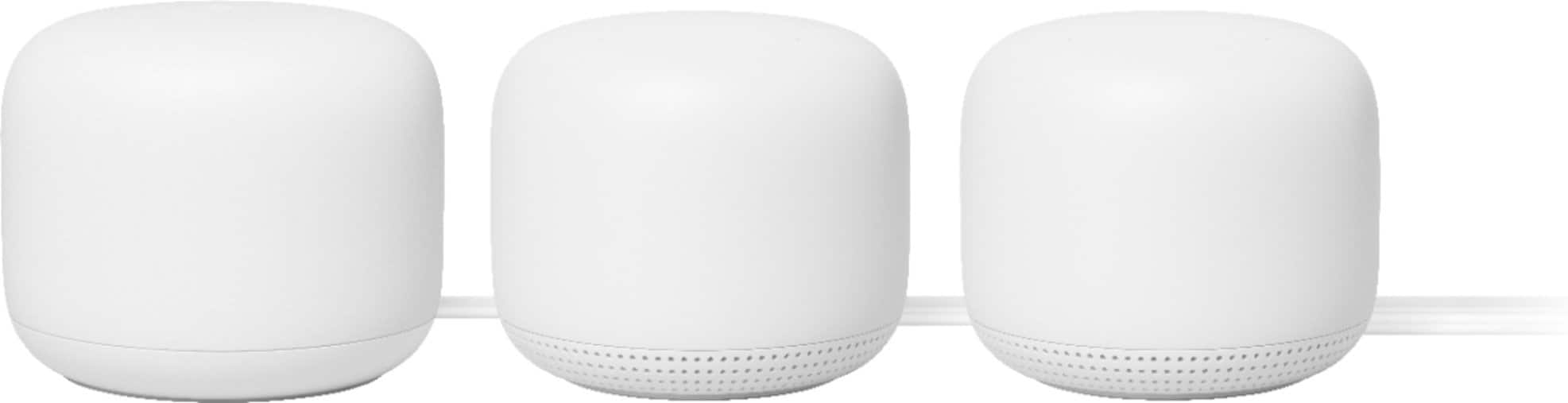







- Model:
- GA00823-US
- SKU:
- 10535382
Rating by feature
- Setup
Rating 4.6 out of 5 stars
- Range
Rating 4.5 out of 5 stars
- Signal Strength
Rating 4.5 out of 5 stars
Didn't work for me and neither did Google Support
||Posted . Owned for 2 months when reviewed.This reviewer received promo considerations or sweepstakes entry for writing a review.I wish I could give this zero stars. I spent 10+ hours either on hold or talking to Google support. I have Xfinity internet and purchased the Nest Wifi Mesh Router in combination with the Arris Surfboard 3.1 Modem (is compatible with Xfinity service). There were phone calls to Xfinity and Arris to ensure their products were working correctly. They were. Google even had me do a speed test going into the router from the Arris modem. I was 600mbps from the modem. I was only getting a maximum of 130 mbps from the router. Typically, I was in the 60-70mbps range. There was never a solution that got me to the speeds I was getting with my original Xfinity rental equipment. Google support was absolutely no help and two of the four people I was in contact with over a week's span were extremely rude. I returned all of the equipment and went back to the Xfinity modem/router.
No, I would not recommend this to a friendThese drop connections
||Posted .This reviewer received promo considerations or sweepstakes entry for writing a review.I installed these a few weeks ago after owning the original Google WiFi. The Neat WiFi can work with the old Google WiFi, so we don’t really lose anything. Well, it’s been a few weeks and many of our devices are kicked off WiFi, while others remain connnected. The one that are kicked off, can’t reconnect. End up setting up a guest network to connect the devices that were kicked off our primary network. This has been an issue and Google Nest support has been unable to recommend a fix. Avoid this product until they have a fix. Not a good purchase if you work from home.
No, I would not recommend this to a friendBrand response from Nest Support
Posted .Hi Batman,
Thanks for leaving your feedback for us. We're really sorry to hear of the connection issue and of the fact that we couldn't provide you with a resolution.
There can be several factors for why your connected devices can disconnect from your Wi-Fi network. One of them is a possible Double NAT. This happens if you have another router or a modem/router combo in the Wi-Fi network that broadcasts its own private network identical to the one Google Wifi broadcasts. The resolution for this can be disabling the Wi-Fi function of the combo or the 3rd party router.
The other probably reason may be a network congestion. If you have many devices connected to your Wi-Fi, but your network bandwidth availability isn't enough to keep all the devices on the network, some devices will disconnect. You can the number of connected devices and how much bandwidth they generally consume by following these steps: Open the Google Home app> Tap Wi-Fi .> At the top, tap Devices. If there is a congestion, we suggest contacting your service provider for further resolution.
We're also here to help! We'd be happy to take a second look to understand the reasons behind the issue if you can get in touch with us at https://support.google.com/wifi/contactflow

Simple but Capable Mesh WiFi
|Posted .This reviewer received promo considerations or sweepstakes entry for writing a review.Let me start off by saying that I have had the pleasure of reviewing several big name mesh wifi systems, both out of the box mesh systems and mesh capable high end routers linked together. This Google Nest Mesh WiFi system is the best I have tested. Inside the box you will received the parent node (Not Google Voice Enabled), the secondary node (Google Voice Enabled), the companion power and ethernet cords, and quick start directions that pretty much just tell you to download the Google Home App. You probably already have this app as it does everything Google related, but if not, just go ahead and download it now. First step is to plug your parent node into power and your modem and open your Google Home App. Inside the app you will see your main router. Select it and follow the app directions. You will be done in moments. Next, select an area in your home you wish to place your secondary node. This node should not be more than 3 rooms away, but remember, this second node can be used as a Google Home smart assistant, so place it in an area that you can use this function. After you find a location and plug in your secondary node and the Google Home App will test its connection to see if the area you selected is acceptable. If not, move it one room closer. The main node has a pretty impressive range, but I have noticed that the performance difference between "Excellent" and "Good" mesh connection is substantial. Ultimately, this is the easiest setup for a Mesh WiFi system I have set up. This is also the most stable mesh system I have experienced. If you are looking for a purpose built mesh system, buy this Google Nest Mesh WiFi.
I would recommend this to a friendgood when it works, wifi drops at the worst time
||Posted . Owned for 2 weeks when reviewed.This reviewer received promo considerations or sweepstakes entry for writing a review.I bought this for our new house but devices keep dropping from the wifi on and off. Restarting the mesh system, giving static IP addresses to the most important devices did not help fix the issue. Did a Google search and found many others have faced the same issue. We ended up returning it.
No, I would not recommend this to a friendBrand response from Nest Support
Posted .Hi HetaS, thanks for choosing Nest Wifi for your new house. We're sorry to hear that you're experiencing connectivity drops with it, and that you had to return it. We're still hoping you will reconsider and use Nest Wifi again in the future. We'd be happy to entertain any questions you may have by reaching out to our support team here: https://support.google.com/googlenest/gethelp
Save time, don’t buy!
||Posted . Owned for 1 week when reviewed.This reviewer received promo considerations or sweepstakes entry for writing a review.Save some time, read this review and do NOT buy this system. This is one case where the few bad reviews were right in track. First of all, the initial set up was horrendous. A 2+ hour long battle of plugging, unplugging, resetting, calling support and starting over again until - oh wow it finally worked. Then, 2 or 3 days later it randomly goes offline. Internet and modem are fine. Just this mesh router set up is down. Unplugged everything for 5 minutes. Plugged back in and it works. 2 days later it’s offline again. Reset again. Offline. Reset. Offline reset. A week in and it’s going offline about every 10 minutes. Sometimes fixing itself. Sometimes requiring hard reset. Rendering it virtually useless. I suspect it has something to do with having several Wi-Fi connected items in my home. But not really any more than most modern homes. In further research this is a known issue with the best system. I am returning this and going with a traditional Wi-Fi router set up.
No, I would not recommend this to a friendBrand response from Nest Support
Posted .Hi heath3990, thanks for sharing your feedback with us about the Nest Wifi, and it’s unfortunate to hear you ran into connectivity issues. We can imagine how difficult this experience has been, and this is not what we intended to share with you. We understand your decision to return your Nest Wifi, but if you’re willing to give us an opportunity to investigate your concern further, feel free to find us anytime here: https://support.google.com/googlenest/gethelp
Jury still out
||Posted . Owned for 1 month when reviewed.This reviewer received promo considerations or sweepstakes entry for writing a review.Jury is still out. So far have not had issues, but sometimes wonder if we are getting bandwidth promised.
No, I would not recommend this to a friendBrand response from Nest Support
Posted .Hi there, thanks for sharing a review. We’re glad that you haven’t had any issues with your Nest Wifi.
You can test your internet download and upload speeds from the Google Home app, or with the Google Assistant. You might find this link helpful: https://support.google.com/googlenest/answer/6246634
Wi-Fi speed can vary depending on a few things such as the type of device you are using, distance between the device and your router or point, the frequency your devices are connected to, and physical barriers like walls in your home. You may check this link that might improve your Nest Wifi experience: https://support.google.com/googlenest/answer/7578264
If you need help, you may get in touch with our specialists anytime at Google Nest help page: https://support.google.com/wifi/gethelp
Great product... but not for Sonos owners
||Posted . Owned for 1 month when reviewed.This reviewer received promo considerations or sweepstakes entry for writing a review.I am giving this 3 out of 5 because i love Google... but i have 3 Sonos speakers and they are not compatible with the mesh system.
No, I would not recommend this to a friendDO NOT BUY!!!
||Posted . Owned for 2 months when reviewed.This reviewer received promo considerations or sweepstakes entry for writing a review.Do not BUY!!!... I'm in the country and was stuck with slow DSL for a long time. Finally the gods of fiber internet shined the light on me and I got 1gig internet. Prior to that, I had a hillbilly system of 2 separate WIFI routers plugged in to get coverage throughout my house. It worked great, no problems. I was recommended this Google Nest because I guess 2 WIFI systems can interrupt one another so I bought it. IT SUCKS!!! constantly crashes and requires way too much time to get set up again. The App to run it is very clunky and not user friendly at all... I've owned it too long to return to Best Buy, and am too lazy to fight the All-Mighty GOOGLE to get a refund... Trying to save you buyers a headache... choose another home system, cuz this is garbage... Best Buy rock's though, hope they post my post.
No, I would not recommend this to a friendBrand response from Nest Support
Posted .Hi there, we appreciate you for posting your review on your Nest Wifi and we're sorry to hear that your experience with the performance of the device was less than ideal. We'd like to know more details about your setup and help investigate the constant crashes you're having with the device so we can find a better resolution for you. Rest assured that your feedback about the Home app will be relayed to the right team for future improvements. If you're willing to give it another go, please contact us on our Google Help page here: https://support.google.com/googlenest/gethelp
Waste of money.
||Posted . Owned for 1 month when reviewed.This reviewer received promo considerations or sweepstakes entry for writing a review."Upgraded" from Google Wifi, to Nest Wifi to get faster connection. App shows a weak connection all through the house that half the time isn't even usable. I've spent a couple hours on the phone with Google trying to fix the issue, and tried to bolster the signal quality by adding some of the old Google Wifi points and still can't get anything better than "weak" connection. Setup was relatively easy as long as you're setting it up as a new network. It is easy to add to an existing network as well, but be prepared to not get the speed increase if adding it to your old network. Then you run into the issue of having to factory reset everything to start over. I would not recommend this at all. I will add I am a big fan of the rest of Google's ecosystem am deeply invested in their smart home products. This item is just a complete let down in comparison to all their other stuff.
No, I would not recommend this to a friendNot so great.
||Posted . Owned for 1 month when reviewed.This reviewer received promo considerations or sweepstakes entry for writing a review.It is easy to install as it is its previous version, but the strength is not significant better to justify the replacement.
I would recommend this to a friendSome Turbulence but Works
|Posted .This reviewer received promo considerations or sweepstakes entry for writing a review.Out of the box, It’s visually pleasing, sleek and is definitely a piece that will fit into any home decor and not be noticed. Much more attractive than the huge black box we have from our service provider. It has some good weight to it and feels solid in ones hand. I would’ve said the steps make it super easy to setup, because it should have been, but Wow, it only took me 4 DAYS to get this thing going...CORRECTLY. Something that should’ve taken no more than 5 minutes became days of trying and retrying, trying to even locate the router and the additional WiFi point in the ecosystem. It would say it’s connected but then it wasn’t and then it wouldn’t be visible at all in the home app. I don’t 100% believe it had much to do with this product alone, as we have had issues with our Google Home app in the past with adding new products to the ecosystem. No, not user error. After going through countless other routes, I finally decided to do a factory reset and the second try after the reset, it finally worked. So now we can see both the router and WiFi point on the app. I doubt the majority will have issues with setup, so don’t let our one off issue be the sole deciding factor in your decision. It has great things about it too. Hence, my four star rating. Now that it’s completely setup, I wanted to test it out a full day or two before I wrote this review. Our internet speed was already fast we just needed a way to extend our coverage and remove dead spots in our home. This does the job well, really well. This eliminated all of the dead spots, and we have noticed a slight boost to speed, but all of our devices are staying connected and we have room to add even more devices, as we continue to increase the smart tech in our home. Additional to the extended range by adding the access point to the opposite end of our home, it is also a Google Home speaker. Which is nice. It has a quick response and it’s also customizable, which I like. The speaker itself isn’t the greatest, and to me our first gen Home Hub sounds clearer, so if you’re looking to bump some tunes, I suggest adding your Bluetooth speakers. However, the assistant itself is loud and can pick up your voice from a great distance away. We can customize family limits or WiFi bans for our kids. And we can set up separate WiFi for our guests. We are also able to view what devices known and unknown that are on our network, and remove any unwanted devices, which is a plus for us because we no longer have to use a separate app. If you need the support of additional ports for connectivity this might be an issue for you, this currently isn’t posing a problem for us, but in the future it could. It also lacks WiFi 6, but once again for the average user, it’s just fine. All in all it did exactly, what we needed it to do and we are currently happy with Google WiFi, even after the initial headache.
I would recommend this to a friendOK...unless you have Fios
||Posted . Owned for 2 months when reviewed.This reviewer received promo considerations or sweepstakes entry for writing a review.It works great for my son in his dorm room, so i bought one for my house, and it doesn't work with Fios.
I would recommend this to a friendBrand response from Nest Support
Posted .Hi Kaycee,
Thanks for letting us know of the connection issue you have with using Nest Wifi to your Fios. Sorry to hear you encountered such an inconvenience and we'd love to help improve your experience.
To help you in the best way possible, we need to hear more details on what's going on. Also, we'd like you to know Nest Wifi comes with a 1-year limited manufacturer warranty starting from the date of original purchase.
We're available to help you further if you can reach out by visiting https://support.google.com/wifi/contactflow
Works, but....
||Posted . Owned for 1 month when reviewed.This reviewer received promo considerations or sweepstakes entry for writing a review....it's really annoying that you can't turn off the light on the access point if you have the microphone muted.
I would recommend this to a friendGet better WiFi from Soup Cans and Dental Floss
||Posted . Owned for 1 month when reviewed.This reviewer received promo considerations or sweepstakes entry for writing a review.I used to have the Google WiFi system and never had a problem at all, unfortunately it's next generation device the Nest WiFi can't even hold a candle to it. Router consistently freezes and drops internet, needs restarting almost daily, and overheats very easily. This is not a one off issue since I've already replaced the system twice and it's still happening. This system is a let down as I have built up my Nest/Google environment and the camera system won't record unless you actually have internet. If you can find the older Google WiFi get that as I had mine for years without internet drops or whole days without service. Google had this far been unable to figure out the issues as well and we've ruled out the ISP and modem as the culprit.
No, I would not recommend this to a friendBrand response from Nest Support
Posted .Hi eAlbany, thanks for your feedback. We´re sorry to hear that your Nest Wifi constantly freezes and drops your Wi-Fi connection.
We suggest checking if you are using a modem/router combo, and if you are, we recommend setting it in bridge mode and disable its Wi-Fi functionality. This will help avoid connectivity issues caused by having your combo and Nest Wifi Router, broadcasting the same SSID and password to your network. You may then connect your Nest Wifi Router to your combo using an Ethernet cable, and connect your other Nest Wifi Points.
We'd like to have a look at your Nest Wifi system and figure out what may be causing the issue. Please feel free to contact us here: https://support.google.com/wifi/gethelp
Still trying to get all three set up, after 3 week
||Posted . Owned for 1 month when reviewed.This reviewer received promo considerations or sweepstakes entry for writing a review.Still trying to get all three set up, after three weeks. Frustrating....
No, I would not recommend this to a friendBrand response from Nest Support
Posted .Hi Pealrsmom,
Thank you for letting us know you're having a difficulty to set up your Nest Wifi mesh system. We totally understand it is a frustrating experience and we want to help you right away!
We designed Nest Wifi to give you a quick and easy setup experience, but something may have gone wrong during the setup process. If you want to try setting it up again, you can follow the step-by-step guide along with a setup visual showing you how to set it up here: https://support.google.com/googlenest/answer/9548301
We can also help you set it up or figure out if there is an issue with it if you can reach out to us here: https://support.google.com/googlenest/contactflow
Mesh
||Posted . Owned for 9 months when reviewed.This reviewer received promo considerations or sweepstakes entry for writing a review.I have 3 meshes already and I wanted this newer model to be added to the existing mesh. ..found out it won’t.
No, I would not recommend this to a friendBuffering an Issue
||Posted . Owned for 3 weeks when reviewed.This reviewer received promo considerations or sweepstakes entry for writing a review.Had issues with sites buffering and some not working at all. Not sure what the issue was. Had main unit downstairs and one in the office upstairs. Took them back and replaced with EERO and so far everything is working fine. Could have been too much coverage area for only two units. We have three now. I have the nest Google wifi in my condo and it works great. Never any issues.
I would recommend this to a friendSet up crashed and could not work. Returned
||Posted . Owned for less than 1 week when reviewed.This reviewer received promo considerations or sweepstakes entry for writing a review.I am sure it was a technical issue, but had to return. Crashed upon installation and could not get it going.
No, I would not recommend this to a friendIt’s ok
||Posted . Owned for 1 month when reviewed.This reviewer received promo considerations or sweepstakes entry for writing a review.It’s ok. Sometimes it just stops working. And the wifi is only a bit better
I would recommend this to a friendBrand response from Nest Support
Posted .Hi Lanaanakk, thank you for sending in your feedback on your Nest Wifi. We can see that you're experiencing some difficulties with your device. We'd like to know more details about your issue so we can help find a resolution for you. Please reach out to our support team and help you improve your experience with your Nest Wifi. You can contact us on our Google Help page here: https://support.google.com/googlenest/gethelp
Google dot
||Posted .This reviewer received promo considerations or sweepstakes entry for writing a review.Ended up buying additional Google dots to get the WiFi coverage I need. Our house is only 3200 sqft
I would recommend this to a friend