Customer Ratings & Reviews
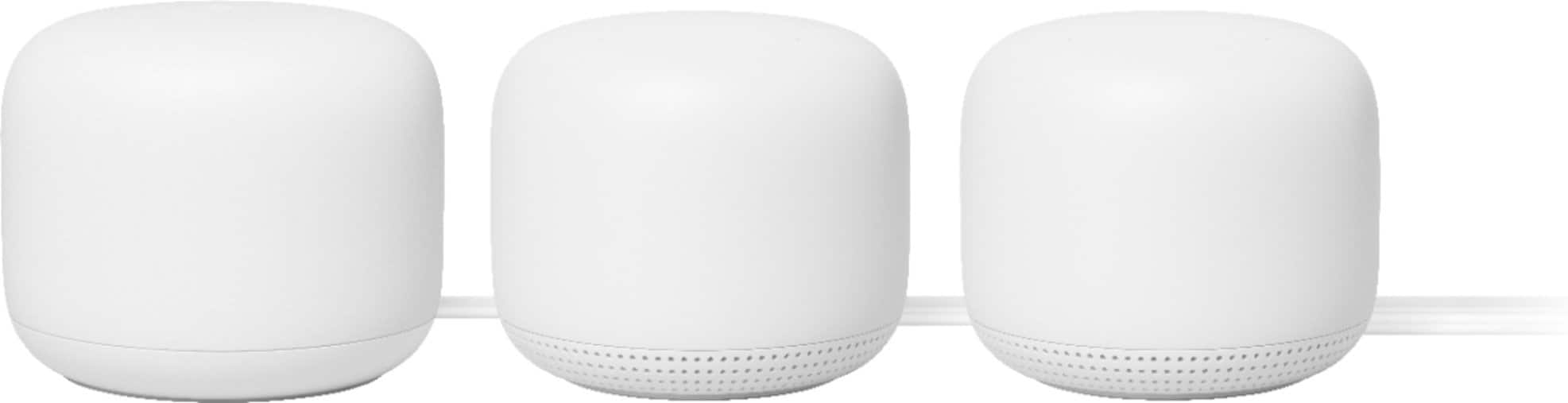







- Model:
- GA00823-US
- SKU:
- 10535382
Rating by feature
- Setup
Rating 4.6 out of 5 stars
- Range
Rating 4.5 out of 5 stars
- Signal Strength
Rating 4.5 out of 5 stars
Adds coverage and speed around the house
Posted .This reviewer received promo considerations or sweepstakes entry for writing a review.Purchased the Google Nest Wi-Fi to upgrade my mesh network as we moved to a bigger place and needed more coverage. I purchased this product to add on to the older Google Wi-Fi product and increase coverage and speeds around the house. The Google Nest Wi-Fi nodes are a lot bigger than the previous versions but work well. The Wi-Fi is more reliable and the coverage seems to be broader around the house. The Nest Wi-Fi units area but pricey and lack Wi-Fi 6 but otherwise serves its purpose.
I would recommend this to a friendBrand response from Nest Support
Posted .Hi Rich, thanks for choosing Google Nest products. We appreciate your feedback and we're glad to hear that Nest Wifi and Google Wifi works well for you. If you have any other concerns or support needs you would like us to address, you're more than welcome to contact our support team using this link: https://support.google.com/googlenest/gethelp

Disappointing
||Posted . Owned for 6 months when reviewed.This reviewer received promo considerations or sweepstakes entry for writing a review.If anything i noticed latency which could possibly come from some sort of buffering. Sticking with the airport....
No, I would not recommend this to a friendBrand response from Nest Support
Posted .Hi GGHHSC,
Thanks for letting us know of the slow Wi-Fi connection issue. We’re truly sorry to know you encountered such inconvenience and we'd love to help improve your experience.
There can be multiple reasons why slow Wi-Fi connections occur. To help you in the best way possible, we need a few more details on what's going on. Also, we'd like you to know Nest Wifi comes with a 1-year limited manufacturer warranty starting from the date of original purchase.
We're available to help you further if you can reach out to us by visiting https://support.google.com/wifi/contactflow
Fixed Wifi Issue
Posted .This reviewer received promo considerations or sweepstakes entry for writing a review.Been using this product for 1 year. It is absolutely awesome! My internet would drop out periodically through the day. This is an issue because of the amount of devices connected, gaming demands, working from home and coverage needed. Also, my wifi was never strong enough to reach outside/pool or upstairs area. I tried many other products-extenders, repeaters, Moca, etc. Moca did help but is no longer supported by my provider. I was fed up. After reading the reviews, I decided to bite the cost bullet and try the Nest product because of its stated performance and ease of setup. Setup was extremely easy. It may not be obvious from the instructions, but if you have a separate modem and router from your internet provider, the Nest completely replaces your router. You don’t add it to your configuration. After plugging everything in, it takes a little bit to figure out the app. It’s not difficult, it might just be different or have more functions that you’re used to. Once you do, you’ll love its features, ability to check your network and send creepy messages to your kids rooms through the speaker which they’ll hate. I’ve used for a year and have not had a single issue nor have I had any dropped connections or weak signals ANYWHERE, I mean anywhere, in the house. My home is approximately 3300 sf. Modem is located in office at front right of home. I previously had weak signals in back of house, pool, all bedrooms on left and upstairs. I placed the 2nd speaker in the back of the house (family room area) and 3rd in bedroom on left of house (bedroom/Xbox played). I have perfect coverage throughout and even around perimeter of home. If you work from home, have gaming kids, maybe do work in your pool area, this product is your solution. FINALLY!
I would recommend this to a friendNot working for me
||Posted . Owned for 1 month when reviewed.This reviewer received promo considerations or sweepstakes entry for writing a review.I keep loosing internet connection. Very frustrating. I couldn't even submit this review without it crashing numerous times.
No, I would not recommend this to a friendDid not work as advertised
||Posted .This reviewer received promo considerations or sweepstakes entry for writing a review.Did not work as advertised. Very poor coverage on second floor of a three-floor townhouse.
No, I would not recommend this to a friendBrand response from Nest Support
Posted .Hi Robert, thanks for sharing your insights. We apologize for the poor signal coverage that you are experiencing with Nest Wifi.
Signal coverage is mostly affected by factors like thick walls, mirrors, windows and even signals from other wireless devices may cause interference that will shorten the distance that your Nest Wifi can cover. You may need to shorten the distance to get a better signal coverage and put your connected devices within a clear line of sight of your Nest Wifi to get better signal reception. As a general rule, Points work best when they’re no more than two rooms away from each other. For example, if the far end of your house has weak Wi-Fi, don’t put a Wifi Point in that exact spot. Instead, put it partway in that direction. Try to place it in an elevated position like on a shelf. Points work best when they can see each other with a clear line of sight. Barriers like heavy furniture and walls made of thick concrete or brick can influence Wi-Fi performance. With additional Points, it’ll be easier to strategically place them in a way that avoids obstructions.
If you need further assistance, we´d be more than happy to help. You may reach out to our support team here: https://support.google.com/googlenest/gethelp
Nest
||Posted . Owned for 3 weeks when reviewed.This reviewer received promo considerations or sweepstakes entry for writing a review.Had a hard time getting them set up so I took the, back and got the eeros.
No, I would not recommend this to a friendBrand response from Nest Support
Posted .Hi there, thanks for your feedback. We're sorry to hear you had a hard time setting us Nest Wifi and that you had to return it. If you ever have a change of heart and consider using Nest Wifi again, we'll certainly do our best to provide you with a better experience. Our support channels are always ready to help you with your support needs, if you can reach out to us here: https://support.google.com/googlenest/gethelp
Terrible
||Posted .This reviewer received promo considerations or sweepstakes entry for writing a review.A nightmare to set up, then found out it was defective anyway. Nothing should be this difficult
No, I would not recommend this to a friendBrand response from Nest Support
Posted .Hi Nanny,
Thanks for letting us know of the issue with your Nest Wifi. We're sorry to hear that you received a defective device.
If your device is still within the return period, you may request for a replacement from the retailer you purchased the device from..
If you need further assistance, we’re here to help. Please reach out to our support team here: https://support.google.com/chromecast/gethelp
Doesn't work
||Posted . Owned for 1 month when reviewed.This reviewer received promo considerations or sweepstakes entry for writing a review.Didn't work. Expensive, good for nothing product that did nothing it claimed to do.
No, I would not recommend this to a friendBrand response from Nest Support
Posted .Hi HomeOwner, thanks for reaching out. We're sorry for any frustration this issue has caused you. We'd like to know more details of the troubles that you're having with your Chromecast with Google TV, and help you improve your experience. Please reach out to our team, and we'd be more than happy to help. Here's the link: https://support.google.com/chromecast/gethelp
Don’t recommend
||Posted . Owned for 2 weeks when reviewed.This reviewer received promo considerations or sweepstakes entry for writing a review.The worse router ever it’s not worth it save your money
No, I would not recommend this to a friendBrand response from Nest Support
Posted .Hi Jose, thanks for sending in your review and we're sorry to hear that your experience with your Nest Wifi didn't meet your expectations when compared to other routers. If you're willing to give Nest Wifi another chance, we'd recommend that you reach out to our support team and help you with your concerns about the device and improve on your overall experience. Please contact us on our Google Help site here: https://support.google.com/googlenest/gethelp
Wfi mesh
||Posted .This reviewer received promo considerations or sweepstakes entry for writing a review.Did not perform required distance for us. What is not strong enough.
No, I would not recommend this to a friendBrand response from Nest Support
Posted .Hi Wfimesh, thanks for taking the time to share your feedback with us. We're sorry to hear that Nest Wifi didn't perform well enough for you.
We recommend checking if you´re using a modem/router combo. If you are, we recommend setting it up in bridge mode and disabling its Wi-Fi functionality. This will avoid any network issues caused by both your combo and Nest Wifi Router, broadcasting the same SSID and password. You may then connect your Nest Wifi Router to your modem using an Ethernet cable, and then connect your Nest Wifi Points to your Nest Wifi Router wirelessly.
You can always count on us for your support needs. Just reach out to our Support team by visiting the Google Wifi support page here: https://support.google.com/wifi/gethelp
Open box missing parts
||Posted .This reviewer received promo considerations or sweepstakes entry for writing a review.Received an open box with point missing and no one responded to me via email.
No, I would not recommend this to a friendBrand response from Nest Support
Posted .Hi Serena, thanks for bringing this to our attention. We're sorry that your Nest Wifi and your support experience has been less than ideal. Even though you may have already contacted our support team, we recommend contacting Best Buy for further assistance with your concern.
didnt work for me.
||Posted .This reviewer received promo considerations or sweepstakes entry for writing a review.arrived as promised and didnt work. signal was inconsistent and unreliable.
No, I would not recommend this to a friendBrand response from Nest Support
Posted .Hi jjriley, thanks for reaching out. We're sorry to hear of the connectivity issue you have with Nest Wifi. Factors like thick walls, mirrors, windows and even signals from other wireless devices may cause interference that will shorten the distance Nest Wifi router can cover. You may need to shorten the distance between your Nest Wifi Router and Nest Wifi Points to get a better signal coverage.
We care about your experience with our products. If bringing them closer doesn't fix the issue, then we may need to have a look at it so we can help you in the best way possible. Please consider reaching out to us here: https://support.google.com/wifi/gethelp
Not good
||Posted . Owned for 1 month when reviewed.This reviewer received promo considerations or sweepstakes entry for writing a review.Had to reboot it constantly. Returned it for the Eero setup and have had no issues.
No, I would not recommend this to a friendOkay but not compatible
||Posted . Owned for 9 months when reviewed.This reviewer received promo considerations or sweepstakes entry for writing a review.Not compatible with with iSp without major configuration to their router
No, I would not recommend this to a friendBrand response from Nest Support
Posted .Hi Tommy80,
Thanks for sharing your feedback with us. We’re sorry that your device isn’t working with your router, and we want to help improve your experience with Nest Wifi, but first we'd like to know more on what’s causing the issue so we can help you in the best way possible.
We're available to help you further so we can take a closer look at the issue if you can reach out to us by visiting: https://support.google.com/wifi/contactflow
Never bought this. Never bought this. Never bought
||Posted . Owned for 3 months when reviewed.This reviewer received promo considerations or sweepstakes entry for writing a review.Never bought this. Never bought this. Never bought this.
No, I would not recommend this to a friendBrand response from Nest Support
Posted .Hey secretwolf98, thanks for taking the time to share your feedback with us. We'd like to know more about the issue, so we can identify the root cause. Please reach out to our support team, so we can try to help improve your experience: https://support.google.com/googlenest/gethelp
Best Mesh Wifi System!
Posted .This reviewer received promo considerations or sweepstakes entry for writing a review.I had an old wifi router go out on me recently and researched the new Mesh technology systems that have come out. I ended up going with this system as I have Nest and Google products in my house already and this would work seamlessly with those. Overall this product has been fantastic! Setup was very easy (start with main then add satellites) and while the 3-pack may have been overkill for my 2000 sq ft ranch I know I have great coverage. Surprisingly I get wifi out in my hammock that is about 50-60 feet away from my home! In my time owning this I have never had an issue with signal drop outs and anytime my ISP has an issue my system is first to know. I can then reset my wifi from my phone and it picks up right away and I am back online Highly recommended for anyone wanting a solid Mesh wifi system, especially if you already have Nest or Google products in your home
I would recommend this to a friendCrap
||Posted . Owned for 5 months when reviewed.This reviewer received promo considerations or sweepstakes entry for writing a review.Don’t even waste your money. This is the biggest pile of crap!
No, I would not recommend this to a friendPurchase not satisfied
||Posted .This reviewer received promo considerations or sweepstakes entry for writing a review.Called google support upload speed only 1…………………..
No, I would not recommend this to a friendBrand response from Nest Support
Posted .Hi Sanil, thanks for your feedback. We're sorry that you came across this issue, but we're here to help. Slow upload speeds can be caused by several issues. We recommend performing these troubleshooting steps and see if this will improve your experience:
- Check your cables and connections. Sometimes loose, disconnected or damaged cables can cause connection issues.
- Disconnect power from all of your network devices, including your modem and your Nest Wifi. Wait until all of the LED lights on the devices you unplugged are off.
- Reconnect power to your modem first then followed by your Nest Wifi router and then your Nest Wifi points.
If the issue remains after doing the steps, we'd like to take a look at your Nest Wifi and work with you so we can help you in the best way possible. Please reach out to our support team here:https://support.google.com/wifi/gethelp
Not happy
||Posted . Owned for 3 weeks when reviewed.This reviewer received promo considerations or sweepstakes entry for writing a review.I need to register not a simple processIt’s too much time
No, I would not recommend this to a friendVery disappointed by lack of support by geek squad
||Posted . Owned for 3 weeks when reviewed.This reviewer received promo considerations or sweepstakes entry for writing a review.Paying for geek squad coverage and not getting results
No, I would not recommend this to a friend