Customer Ratings & Reviews
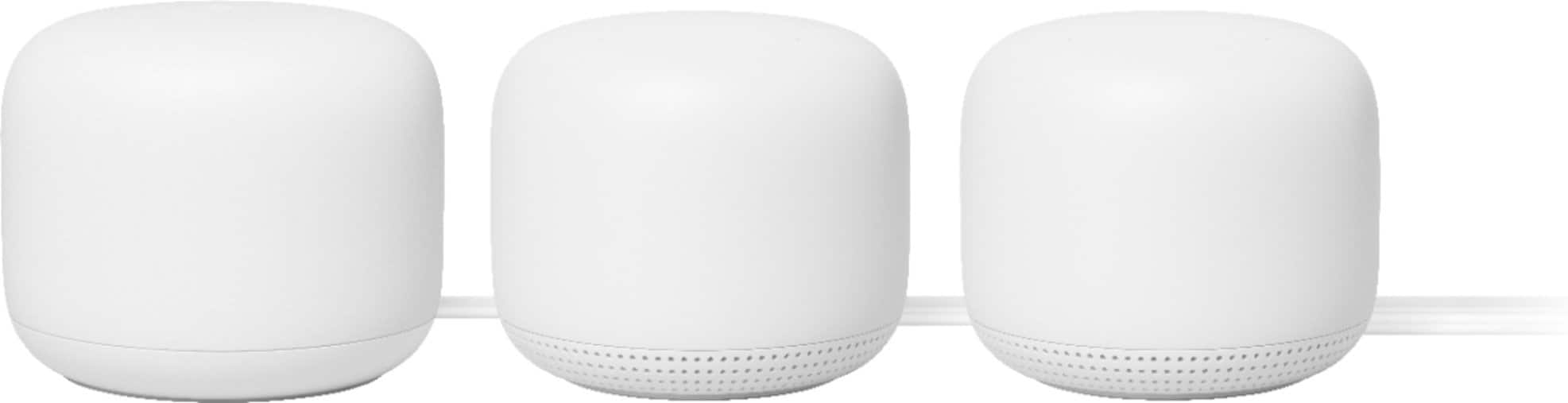







- Model:
- GA00823-US
- SKU:
- 10535382
Rating by feature
- Setup
Rating 4.6 out of 5 stars
- Range
Rating 4.5 out of 5 stars
- Signal Strength
Rating 4.5 out of 5 stars
Extends the Internet like a charm
Posted .This reviewer received promo considerations or sweepstakes entry for writing a review.Works well! We have a 2000 sqft house and the router sits at one end, making internet on the other side of the house spotty. I set this up in a room on the other side of the house and everything is much better! Works way better than the cheap "wifi extender" plug in we've been using. I also like that you can turn off the microphone. We wanted a mesh system but not the song and dance of a thing that speaks to you. You do need a smartphone to set it up which could be a barrier to some folks but luckily was not for me
I would recommend this to a friendBrand response from Nest Support
Posted .Hi RobbieOps, it's amazing to hear that Nest Wifi works well for you. We value your feedback and we'd like to know more about your experience with our products. We'd be happy to work with you and help you with your support needs with Nest Wifi. Simply reach out to us here: https://support.google.com/googlenest/gethelp

I finally have full speed at home.
Posted .This reviewer received promo considerations or sweepstakes entry for writing a review.I am finally happy with my wifi setup. Google did an outstanding job with this new Nest AC2200 Wifi 3-pack. My speeds are through the roof. I really like the fact that I can use it also to talk through the satellites. It's really fun. My little one loves it. I don't have to yell upstairs anymore. It was very easy to set up. Took about 10-15 min max. They are a bit big. I wish they were smaller. Mesh WiFi is the way to go.
I would recommend this to a friendGreat product
Posted .This reviewer received promo considerations or sweepstakes entry for writing a review.Great product for extending WiFi to atubborn hard to reach dead zones.
I would recommend this to a friendFalls Well Short of The Competition
Posted .This reviewer received promo considerations or sweepstakes entry for writing a review.I have a 3 story, 3,700 SQ FT house and it's taken 5 devices(3 AC2200) to cover the house properly. Additionally, our two boys who game often required a dedicated AC200 router so they eliminate constant issues with lagging in their games. We have gig fiber into the house, and they would only get 70 to 80mbps down and 60 to 70 up and constantly had issues. We ended up buying 2 of AC2200 routers and they doubled their speeds moving to a wired connection to the access point. We still have to reboot the system 1-3 times weekly to eliminate significant performance issues. We've had this system for almost 2 years and at lest the first year was good but it's been near constant weekly issues for the past year. I currently using a brand new high end laptop, 6 feet from an access point and only get 85mbps up 85mbps down from a system we completely reset yesterday as a hail mary to improve speeds. The Amazon Eero Pro 6 has great reviews for speed but range can be an issue so their 3 system offering likely falls short and you'll need to buy at least one more unit. Or, you can go with a ASUS AX5700 WiFi 6 Gaming Router which is mesh compatible a two of these would easily cover a larger home with significantly better speeds. Likely the best overall value buy would be the TP-Link Deco W7200.
No, I would not recommend this to a friendBrand response from Nest Support
Posted .Hi Tr1ton, we appreciate your feedback. It's unfortunate that you encountered speed issues with Nest Wifi, and we´re sorry for any inconvenience this may have caused you.
We recommend checking if you´re using a modem/router combo. If you are, it's best to set it up in bridge mode and disable its Wi-Fi functionality. This will help to avoid any network issues caused by both your combo and primary Google Wifi Point, broadcasting the same SSID and password. You may then connect your primary Google Wifi Point to your modem using an Ethernet cable, and then connect your secondary Google Wifi Points to your primary Google Wifi Point wirelessly.
Our support team would be happy to assist you further and see how we can help you best. You may reach out to any of our support agents here: https://support.google.com/wifi/gethelp
Google Nest mesh router and pods
Posted .This reviewer received promo considerations or sweepstakes entry for writing a review.Easy to install. Extended our internet range as we had hoped for. Love the “Hey Google” feature.
I would recommend this to a friendGoogle Nest WiFi mesh router & Point
Posted .This reviewer received promo considerations or sweepstakes entry for writing a review.Once up and running, WiFi performance throughout house was excellent. The 'night light' feature of the Point would be disturbing if we had placed it in our bedroom rather than a guest room, will be interesting to see/hear reaction of an overnight guest. Setup was not clean as there aren't any directions and we had to use our Geek Squad Total Tech support to get it up and running. 5 stars to the Geek Squad agent! Also, would have hoped for more Ethernet & USB ports, but thankfully legacy Ethernet switch works just fine.
I would recommend this to a friendRecommended!
Posted .This reviewer received promo considerations or sweepstakes entry for writing a review.Easy to install. Works as described - getting great internet speeds and wifi has never been better!
I would recommend this to a friendMesh Wi-Fi
Posted .This reviewer received promo considerations or sweepstakes entry for writing a review.We run this system in two homes with great results. No dead zones throughout the homes.
I would recommend this to a friendBetter performance instantly across 3 floors! BUY
Posted .This reviewer received promo considerations or sweepstakes entry for writing a review.Thrilled with my purchase. Got the Nest Wifi hub with 2 points. I put the main hub on our first floor and the points in the basement and 2nd floor of my home and it works PERFECTLY. Getting over 200mbs throughout the entire home where I was previously getting super poor results upstairs and in far corners. Couldn't be happier. Extra bonus is that the points act as google home speakers! Love it and highly recommend.
I would recommend this to a friendWorth the BUY .
Posted .This reviewer received promo considerations or sweepstakes entry for writing a review.Had many issues with our WiFi connection before buying , now we are enjoying our homes devices with out any interruptions or buffering Owner of a two floor home . I have the rotor and a nest point on one floor of the house and the second point on the second floor in the middle Of our home . Seems to be working great and running fast. Saved our lives !
I would recommend this to a friendEasy
Posted .This reviewer received promo considerations or sweepstakes entry for writing a review.Works pretty good. Easy to set up and use for the family
I would recommend this to a friendPoor Connectivity. Poor Support. Good Speeds
Posted .This reviewer received promo considerations or sweepstakes entry for writing a review.After a year of inconsistent connectivity, as advertised speed, and annoying features like accessing the app only through a phone, I'm calling it. Google Nest Wifi is dead to me. Situation: Mostly Apple products on network are high bandwidth. One MacBook Pro of the set consistently but randomly would drop connection. Had run an Apple AirPort Extreme prior with no issues but then the disk drive died so we thought it was time to upgrade. Wasn't able to wait for shipping so got the best product in stock at Best Buy. Smart devices in house consistently had connection issues. ~20 total devices. Worst connection was Brother HL-3170CDW Printer. Lots of problems connecting to that. It is one of the older devices. House is relatively small (~1200 sq ft / 111 sq meters). One router and one mesh point. Extended point inconsistently connected to primary point. Often shows up as its own wifi network under default name. I did have them at opposite sides of the house but it was too far for the mesh performance. Cable Modem: Hitron E31N2V1 (issue here with GUI access; more later) Performance: ISP claims to to 200 Mbps / 10 Mbps. Typically clock 225 Mbps / 11Mbps. Main issues have been connection to get these speeds. Once connected, it is not an issue. Staying connected, it is an issue. During COVID times, my daughter, wife, and I are working/schooling from home. At times had son home too. All on video streaming. Often jittery, seldom dropped. Can't complain. Since day one, have had constant but random drops from devices. Daughter loses connection on iPad and/or laptop. Wife can't enter primary point area or drops very frequently. About 6 months into owning, entire network goes down midday. Spend hours on phone with Google Support. End up wiping entire system. Renaming network. Re-adding devices. Appears to be a common complaint on this subreddit. Since that day, typically have to hard reboot primary and mesh points every 5-10 days. Devices still drop. Can't complain about speed, if you can get on the network. As I write this, my wife dropped off an important video call for work. Approaching the one year mark, we realize that the Nest Wifi is still under warranty. Begin process of asking for support knowing that, to this point, nothing has been resolved, and ultimately a warranty claim would be filed. Cue the fun. Multiple chats, calls, and follow ups with Google Support. They claim first that the problem is that I had a "." in network name. Spend the afternoon renaming the network and reconfiguring all devices. Next they claim that there is a double NAT causing the issues. Attempt to access modem GUI to change to bridge mode. Realize after 45 mins of attempts that the Hitron E31N2V1 cable modem has its GUI blocked by the ISP. Chat with ISP, the confirm that its in bridge mode. Call ISP, they confirm that it is in bridge mode. Access the WAN IP range and confirm that it is not in the private range (kudos to /u/PetarMarinkovic for assistance on this). Reconnect with Google Support and they respond its definitely the double NAT and to contact my ISP. Getting pretty peeved at this point. (Yes, I cannot confirm the bridge mode via the ISP but between the forced service through Spectrum and the choice in my router, I have to choose to interact with the product I have some influence over and not slam my head against a bureaucracy like Spectrum) Google support responds: Other routers are not like you're Nest router as they do not use cloud server connection that is why the double NAT does not affect other router devices. Send status report and diagnostic report when I LAN into router. Several minutes to review these reports. Right, straight back to where we are. Google claims double NAT again. ISP and research say otherwise. When I point out the circular logic, Google support responds: How familiar are you with double NAT just to confirm? Now this is a test of my knowledge of networking? Decide to turn the conversation to Google Support's complete lack of actual support. The "our product depends on a certain condition that we can't confirm exists and other player's confirm don't exist" thus not Google's problem. Go away." argument. Very frustrated that they again are sending me back to ISP without any further information, proof, or direction to how to resolve this. For the 5th time in 3 days, I point out that ISP and WAN IP range still point that it is not a double NAT issue. Response to this from Google Support after an hour of chats is: Ask them to setup DMZ setting to the modem for the Nest Wifi router and also open port number 5222 UDP for the Nest router once that is done and you're still getting network drops let us know and we will have it consulted to our higher tier of support for a possible replacement if needed... Go ahead and ask you're internet service provider about that work around instead and let us know what will be their solution. Perhaps this will help other people. Perhaps this will inspire a class-action suit that I can be part of. But I can't spend any more time trying to get their conditions right for a product that has been inconsistent at best and will drop any further "support" in the future once the warranty actually expires in 5 days. I'll be replacing the Nest with another traditional router. Will replace the cable modem with something I can access just in case too.
No, I would not recommend this to a friendGreat - Especially for Google based home
Posted .This reviewer received promo considerations or sweepstakes entry for writing a review.Think this might be 2nd gen product. We've had first gen for nearly 2 years. Works perfectly in 2300 sq. ft. condo. Able to feed Google speakers and others via Chromecast audio devices (no longer sold) to very corner of home. Looks like price went UP substantially. Might be better brands for your $$.
I would recommend this to a friendNest wifi router and point
Posted .This reviewer received promo considerations or sweepstakes entry for writing a review.Great speed and coverage with great price!!! Recommend to everyone.
I would recommend this to a friendRouter
Posted .This reviewer received promo considerations or sweepstakes entry for writing a review.Great for large apartments. Works great fast internet connection
I would recommend this to a friendAmazing
Posted .This reviewer received promo considerations or sweepstakes entry for writing a review.Amazing Very fast easy setup and huge range Boosts dead zone areas
I would recommend this to a friendExcellent Mesh System!
Posted .This reviewer received promo considerations or sweepstakes entry for writing a review.This is probably the best router/mesh system I've own. Super fast speeds! I signed up for charter's basic 200 mbps package but was receiving 220 mbps download speeds. Incredible!! My only compliant is that the router is a little confusing to setup at first as it was not detecting my access point. But once I was able to fix the issue, the speeds went through the roof!!
I would recommend this to a friendGood....at first
Posted .This reviewer received promo considerations or sweepstakes entry for writing a review.Worked really well for the first 18 months or so, but then issues started. One by one, the Points stopped functioning and wouldn't allow devices to connect to WiFi (even directly from the router). So, now I have a basic router and no Points due to the failure of the device. Barely two years old and it's now essentially useless.
I would recommend this to a friendBrand response from Nest Support
Posted .Hello there, AtHomeWineSnob. Thank you for sharing your review on Nest Wifi. We're sorry to learn that you're having some connectivity issues with your device. This is not the experience we want you to have with the products and services we provide. We recommend that you reach out to our support specialists so we can help identify the cause of the issue and help find a better resolution for you. Please contact us on our Google Help page here: https://support.google.com/googlenest/gethelp

Good Connection awful interface
|Posted .This reviewer received promo considerations or sweepstakes entry for writing a review.Google's newest mesh network setup. Comes with 2 nodes, one is the router, one is the extender node to increase coverage. Comes with the nodes, power supplies, ethernet cable to connect to modem. Setup was not very difficult but during the setup the app doesn't really tell you whats going on just tells you "to hang on" while it does stuff without telling you what. My first major complaint you can't setup the router as an access point to an existing network. I have a much nicer linksys ac-3000 router I had to put into bridge mode because Google won't get off their high horse and let you think there could be anything better than their product. I find the interface to manage the router settings to be not very user friendly at all with having to dig to look for basic things like restart the network, set static ip addresses etc. The connection is solid in my house. 2 story home plaster lathe walls 1800 sq ft. I haven't had any issues covering the whole house with the 2 node unit. All that said I would not recommend this to anyone but the people who hate technology and want to set it and forget it. If you like to tinker and manage network I would avoid this as a mesh option. I read some further reviews where people called Google for help getting into access point mode but at the time of this review it was not a readibly accessible option. For shame Google, for shame.
No, I would not recommend this to a friendNot as rock-solid as previous generation
Posted .This reviewer received promo considerations or sweepstakes entry for writing a review.Pros: - Easy to set up - Good coverage Cons: - Not as plugin-and-forget as the previous generation. There have been quite a few times over the last few weeks where I needed to unplug+replug the main router to get the router back online.
No, I would not recommend this to a friendBrand response from Nest Support
Posted .Hi there LongTimeGoogleWifiUser, thanks for sharing details about your feedback with Nest Wifi. We´re sorry for any connectivity issue you may be having with it. Unplugging and restarting Nest Wifi is a great idea to fix some connectivity issues. However, if the issue is persistent, we recommend contacting our support team for further troubleshooting and isolation. We'd be happy to work with you to figure out what may be causing it. Feel free to reach out to us using this link: https://support.google.com/googlenest/gethelp