Customer Ratings & Reviews


- Model:
- NBIQ4KUS
- SKU:
- 6543920
Rating by feature
- Value
Rating 3.4 out of 5 stars
- Quality
Rating 3.6 out of 5 stars
- Ease of Use
Rating 3.5 out of 5 stars
Customers are saying
Customers love the 4K iQ Smart Dash Cam for its top-notch video quality, ease of use, GPS functionality, and parking mode. The dash cam is also praised for its installation process, motion detection, voice control, overall performance, and sleek design. However, some customers have expressed concerns about connectivity issues, battery life, the app, size, and price.
This summary was generated by AI based on customer reviews.
- Pros mentioned:Video qualityCons mentioned:App

Excellent image quality, but large size
|Posted .This reviewer received promo considerations or sweepstakes entry for writing a review.The Nextbase iQ is camera with outstanding image quality both daylight and nighttime. It is a bit tricky to set up due to the app enlarges the image when reading the QR code. It is best to set up before attaching it to the windshield. It comes with all accessories to connect it directly to the car battery. Unfortunately, it has several drawbacks which are not practical for my area. It does not come with a USB connection to connect it in the cabin which now most cars come with USB ports. In addition, it does not have a viewing screen so videos can only be seen on the app or by removing the SD card and using the pc or laptop. The app is easy to use but can’t see video’s without paying a subscription fee which was a surprise to find out. Everything is going to subscription base so this is not the exception but it records with or without subscription. Once attached to the windshield there is not way to rotate the camera only tilt. It has a larger footprint than expected so will be getting a smaller camera.
No, I would not recommend this to a friendBrand response from Nextbase
Posted .Hello,
Thank you for your review. We appreciate the feedback.
As you correctly pointed out, we recommend setting it up before installation because the Live View will help you find the best position for the IQ.
The reason it doesn’t have a USB connection is because it wouldn’t provide enough power for the IQ. This is potentially a three-camera system, and it needs a stronger power source.
Both size and design are meant to be user-friendly and provide the best performance at the same time.
The subscription allows the use of smart features like Smart Sense Parking Mode or Witness Mode. You can also access the Camera remotely and have videos uploaded to the cloud. All of these need a 4G connection service, that’s why a subscription is required.
Please feel free to email us if you need further information: [email protected]
The Nextbase Review Team
- Pros mentioned:Video qualityCons mentioned:Price
Nothing but problems
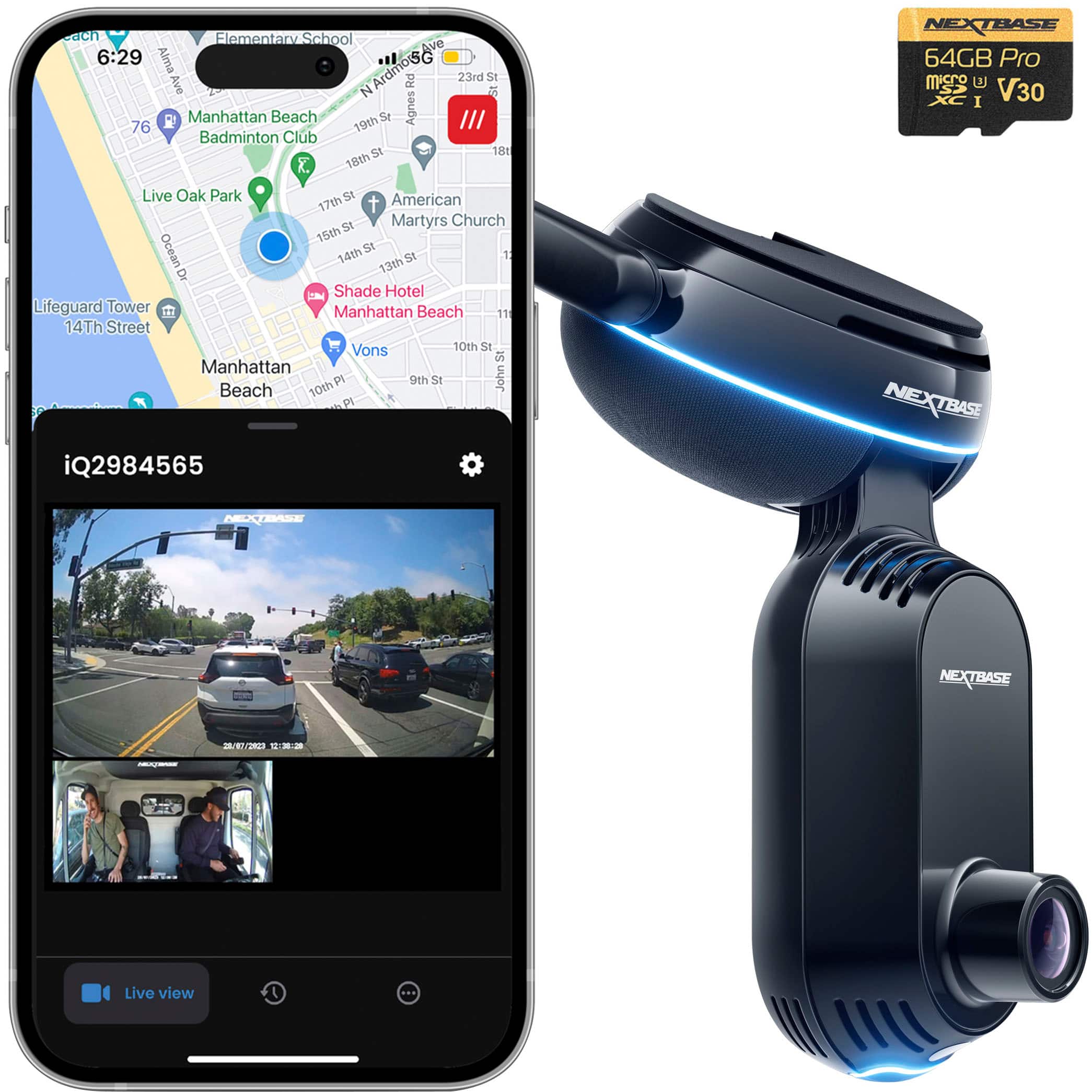
|Posted .This reviewer received promo considerations or sweepstakes entry for writing a review.The IQ4K kit ships with the IQ camera, ODB to USB-C power cable, hardwire kit, extra adhesive mount, and mounting/wiring tools. The camera has two lenses, front and cabin facing. No rear window camera is included, although one is available for purchase as an optional accessory. Physical installation via ODB port is nearly as easy as the typical DC outlet plug method. It’s merely a slightly different plug location and style. There are hardwiring options also available if preferred, but the ODB port option works fine for me. I connected the plug to the camera, plugged the other end into my easily accessible ODB port underneath the left side of the dash, affixed the camera to the windshield via the 3M tape mount, hid the wires for aesthetics, and I was done. The IQ can slide off of the adhesive mount if desired for use in a second vehicle or other purposes. Camera activation and app setup were where my problems began and it all went rapidly downhill from there. After installing the app and connecting the camera to the ODB port in my vehicle as instructed, the camera powered on and the app instructed me to scan the QR code on the camera’s small LCD display to pair the camera. The tiny high gloss display had a huge amount of reflectivity and my phone camera had a lot of trouble avoiding the reflections and focusing on the QR code. I was also initially trying to set everything up in the evening after work, but quit after it proved to be an exercise in futility, even with supplemental lighting. I tried again the following day during daylight and, after numerous tries, the phone finally read the code. Problem number two then occurred as the camera screen displayed a message stating the camera failed to update and a circular connection indicator on the camera screen kept spinning. Eventually the spinning stopped and the app displayed a message that the camera was unavailable. I power-cycled the camera by removing and reinserting the power cable from the camera’s USB port which caused it to enter pairing mode again. However, I then ended up in an annoying cycle of scanning the QR code numerous times, finally connecting, and then the camera immediately disconnecting. Each time the camera lost contact I was presented with three options to contact Nextbase support (email, chat, or call). Instead, I kept opting to reboot the camera and try again. I was already out of patience by that point, but persisted nonetheless, I eventually made it past the loop, the camera connected to the app/phone and I was finally able to see live video from both lenses displayed in the app. I clicked to verify that the recorded footage looked good and I was then taken to an account creation screen. I thought I was finally good to go. Wrong again. This time, I entered my name and email address as instructed and hit enter to register a new account. The app returned an error stating “something went wrong, please retry”. When I retried, it said the email address was already registered. I tried again with another email, same thing. I subsequently tried a third email, and again same error. I decided not to try a fourth email because by that point it seemed silly. I suspected my email addresses were being incorrectly harvested and erroneously recorded as already being registered. I begrudgingly reached out to Nextbase support that evening and received an email reply the following day. After a day of back and forth communications, we set up a phone call with a live support agent for the following day. The agent was late calling, so while waiting on the call, I tried to activate the IQ one last time. Again, all of my email addresses got the same “already registered” error. I then tried my wife’s address out of curiosity, and surprisingly, it finally worked. I was able to register, subscribe, and complete the setup. I have only used my primary email with other Nextbase cameras, so I have no idea why the others didn’t work. The rep called shortly after and I advised them that I managed to finally get it working. Feeling home free at last, I put the IQ through the paces. It does a great job as a basic dash cam. Both roadway and cabin views are available and footage is clear on playback, even during low light capture. Footage is saved locally on the pre-installed memory card and also in the cloud with an IQ subscription. Both video and audio are recorded with great clarity. I can view live feeds locally or remotely from both cameras on demand both with the vehicle in motion and while parked. There’s approx 15 seconds of latency between actual live footage and when it’s viewable in app. When the vehicle is parked, the IQ goes into security mode when smart sense parking is activated. It monitors for movements, impacts, and other events. Lights flash showing status when something is detected and I can also trigger a manual alarm in the camera to deter suspicious actions. The included 64GB SD card capacity is a bit smallish for always on monitoring and 4K recording. It nearly filled up completely after a single day of light use and always displays capacity as close to maxed. In addition to video, there is a map in the IQ app that shows the vehicle location. At the moment, it only shows where the vehicle is and nothing else. Looking over the IQ specs, it appears the map will play a bigger role with features like geofencing alerts once some of the still in development features like Guardian mode go live. I really would like to share that the issues subsided after the camera was finally activated and functional, but they didn’t. The camera itself works overall, but several features seemingly don’t work properly. I understand that the guardian and roadwatch A.I. modes are not yet available and both are labeled as such and inaccessible in the app, but even parking sense and other alerts don’t seemingly fully work as intended. The camera records activities and logs them in the catch-all library, but frequently logs nothing in the events tab and rarely sends me any notifications. I’ve checked every possible notification setting on both my phone and in the camera. Despite every possible option being set to allow and even when testing the sensor set at max sensitivity, it seldom sends notifications. I’ll get sporadic “impact” alerts for random door closings, and other impact alerts for no reason at all other than driving. I followed up with Nextbase support again about the lack of alerts and events and received conflicting answers. I was told via email that suspicious movements around the vehicle “would not be considered an event”, and thus would not generate event notifications. So in other words, whoever replied basically advised me that the smart sense parking feature is essentially useless for proactive security monitoring. I would much rather be warned of someone sneaking around or breaking into my car BEFORE it happens, not through a buried routine log entry after the fact. I’m highly doubtful that the information I was provided was accurate, but then again, I don’t work in Nextbase support, so I defer to their judgement despite my doubts. Given the problems and inconsistencies I’ve been encountering, I no longer have any realistic expectations for anything this camera promises. I was also requested to send screen shots showing my phone and app notification settings despite sharing that I already checked all the settings. I sent the photos showing every permission related to alerts in both the app and phone all properly checked to allow notifications. That last email was sent to support early this morning. It is now late at night and I am still awaiting a reply from support again, but it no longer matters because barring a miraculous turnaround, I highly doubt I will continue using this IQ after the subscription trial expires. It doesn’t quite seem like all the kinks are fully baked out and it feels more like a beta release tester product than a finished and polished retail product. The features still labeled as “coming soon” in the app should have been a tip off to me that this camera wasn’t quite ready, but I gave it an honest try and did everything within the limited controls provided to make the camera work properly. Even with all phone and app settings correctly set, and traveling among several different areas with varying wireless signals, my experience with the IQ has been marginal at best. Maybe I got a bum camera. That’s my belief. But troubleshooting steps so far have failed to resolve the issues and left me even more puzzled than before regarding the camera’s features and how it is properly supposed to function. The troubleshooting has been basic so far, with every question suggesting possibly some sort of incorrect setting, expectation, or other user error. There very well may be some IQ cameras working just fine out there, but based off my experience with this specific troublesome camera that I received, I cannot recommend the IQ at the moment.
No, I would not recommend this to a friendBrand response from Nextbase
Posted .Thank you for taking the time to share your detailed experience with the Nextbase IQ4K kit. We sincerely apologize for the challenges you encountered during the setup and subsequent usage of the product. Your feedback is invaluable to us, and we want to assure you that we take your concerns seriously.
We're glad to hear that, once activated, the IQ4K performed well, providing clear footage and useful features such as live feeds and security mode. However, we deeply regret the issues you faced during the activation process and subsequent difficulties with certain features.
Regarding the challenges with the QR code scanning and camera updates, we understand the frustration this caused. We are confident we have implemented some fixes through firmware updates to ensure smoother setup processes for all our customers.
We were particularly concerned about the issues you raised regarding the app registration and email validation. Your experience did not meet the standards we aimed for and as such we are confident we have now resolved this issue.
Your feedback on the functionality of features such as parking sense and notifications is crucial, and we appreciate your patience as we work to enhance these aspects of the product. We understand the importance of proactive security monitoring and will take your input into account as we continue to refine and develop our product.
We apologize for any confusion or conflicting information you may have received from our support team. We are always reviewing how we can evolve our customer experience and improve processes and knowledge within our support team.
Once again, we appreciate your thorough review and your willingness to give the Nextbase IQ4K a try. We are committed to resolving your concerns and ensuring that your experience with our product meets your expectations.
Thanks,
The Nextbase Team
- Pros mentioned:Video quality
Nextbase for the win!
Posted .This reviewer received promo considerations or sweepstakes entry for writing a review.I couldn't be more impressed with the Nextbase iQ dash camera—it’s truly a next-level product! The video quality is outstanding, capturing crystal-clear footage even in low light conditions. The smart features, like real-time alerts and remote access via the app, make it an indispensable tool for staying connected to my car’s surroundings. The setup was a breeze, and the sleek design blends seamlessly into the interior of my vehicle. What sets it apart is the peace of mind it provides, knowing I have reliable eyes on the road at all times. Whether it’s monitoring parking or recording my daily commutes, the Nextbase iQ has exceeded all my expectations. If you’re on the fence about investing in a premium dash cam, don’t hesitate—this one is worth every penny. Highly recommend!
I would recommend this to a friendBrand response from Nextbase
Posted .Hello Tim,
Thank you so much for your detailed and thoughtful review!
We're glad to hear you're having such a positive experience with your iQ, especially with its image quality and the peace of mind it provides.
If you ever encounter any issue with your iQ in the future, don't hesitate to reach out to us. We'll be happy to help!
-The Nextbase reviews team
Next Gen Dash Cam
|Posted .This reviewer received promo considerations or sweepstakes entry for writing a review.--- SETUP --- The setup for the Nextbase i! Dash Cam is facilitated by a video. The video explains that there are multiple options on how to connect the camera, the most common to this camera is an OBD outlet in your vehicle. This port can be found under the steering wheel for most vehicles. It is not the cigarette lighter. Following that, you connect the cable to the dash cam to give it power, remove the sticky tape cover, and stick the camera to the center or passenger side of your windshield. Download the app and it will guide you on how to connect it with your phone. --- FEATURES --- 4K recording, two cameras - one cabin facing, 140 degrees FOV, live view while away from vehicle, witness mode when in stressful situations, automatic incident detection while driving and while parked, automatic phone alerts while you’re away from your vehicle, voice activated, optional subscription unlocks more features. --- PERFORMANCE AND EXPECTATIONS --- This dashcam is truly a next generation experience. Think of it as a security camera installed in your vehicle. It does what you expect a dash cam to do, which is to record your commute while you drive, but it does it better and then some. For starters, this dash cam connects to your OBD port. This is a multi-pin port located below your steering wheel on most vehicles. At first, I thought that this process would be complicated, but it really wasn’t. After watching the introductory video, I found my OBD port in seconds and installed it in less than a minute. It immediately powered the iQ dashcam. The dashcam showed me a QR code that I scanned with the app and that process automatically paired the app with the cam in a very seamless fashion. While driving, I am able to see what my camera is recording in both the cabin and the outside through the app. At any point, I can go back and rewatch the videos and save them to my phone without ever removing the installed SD card. While my vehicle is parked. I can open the iQ app and watch what is happening near my vehicle. One of my friends leaned on my vehicle while we were talking outside the parking lot and I got a notification of a parking incident. Tapping on the notification allowed me to see what was happening near the vehicle. This gives me peace of mind that I am able to check my vehicle's surroundings before I even reach it or while far away from it. One very unique feature is witness mode. The explanation of witness mode is that it’ll start recording upon activation in stressful situations. As an example, the diagram in the app shows a person being stopped by the police. Using the voice command, “Hey dashcam, start Witness Mode,” the camera begins to record video and audio as well as send a link to 2 contacts of your choice so that they can see the live feed of what is happening that is causing you stress. These contacts can be chosen from within the app. The first time you set up a contact, they will receive a notification and an explanation of what you set them up with so they understand the safety feature. Roadwatch AI is a feature that adds context to your footage. If you need to prove how fast other vehicles are going, roadwatch AI will give approximations of other vehicles speeds, and distances in relation to you. It also auto-identifies pedestrians, cyclists, and more to track those item’s movements. --- APPROVAL --- Overall, having the extra piece of mind that my vehicle’s surrounding area is available to me remotely is worth the recommendation to anyone.
I would recommend this to a friendGreat product
||Posted .This reviewer received promo considerations or sweepstakes entry for writing a review.Switched from RoadHawk which was solid. NBiQ 4K is a great product; does the job and runs in the background silently. The motion sensors works great as well.
I would recommend this to a friendBrand response from Nextbase
Posted .Hello,
Thank you for sharing your experience. We’re delighted to hear the 4K iQ has been a seamless upgrade for you and that its performance, motion sensing, and quiet operation are delivering exactly what you expect.
We truly appreciate your trust and kind words.
-The Nextbase Reviews Team
- Cons mentioned:Connectivity
Great when works customer service SUCKS
||Posted . Owned for 5 months when reviewed.This reviewer received promo considerations or sweepstakes entry for writing a review.Customer service is extremely difficult and very time consuming. When the unit was working, it was great with the exception that if you try to view the camera with your phone, you better be on Wi-Fi because the connection between the camera and a person trying to check in on their family from another area. Just plain sucks. One side has to be on a solid connection to a ISP. For some reason ours started to malfunction.. It’s been over a month and I have still not got my unit running despite my constant contact with me. Customer service by the way is all out of the country and they do not have a repair facility in the country. They will make you waste valuable time, even though you’ve already followed the troubleshooting guides to troubleshoot. They will make you try and your card that they have to send to you and if it works, then they send you a permanent card. If it doesn’t work then I guess you still have to deal with them wanting you to send them pictures of the same things with the unit is still doing the same stuff at multiple points stopPed responding to the customer Service emails and I would have to call to get somebody else to help me. So if you buy this, make sure that you pray to the gods that the unit will never go down or buy some type of service plan that you do not have to rely on the manufacturing warranty
No, I would not recommend this to a friendBrand response from Nextbase
Posted .Hello Andrew,
Thank you for taking the time to leave a review, we're really sorry to hear the camera malfunctioned and that the customer service you've received so far hasn't been up to standard. Please be assured that steps will be taken to improve our communication and service quality.
If you could, please get back in touch with our support team and let them know the reviews team has requested an escalation for you, that way we can properly review your case and help you get to a resolution as soon as possible. Once again we're really sorry for any inconvenience this might have caused.
-The Nextbase Reviews Team
Front rear and incab Dash Cam
||Posted . Owned for 8 months when reviewed.This reviewer received promo considerations or sweepstakes entry for writing a review.90% of the time it works perfect sometimes it gas its ups and downs but I'm happy with it,i can keep and eye on my truck while inside buildings
I would recommend this to a friendBrand response from Nextbase
Posted .Hi Ramon,
Thank you for sharing your experience with the iQ 4K Smart Dash Cam! We’re glad to hear it works well most of the time and that it helps you keep an eye on your truck, even indoors.
If you ever notice inconsistencies, our support team is always happy to help troubleshoot to make sure you’re getting the best performance. We really appreciate your feedback and your support!
-The Nextbase Support Team
- Cons mentioned:Connectivity
Difficult to interface with cell phone.
||Posted . Owned for 1 week when reviewed.This reviewer received promo considerations or sweepstakes entry for writing a review.Very difficult to interface with cell phone. We had to disconnect and reconnect power to the unit several times before interface was finally established. My son had the exact same problem with his unit.
I would recommend this to a friendBrand response from Nextbase
Posted .Hello Paul,
Thank you for sharing this valuable feedback.
We're sorry to hear that you're encountering connectivity issues with your iQ.
Please reach out to us at [email protected]
We'll do our best to help!
-The Nextbase Reviews Team
- Pros mentioned:Video quality
Worth the money
Posted .This reviewer received promo considerations or sweepstakes entry for writing a review.Had this cam professionally installed the video is super clear and app is easy to use would recommend this to anyone looking for a high-quality dash cam. But hold off on the rear cam until the fix the problems of not recording.
I would recommend this to a friendBrand response from Nextbase
Posted .Hello,
Thank you for your review. We appreciate the feedback.
We are very proud of the IQ, and we are glad you are enjoying it. The IQ rear camera should record properly. There is a new firmware update that should solve any connectivity issues, but if you are having problems beyond that, we would be happy to troubleshoot to find a solution for you.
Please email us so we can help you: [email protected]
The Nextbase Review team
Not sure if its worth the cost
||Posted . Owned for 3 weeks when reviewed.This reviewer received promo considerations or sweepstakes entry for writing a review.So far its just ok, if you use it for a regular dashcam then its fine.. all other features are questionable, viewing videos is quite the task.. nextbase 4k needs more tutorials on how to use and troubleshooting videos..
No, I would not recommend this to a friendBrand response from Nextbase
Posted .Hello Richard,
Thank you for taking the time to write a review.
We're truly thankful for this feedback. We'll make sure to work on more tutorials and troubleshooting videos!
I'm sorry to hear you're having trouble using your camera.
Please reach out to us at [email protected] and we'll work to resolve this for you as soon as possible.
-The Nextbase Reviews Team
- Pros mentioned:Video quality
Best Smart Dash Cam Money Can Buy
||Posted .This reviewer received promo considerations or sweepstakes entry for writing a review.The iQ capabilities are amazing. It reminds me of the Ring system that I have in my home, but in my car. Being able to check in on my vehicle at any time from anywhere is a feature you just can’t put a price on - especially when we’re traveling. The image quality is top notch, you can clearly see license plates and street signs in all of your footage. The voice commands remind me of what I get with my Alexa products, such a great dash cam if you’re on the market! 10/10 would recommend.
I would recommend this to a friendBrand response from Nextbase
Posted .Hello,
Thank you for writing such a detailed and kind review!
We're truly happy to hear that you're enjoying your iQ and its image quality. We understand how important it is to be able to access a live view of your vehicle when you're away from it and how priceless that peace of mind is.
If you ever need help with your iQ don't hesitate to reach out to us at [email protected]
We'll be happy to help!
-The Nextbase Reviews Team
- Pros mentioned:Video quality
Long overdue P.O.M. and stoked!!
||Posted . Owned for 1 week when reviewed.This reviewer received promo considerations or sweepstakes entry for writing a review.Big upgrade for my Sprinter Camper Van and finally some Piece Of Mind. Live view was the main reason I opted for this model as I leave my van at trail heads, in ski resort parking lots and do a lot of BLM remote camping in/ around Utah. Easy to install and the video quality is way better than expected. It's a new purchase but I'm very optimistic on all the use cases. Stoked!!
I would recommend this to a friendBrand response from Nextbase
Posted .Hello Bill,
Thank you for taking the time to leave a review, We're glad to hear you're enjoying the camera and that the Live view feature is giving you some peace of mind. We're always here to help so if you have any question just let us know to help you! Safe Driving!
-The Nextbase Reviews Team
About my purchase
||Posted . Owned for 3 weeks when reviewed.This reviewer received promo considerations or sweepstakes entry for writing a review.Overall, I love my purchase. It is exactly what I was looking for and found it in Best Buy. Employees are always great at helping me out.
I would recommend this to a friendBrand response from Nextbase
Posted .Hello Juan,
Thank you for taking the time to write a review!
We're glad to hear you're having a positive experience with your iQ 4K camera.
If you ever need help, don't hesitate to reach out!
-The Nextbase reviews team
- Pros mentioned:Video quality
Peace of Mind with Cutting-Edge Features
||Posted . Owned for 7 months when reviewed.This reviewer received promo considerations or sweepstakes entry for writing a review.The Nextbase iQ 4K Smart Dash Cam is a must-have for any parent or driver. I love being able to remotely view my child’s driving in real time, which gives me peace of mind while they’re on the road. The ability to download video clips from the cloud is incredibly convenient, ensuring I have access to important footage whenever I need it. Plus, the GPS tracking feature makes it easy to monitor the vehicle’s location. The 4K video quality and reliable 4G/LTE connectivity make this dash cam an exceptional investment for safety and convenience!
I would recommend this to a friendBrand response from Nextbase
Posted .Hello,
Thank you so much for your detailed and thoughtful review! We’re delighted to hear that the Nextbase iQ 4K Smart Dash Cam is providing you with peace of mind and enhancing your driving experience. Your feedback means a lot to us, and we're so glad this dash cam is meeting your needs. If you ever have any questions or need support, we’re here to help!
-The Nextbase Reviews Team
- Cons mentioned:Connectivity
World Record worst Customer Service experiences
||Posted . Owned for 1 year when reviewed.This reviewer received promo considerations or sweepstakes entry for writing a review.Owned this device for a year and it had remained very buggy with only short record length of videos (?20 seconds). Customer service is terrible. It's been flashing some random error code since purchase and after working through the customer support (UK based) I finally gave up after they kept sending scripted things to do which did not seem to relate to the issue I was having. More recently it has stopped uploading videos to the server even though I paid $200 (for a year) of service. Again I've tried for 6 weeks to work through their customer service, and same experience - even though the device is defective, they're given the same instructions that don't seem to relate to the issue I'm having. They blame everything (SD card, my wifi, etc) other than taking responsibility for their device. The customer service has been SO bad, if they were based in the US I would file a complaint with the BBB. Buyer beware! Device doesn't work as advertised, and if you have any issues... good luck. The only thing that was good about this $1000 purchase was the job Best Buy did installing it. Otherwise it's been a nightmare.
No, I would not recommend this to a friendBrand response from Nextbase
Posted .Hello David,
Thank you for taking the time to leave a review.
I'm really sorry to hear about this negative experience.
We aim to provide the best support possible to our customers and regret that this has not been the case.
Please reach out to our North America Support Team at [email protected], saying you were referred by the Nextbase Reviews Team. I'll make sure to follow your case personally.
Again, we're sorry for the inconvenience caused. We’re committed to ensuring your satisfaction and appreciate the opportunity to make things right.
-The Nextbase Reviews Team
- Pros mentioned:Video quality
Best Dash Cam on the market
||Posted . Owned for 1 week when reviewed.This reviewer received promo considerations or sweepstakes entry for writing a review.The Nextbase IQ 4K is awesome. First off, this is not a full in depth review. Besides the intial hefty price, it offers so much for a dashcam. People complaining about not all features are ready out of the box I get it, but those features will be out soon and Im sure it will be worth the wait. This cam has great video quality external and cabin view. The app is easy to use and if you have the subscription, it is worth the cost. I can tap in live stream to check on vehicle or browse my travel history remotely without a hitch. I love that it senses things around the vehicle, particularly if you happen to park in a not so great area of town for w.e reason you can see if anyone is snooping around. I can give the wife full access to the library or recieve alerts as a secondary person on the app. This cam gives a great piece of mind to have as a safeguard if ever an accident or extra vehicle security. I would highly recommend and would purchase again.
I would recommend this to a friend - Pros mentioned:Gps
Great product
||Posted . Owned for less than 1 week when reviewed.This reviewer received promo considerations or sweepstakes entry for writing a review.This is my first dash cam I was very apprehensive about buying I wanted to buy the right one Reading reviews on this I was 50/50 some were good some more I am very happy I don't think I could have asked for better I should have bought the back window also but I'm in the process of getting that now beautiful I have no problems I can go on the app and look at the car when I want it tells me where is parked I love it I haven't had another one so I can't compare it but I'm definitely satisfied
I would recommend this to a friendBrand response from Nextbase
Posted .Hello,
Thank you so much for your thoughtful review! We're thrilled to hear that you are enjoying your new dash cam and that it has met your expectations. We understand how important it is to make the right choice when purchasing a dash cam, and we’re so happy to know that you feel confident in your decision.
It's also great to hear that you're enjoying the app and the ability to easily check on your car's location. We completely agree that adding a rear camera can be a great addition, and we’re excited to hear that you’re in the process of expanding your setup. If you ever need assistance or have any questions, don’t hesitate to reach out. Thank you again for sharing your experience
-The Nextbase Reviews Team
- Pros mentioned:Video quality
List of cell service
||Posted . Owned for 1 month when reviewed.This reviewer received promo considerations or sweepstakes entry for writing a review.I went into the Appalachian Area and lost cell service but the camera still did its job and gave me the video when service came back and downloaded it in 4k. Now the criminals going to jail.
I would recommend this to a friendBrand response from Nextbase
Posted .Hello David,
Thank you for taking the time to write a review!
We're happy to hear that you were able to retrieve the footage you needed. Let us know if there is anything we can help with!
-The Nextbase Reviews Team
- Cons mentioned:Connectivity
It's ok, but.............
||Posted . Owned for less than 1 week when reviewed.This reviewer received promo considerations or sweepstakes entry for writing a review.I REALLY want to like this dash cam. The idea is great. The execution not so much. You must invest time to go into literally every setting and tweak them. I still have not been able to download a video from the cloud to phone. It stops half way and gives an error. Sometimes GPS connects and sometimes it doesn't. If your looking for Plug and Play. This is not for you.
No, I would not recommend this to a friendBrand response from Nextbase
Posted .Hello Jeremy,
Thank you for your feedback, we're sorry to hear you're having issues downloading the videos from your camera, this is definitely not how it should work. Have you tried deleting and reinstalling the app? You shouldn't be doing this every time you download a video but maybe there has been an issue with the connection and might need an update.
If the issue persist please get in touch with our support team at [email protected] to further investigate this issue and get your camera properly working!
- The Nextbase Reviews Team
- Cons mentioned:App
Never worked on my iphone since i updated my phone
||Posted .This reviewer received promo considerations or sweepstakes entry for writing a review.This dash cam has not worked on my phone since october 15 2024 when i updated my iphone. Customer service tried but nothing worked. When i take my SD card out and put in my computer i view everything but on my nextbase iq app on my phone it aways says offline. Well at least i can do something with it. This is my fifth and last nextbase dash cam when im ready to update it will be another brand. So disapointing after spending so much money
No, I would not recommend this to a friendBrand response from Nextbase
Posted .Hello,
Thank you for taking the time to write a review.
We’re very sorry to hear about the frustration you’ve experienced with the app after your iPhone update, and we understand how disappointing this must be—especially as a long-time Nextbase customer.
We appreciate you sharing your experience, and we’d like the chance to work with you to get this resolved.
Please reach out to our support team at [email protected] and we’ll do our best to assist you further.
-The Nextbase Reviews Team