Customer Ratings & Reviews





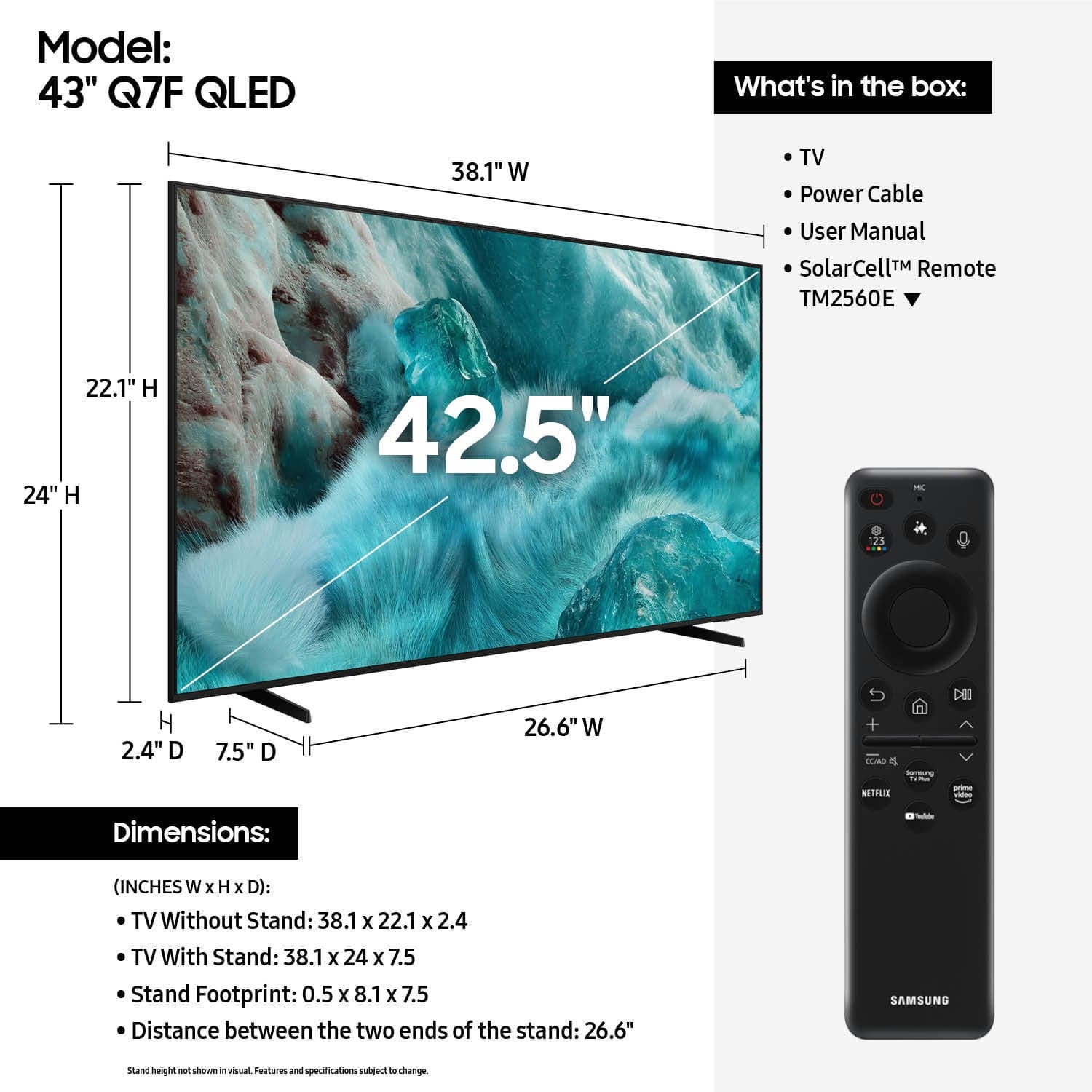











- Model:
- QN43Q7FAAFXZA
- SKU:
- 10517965
Rating by feature
- Picture Quality
Rating 4.8 out of 5 stars
- Sound Quality
Rating 4.6 out of 5 stars
- Brightness
Rating 4.8 out of 5 stars
Samsung
||Posted . Owned for 2 weeks when reviewed.This reviewer received promo considerations or sweepstakes entry for writing a review.TV is great , it is for the bedroom , finally got a bigger TV for the bedroom , samsung makes very good products , i have several different ones
I would recommend this to a friendGood tv
||Posted . Owned for 1 month when reviewed.This reviewer received promo considerations or sweepstakes entry for writing a review.Very good tv. It is really easy to use, too. Easy to install. Good price.
I would recommend this to a friendnice tv
||Posted . Owned for 3 weeks when reviewed.This reviewer received promo considerations or sweepstakes entry for writing a review.TV is great. Installation was disappointing - crooked and wire hanging down. Team unresponsive to my complaints.
I would recommend this to a friendGood job best buy
||Posted . Owned for 3 weeks when reviewed.This reviewer received promo considerations or sweepstakes entry for writing a review.Great TV Best Buy did great job describing the TV, it’s great with streaming and cable services we loved it
I would recommend this to a friendGreat
||Posted . Owned for 2 weeks when reviewed.This reviewer received promo considerations or sweepstakes entry for writing a review.Great picture quality and it doesnt weight much…..
I would recommend this to a friendDidn't get a remote or legs with this tv
||Posted .This reviewer received promo considerations or sweepstakes entry for writing a review.Tv came with no remote and no legs, old customers account was still connected and had changed the pins so I had to take the time to figure out how to bypass it to reset the pins. I think it's a pretty reasonable expectation that a remote and legs will come with the TV even if it is open box and I had ordered it in excellent condition. I had to buy a tabletop stand and pair an existing Samsung remote to take care of all the issues and spend extra for a tabletop stand (still don't have a new remote for this tv). I wasn't going to take the extra time to get the TV back to them when I was the one who lost out. The 2 stars are for a working screen and it is a nice TV too (so far it's still working) but I dumped way more extra time, money and effort into this TV than I should've had to.
I would recommend this to a friendBrand response from Samsung
Posted .JessicaW,
We appreciate your feedback regarding the missing parts from your Samsung TV. As your unit was purchased in open-box condition, we recommend contacting Best Buy directly for assistance with resolving this matter.
Once resolved, please know we’re happy to help with setup or any product-related questions. You can reach us at 1-800-SAMSUNG, 8AM – 12AM EST, 7 days a week, or via LiveChat on our website under the ‘Support’ section.
~ Samsung Specialist
Samsung Rocks
||Posted . Owned for 1 month when reviewed.This reviewer received promo considerations or sweepstakes entry for writing a review.Quality picture and super quick response. Perfect upgrade from my old LED tv
I would recommend this to a friendAwesomw tv
||Posted . Owned for 2 weeks when reviewed.This reviewer received promo considerations or sweepstakes entry for writing a review.We got this tv for our daughter's room and it is the perfect size. The picture quantity is great and was easy to set up.
I would recommend this to a friendNEW TV
||Posted . Owned for 1 month when reviewed.This reviewer received promo considerations or sweepstakes entry for writing a review.Great picture!!!! Easy set up! The remote is so easy to handle too!
I would recommend this to a friendMyTVTV
||Posted . Owned for 3 weeks when reviewed.This reviewer received promo considerations or sweepstakes entry for writing a review.Nice and cool TV. Good picture Quality. Hopefully this lasts.
I would recommend this to a friendHighly recommend
||Posted . Owned for 3 weeks when reviewed.This reviewer received promo considerations or sweepstakes entry for writing a review.Setup eay since I already had a Samsung account. Clarity is GREAT. Even old shows like little house on the prairie are crusp and sharp. Times i feel like i could reach out and touch the people on the screen.
I would recommend this to a friendGood TV but overhead with sign in process.
||Posted . Owned for 2 weeks when reviewed.This reviewer received promo considerations or sweepstakes entry for writing a review.The TV works well and has a good picture quality. It takes a while to set up TV because of the new Samsung account that needs to be created to use the TV with layers of authentication. Our Sony Bravia works out of the box without the requirement to sign in to Google TV. This layer is frustrating and does not seem to provide extra content only makes it harder to find what we want to watch. There is a nice Netflix button which is useful.
I would recommend this to a friendA Gift
||Posted . Owned for 3 weeks when reviewed.This reviewer received promo considerations or sweepstakes entry for writing a review.Perfect Smart TV to get all the shows I like. It was a gift from my family who knew I needed to be updated!
I would recommend this to a friendSamsung tv
||Posted . Owned for 8 months when reviewed.This reviewer received promo considerations or sweepstakes entry for writing a review.Nice tv for the most part. Have had some issues with apps not loading a couple of times, but otherwise good.
I would recommend this to a friendA great smart tv
||Posted .This reviewer received promo considerations or sweepstakes entry for writing a review.The tv works great. I like the Tizen software and the coldcolor looks great. Videogames look good and the automatic recognition of gaming systems is a nice touch. It only loses 1 star due to color dilution when viewing tv from a deep angle or from the side.
I would recommend this to a friendExcellent Picture
||Posted . Owned for 1 week when reviewed.This reviewer received promo considerations or sweepstakes entry for writing a review.Superb picture quality. This TV is mounted in my lanai and even in the brightest of days I have no trouble with the picture. Blacks are not washed out and colors are true. I recommend this to anyone looking for a smart tv that can handle differing light levels with precision.
I would recommend this to a friendSamsung 43 class QLED 4k
||Posted . Owned for 1 month when reviewed.This reviewer received promo considerations or sweepstakes entry for writing a review.Great TV system with all the updated features from AI to Smart TV to clarity and very reliable company. The QLED makes the pitch quality more crisp than any OLED or LEDs out there.
I would recommend this to a friendOver priced for a small tv.
||Posted . Owned for 3 weeks when reviewed.This reviewer received promo considerations or sweepstakes entry for writing a review.I purchased this tv because the one I wanted was not in stock and had to be ordered. The picture doesn't seem much better than my old 20 yr. old Insigina. Unable to connect to internet. My other tvs connect ok, The stand fit my stand top where others were too wide for my space was another reason I bought it. It's ok but over priced.
I would recommend this to a friendBrand response from Samsung
Posted .RobertE,
We appreciate your feedback on the picture quality of Samsung’s Q7F TV. If the image doesn’t quite match your preferences, there are several adjustments you can make to better suit your viewing environment and content type.
First, please ensure your TV is running the latest firmware, as updates may include important picture quality enhancements. Go to: Home > Left directional button > Settings > Support > Software Update > Update Now
To explore picture mode options, navigate to: Home > Left directional button > Settings > All Settings > Picture > Picture Mode. Options include:
• Standard – Ideal for general viewing
• Dynamic – Brighter and more vibrant for well-lit spaces
• Eco – Optimized for energy efficiency
• Movie – Best for viewing in low light
• Filmmaker Mode – Preserves the content creator’s intent and disables motion smoothing for supported content
You can further customize your image by going to: Settings > All Settings > Picture > Expert Settings, where you can adjust Brightness, Contrast, Color Tone, Sharpness, Contrast Enhancer and more.
If you’d like help finding the best picture settings for your preferences, please don’t hesitate to contact Samsung Support at 1-800-SAMSUNG, available 8AM – 12AM EST, 7 days a week. You can also LiveChat with an agent or explore additional resources on our website by clicking the ‘Support’ link.
~ Samsung Specialist
My Opinion
||Posted . Owned for 2 weeks when reviewed.This reviewer received promo considerations or sweepstakes entry for writing a review.Everything is great with the TV, but one does have to get used to the solar-powered remote (it's not the standard remote with buttons), but with practice you'll get used to it.
I would recommend this to a friend43” Samsung QLED
||Posted . Owned for 1 month when reviewed.This reviewer received promo considerations or sweepstakes entry for writing a review.Awesome clear picture. Great option for the bedroom.
I would recommend this to a friend