Customer Ratings & Reviews





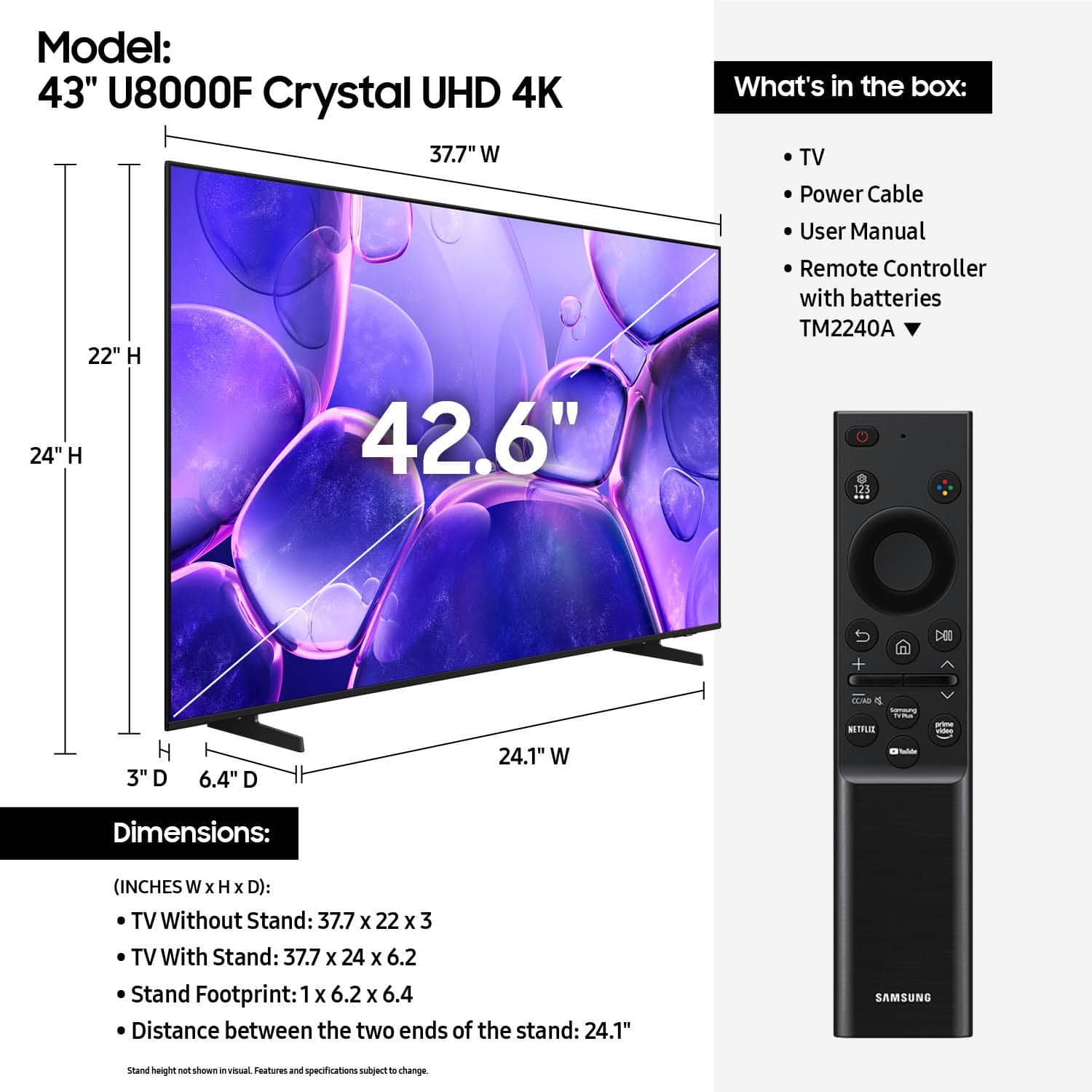












- Model:
- UN43U8000FFXZA
- |
- SKU:
- 10187654
Customer reviews
Rating 4.6 out of 5 stars with 944 reviews
(944 customer reviews)Rating by feature
- Picture Quality4.8
Rating 4.8 out of 5 stars
- Sound Quality4.6
Rating 4.6 out of 5 stars
- Brightness4.7
Rating 4.7 out of 5 stars
Rated 4 out of 5 stars
Senoir Citz.
||Posted . Owned for 2 weeks when reviewed.This reviewer received promo considerations or sweepstakes entry for writing a review.Had some trouble figuring out the remote control. But after that we did O.K. The only bad thing was the lack of detailed instructions.
This review is from Samsung - 43” Class U8000F Series Crystal UHD 4K Smart Tizen TV (2025)
I would recommend this to a friend- Pros mentioned:Picture quality
Rated 5 out of 5 stars
New TV
||Posted . Owned for less than 1 week when reviewed.This reviewer received promo considerations or sweepstakes entry for writing a review.Works excellently. Great value for the cost. Phenomenal computer monitor.
This review is from Samsung - 43” Class U8000F Series Crystal UHD 4K Smart Tizen TV (2025)
I would recommend this to a friend - Pros mentioned:Setup ease
Rated 5 out of 5 stars
samsung
||Posted . Owned for 1 month when reviewed.This reviewer received promo considerations or sweepstakes entry for writing a review.it was easy to attach and it looks amazing. very easy instructions too!
This review is from Samsung - 43” Class U8000F Series Crystal UHD 4K Smart Tizen TV (2025)
I would recommend this to a friend - Pros mentioned:Picture quality
Rated 5 out of 5 stars
Samsung 43"
||Posted . Owned for 1 month when reviewed.This reviewer received promo considerations or sweepstakes entry for writing a review.Great TV! Reasonable price. Good quality. Will continue to purchase Samsung items in the future!
This review is from Samsung - 43” Class U8000F Series Crystal UHD 4K Smart Tizen TV (2025)
I would recommend this to a friend Rated 5 out of 5 stars
Best tv (for me in my opinion)
||Posted . Owned for 2 weeks when reviewed.This reviewer received promo considerations or sweepstakes entry for writing a review.This is 100% good i recommend everyone to buy this if you have good enough money and it has lasted me so long
This review is from Samsung - 43” Class U8000F Series Crystal UHD 4K Smart Tizen TV (2025)
I would recommend this to a friendRated 5 out of 5 stars
Product Review
||Posted .This reviewer received promo considerations or sweepstakes entry for writing a review.Great Product and setup was very easy. Price Point very reasonable.
This review is from Samsung - 43” Class U8000F Series Crystal UHD 4K Smart Tizen TV (2025)
I would recommend this to a friend- Pros mentioned:Picture quality
Rated 5 out of 5 stars
COMMENTS
||Posted .This reviewer received promo considerations or sweepstakes entry for writing a review.CUSTOMER SERVICE GREAT. DELIVERY TIME RIGHT ON POINT. PRODUCT WE ARE PLEASED WITH THE TV COLOR, AND SOUND.
This review is from Samsung - 43” Class U8000F Series Crystal UHD 4K Smart Tizen TV (2025)
I would recommend this to a friend - Pros mentioned:Picture quality
Rated 5 out of 5 stars
Quality
||Posted . Owned for 2 weeks when reviewed.This reviewer received promo considerations or sweepstakes entry for writing a review.I love samsung tv's we have 4 of them great tv's definitely recommend.
This review is from Samsung - 43” Class U8000F Series Crystal UHD 4K Smart Tizen TV (2025)
I would recommend this to a friend - Pros mentioned:Picture quality
Rated 5 out of 5 stars
Great TV
||Posted . Owned for 1 week when reviewed.This reviewer received promo considerations or sweepstakes entry for writing a review.Excelente imagen funciones de ultima tecnología software y actualizaciones rapidas
This review is from Samsung - 43” Class U8000F Series Crystal UHD 4K Smart Tizen TV (2025)
I would recommend this to a friend Rated 4 out of 5 stars
Remote and app selection confusing but good tv
||Posted . Owned for 2 weeks when reviewed.This reviewer received promo considerations or sweepstakes entry for writing a review.The tv is good; however, the remote is very tiny and challenging to use, especially for older/elderly adults. The buttons/controls were confusing and not labeled so we had to use the universal remote from the old tv. Too hard to switch between apps so they can’t use any of the smart features/apps. This was a gift.
This review is from Samsung - 43” Class U8000F Series Crystal UHD 4K Smart Tizen TV (2025)
No, I would not recommend this to a friend- Pros mentioned:Picture quality
Rated 5 out of 5 stars
Perfect!
||Posted . Owned for 3 weeks when reviewed.This reviewer received promo considerations or sweepstakes entry for writing a review.Perfect Purchase!!! I am happy with it. Good price
This review is from Samsung - 43” Class U8000F Series Crystal UHD 4K Smart Tizen TV (2025)
I would recommend this to a friend - Pros mentioned:Picture quality
Rated 5 out of 5 stars
Great value for price
||Posted . Owned for 1 month when reviewed.This reviewer received promo considerations or sweepstakes entry for writing a review.Sharp bright picture. Great value for price. The user interface is a designed for all your subscriptions.
This review is from Samsung - 43” Class U8000F Series Crystal UHD 4K Smart Tizen TV (2025)
I would recommend this to a friend - Pros mentioned:Picture quality
Rated 5 out of 5 stars
SAMSUNG 43 INCH
||Posted . Owned for 1 month when reviewed.This reviewer received promo considerations or sweepstakes entry for writing a review.SOLID SAMSUNG 43 INCH TV. YOU KNOW WHAT YOU ARE GETTING FOR A VERY GOOD PRICE. NO ISSUES W THIS TV AT ALL. DO IT! DO IT!
This review is from Samsung - 43” Class U8000F Series Crystal UHD 4K Smart Tizen TV (2025)
I would recommend this to a friend - Pros mentioned:Picture quality
Rated 5 out of 5 stars
Perfect for our needs!
||Posted .This reviewer received promo considerations or sweepstakes entry for writing a review.Great size for the bedroom, excellent smart features, great picture and sound!
This review is from Samsung - 43” Class U8000F Series Crystal UHD 4K Smart Tizen TV (2025)
I would recommend this to a friend Rated 4 out of 5 stars
A TV for my mother that makes her life better.
||Posted .This reviewer received promo considerations or sweepstakes entry for writing a review.My 90+ year old mother was really happy with getting a new TV. The only issue was the initial connection was not easy to set up, and the remote was somehow stubborn to function. After everything worked correctly has been a good thing to have.
This review is from Samsung - 43” Class U8000F Series Crystal UHD 4K Smart Tizen TV (2025)
I would recommend this to a friendRated 5 out of 5 stars
New Samsung TV
||Posted .This reviewer received promo considerations or sweepstakes entry for writing a review.Love my TV. … Beautiful picture!! Highly recommend !
This review is from Samsung - 43” Class U8000F Series Crystal UHD 4K Smart Tizen TV (2025)
I would recommend this to a friend- Pros mentioned:Picture quality
Rated 5 out of 5 stars
lovely television
||Posted . Owned for 1 week when reviewed.This reviewer received promo considerations or sweepstakes entry for writing a review.It is simply described as the best television in picture and sound quality.
This review is from Samsung - 43” Class U8000F Series Crystal UHD 4K Smart Tizen TV (2025)
I would recommend this to a friend - Pros mentioned:Picture quality
Rated 5 out of 5 stars
Professional from Garner, NC
||Posted . Owned for 1 month when reviewed.This reviewer received promo considerations or sweepstakes entry for writing a review.This was a great purchase. Reasonably priced. Great performance from the tv. I am totally satisfied!
This review is from Samsung - 43” Class U8000F Series Crystal UHD 4K Smart Tizen TV (2025)
I would recommend this to a friend - Pros mentioned:Picture quality
Rated 5 out of 5 stars
Samsung TV
||Posted .This reviewer received promo considerations or sweepstakes entry for writing a review.Excellent television bright picture and great sound !
This review is from Samsung - 43” Class U8000F Series Crystal UHD 4K Smart Tizen TV (2025)
I would recommend this to a friend Rated 5 out of 5 stars
nice picture
||Posted . Owned for 10 months when reviewed.This reviewer received promo considerations or sweepstakes entry for writing a review.Samsung TVs are my favorite. easy to use, consistent interface.
This review is from Samsung - 43” Class U8000F Series Crystal UHD 4K Smart Tizen TV (2025)
I would recommend this to a friend