Customer Ratings & Reviews





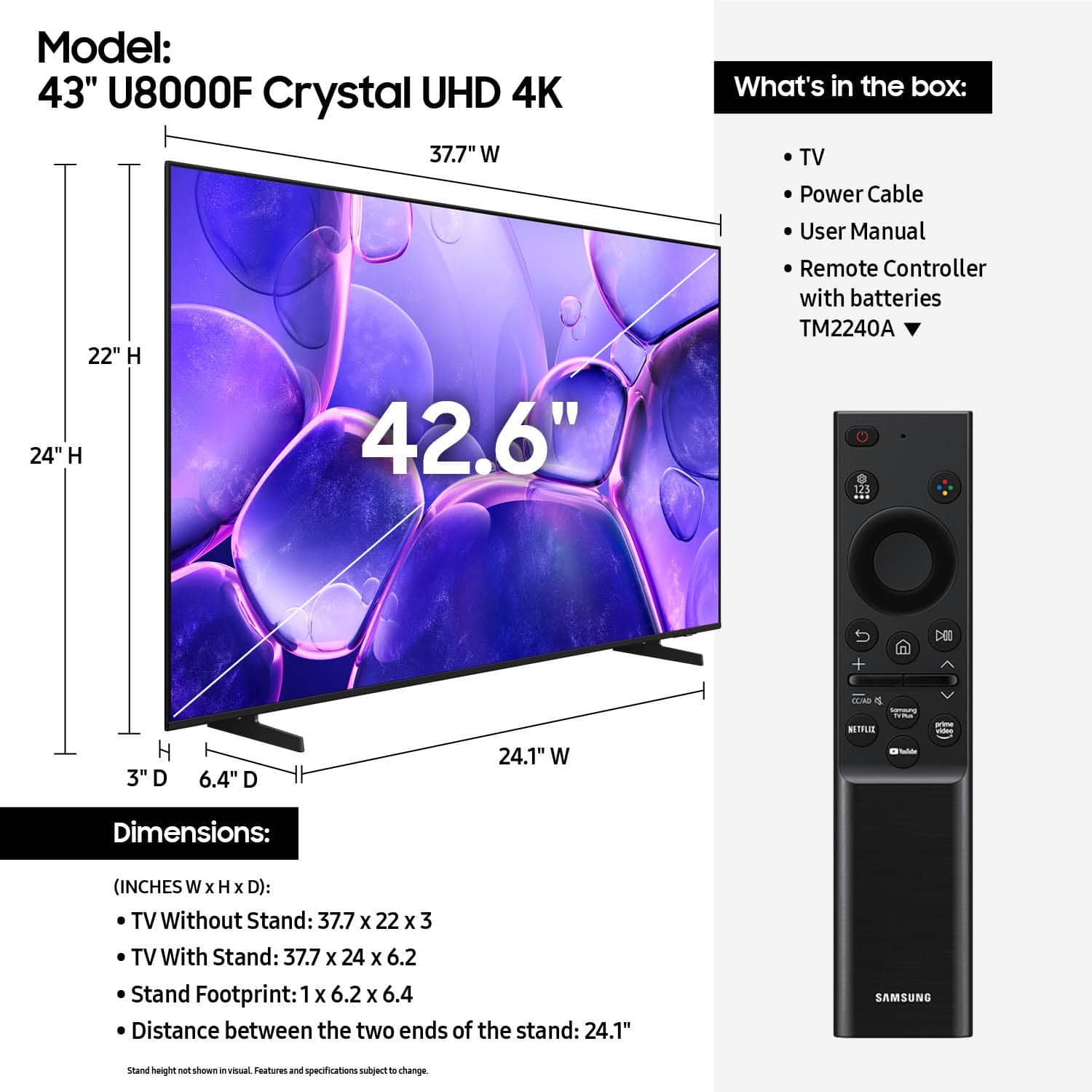












- Model:
- UN43U8000FFXZA
- SKU:
- 10187654
Rating by feature
- Picture Quality
Rating 4.8 out of 5 stars
- Sound Quality
Rating 4.6 out of 5 stars
- Brightness
Rating 4.7 out of 5 stars
- Pros mentioned:Picture quality
Samsung TV
||Posted . Owned for 2 weeks when reviewed.This reviewer received promo considerations or sweepstakes entry for writing a review.Good stuff I definitely recommend this tv works great
I would recommend this to a friend - Pros mentioned:Size
Oh yea
||Posted . Owned for 1 month when reviewed.This reviewer received promo considerations or sweepstakes entry for writing a review.This is our bedroom TV, it's great for the space we have.
I would recommend this to a friend - Pros mentioned:Picture quality
Like No TV I Ever Owned - In A Bad Way
||Posted .This reviewer received promo considerations or sweepstakes entry for writing a review.Good picture. Slips of paper, poorly explaining, for a manual. Required to sign in on Samsung.com, which after 3 tries with 3 separate attempts to register, could never get in. TV is not user-friendly - at least to me. Many simple features do not work because I can't access Samsung. Remote is ultra, ultra thin, with a slick finish, and weird way to use buttons. Had to find out enough to use it with online videos. I'm no longer the "target market" so it probably matters very little what I think. Double thumbs down for Samsung AND this TV.
No, I would not recommend this to a friendBrand response from Samsung
Posted .Hi TomB,
We're sorry to hear of the issues you are experiencing. To best assist you, please call us at 1-800-SAMSUNG between 8AM and 12AM EST, any day of the week. You can also chat with us online by visiting the ‘Support’ section of our website.
~ Samsung Advisor
- Pros mentioned:Picture quality
Good someone television
||Posted . Owned for 3 weeks when reviewed.This reviewer received promo considerations or sweepstakes entry for writing a review.The tv works and is better than mine. Some people expect too much. As long as it works im fine
I would recommend this to a friend - Pros mentioned:Picture quality
Great TV
||Posted . Owned for 1 month when reviewed.This reviewer received promo considerations or sweepstakes entry for writing a review.Great Picture and sound. Great size for the bedroom.
I would recommend this to a friend - Pros mentioned:Picture quality
Best Television Ever
||Posted . Owned for 2 weeks when reviewed.This reviewer received promo considerations or sweepstakes entry for writing a review.I love my Samsung 43’ TV I would recommend to other
I would recommend this to a friend Beautiful picture...
||Posted . Owned for 2 weeks when reviewed.This reviewer received promo considerations or sweepstakes entry for writing a review.Great picture, simple set up. Perfect size for wall unit. Great value.
I would recommend this to a friend- Pros mentioned:Picture quality
Works perfectly
||Posted .This reviewer received promo considerations or sweepstakes entry for writing a review.Works perfectly and work really good with samsung phones
I would recommend this to a friend Good Value
||Posted . Owned for 2 weeks when reviewed.This reviewer received promo considerations or sweepstakes entry for writing a review.Great value for this Smart TV. Easy to set up and provides a great TV experience.
I would recommend this to a friendgreat tv
||Posted . Owned for 2 months when reviewed.This reviewer received promo considerations or sweepstakes entry for writing a review.Great TV, clear picture and excellent sound!!!!!!!
I would recommend this to a friend- Pros mentioned:Picture quality
Pretty solid TV!
||Posted . Owned for 3 weeks when reviewed.This reviewer received promo considerations or sweepstakes entry for writing a review.Easy enough to set up, great quality and didnt go broke buying it! Pretty happy with this tv.
I would recommend this to a friend - Pros mentioned:Picture quality
Samsung 43" 4K TV
||Posted . Owned for 1 week when reviewed.This reviewer received promo considerations or sweepstakes entry for writing a review.Well satisfied. All deliverables met. Exceeded all expectations.
I would recommend this to a friend - Pros mentioned:Picture quality
Great tv!
||Posted .This reviewer received promo considerations or sweepstakes entry for writing a review.Tv delivered promptly and I like it very much. No issues.Nice clear picture.
I would recommend this to a friend - Pros mentioned:Setup ease
Great and easy tv start up. Crystal clear TV
||Posted .This reviewer received promo considerations or sweepstakes entry for writing a review.Easy to install with the bar code and your phone sets it up
I would recommend this to a friend Great
||Posted . Owned for 2 weeks when reviewed.This reviewer received promo considerations or sweepstakes entry for writing a review.Is a great tv and good quality. Very easy to setup .
I would recommend this to a friend- Pros mentioned:Picture quality
Quality Picture at a very good Price.
||Posted . Owned for 1 month when reviewed.This reviewer received promo considerations or sweepstakes entry for writing a review.Quality of picture is excellent. We have only had it for 1.5 months. But so far so good.
I would recommend this to a friend - Pros mentioned:Weight
Exquisite
||Posted . Owned for 2 weeks when reviewed.This reviewer received promo considerations or sweepstakes entry for writing a review.I love the clarity of my product. Impressed how lite weight it is.
I would recommend this to a friend Simple and Easy
||Posted . Owned for 1 month when reviewed.This reviewer received promo considerations or sweepstakes entry for writing a review.Legs attach with ease, it's also easy to mount, set up was a breeze!
I would recommend this to a friendSamsung 43" tv
||Posted . Owned for 3 weeks when reviewed.This reviewer received promo considerations or sweepstakes entry for writing a review.Great picture quality.excellent price for the size.
I would recommend this to a friend- Pros mentioned:Picture quality
TV Review
||Posted . Owned for 2 weeks when reviewed.This reviewer received promo considerations or sweepstakes entry for writing a review.Great TV for a great price i honestly dont have any complaints
I would recommend this to a friend