Customer Ratings & Reviews





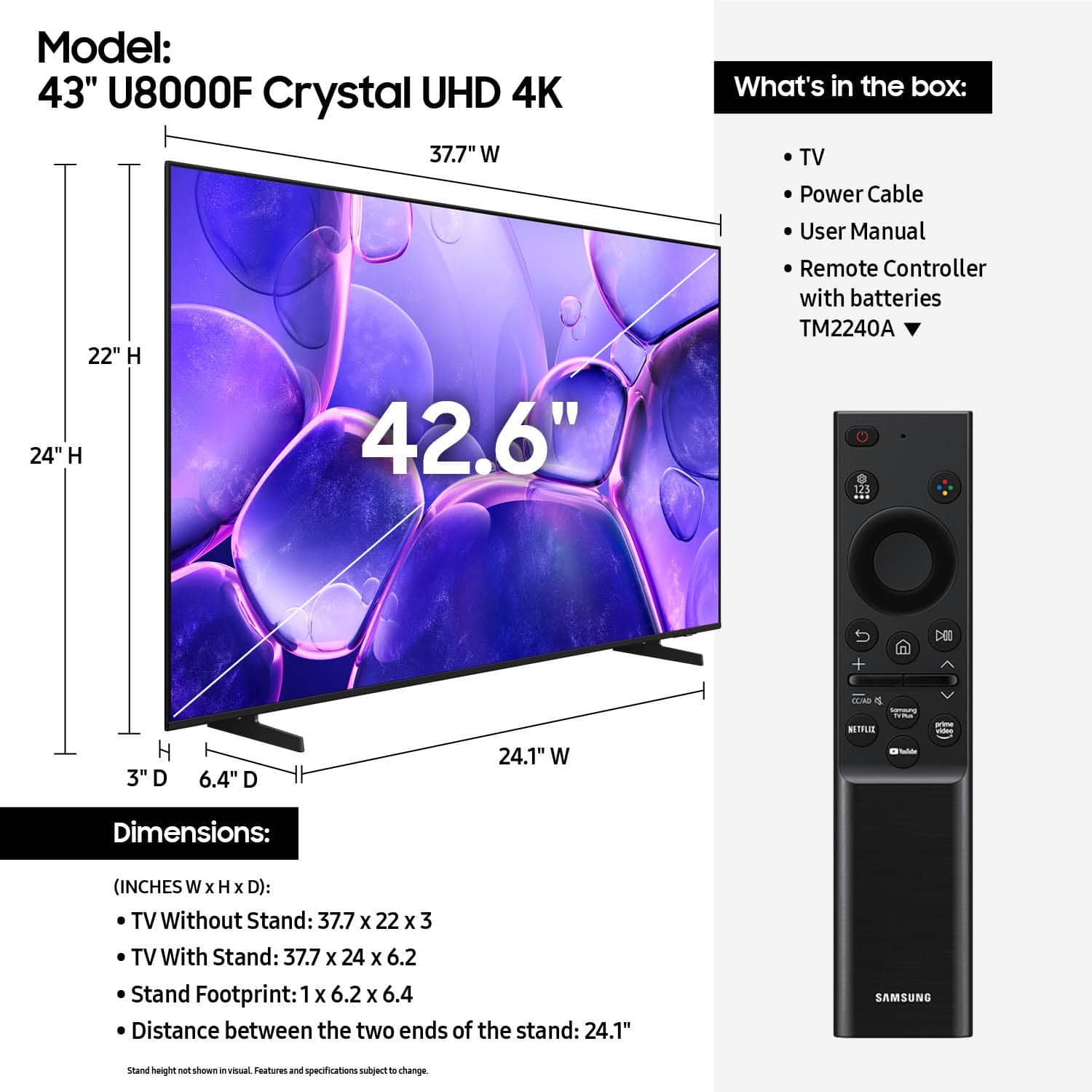












- Model:
- UN43U8000FFXZA
- |
- SKU:
- 10187654
Customer reviews
Rating 4.6 out of 5 stars with 944 reviews
(944 customer reviews)Rating by feature
- Picture Quality4.8
Rating 4.8 out of 5 stars
- Sound Quality4.6
Rating 4.6 out of 5 stars
- Brightness4.7
Rating 4.7 out of 5 stars
Rated 5 out of 5 stars
Great tv !
||Posted . Owned for 3 weeks when reviewed.This reviewer received promo considerations or sweepstakes entry for writing a review.Awesome Tv! Picture quality is great, tv fits perfectly where needed.
This review is from Samsung - 43” Class U8000F Series Crystal UHD 4K Smart Tizen TV (2025)
I would recommend this to a friendRated 5 out of 5 stars
Review
||Posted . Owned for 2 weeks when reviewed.This reviewer received promo considerations or sweepstakes entry for writing a review.Got it as a gilft, no bad feedback. B
This review is from Samsung - 43” Class U8000F Series Crystal UHD 4K Smart Tizen TV (2025)
I would recommend this to a friendRated 4 out of 5 stars
New smart tv
||Posted . Owned for 1 month when reviewed.This reviewer received promo considerations or sweepstakes entry for writing a review.I like the tv, it is just hard to figure out some of the things on it. I haven't figured out how to get it to turn on live tv right away. It has to sit and process. Possibly an internet thing, but it goes through my cable box, not internet.
This review is from Samsung - 43” Class U8000F Series Crystal UHD 4K Smart Tizen TV (2025)
I would recommend this to a friend- Pros mentioned:Picture quality
Rated 5 out of 5 stars
Great TV
||Posted . Owned for 2 weeks when reviewed.This reviewer received promo considerations or sweepstakes entry for writing a review.Excellent color, many viewing options. Nice TV , excellent sound.
This review is from Samsung - 43” Class U8000F Series Crystal UHD 4K Smart Tizen TV (2025)
I would recommend this to a friend - Pros mentioned:Picture quality
Rated 5 out of 5 stars
Samsung tv
||Posted . Owned for 1 month when reviewed.This reviewer received promo considerations or sweepstakes entry for writing a review.the sound and picture are great.the bracket was easy to install.
This review is from Samsung - 43” Class U8000F Series Crystal UHD 4K Smart Tizen TV (2025)
I would recommend this to a friend - Pros mentioned:Picture quality
Rated 4 out of 5 stars
Great for the bedroom
||Posted . Owned for 1 month when reviewed.This reviewer received promo considerations or sweepstakes entry for writing a review.Being able to watch YouTuneLive on the smart tv is a bonus to the clear pic and color.
This review is from Samsung - 43” Class U8000F Series Crystal UHD 4K Smart Tizen TV (2025)
I would recommend this to a friend Rated 5 out of 5 stars
Nice size for small room
||Posted . Owned for 2 weeks when reviewed.This reviewer received promo considerations or sweepstakes entry for writing a review.Very clear and bright picture. Perfect size for my bedroom.
This review is from Samsung - 43” Class U8000F Series Crystal UHD 4K Smart Tizen TV (2025)
I would recommend this to a friend- Pros mentioned:Picture quality
Rated 5 out of 5 stars
Samsung tv
||Posted . Owned for 3 weeks when reviewed.This reviewer received promo considerations or sweepstakes entry for writing a review.Good quality picture sound is good and bright ness is excellent
This review is from Samsung - 43” Class U8000F Series Crystal UHD 4K Smart Tizen TV (2025)
I would recommend this to a friend - Pros mentioned:Picture quality
Rated 5 out of 5 stars
Very pleased. love it.
||Posted . Owned for 1 month when reviewed.This reviewer received promo considerations or sweepstakes entry for writing a review.All positives; Nothing bad to say. Very pleased....................
This review is from Samsung - 43” Class U8000F Series Crystal UHD 4K Smart Tizen TV (2025)
I would recommend this to a friend - Pros mentioned:Picture quality
Rated 5 out of 5 stars
Samsung TV
||Posted .This reviewer received promo considerations or sweepstakes entry for writing a review.Picture quality is great and I love the fact it’s a smart TV. Great product for a good price.
This review is from Samsung - 43” Class U8000F Series Crystal UHD 4K Smart Tizen TV (2025)
I would recommend this to a friend - Pros mentioned:Picture quality
Rated 5 out of 5 stars
Best Quality
||Posted . Owned for 1 week when reviewed.This reviewer received promo considerations or sweepstakes entry for writing a review.From Vizio to Samsung, and All I can say is that its is a HUGEEEE UPGRADE !
This review is from Samsung - 43” Class U8000F Series Crystal UHD 4K Smart Tizen TV (2025)
I would recommend this to a friend - Pros mentioned:Picture quality
Rated 5 out of 5 stars
Samsung TV
||Posted . Owned for 3 weeks when reviewed.This reviewer received promo considerations or sweepstakes entry for writing a review.excellent picture at a great price! Happy with purchase thus far.
This review is from Samsung - 43” Class U8000F Series Crystal UHD 4K Smart Tizen TV (2025)
I would recommend this to a friend - Pros mentioned:Picture quality
Rated 5 out of 5 stars
Samsung TV
||Posted .This reviewer received promo considerations or sweepstakes entry for writing a review.I own three Samsung TVs excellant picture great sound , easy to operate
This review is from Samsung - 43” Class U8000F Series Crystal UHD 4K Smart Tizen TV (2025)
I would recommend this to a friend - Pros mentioned:Picture quality
Rated 4 out of 5 stars
Answering the survey
||Posted . Owned for 1 month when reviewed.This reviewer received promo considerations or sweepstakes entry for writing a review.I like the t.v. It has good color. I recommend it.
This review is from Samsung - 43” Class U8000F Series Crystal UHD 4K Smart Tizen TV (2025)
I would recommend this to a friend - Pros mentioned:Picture quality
Rated 5 out of 5 stars
Nice TV
||Posted . Owned for 3 weeks when reviewed.This reviewer received promo considerations or sweepstakes entry for writing a review.Very nice picture and nice features................
This review is from Samsung - 43” Class U8000F Series Crystal UHD 4K Smart Tizen TV (2025)
I would recommend this to a friend - Pros mentioned:Picture quality
Rated 5 out of 5 stars
Would recommend
||Posted . Owned for 1 month when reviewed.This reviewer received promo considerations or sweepstakes entry for writing a review.Really good quality for the prize. The picture quality is really good.
This review is from Samsung - 43” Class U8000F Series Crystal UHD 4K Smart Tizen TV (2025)
I would recommend this to a friend Rated 5 out of 5 stars
review
||Posted . Owned for 3 weeks when reviewed.This reviewer received promo considerations or sweepstakes entry for writing a review.we are enjoying our new tv we are still checking on the streaming
This review is from Samsung - 43” Class U8000F Series Crystal UHD 4K Smart Tizen TV (2025)
I would recommend this to a friend- Pros mentioned:Picture quality
Rated 5 out of 5 stars
Great tv for the price
||Posted . Owned for 3 weeks when reviewed.This reviewer received promo considerations or sweepstakes entry for writing a review.This tv has a good picture and sound, at a good price.
This review is from Samsung - 43” Class U8000F Series Crystal UHD 4K Smart Tizen TV (2025)
I would recommend this to a friend - Pros mentioned:Picture quality
Rated 5 out of 5 stars
Perfect choice for your dorm room
||Posted . Owned for 3 weeks when reviewed.This reviewer received promo considerations or sweepstakes entry for writing a review.Super easy to use TV and it makes the games I play in my PS5 look absolutely beautiful.
This review is from Samsung - 43” Class U8000F Series Crystal UHD 4K Smart Tizen TV (2025)
I would recommend this to a friend - Cons mentioned:Remote control
Rated 4 out of 5 stars
Good Value
||Posted .This reviewer received promo considerations or sweepstakes entry for writing a review.Good tv for the price. The Samsung OS is okay. I wish the remote was backlit when watching at night.
This review is from Samsung - 43” Class U8000F Series Crystal UHD 4K Smart Tizen TV (2025)
I would recommend this to a friend