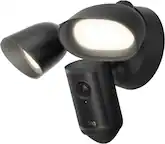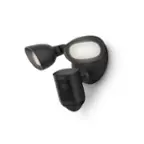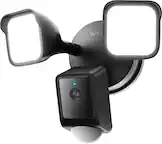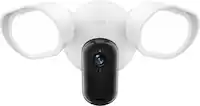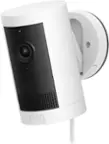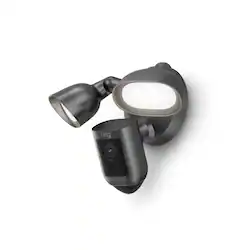
Floodlight Cam Pro with 2K Video and Ring Vision, 2 LED Lights, Dual Band Wi-Fi, and 3D Motion Detection - Graphite
- Key Specs
- Video Camera Resolution: 2K (1440p) (Refers to the number of pixels, both horizontally and vertically, used to capture video/images. The higher the resolution the finer the detail that can be seen.)
- Field Of View: 140 degrees (The area of a target, measured as an angle from the location of viewing, that can be observed.)
- Night Vision: true
- Number Of Cameras Included: 1
- Camera Power Source: Hard wired
- Works With: Amazon Alexa, Ring (Compatible with or able to be connected to other smart devices or applications.)
- Wireless Connectivity: Wi-Fi (The manner in which a device sends data to another device over a short distance without the use of wires or cables.)
- Maximum Operating Temperature: 118 degrees fahrenheit (The highest recommended ambient (surrounding) temperature in which the product can ideally operate stated by the manufacturer. Generally long-term exposure of the product to temperatures more than the maximum can result in ineffective operation.)
- Storage Type: Cloud
- Indoor Or Outdoor Use: Outdoor (Indicates the appropriate environment product was designed to be used in.)
- Minimum Operating Temperature: -5.0 degrees fahrenheit (The lowest recommended ambient (surrounding) temperature in which the product can ideally operate stated by the manufacturer. Generally long-term exposure of the product to temperatures less than the minimum can result in ineffective operation.)
- Audio Communication: 2-way (1-way communication devices allow a user to hear detected audio, while 2-way communication adds the ability for a user to talk back through the device.)
- General
- Brand: Ring
- Model Number: B09PTJKC33
- Product Name: Ring Floodlight Cam Pro with 2K Video and Ring Vision, 2 LED Lights, Dual Band Wi-Fi, and 3D Motion Detection
- Color: Graphite
- Camera
- Video Camera Resolution: 2K (1440p) (Refers to the number of pixels, both horizontally and vertically, used to capture video/images. The higher the resolution the finer the detail that can be seen.)
- Camera Resolution: 2560 x 1600 (Refers to the number of pixels, both horizontally and vertically, used to capture video/images. The higher the resolution the finer the detail that can be seen.)
- Field Of View: 140 degrees (The area of a target, measured as an angle from the location of viewing, that can be observed.)
- Night Vision: true
- Night Vision Distance: 30 feet
- Night Vision Image: Color
- Number Of Cameras Included: 1
- Day/Night Mode: true (Captures images/video with optimal clarity by automatically adjusting settings to various light levels.)
- Power
- Camera Power Source: Hard wired
- Compatibility
- App Compatible: true (The product can be connected to a program or software application on a mobile device, which then receives collected data from the product.)
- Compatibility: Apple iOS and Android
- Brand Compatibility: Ring
- Operating System Compatibility: Android, Apple iOS
- Works With: Amazon Alexa, Ring (Compatible with or able to be connected to other smart devices or applications.)
- Connectivity
- Camera Connectivity: Wireless (Security system cameras can be set up in several ways. Wired cameras require cables for power and footage transmission, while wire-free cameras don't need cables for either. Wireless cameras still require cables for receiving power but are able to transmit footage via a wireless network.)
- Wireless Connectivity: Wi-Fi (The manner in which a device sends data to another device over a short distance without the use of wires or cables.)
- Wireless Networking Standard: Wi-Fi 5 (The wireless networking standard used by the device. Each iteration of the standard developed by the Wi-Fi Alliance corresponds to an existing IEEE 802.11 protocol; for example, standard 802.11ac (or AC) is termed Wi-Fi 5. Refers specifically to the standard the device is designed to use, but ultimately determines product interoperability and backward compatibility including previous versions.)
- Wireless Standard: AC (The wireless networking protocol used by the device. Each iteration of the protocol is based on the 802.11 standard developed by the Institute of Electrical and Electronics Engineers (IEEE) Standards Association. Denoted by letters following 802.11 (802.11a, 802.11ac, etc.), each version, published in alphabetical order, encompasses all previous versions.)
- Frequency Band: 2.4 GHz, 5.0 GHz (Bands may be grouped into categories such as low- and high-band VHF (Very High Frequency), low- and high-band UHF (Ultra High Frequency), or certain frequency channels (measured in MHz or GHz). Generally, higher frequencies transmit information faster but have shorter range than lower frequencies.)
- Recording & Playback
- Streaming Video: true (The ability to transmit a live video feed from the product.)
- Video Recording Capability: true
- Records Audio: true
- Performance
- Maximum Operating Temperature: 118 degrees fahrenheit (The highest recommended ambient (surrounding) temperature in which the product can ideally operate stated by the manufacturer. Generally long-term exposure of the product to temperatures more than the maximum can result in ineffective operation.)
- Indoor Or Outdoor Use: Outdoor (Indicates the appropriate environment product was designed to be used in.)
- Protective Qualities: Weather resistant
- Minimum Operating Temperature: -5.0 degrees fahrenheit (The lowest recommended ambient (surrounding) temperature in which the product can ideally operate stated by the manufacturer. Generally long-term exposure of the product to temperatures less than the minimum can result in ineffective operation.)
- Storage
- Storage Type: Cloud
- Lighting
- Lighting Type: Floodlight, Motion activated
- Features
- Audio Communication: 2-way (1-way communication devices allow a user to hear detected audio, while 2-way communication adds the ability for a user to talk back through the device.)
- Auto-On Detection: Motion
- Mount Type: Ceiling mount, Wall mount
- Dimensions
- Product Height: 12.8 inches (The out of box height of the item. Height is measured as the vertical distance from the bottom of the item to the top as it would be primarily used or placed.)
- Product Width: 8.5 inches (The out of box width of the item. Width is measured as the horizontal distance from one side of the item to the other as it would be primarily used or placed.)
- Product Depth: 7.77 inches (The out of box depth of the item. Depth is measured as the distance from the front of the item to the back as it would be primarily used or placed.)
- Product Weight: 4.5 pounds (The out of box weight of the item.)
- Sensor
- Sensors: Motion sensor (Detects stimuli such as heat, light, sound, motion, or pressure and responds accordingly by operating a control or initiating a function of the device.)
- Warranty
- Warranty - Parts: 1 year limited
- Warranty - Labor: 1 year limited
- Other
- UPC: 840268958152
Protect large outdoor areas like the driveway or backyard with Floodlight Cam Pro. Our most advanced floodlight camera harnesses the power of Ring Vision to deliver brilliant 2K clarity and color.1 Get more precise motion alerts with next-level security features such as 3D Motion Detection and Bird's Eye View. Use the Ring App to see what’s happening, turn on the lights, speak to visitors with improved noise reduction and crisp Audio+, and sound the siren when you need to.
- 3D Motion Detection: Pinpoint motion in your yard with advanced 3D Motion Detection and Bird's Eye View.
- Night vision: Eliminate blind spots or dark areas with built-in Color Night Vision and 2 LED spotlights.
- Detlete This: Sound the 110dB security siren on suspicious activity.
- Alexa: Works with Alexa so you can hear audio announcements whenever motion is detected and enjoy hands-free home security.
- Lifetime purchase protection:: If your Floodlight Cam gets stolen, we'll replace it for free.
- 3D Motion Detection: Pinpoint motion in your yard with advanced 3D Motion Detection and Bird's Eye View.
- Night vision: Eliminate blind spots or dark areas with built-in Color Night Vision and 2 LED spotlights.
- Detlete This: Sound the 110dB security siren on suspicious activity.
- Alexa: Works with Alexa so you can hear audio announcements whenever motion is detected and enjoy hands-free home security.
- Lifetime purchase protection:: If your Floodlight Cam gets stolen, we'll replace it for free.
Whats Included
- Ring Floodlight Cam Wired Pro Outdoor Wireless 1080p Surveillance Camera
- Mounting bracket
- Installation tools and screws
- Security sticker
- Owner's manual
- Ring Floodlight Cam Wired Pro Outdoor Wireless 1080p Surveillance Camera
- Mounting bracket
- Installation tools and screws
- Security sticker
- Owner's manual
Disclaimers
- 1Video quality may vary based on internet bandwidth and device temperature.
- 2Your Ring videos in the cloud are stored temporarily, up to 180 days. Changing your video storage time will only affect videos that are recorded after you adjust your storage time setting. Check Ring.com/plans for more information.
- 3Ring Home Premium subscription required, sold separately. For customers in Illinois & Texas: Ring Smart Video Search is not available on Ring devices due to specific state legislation. Feature only available in English.
- 1Video quality may vary based on internet bandwidth and device temperature.
- 2Your Ring videos in the cloud are stored temporarily, up to 180 days. Changing your video storage time will only affect videos that are recorded after you adjust your storage time setting. Check Ring.com/plans for more information.
- 3Ring Home Premium subscription required, sold separately. For customers in Illinois & Texas: Ring Smart Video Search is not available on Ring devices due to specific state legislation. Feature only available in English.
A: Hello MA3, Good question. Yes, you can use multiple Ring devices at different locations using the same Ring App and account. Locations are a function in the Ring app that allows you to group your Ring devices by their physical location. If, for example, you had a Ring Alarm and a number of Ring cameras at both your home and your place of business, you could group these devices into "Home" and "Business" locations. That way when you want to check on the status of a business camera or make an adjustment to the Ring Alarm system in your home, you can view devices at that particular Location. Please see our help center article for more information: https://support.ring.com/hc/en-us/articles/115005039983-Managing-Ring-Devices-Using-Locations. For any additional questions or concerns, please feel free to reach out on our community forum at https://community.ring.com/. We look forward to hearing from you soon! Thank you, Jamila with Ring.
A: Yes it can. It has multiple settings. You can set it to always stay on and also for motion only
Q: Can multiple phones receive notifications
A: I found it different from answers ring provided below. When multiple devices, alert was sent to only one of the multiple devices. Sometimes device A and other times device B, kind of random as i didnt do anything to control it.
A: You can set it for both
Q: Can it be connected to an outlet plug?
A: Hello, Great question! No, the Ring Floodlight Cam Wired Pro can only be hardwired (100V-240V). If you do not already have an existing junction box, one can be installed, however, Ring highly recommends that you engage a licensed electrician for this. Here is an article with more detailed specifications for this device: https://support.ring.com/hc/en-us/articles/360059101391-Ring-Floodlight-Cam-Wired-Pro-Information. For any additional questions or concerns, please feel free to reach out on our community forum at https://community.ring.com/. We look forward to hearing from you soon! Thank you, Alexis at Ring
A: Hello TrembL, Your Floodlight Cam Wired Pro must be installed on a 4“ round UL listed weatherproof electrical box. A proper electrical box should allow you to secure the device with two screws. Here is a helpful article with images for your review: https://support.ring.com/hc/en-us/articles/360059068632-Installing-Your-Ring-Floodlight-Cam-Wired-Pro-. For any additional questions or concerns, please feel free to reach out on our community forum at https://community.ring.com/. Thanks, Alexis with Ring
A: Yes. That is what I did. But if you turn off the switch you turn off the camera. I have a family member who is habitually turning it off and it’s driving me crazy! I may get an electrician to take it off the switch. And just wire it close by.
A: It requires being hard wired into power at a junction box for power. Camera connects via wifi to provide picture/video/alerts & app.