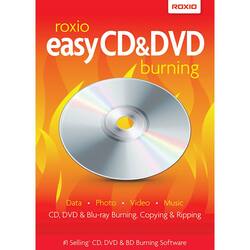
Roxio - Easy CD & DVD Burning - Windows [Digital]
- Key Specs
- Number of Users: 1
- Number of Devices: 1
- Operating System Compatibility: Windows
- Software Format: Digital (Physical software requires a disc, cartridge, etc. be inserted into the gaming console or computer to download and/or operate the software. Digital software allows for downloading and/or playing the software on the gaming console or computer without a physical disc, cartridge, etc. Physical (Download Code Only) software is purchased in physical form with a code that allows for downloading and/or playing the software on the gaming console or computer without a physical disc, cartridge, etc.)
- General
- Brand: Roxio
- Model Number: ROXIO EASY CD & DVD BURNING
- Product Name: Easy CD & DVD Burning
- Publisher: Roxio
- Features
- Language(s): English
- Purchase Rights
- Number of Users: 1
- Number of Devices: 1
- Purchase Rights: Install on 1 Computer.
- Compatibility
- Operating System Compatibility: Windows
- Software Format: Digital (Physical software requires a disc, cartridge, etc. be inserted into the gaming console or computer to download and/or operate the software. Digital software allows for downloading and/or playing the software on the gaming console or computer without a physical disc, cartridge, etc. Physical (Download Code Only) software is purchased in physical form with a code that allows for downloading and/or playing the software on the gaming console or computer without a physical disc, cartridge, etc.)
- Requirements
- System Requirements: Windows 8, Microsoft Windows Vista Home/Business/Ultimate, Windows XP Home/Pro/MCE (Service Pack3), Windows 7 Home Premium, Professional and Ultimate, (32 bit and 64 bit), Windows 8, Windows 10 (The software that a product must have for it to be able to integrate with another product.)
- Subscription: false
- Digital Download Type: Productivity software download
- Download File Size: 1 gigabytes
- Other
- UPC: 400073090814
The new, handy desktop widget in Roxio Easy CD & DVD Burning lets you easily drag and drop files to your CD burner for writing or copying right from your desktop. Roxio Easy CD & DVD Burning is a CD and DVD burner right on your desktop. Just drag and drop your music, photo and video files to the handy desktop widget. Create custom music CDs, preserve photos and burn video in minutes. This item cannot be returned or refunded, please visit Best Buy Return Policy to learn more.
Q: Does this product create a bootable DVD. I'd like to burn a LINUX installation DVD.
A: Yes, this product can be used for burning a bootable DVD.
Q: what is the max minutes for music a CD will have
A: That really depends on your CD you use. If you use it as data, it's measured in MB and then that will depend on the music file itself as all of them are different. I believe if you burn a regular CD that is not rewritable as a jukebox CD, the limit is 80 minutes. I haven't done that in so long that I can't guarantee that's the limit, but that's what I recall from memory. I've been making jukebox CDs from mp3 files which allows me the 700 MB function.
A: It is the old version, and according to Roxio it will not run on Windows 10 64 bit. Run away
Q: can not download digital corel- easy cd & dvd burning
A: undefined