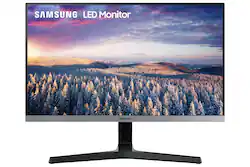
Samsung - 24" LED FHD AMD FreeSync Monitor with bezel-less design (HDMI, D-sub) - Black
- Key Specs
- Refresh Rate: 75Hz (The number of frames per second the device can produce natively without enhancement. Higher rates help produce smooth, seamless pictures.)
- Maximum Resolution: 1920 x 1080 (Maximum resolution refers to the highest number of pixels that a screen can process and display. Higher resolution signals produce more detailed images.)
- Response Time: 5 milliseconds (The speed at which pixels can change colors is called response time. It is measured in milliseconds (ms).)
- Panel Type: VA (Technology that affects response time and image quality.)
- Synchronization Technology: FreeSync (AMD Adaptive Sync) (Generally, these technologies allow syncing between a computer/console game's frame rate and the device's refresh rate for a smoother display without tearing.)
- Screen Size: 24 inches (Size of the screen, measured diagonally from corner to corner.)
- Display Connector(s): 1 x HDMI (The number and type of connectors used to connect to an external display.)
- General
- Product Name: 24" LED FHD AMD FreeSync Monitor with bezel-less design (HDMI, D-sub)
- Brand: Samsung
- Operating System Compatibility: Windows
- Model Number: LS24R35AFHNXZA
- Color: Black
- Display
- Refresh Rate: 75Hz (The number of frames per second the device can produce natively without enhancement. Higher rates help produce smooth, seamless pictures.)
- Maximum Resolution: 1920 x 1080 (Maximum resolution refers to the highest number of pixels that a screen can process and display. Higher resolution signals produce more detailed images.)
- Contrast Ratio: 5000:1 (Measured difference between a displayed image's brightest whites and darkest blacks. The larger the first number, the more detail and color that can be displayed.)
- Response Time: 5 milliseconds (The speed at which pixels can change colors is called response time. It is measured in milliseconds (ms).)
- Display Type: LED
- Panel Type: VA (Technology that affects response time and image quality.)
- Synchronization Technology: FreeSync (AMD Adaptive Sync) (Generally, these technologies allow syncing between a computer/console game's frame rate and the device's refresh rate for a smoother display without tearing.)
- Aspect Ratio: 16:9 (The measurement of the width of a screen compared to the height of a screen, expressed as a ratio.)
- Curved Screen: false
- Brightness: 250 candela per square meter (A measure of the total light output.)
- Screen Size: 24 inches (Size of the screen, measured diagonally from corner to corner.)
- High Dynamic Range (HDR): false (An HDR-compatible 4K TV or other HDR-compatible product displays HDR video content when it's available from sources like 4K Ultra HD Blu-ray Discs and 4K streaming services.)
- Vertical Viewing Angle: 178 degrees (The maximum angle at which the display can be viewed with acceptable visual performance from above or below.)
- Connectivity
- Number of HDMI Inputs (Total): 1
- Display Connector(s): 1 x HDMI (The number and type of connectors used to connect to an external display.)
- Compatibility
- Wall Mountable: true (The product is able to be secured to a wall. Some products are designed ready to mount, while others may require additional hardware/accessories for installation.)
- VESA Wall Mount Standard: 75mm x 75mm (VESA wall mount standards refer to the spacing of screw holes built into a TV in order to fit with standard TV wall mounts. These standards are implemented into most TVs and monitors.)
- Features
- Adjustable Stand Height: false
- Built-In Webcam: false
- Integrated Speaker(s): false
- Dimensions
- Product Height With Stand: 16.7 inches
- Product Height Without Stand: 12.6 inches
- Product Width: 21.2 inches (The out of box width of the item. Width is measured as the horizontal distance from one side of the item to the other as it would be primarily used or placed.)
- Product Depth (With Stand): 9.2 inches
- Product Depth Without Stand: 1.9 inches
- Product Weight: 7.5 pounds (The out of box weight of the item.)
- Stand Included: true
- Certifications Listings & Approvals
- ENERGY STAR Certified: false (Devices carrying the ENERGY STAR service mark, such as computer products and peripherals, kitchen appliances, and other products, generally use 20% to 30% less energy than required by federal standards.)
- EPEAT Qualified: false (The Electronic Product Environmental Assessment Tool (EPEAT) was designed to provide an environmental assessment tool for purchasers. In order to qualify for EPEAT, a product must meet all 23 required criteria.)
- Warranty
- Manufacturer's Warranty - Parts: 1 year
- Manufacturer's Warranty - Labor: 1 year
- Other
- UPC: 887276651668
The SR35 FHD monitor has a 3-sided bezel-less screen for maximum viewing and a sleek, modern Y-shaped stand – perfect for a dual monitor set-up. With Eye Saver, Flicker Free Technology and Game Mode, you can work and play with less strain and more efficiency. HDMI and D-Sub ports make connectivity easier and more convenient.
- Expand Your View: Simplistic design, total sophistication. Exquisite craftsmanship makes the difference in a flat screen monitor that's serious about style. The 3-sided bezel-less screen and slim Y-shaped stand bring a minimalist look.
- All Action, No Delay: Superfluid entertainment experience. AMD Radeon FreeSync™ keeps your monitor and graphics card refresh rate in sync to reduced image tear and stutter. Watch movies and play games without any interruptions. Even fast action scenes look clear and seamless.
- More Gaming Power: Ideal game settings instantly give you the edge. Get optimal color settings and image contrast to see scenes more vividly and spot enemies hiding in the dark. Game Mode adjusts any game to fill your screen with every detail in view.
- Moves with the Flow: Now, all the action looks flawless. The 75Hz refresh rate delivers a more fluid picture. Whether you're catching up on your favorite TV drama, watching a video, or playing a game, your entertainment is smooth with no lag or ghosting effect.
- Focused Comfort: Protect your eyes and do more. The advanced eye comfort technology reduces eye strain for more comfortable extended computing.
- True Versatility: Connect to more. With both HDMI and D-sub ports, multiple devices can be plugged straight into your monitor for complete flexibility. Now, your computing environment is even more convenient with additional input possibilities.
Q: Does it come with the HDMI and D-Sub cords?
A: It comes with a HDMI cable. D-Sub cord is not included.
Q: Does the Monitor move up and down or stays in one position?
A: this monitor only tilts up and down, it wont move up and down on the stand. Still great monitor for the value!
Q: Does this monitor have a USB connection?
A: No, just HDMI and VGA inputs
A: yes it is 75x75mm mount size. You can always take the model number and look it up on samsungs website to find out.
Q: Does it have a camera on it for zoom calls?
A: The monitor does not have a camera.
Q: How do you tilt the screen?
A: You simply bend it with your hands. Apply gentle pressure to tilt the screen. Mine works very well.
Q: Can I use it horizontally for coding after attaching it to my laptop using it as a 3rd screen?
A: It should be possible. I’m curious to try this myself. The only issue is that the stand that comes with it doesn’t support rotating the screen, so you would need a mount for the screen that does rotate.






















