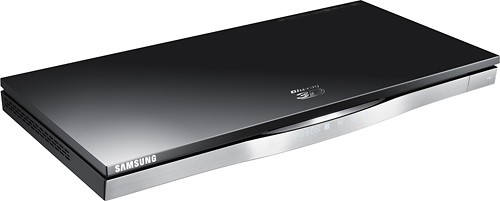
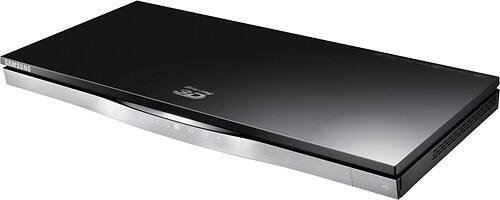
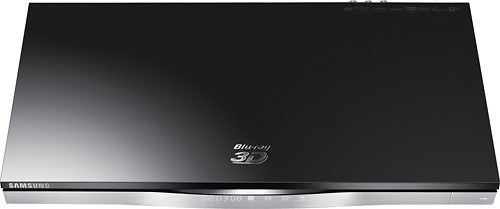

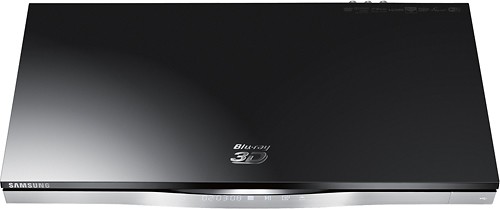
Samsung - 3D Wi-Fi Built-In Blu-ray Player
This item is no longer available in new condition.
See similar items below.
Description
Features
Blu-ray player
For high-definition movie playback with resolution up to 5 times greater than DVD. Watch films in stunning high-definition just like you do on the big screen.
Upscale DVDs
Delivers greatly enhanced video performance of standard DVDs by upscaling their video resolution to HDTV-compliant 1080p via the HDMI interface.
3D technology
Delivers full 3D content for an immersive viewing experience when you pair this Blu-ray player with a 3D HDTV (HDMI 1.4 cable required; not included).
Connect to the Internet
Via Samsung Smart Hub for access to Netflix, Pandora, YouTube, Hulu and more. Full browser enables easy navigation.
Built-in Wi-Fi
Lets you view streaming content and provides firmware updates. Ethernet port allows simple wired connection.
Allshare DLNA capability
Makes it easy to access content stored on your PC.
Playable formats
Include BD-ROM discs; backward compatible with DVD±R/RW, DVD-Video, CD-R/RW and CD-DA for a variety of media choices. Also compatible with MPEG-2, MPEG-4, Xvid, AVCHD, MKV, WMV, AAC, MP3, WMA and JPEG formats.
Built-in Dolby Digital and DTS decoders
Feature 7.1-channel analog audio outputs for Dolby Digital, Dolby Digital Plus, Dolby TrueHD, DTS Surround, DTS-HD Master Audio and DTS-HD High Resolution Audio for playback on a compatible audio system.
2 HDMI inputs, 1 HDMI output
HDMI cable not included. High-speed HDMI cable is the only connection that can deliver a Blu-ray experience with a full 1080p picture and digital surround sound.
Quick-start mode
Allows discs to begin playing in as little as 0.5 seconds.
USB 2.0 port
Lets you watch media stored on a USB flash drive for expanded entertainment options.
For additional information please see the Specifications Tab
What's Included
Samsung 3D Wi-Fi Built-In Blu-ray Player
Remote with battery
Owner's manual
Other
- Energy Star CompatibleNo
- Player TypeBlu-ray Player
- <a href="javascript:winopengld('1087340814919','pcmcat38200050027','cat12080')">Playback Formats</a>3D BD-ROM, BD-ROM, DVD±R/RW, DVD-Video, CD-R/RW, CD-DA, MPEG-2, MPEG-4, Xvid, AVCHD, MKV, WMV, AAC, MP3, WMA, JPEG
- Maximum Output ResolutionHigh Definition up to 1080p
- <a href="javascript:winopengld('1142288291174','pcmcat38200050027','cat12080')">Media Card Slot</a>No
- <a href="javascript:winopengld('1142288289852','pcmcat38200050027','cat12080')">HDMI Inputs</a>2
- HDMI Outputs1
- Composite Video Inputs/Outputs0/0
- Digital Audio Outputs1
- USB PortYes
- Ethernet PortYes
- <a href="javascript:winopengld('1087340567137','pcmcat38200050027','cat12080')">Optical Digital Audio Outputs</a>1
- SD Card SlotNo
- Instant ContentNetflix, Pandora, YouTube, Hulu and more
- BD LiveYes
- <a href="javascript:winopengld('1218870374819','pcmcat38200050027','cat12080')">ENERGY STAR Certified</a>No
- Wi-Fi ReadyYes
- Wi-Fi Built InYes
- 3D-ReadyYes
- Surround Sound DecodersDolby Digital, Dolby Digital Plus, DolbyTrueHD, DTS Surround
- Smart CapableYes
- UPC036725608979
Customer reviews
Rating 4.3 out of 5 stars with 72 reviews
(72 customer reviews)Rating by feature
- Ease of Use4.3
Rating 4.3 out of 5 stars
Customers are saying
Customers appreciate the excellent picture quality and ease of use of this Blu-ray player, frequently praising its simple setup and 3D capabilities. While some users found the web browser difficult to use and experienced issues with HDMI input compatibility, many consider it a great value for its price and features.
This summary was generated by AI based on customer reviews.
- Pros mentioned:3d, Picture quality
Rated 4 out of 5 stars
Very pleased
||Posted .This reviewer received promo considerations or sweepstakes entry for writing a review.Overall this is a great player. It has excellent picture and sound quality, the 3D is as good as any other top player these days, and it's relatively quiet. There are only a couple issues I've noticed. First is that every now and then it'll throw up a network connection error and won't let me access any of the apps. So far I haven't had any trouble getting the signal back. It just requires unplugging the unit for a minute or two and plugging it back in. This could be an issue for some, but since I'm using one of the plugs in the back of my receiver to power it, I simply turn the receiver off and it gives me the same result. I've never had this NOT regain the connection. The only other thing is that sometimes it takes the unit a minute to start up. I have the fast start up enabled and sometimes it comes up immediately (within a second or 2) but sometimes it takes it about 30-45 seconds. I'm not sure what the reason is behind this. I haven't payed enough attention to identify any particular pattern or causative factors. Oh, and one other thing I noticed while watching 3D movies with my deaf cousin is that in some shots the subtitles are ghosting. It looks like the images aren't layered correctly. I'm not sure if this is an issue with the player or my tv or if it's an inherent problem with subtitles in 3D movies. It only happens in certain types of shots and only a few times per movie, but it has happened each time I've used subtitles on a 3D movie. They are still readable, so it doesn't hurt the watchability of the movies. It's just a little annoying. Overall, even with these few issues I'd still very much recommend this player to anyone based on the sound and picture quality and the fact that none of the issues above actually hurt the usability of the player very much.
I would recommend this to a friend - Pros mentioned:Picture qualityCons mentioned:Web browser
Rated 4 out of 5 stars
After trying several streamers, found a good one!
||Posted .This reviewer received promo considerations or sweepstakes entry for writing a review.Purchased my first HD TV (Samsung) and wanted to use one remote for streamer and TV, so bought a lower end Samsung streamer. It did not produce good picture sharpness and had jittery motion. Took it back and bought the next model up from Samsung. Had the same issue with quality and some freezing problems. Kept returning the various models and even tried a Vizio streamer until I got to this one. Practically true HD quality picture. It comes with a price tag and web browser is too difficult to realistically use. Have to use the arrow keys on the remote to move the cursor in the web browser. Way too slow to be able to navigate between pages and scroll the window.
I would recommend this to a friend - Pros mentioned:Ease of use, Features
Rated 5 out of 5 stars
Amazing DVD player. Has lots of bells & whistles.
||Posted .This reviewer received promo considerations or sweepstakes entry for writing a review.I do lots of research before I buy any piece of electronics. I'm almost over cautious. Spent 1 hr talking to specialist prior to making decision. I have a top of line smart Samsung TV and wanted a DVD player to match my TV. 5 stars across the board for Samsung. I can't tell you how easy everything has been. It's very advanced and lots of extra toys to play with. Need to make time to learn how to fully utilize my player. I recommend this player to everybody even if you do not own a Samsung TV.
I would recommend this to a friend - Pros mentioned:Ease of use, Picture quality
Rated 5 out of 5 stars
Top of the line Samsung blu-ray player for 2012.
||Posted .This reviewer received promo considerations or sweepstakes entry for writing a review.Great player for my new Samsung TV! Great picture, easy install, link with TV. Since my Samsung TV has all apps and wireless N, I'll use it and not the blu-ray player for those features (such as Netflix).
I would recommend this to a friend - Pros mentioned:Features
Rated 5 out of 5 stars
The Best that I have seen for the Price
||Posted .This reviewer received promo considerations or sweepstakes entry for writing a review.I have own many DVD players and now four Blu-ray players. For the cost it really surprised me how many features, from extra inputs to self updating from the Internet, this units has. Plus it works smartly with my Samsung Tv, so I only need the one remote.
I would recommend this to a friend - Pros mentioned:Ease of use, Picture quality
Rated 4 out of 5 stars
good value
||Posted .This reviewer received promo considerations or sweepstakes entry for writing a review.Overall great picture quality and relatively easy to use. Only drawback for me was the Blockbuster issue. Although the App says it works on this model Samsung Blu-ray - it doesn't
I would recommend this to a friend - Pros mentioned:Ease of use, Picture quality
Rated 4 out of 5 stars
This is a great unit for the price
||Posted .This reviewer received promo considerations or sweepstakes entry for writing a review.I will recommend this unit because once it set up, it is very easy to operate and the picture is great. Please read the instuctions very carefully before attempting setup. If you fail the set-up the first time, do not get discouraged, try again. Then enjoy.
I would recommend this to a friend - Pros mentioned:Ease of use, Picture quality
Rated 5 out of 5 stars
Great Blu-Ray
||Posted .This reviewer received promo considerations or sweepstakes entry for writing a review.Great picture , easy to use, Slot loading , fast load times
I would recommend this to a friend
Q: Questionnormal dvdswill this device play regular and blu-ray as well as 3d blu-rays
Asked by Anonymous.
- A:Answer Yes, 3-D Blu-ray discs, Blu-ray discs, DVDs, and audio CDs can all be played in this player. Thanks for your interest in Samsung products. Mr. Samsung
Answered by MrSamsung

Q: Questionwill it play regular blu-ray dads, even if they are not 3d?
Asked by Anonymous.
- A:Answer Yes, Blu-ray discs, 3-D Blu-ray discs, DVDs and even compact discs will play in this model. Thanks for your interest in Samsung products. --Mr.Samsung
Answered by MrSamsung
Q: QuestionHDMI InputsThis unit has two HDMI Inputs. Would one of those be for my cable box and the other for another device like my HDMI output from laptop?
Asked by Elario.
- A:Answer You can use the player to increase the number of devices you can connect to your TV by connecting up to two external devices to the HDMI IN ports on the back of the player. For instance, one could be a Set Top Box, or a Game Console or Camcorder. Thanks for your interest in Samsung products. --Mr.Samsung
Answered by MrSamsung
Q: QuestionWeb browser capabilityIs the web browser able to stream video from websites, and support java and adobe flash?
Asked by Anonymous.
- A:Answer Adobe Flash 10. and below are supported. If the site you're visiting requires a higher version of Flash or other codec option for the browser feature, playback results may vary or not work. Thanks for your interest in Samsung products. --Mr.Samsung
Answered by MrSamsung
Q: QuestionIs it compatible with new remote keyboard VG-KBD1000?I bought this blu-ray player mainly because of the Smart TV features, but navigating with the remote is really painful. Then I found out Samsung has a new remote keyboard VG-KBD1000 that is made for Smart TV, but I'm not sure it is compatible with this blu-ray player, since it connects via bluetooth. Can someone please clarify? Thanks.
Asked by Anonymous.
- A:Answer This is compatible with TVs only. The LED ES6500 and UP and LED EH5300 Series and up are supported. Additionally, if you have a plasma, it will work on models E550 Series and up. Unfortunately, it won't work with your Blu-Ray model. Thanks for your interest in Samsung products. --Mr.Samsung
Answered by MrSamsung
Q: QuestionWhat compatible audio system by samsung are availiable for this player?I have bought player and want surround sound .Do not need another blu- ray player just audio system. Thanks Mark (I also have Samsung 46 inch 3D TV series 7100)
Asked by Mark.
- A:Answer Mark, thanks for the inquiry. Many of our "Home Theater Systems" have Blu-Ray players included, but if you want a standalone receiver, try checking out the Samsung AV Receivers section of our website here: http://www.samsung.com/us/video/a-v-receivers Thanks for considering Samsung products! --Mr.Samsung
Answered by MrSamsung
Q: QuestionDoes the On-Demand Blockbuster app actually work on this model?The BD-E5900 player states that it offers this app but when you try to use it after downloading it doesn't work....A samsung site stated that it only works on the 6500 models or higher. This model should work but i do not want to buy it until i know for sure.
Asked by jp.
- A:Answer The apps are offered on a variety of Samsung Blu-Ray players. However, in some cases, the App owner may temporarily disable or suspend the App to improve performance, update, or add additional features - or in some rare instances, suspend or remove their services. We have no control when this happens, as each App is owned by the individual App owners. If the other Apps are working, and you have a problem with one App, please reach out to that App owner directly to see if they can assist with your account. For assistance with the BlockBuster App specifically, you can reach out to [email protected] Thanks for your interest in Samsung Blu-Ray players. --Mr.Samsung
Answered by MrSamsung
Q: QuestionHDMI Inputs and audio out on Samsung BD-E6500if a device like a PC is connected to one of the BD-E6500 HDMI inputs and the Audio out on the BD-E6500 is connected to a receiver, and the HDMI out is connected to a TV, can the audio from the laptop HDMI be played on the receiver through the BD-E6500 Audio out?
Asked by slh.
- A:Answer I can't say for 100% because I haven't done it, but that shouldn't be any different than watching a disk. You select the video source in the player menu, if you have something connected to one of the HDMI inputs. It then SHOULD use the HDMI output for the video (as normal) and the optical out for the audio (again, as normal). As I say, I can't confirm this 100% because I haven't tried it, but I see no reason that it would t work. I am assuming you're connecting the computer to the player with a single HDMI cable.
Answered by Anonymous
Most viewed
- $999.99Your price for this item is $999.99
- $249.99Your price for this item is $249.99
- $699.00Your price for this item is $699.00$799.00The comparable value for this item is $799.00
- $69.99Your price for this item is $69.99$449.99The comparable value for this item is $449.99
- $499.99Your price for this item is $499.99
- $899.99Your price for this item is $899.99$1,099.99The comparable value for this item is $1,099.99
- $239.99Your price for this item is $239.99$499.99The comparable value for this item is $499.99
- $1,199.99Your price for this item is $1,199.99$1,499.99The comparable value for this item is $1,499.99
- $347.09Your price for this item is $347.09$349.00The comparable value for this item is $349.00
- $499.00Your price for this item is $499.00
- $329.99Your price for this item is $329.99$699.99The comparable value for this item is $699.99
- $499.99Your price for this item is $499.99
- $33.34Your price for this item is $33.34/mo.per monthfor 36 mos.; 0% APR
- $13.99Your price for this item is $13.99
- $139.00Your price for this item is $139.00$319.00The comparable value for this item is $319.00
- $119.99Your price for this item is $119.99$299.99The comparable value for this item is $299.99
- $579.99Your price for this item is $579.99$949.99The comparable value for this item is $949.99
- $119.99Your price for this item is $119.99
- $119.99Your price for this item is $119.99$219.99The comparable value for this item is $219.99
- $1,579.00Your price for this item is $1,579.00