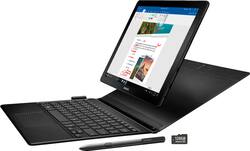
Samsung - Galaxy Book - 12" - 128GB - With Keyboard - Black
- Key Specs
- Screen Size: 12 inches (Size of the screen, measured diagonally from corner to corner.)
- Screen Resolution: 2160 x 1440 (Screens come in a range of resolutions (measured in pixels, horizontal x vertical). The higher the resolution, the greater the picture quality.)
- Processor Model: Intel 7th Generation Core i5 (Your computer's processor is like its brain. Working in combination with system memory, the power of the processor determines the complexity of software you can run, how many programs you can have open at the same time, and how fast those programs will run. Most computers feature an AMD, Intel or Snapdragon processor.)
- Total Storage Capacity: 128 gigabytes
- Operating System: Windows 10 Home (The operating system manages all software and hardware, including files, memory and connected devices. Most importantly, it lets you interact with your device and your programs in a visual way; otherwise, you'd be typing computer code to get anything done.)
- Voice Assistant Built-in: Cortana (A digital assistant built into the device that uses voice commands to answer questions and control smart devices.)
- 2-in-1 Design: true (A laptop and a tablet combined in one lightweight, portable device. Sometimes referred to as "convertible" or "hybrid" laptops, these devices deliver the processing power and keyboard of a laptop. When you're ready to play, either detach the screen or fold your 2-in-1 into tablet mode to comfortably watch movies, play games, read an e-book and more.)
- Security Features: Password Protection
- General
- Product Name: Galaxy Book - 12" - 128GB - With Keyboard
- Brand: Samsung
- Model Number: SM-W720NTKBXAR
- Model Family: Samsung Galaxy Book
- Year of Release: 2017
- Display
- Display Type: LED
- Screen Type: Super AMOLED
- Screen Size: 12 inches (Size of the screen, measured diagonally from corner to corner.)
- Screen Resolution: 2160 x 1440 (Screens come in a range of resolutions (measured in pixels, horizontal x vertical). The higher the resolution, the greater the picture quality.)
- Stylus Input: Built for Windows Ink (Active) (An active stylus/pen is able to communicate directly with a compatible device; active electromagnetic resonance (EMR) pens are powered via a device's screen and active electrostatic (AES) pens require an additional power source. A passive stylus does not have electronic features and is compatible with most capacitative touch screens.)
- Processor
- Processor Brand: Intel
- Processor Model: Intel 7th Generation Core i5 (Your computer's processor is like its brain. Working in combination with system memory, the power of the processor determines the complexity of software you can run, how many programs you can have open at the same time, and how fast those programs will run. Most computers feature an AMD, Intel or Snapdragon processor.)
- Storage
- Total Storage Capacity: 128 gigabytes
- Memory
- System Memory (RAM): 4 gigabytes (Random-access memory (RAM) is a computing device's short-term data storage, which allows active information to be accessed quickly. The size and type of RAM determines how efficiently the device can handle large amounts of information at one time. For example, gaming or video editing requires more RAM for optimal performance.)
- Expandable Memory Compatibility: microSD
- Compatibility
- Operating System: Windows 10 Home (The operating system manages all software and hardware, including files, memory and connected devices. Most importantly, it lets you interact with your device and your programs in a visual way; otherwise, you'd be typing computer code to get anything done.)
- Operating System Compatibility: Windows
- Voice Assistant Built-in: Cortana (A digital assistant built into the device that uses voice commands to answer questions and control smart devices.)
- Connectivity
- Compatible Wireless Standard(s): Wireless-A, Wireless-AC, Wireless-B, Wireless-G, Wireless-N (The wireless networking standard(s) the device is backwards compatible with. This includes networking protocols based on the IEEE 802.11 standard (alphabetically ascending) and the Wi-Fi Alliance standard (numerically ascending), both of which provide high-throughput wireless local area networks (WLANs). Devices designed to work with specific standard(s) will be backwards compatible with previous versions but may not run at optimal performance when using earlier iterations.)
- Headphone Jack: true (The device features an interface that allows for the connection of headphones.)
- GPS Enabled: true
- Interface(s): USB Type C (Refers to the types of connections that devices use to interact and communicate with each other.)
- Data Plan Required: false
- Power
- Battery Life (up to): 11 hours (Battery life will vary depending on the product configuration, product model, applications loaded on the product, power management setting of the product and the product features used by the customer. As with all batteries, the maximum capacity of this battery will decrease with time and usage.)
- Battery Capacity: 5070 milliampere hours (The amount of energy stored in the battery.)
- Camera
- Front-Facing Camera: true
- Front Facing Camera Megapixels: 5 megapixels (The more megapixels, the more detail that the camera facing the user can capture.)
- Rear-Facing Camera: true
- Rear Facing Camera Megapixels: 13 megapixels (The more megapixels, the more detail that the camera facing away from the user can capture.)
- Features
- 2-in-1 Design: true (A laptop and a tablet combined in one lightweight, portable device. Sometimes referred to as "convertible" or "hybrid" laptops, these devices deliver the processing power and keyboard of a laptop. When you're ready to play, either detach the screen or fold your 2-in-1 into tablet mode to comfortably watch movies, play games, read an e-book and more.)
- Keyboard Included: true
- Security Features: Password Protection
- Stylus Dock: None
- Certifications Listings & Approvals
- ENERGY STAR Certified: true (Devices carrying the ENERGY STAR service mark, such as computer products and peripherals, kitchen appliances, and other products, generally use 20% to 30% less energy than required by federal standards.)
- Included
- Included Software: true
- Stylus Included: true
- Other
- UPC: 887276224350
Only at Best Buy
Watch movies and TV shows anywhere on this 12-inch Samsung Galaxy Book 2-in-1 tablet. It has a Super AMOLED display that supports 4K resolution to replicate the movie theater experience, and its S Pen provides precision in creative projects. This Samsung Galaxy Book 2-in-1 tablet has a battery life of up to 10.5 hours.
- Windows 10 operating system: Windows 10 brings back the Start Menu from Windows 7 and introduces new features, such as Edge Web browser that lets you mark up Web pages on your screen. Learn more ›
- Built for Windows Ink: With Windows Ink-compatible computers, you can take notes on screen, mark up photos and screen shots, or create content through Ink-enabled apps.Learn more ›
- 12" screen with 2160x1440 resolution: High pixel density and stunning detail make this screen ideal for web browsing, studying, reading and streaming HD content.
- 128GB internal storage plus microSD slot: Store your software, applications, music, movies, photos and more. Expand storage with a microSD card up to 256GB (sold separately).
- Dual-core processor: Delivers responsive performance, smooth-streaming video and fast access to the Web and e-mail.
- Two HD cameras for photos and face-to-face chat: 5.0MP front camera and 13.0MP autofocus rear camera.
- Spark your creativity with the included pressure-sensitive S Pen: Edit photos, create detailed illustrations or send handwritten notes to family and friends.
Whats Included
- 128GB MicroSD card
- Keyboard
- Power Adapter
- Quick Start Guide
- S Pen
- Samsung Galaxy Book - 12" - 128GB
- USB Type-C cable
A: Nobody wants the 4/128, Win10 Home models. As a hybrid, the only acceptable minimum is the 8/256, Win10 Pro version. Otherwise, I might as well stick with two separate devices.
Q: Where's the option for 8GB RAM, 256 GB SSD? 128GB for a laptop is a joke.
A: I think Samsung is reserving that model for themselves. I've only found it for sale on their site. Also, if you use Google Drive or Microsoft OneDrive, you can get by with 128GB internal storage, especially since you can add a micro SD card. It's the RAM that bothers me, really feel like I need 8GB minimum.
A: I actually had the Microsoft pro 4 before this came out for sale. I returned it to buy this. As of today (5/14/2018) the newest surface pro (5) is $1299.99 for a 256gb 8gb ram. This includes the tablet (with windows 10 pro) and the keyboard case. Additionally u need a pen (ink ready recommended) add $99.99+. The Samsung is $1329 it includes tablet (with windows 10 home), keyboard with multiple positioning, and S pen, it to is 256gb with 8gb ram. Both devices have an i5 Intel core... In my opinion the surface had alot of issue with regards to crashing and booting up ( I went through 3 before I bought the Samsung.) functionality is better on the Samsung, however this comes with alot of Samsung's bloatware. If you do not own a Samsung phone or TV it can be pointless software (it is user removable though). The surface has actual USB ports where as the Samsung has only 2 type c-USB's (one should be for charging when needed, so a USB hub is recommended). The surface has a SD card slot (the card does stick out of device) and the Samsung has a microSD internal slot. So it come down to ur needs and preferences, but I would say the Samsung is a better value out the box.
A: The keyboard that comes with the galaxy book is backlit! Although I am not very familiar with the Tab pro S keyboard I believe the overall keyboard is a little larger with more spread out keys and has a larger trackpad on the galaxy book
A: I do not think you can change internal parts in 2in1 devices. Everything is soldered on to the board. What you buy is what you get. You can only insert micro ssd to boost your storage capacity. That's it.
A: I lost my Surface under similar circumstances. This is a much hardier unit. I have already dropped it once (in the month I've owned it) and it is fine. Part of the reason is the padded cover that serves as the stand for the display portion. Another part is that it was simply designed to withstand more "abuse." I really loved my Surface. I'm finding I love this Samsung even more. Hope this helps!
A: Yes. The one charger will charge both the tablet and S8.
A: Personally I don't use Samsung Flow. I believe it's only used to unlock your tablet with your phone. I just unlock it on the tablet itself. I see no need to use Samsung Flow at all so far. I hope that helps.





















