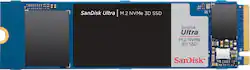
SanDisk - Ultra 1TB Internal SSD PCIe Gen 3 x4 NVMe
- Key Specs
- Storage Capacity: 1000 gigabytes (Measured in megabytes (MB), gigabytes (GB) and terabytes (TB), this is the amount available for storing files, music, movies, photos and more. The total includes the capacity of the hard disk drive and solid state drive if both are included on the computer.)
- Storage Drive Type: SSD (Traditional, mechanical hard disk drives are the most common type of storage because they're relatively inexpensive and offer huge capacities. However, they also generate both noise and heat. Solid state drives, also known as SSDs, are many times faster than hard disk drives and have no moving parts to wear out, but typically offer less capacity for the same price.)
- Maximum Read Speed: 2400 megabytes per second (The greatest speed at which the device can read information; for example, opening files.)
- Maximum Write Speed: 1950 megabytes per second (The greatest speed at which the device can write information; for example, saving files.)
- Interface(s): PCIe Gen 3 x4 (Refers to the types of connections that devices use to interact and communicate with each other.)
- General
- Product Name: Ultra 1TB Internal SSD PCIe Gen 3 x4 NVMe
- Brand: SanDisk
- Model Number: SDSSDH3N-1T00-G25
- Capacity
- Storage Capacity: 1000 gigabytes (Measured in megabytes (MB), gigabytes (GB) and terabytes (TB), this is the amount available for storing files, music, movies, photos and more. The total includes the capacity of the hard disk drive and solid state drive if both are included on the computer.)
- Performance
- Storage Drive Type: SSD (Traditional, mechanical hard disk drives are the most common type of storage because they're relatively inexpensive and offer huge capacities. However, they also generate both noise and heat. Solid state drives, also known as SSDs, are many times faster than hard disk drives and have no moving parts to wear out, but typically offer less capacity for the same price.)
- Maximum Read Speed: 2400 megabytes per second (The greatest speed at which the device can read information; for example, opening files.)
- Maximum Write Speed: 1950 megabytes per second (The greatest speed at which the device can write information; for example, saving files.)
- Heatsink: false (Dissipates heat during intense operation for sustained peak performance.)
- Compatibility
- Internal Or External: Internal
- Product Compatibility: Laptop computers, Desktop computers
- Interface(s): PCIe Gen 3 x4 (Refers to the types of connections that devices use to interact and communicate with each other.)
- Features
- Security Features: None
- Usage: Everyday computing, Gaming, Performance computing
- Dimensions
- Product Height: 0.1 inches (The out of box height of the item. Height is measured as the vertical distance from the bottom of the item to the top as it would be primarily used or placed.)
- Product Width: 0.9 inches (The out of box width of the item. Width is measured as the horizontal distance from one side of the item to the other as it would be primarily used or placed.)
- Product Weight: 0.3 ounces (The out of box weight of the item.)
- Included
- Included Software: SanDisk SSD Dashboard
- Other
- UPC: 619659176709
Build a system that keeps up with you with the SanDisk Ultra® M.2 NVMe™ 3D SSD. Whether you’re upgrading your current PC or building a new one from scratch, get lightning-fast, ultra-responsive performance in a powerful yet price-conscious drive. Sequential write speeds of up to 1,950MB/s ensure fast booting and rapid data transfer. Accelerate with next-gen NVMe performance to boot faster, work smarter and play longer.
- PCIe Gen 3 x 4 (NVMe) interface: Offers simple connection to your computer.
- 1TB storage capacity: Provides ample storage space for your music, movies and more.
- Up to 2,400MB/s read speed: Along with an up to 1,950MB/s write speed saves you time when transferring files.
- Lightning-fast speeds: With read speeds up to 2,400MB/s, the SanDisk Ultra M.2 NVMe 3D SSD is 4x faster than our SATA SSDs for ultra-responsive PC performance at work and at play.
- Cool under pressure: An optimal thermal design keeps the SanDisk Ultra M.2 NVMe 3D SSD going even during intense use, so you can keep creating, processing, gaming, and more.
- Compact size, big output: The slimline, single-sided M.2 2280 PCIe® Gen3 x4 NVMe SSD delivers big results in a streamlined package, making it ideal for your next custom build or system upgrade.
Whats Included
- Ultra 1TB Internal PCI Express 3.0 x4 (NVMe) Solid State Drive
- SanDisk SSD Dashboard software
Product Manuals
Q: Will this work in a M.2 Slot?
A: Hi, please be informed that if the M.2 Slot does not support NVMe Drives, then this SSD Drive would not work in that M.2 Slot. In order to know if your M.2 Slot supports NVMe Drives, it would be best to contact the manufacturer of your laptop/ motherboard as they would have all the technical specifications for the same.
Q: I have a xw6600 Hp workstation, with Windows 10 64-bit; will this work with my setup?
A: I just looked up your specs and unless you changed your motherboard you don't have the NVME slot, so you won't be able to use this one.
A: Need to transfer windows to new SSD first. It's called cloning a drive.
Q: Is this compatible with Dell Inspiron 15 5100?
A: Hi, please be informed that if your Dell laptop has an internal PCIe 3.0 x4 NVMe M.2 slot, then you can connect this SSD Drive in your laptop. In order to know if your laptop has an internal PCIe 3.0 x4 NVMe M.2 slot, it would be best to contact Dell Customer Support as they would have all the technical specifications for your laptop.
A: Hi, please be informed that if your computer has an internal PCIe 3.0 x4 NVMe M.2 slot, then you can connect this SSD Drive in it. In order to know if your computer has an internal PCIe 3.0 x4 NVMe M.2 slot, it would be best to contact your computer manufacturer's Customer Support as they would have all the technical specifications for your computer.
A: Yes it definitely will work with your computer, you have 2 m.2 slots on your motherboard, and if you wanted to transfer your existing OS with everything intact you could use aomei partition assistant (the freeware version works) and it will do it in a couple clicks. There are other ways, but this is what I used, very simple, safe and free.
A: Yes it will work and you should have no problems with doing so.
A: No. This does not have dram cache. This is the same drive as the WD SN550, picture looks identical. WD SN550 also does not have Dram, so buy the cheaper of the two.























