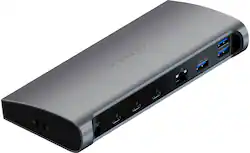
Satechi - Thunderbolt 4 Dock 12-in-1 – 3 Thunderbolt 4 Ports, 3 USB-A 3.2, USB-A 2.0, SD Card, Ethernet, Audio Jack - Space Gray
- Key Specs
- Maximum Number of Displays Supported: 2
- Number of DisplayPort Outputs (Total): 3
- Passthrough Power: false (Indicates whether the device allows power to passthrough, possibly with some loss, to another device, typically to charge that other device.)
- General
- Product Name: Thunderbolt 4 Dock 12-in-1 – 3 Thunderbolt 4 Ports, 3 USB-A 3.2, USB-A 2.0, SD Card, Ethernet, Audio Jack
- Brand: Satechi
- Model Number: ST-UCT4DM
- Color: Space Gray
- Display
- Maximum Number of Displays Supported: 2
- Ports
- Display Connector(s): 1 x HDMI, 1 x Thunderbolt 4 (The number and type of connectors used to connect to an external display.)
- Number of DisplayPort Outputs (Total): 3
- Number of HDMI Ports (Total): 0
- Number of VGA Ports: 0 (VGA (Video Graphics Adapter or Video Graphics Array) is a display standard that transmits via analog signals. This type of interface is typically used to connect a computer to a display device such as a monitor, projector, or TV.)
- USB Ports: 3 x USB-A 3.0, 1 x USB-A 2.0 (The number and type of USB ports the product has.)
- Power
- Powered: true
- Power Supply Input: DC jack (2.1mm)
- Maximum Input Power: 15 watts (The maximum amount of power allowed to come into the device.)
- Passthrough Power: false (Indicates whether the device allows power to passthrough, possibly with some loss, to another device, typically to charge that other device.)
- Compatibility
- Brand Compatibility: Universal
- Model Compatibility: Universal
- Dimensions
- Product Height: 1.18 inches (The out of box height of the item. Height is measured as the vertical distance from the bottom of the item to the top as it would be primarily used or placed.)
- Product Length: 7.68 inches (The out of box length of the item. Length is measured as the longest dimension of the item.)
- Product Width: 3.35 inches (The out of box width of the item. Width is measured as the horizontal distance from one side of the item to the other as it would be primarily used or placed.)
- Product Weight: 0.93 ounces (The out of box weight of the item.)
- Other
- UPC: 879961009601
Take your workspace to the next level with the Satechi Thunderbolt 4 Dock, featuring all-new Thunderbolt 4 technology that offers better flexibility and versatility for your entire setup. With a multitude of ports including, three Thunderbolt 4, four USB-A, Gigabit Ethernet, UHS-II card readers, and 3.5mm audio jack port, the Satechi Thunderbolt 4 Dock is a powerhouse that does it all – so you can work at your best.
- New Thunderbolt 4: Featuring all-new Thunderbolt 4 technology that provides even greater flexibility for your setup with dual 4K HDMI video, up to 40 Gbps data transfer, and Power Delivery charging up to 96W.
- All-in-One Docking Station: Equipped with everything you need for a powerhouse workstation, including three Thunderbolt ports, three USB-A 3.0, one USB-A 2.0, Gigabit Ethernet, SD card reader, and an audio jack port.
- Connect Your Peripherals: The Thunderbolt 4 Dock adds a plethora of USB ports, perfect for USB mice, keyboards, hard drives and more, plus a removable AC adapter for an extra boost of external power to help run those high-powered peripherals.
- Modern Design: With its sleek aluminum finish and padded grips to help prevent movement or slips, the Thunderbolt 4 Dock adds a modern yet functional touch to your workspace.
Whats Included
- Thunderbolt 4 Dock
- AC Adapter
- User Manual
Q: Does this Dock comes with a Thunderbolt 4 cable or just a USB C Cable?
A: Mine came with a 30" Thunderbolt 4 cable.
Q: Does it support ethernet? From the photos I don't see a way to plug in my ethernet connection.
A: You missed it. It is on the back of the Satechi. I just looked at mine to be sure.
A: I use a Thunderbolt to HDMI in one port and a Thunderbolt to DisplayPort in the other and it works perfectly fine with my new Macbook 14” You don’t need anything special as long as your computer supports Thunderbolt 4.
Q: Not a deal breaker, heck I already bought it, but does this docking station have a power button?
A: Nope
A: In MacBook Pro running Mac OS Monterey: Go to volume controls and select the dock as your audio output. The volume control is in preferences. You can add volume control to the menu bar from preferences, just select keep in menu.
Q: I bought a new Macbook Pro with M1 (2021). Can this support dual display from Macbook ?
A: I have an M1 13" MacBook Pro(2020) and this dock and you CANNOT use this dock to support multiple displays from the 2020 M1 MBP (assuming you have the 2 port model). I also have an M1 Pro 14" Macbook Pro (2021 with 3 Thunderbolt 4 ports), and that CAN support more than one monitor from this dock. Make sure you have the Thunderbolt 4 model and you can support at least 2 monitors with this dock.
Q: does this have integrated charging and at what wattage?
A: Yes, it has 96w USB-C charging. This was verified on my Mac by looking at the OS-level Power Supply details in System Report.
Q: Does this Thunder Bolt 4 work with Windows OS and typical laptops like HP, Dell?
A: It's backwards compatible with any USB C input, so it should work for any PC with a USB type C port, I believe. But you're only going to get the real value out of this if your port is Thunderbolt 3 or 4 with 40gbps bandwidth. If you only have a basic USB C 3.2 port, you're going to bottleneck when you try to fill up the dock, in which case you'd be better off buying a much cheaper dock that's appropriate for the bandwidth of your port.