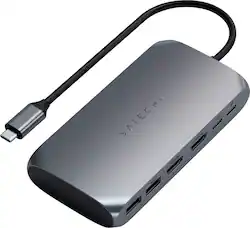
Satechi - USB-C Multimedia Adapter for M1/M2 with 2 4K HDMI, USB C PD (85W), USB-C, 2 USB-A for MacBook, iPad, Mac & Windows - Space Gray
- Key Specs
- Maximum Number of Displays Supported: 2
- Maximum Supported Resolution: 4K (2160p)
- Number of DisplayPort Outputs (Total): 0
- Number of Thunderbolt Ports (Total): 0
- Passthrough Power: true (Indicates whether the device allows power to passthrough, possibly with some loss, to another device, typically to charge that other device.)
- General
- Product Name: USB-C Multimedia Adapter for M1/M2 with 2 4K HDMI, USB C PD (85W), USB-C, 2 USB-A for MacBook, iPad, Mac & Windows
- Brand: Satechi
- Model Number: ST-UCM1HM
- Color: Space Gray
- Display
- Maximum Number of Displays Supported: 2
- Maximum Supported Resolution: 4K (2160p)
- Maximum Supported Refresh Rate: 60Hz (The number of frames per second the device can support, expressed as a frequency. Higher rates help produce smooth, seamless pictures.)
- Ports
- Display Connector(s): 2 x HDMI (The number and type of connectors used to connect to an external display.)
- Number of DisplayPort Outputs (Total): 0
- Number of HDMI Ports (Total): 2
- Number of Thunderbolt Ports (Total): 0
- Number of VGA Ports: 0 (VGA (Video Graphics Adapter or Video Graphics Array) is a display standard that transmits via analog signals. This type of interface is typically used to connect a computer to a display device such as a monitor, projector, or TV.)
- Number Of Ethernet Ports: 0
- Number of USB Ports (Total): 3
- USB Ports: 2 x USB-A 3.0, 1 x USB-C 3.0 (The number and type of USB ports the product has.)
- Headphone Jack: false (The device features an interface that allows for the connection of headphones.)
- Microphone Input: false (The device features an input for connecting an external microphone.)
- Memory Card Slot: false
- Power
- Powered: true
- Power Supply Included: false
- Power Supply Input: USB Type C
- Maximum Input Power: 100 watts (The maximum amount of power allowed to come into the device.)
- Passthrough Power: true (Indicates whether the device allows power to passthrough, possibly with some loss, to another device, typically to charge that other device.)
- Power Supply Output: USB Type C (The connector type(s) used by the device to send electrical power to another device.)
- Maximum Output Power: 85 watts (The maximum amount of power produced or allowed to flow through the device.)
- Compatibility
- Maximum Data Speed: 5000 megabits per second
- Brand Compatibility: Universal
- Model Compatibility: Universal
- Features
- Cable Lock Slot: None
- Material: Aluminum
- Indicator Light(s): true
- Dimensions
- Product Height: 0.77 inches (The out of box height of the item. Height is measured as the vertical distance from the bottom of the item to the top as it would be primarily used or placed.)
- Product Length: 4.7 inches (The out of box length of the item. Length is measured as the longest dimension of the item.)
- Product Width: 2.3 inches (The out of box width of the item. Width is measured as the horizontal distance from one side of the item to the other as it would be primarily used or placed.)
- Product Weight: 4.82 ounces (The out of box weight of the item.)
- Other
- UPC: 810086360147
Upgrade your tech to M1 with the Satechi USB-C Multimedia Adapter, featuring dual 4K HDMI display ports (60Hz/30Hz), USB-C charging, USB-C data, and two extra USB-A 3.0 data ports - all using a single USB-C connection to your M1 device. With its hi-res dual 4K display output, multitude of options for fast data transfer, and modern aluminum finish, the USB-C Multimedia Adapter is your all-in-one solution to enhancing your M1 experience.
- Six Essential Ports, One Powerful Adapter: The USB-C Multimedia Adapter M1 provides all the ports you need for a productive workspace with two 4K HDMI ports (60Hz/30Hz), one USB-C PD charging port, one USB-C data port, and two USB-A 3.0 data ports for
- Dual 4K HDMI Display: Features dual 4K HDMI ports, one up to 60Hz and another at 30Hz, to output hi-res display to up to two HDMI-enabled external monitors for the ultimate work setup. Requires a direct HDMI connection.
- Perfect for Peripherals: Ideal for wired mice, keyboards, USB hard drives, and more, the adapter’s two USB-A data ports and USB-C data port connect a multitude of peripherals. Data ports do not support charging or video output.
Whats Included
- USB-C Multimedia Adapter M1
- User Manual
A: Hi Brett! Thank you for reaching out to us. Unfortunately, the "lightning" port is a USB-C PD (Power Delivery) port and is meant to connect a USB-C power adapter to charge your host computer. The adapter features two HDMI ports, which you can use HDMI-to-HDMI cable in one port and a HDMI-to-VGA cable in the other. Also, keep in mind that you would need to install Silicon Motion's Instant View in order for the second HDMI port on the adapter to function.
A: I have a 1080P display and a 2K display if that’s any help. Not sure about 1080 and 4k though.
A: I bought it for use with a 13” Mac Air and it was only useful for connecting one thing at a time. For that usage there are cheaper options.
A: We can confirm that this is normal. Rest assured, no one is actually viewing/recording your screen. The message you are receiving is the application confirming detection from the hub to your 2 external monitors (this is through the firmware Silicone Motion)
Q: Can I use this adapter to connect an external drive to my MacBook Pro M1?
A: Yes, you will be able to use an external hard drive for data transfer through the USB-C data port. (up to 5 Gbps) The other USB-C port on the adapter will only support passthrough charging and will not support data transfer
A: One monitor can portrait through this device. One monitor can portrait through a port on the laptop. The additional HDMI port will not allow it. (Don't know about MBP2018 specifically, I'm on 2020 MBP M1
Q: Is this only specific for Mac? Can we use for windows laptop?
A: I am using this on my Surface Laptop and it works perfectly.














