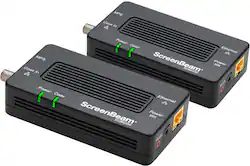
ScreenBeam - MoCA 2.5 Network Adapter for Ethernet Over Coax (2 Pack) - 2.5 GBPS Coax to 1.0 GBPS Ethernet Adapter - Black
- Key Specs
- Adapter Type: Wired
- General
- Product Name: MoCA 2.5 Network Adapter for Ethernet Over Coax (2 Pack) - 2.5 GBPS Coax to 1.0 GBPS Ethernet Adapter
- Brand: ScreenBeam
- Model Number: ECB6250KIT01
- Color: Black
- Warranty
- Manufacturer's Warranty - Parts: 1 year
- Manufacturer's Warranty - Labor: 1 year
- Other
- UPC: 789286809476
ECB6250 MoCA 2.5 Network Adapter uses the existing coax wiring in your home to establish an incredibly reliable wired connection for your home network. Now you can extend and enhance your Wi-Fi network beyond your primary router to create an extremely stable and reliable connection, as well as extend your network’s reach to every room that has a coax outlet. Get the best of both worlds: the convenience of Wi-Fi throughout the entire home with the solid reliability of wires and faster speeds wherever you need them.
- ScreenBeam: Same great product you know and love with a new look and brand!
- Increase Speed & Coverage of your WiFi Network: MoCA Network speeds up to 2.5 Gbps, 2.5 Gbps to end point devices. Achieve a fast, reliable Ethernet connection between a router and any device with an Ethernet port. MoCA 2.5 technology outperforms wireless for speed, latency, reliability, and security.
- Want Better WiFi? Add Wires: Create a 2.5 Gbps “Internet Autobahn” between your Router and a WiFi Access Point or WiFi Extender with the existing cable wiring in your home by connecting one MoCA Network Adapter to your Router and one to your WiFi Access Point or Extender in another room.
- Advanced Safety & Security: MoCA Protected Setup (MPS) for easier set up. With new MOCA Protected Setup (MPS) technology, get additional security on your home network, allowing for secure connection of additional adapters. Re-configuring your router with the adapter is not required.
- Compatibility: MoCA 2.5 with backward compatibility to MoCA 2.0. Also compatible with any Ethernet router and virtually any device with an Ethernet port including computers, Xbox, PlaySation, streaming media devices, digital audio streamers and more. See below for non-compatible devices.
- Better Gaming & Streaming: The MoCA 2.5 network adapter increases your WiFi performance, including the speed and bandwidth of your network, by up to 300% for pristine 4K and HD video, online gaming, working from home, and other demanding applications.
Q: What comes in the box? Does the kit include: 2 Power Adapters, 2 Ethernet Cables, and 2 Coax Cables?
A: Yes. The kit includes instructions, 2 power adapters, 2 ethernet cables, 2 coax cables, and 2 coax high pass splitters.
A: Actiontec describes the ECB6250 as a MoCA 2.5 Network Adapter that delivers speeds up to 2.5 Gbps* . However note the Asterisk *, which clarifies that 1 Gbps is the maximum throughput to end devices. The maximum throughput over the MoCA network is up to 2.5 Gbps. The ECB7250 is both 2.5 Gpbs MoCA and 2.5 Gbps Ethernet to end devices.
A: It doesn't necessarily have to go to the same cable as the modem, any coaxial outlet would do, although it's pretty uncommon to have a bunch next to each other so we'll say yes for the sake of it. As for the second question no products like this are intended to make non moca ready devices function as though they were, by sending the MoCA signal through the cable line to the second adapter which then turns it back into ethernet for the device. I'll draw up a quick diagram of a couple ways to use hope it helps. The second way is preferable since it eliminates 2 possible issues 1) reducing your signal to a point where your modem no longer connects properly 2) noise that could be introduced by otherwise unused lines that could also cause your modem not to connect OR lower your speeds (this will only happen if those cables are bad, lowering signal does not itself lower internet speeds). The first is probably more practical however since most houses don't have multiple coax ports in close proximity. If your provider has already placed splitters in your line somewhere to deal with signal that is too high this can help with issue 1 as long as you balance it out to be roughly the same loss to the modem as it was before. If you have further questions about your specific use it may be wise to contact your ISP to have a local tech help.
A: MoCA 2.5 is listed as backwards compatible with 2.0, so it SHOULD work by just plugging 1 into your router and running it back through the cable line, but there are lots of ways to do this in case it doesn't. 1) tivo makes a tivo bridge product validated for this purpose 2) if your tivo boxes are near to your mesh nodes you could run ethernet from the mesh nodes to the tivo boxes and change their network settings from MoCA to ethernet 3) having one of these per TiVo and running ethernet from the MoCA adapter is a last resort but would almost certainly work One thing to keep in mind though is that splitters aren't magic, and as shown in the picture a 2 way is marked 3.5db, that's 3.5db of loss on the cable signal and depending on the signal level entering your house, splitters already in place adding even one in the wrong spot could lower the signal to the TV or Modem to a degree that causes pixilation of a digital TV signal OR loss of carrier lock on the modem, and the more TVs you have in place the more you're already losing from splitters.
Q: Is there one or two adapters included for this price?
A: Yes there are two adapters in the kit.
Q: Can I get just one? I don't need two.
A: Unless your router supports MoCA then you will need two but they are worth every Penney and more!