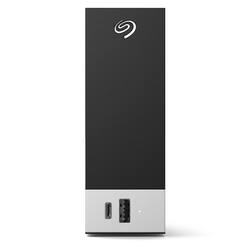
Seagate - One Touch Hub 14TB External USB-C and USB 3.0 Desktop Hard Drive with Rescue Data Recovery Services - Black
- Key Specs
- Storage Capacity: 14000 gigabytes (Measured in megabytes (MB), gigabytes (GB) and terabytes (TB), this is the amount available for storing files, music, movies, photos and more. The total includes the capacity of the hard disk drive and solid state drive if both are included on the computer.)
- Storage Drive Type: HDD (Traditional, mechanical hard disk drives are the most common type of storage because they're relatively inexpensive and offer huge capacities. However, they also generate both noise and heat. Solid state drives, also known as SSDs, are many times faster than hard disk drives and have no moving parts to wear out, but typically offer less capacity for the same price.)
- Interface(s): USB Type C (USB 3.0 Gen2) (Refers to the types of connections that devices use to interact and communicate with each other.)
- General
- Product Name: One Touch Hub 14TB External USB-C and USB 3.0 Desktop Hard Drive with Rescue Data Recovery Services
- Brand: Seagate
- Model Number: STLC14000400
- Capacity
- Storage Capacity: 14000 gigabytes (Measured in megabytes (MB), gigabytes (GB) and terabytes (TB), this is the amount available for storing files, music, movies, photos and more. The total includes the capacity of the hard disk drive and solid state drive if both are included on the computer.)
- Performance
- Storage Drive Type: HDD (Traditional, mechanical hard disk drives are the most common type of storage because they're relatively inexpensive and offer huge capacities. However, they also generate both noise and heat. Solid state drives, also known as SSDs, are many times faster than hard disk drives and have no moving parts to wear out, but typically offer less capacity for the same price.)
- Compatibility
- Internal Or External: External
- External Hard Drive Type: Desktop (Physical characteristics of the hard drive, including size, weight and how you connect to your device.)
- Interface(s): USB Type C (USB 3.0 Gen2) (Refers to the types of connections that devices use to interact and communicate with each other.)
- Operating System Compatibility: Windows, Mac
- Minimum System Requirements: Compatible with most Windows® and macOS ® systems. Visit www.seagate.com/os for details. Available USB 3.0 port (required for USB 3.0 transfer speeds).
- Features
- Security Features: Password Protection
- Usage: Backup
- Power
- Power Source: AC adapter
- Dimensions
- Product Height: 1.783 inches (The out of box height of the item. Height is measured as the vertical distance from the bottom of the item to the top as it would be primarily used or placed.)
- Product Width: 5.114 inches (The out of box width of the item. Width is measured as the horizontal distance from one side of the item to the other as it would be primarily used or placed.)
- Product Weight: 2.73 ounces (The out of box weight of the item.)
- Included
- Included Software: Seagate® Toolkit Backup software, Rescue Data Recovery Services
- Other
- UPC: 763649169476
Let’s face it, life’s busy. And backing up digital memories is always on the to-do list. Check it off—with One Touch Hub. Password-protected storage with a front-facing USB-C and USB 3.0 port lets you quickly backup files AND charge multiple devices simultaneously. Windows® and Mac® compatibility, file mirroring, and capacities that store countless photos and more make this task a thing of the past.
- 14TB capacity: Abundant capacitiy to store countless photos, videos, files, and more.
- Connect your world: A front-facing USB C and USB 3.0 port for connecting and recharging devices—even if your computer is off.
- Password protection: Password-protected external hard drive with USB hub to secure your digital life.
- Cross-platform: Out-of-the-box compatibility with Windows® and Mac® computers.
- Backup your way: Includes Seagate Toolkit backup software for one-click and scheduled backups and file mirroring.
- Rescue Daa Recovery Services: Enjoy long-term peace of mind with the included two-year limited warranty and Rescue Data Recovery Services.
- Boundles creativity: Four-month complimentary membership to Adobe Creative Cloud Photography plan (must redeem plan within one year of drive registration; not available in all countries).
- Visual memories: Receive a one-year complimentary subscription to Mylio Create (not available in all countries; must redeem during product registration).
Whats Included
- Seagate One Touch drive with hub, 18-inch USB 3.0 cable, 18W power adapter, Quick start guide
Product Manuals
Q: Is this one drive or multiple drives to make 14TB?
A: This is a single drive, seems to work fine. Transfer speeds of connected flash or portable drives are not the same as when connected to the computer separately, but you have the 2 built-in ports, which allows you to keep this connected at all times. Most portable drives have their own cables, if not you can buy at BestBuy or Amazon, especially the USB-C to USB-A. I’ve owned about 5-6 of these from 4TB to 6 to 8 to 10, they’re reliable and quiet. I had a 6TB fail on me, but these are mechanical devices, it happens. Mine are on 24/7 duty, and I usually replace them after 4-5 years without waiting for trouble, as the storage needs increase. For me these are for back-up purposes. As usual you should NEVER use just ONE drive to store files, because failure can be disastrous. If you use a Mac you reformat to HFS or whatever is needed, and vice-versa. Drive comes pre-formatted as NTFS and has its own utilities but I use my own separate backup program.
A: USB-C ports are kind of gimmicky because they are everywhere, although most peripherals don’t have the actual cable ends to match or sustained speeds. For me, USB3 means transfers of up to 120 MBPS, you see Windows displaying that as you copy files, and USB-C is supposed to be faster, but I have a USB-C on my desktop and I connected a portable drive with a separate cable I bought at Amazon, and the transfer speeds don’t seem better. I prefer the older Seagate hubs with 2 regular USB ports, but times are changing and they are trying to be “hip”. However, there are no comparable hubs out there, so this is useful because it allows you to leave this drive plugged into the main computer 24/7 and makes 2 ports available. I use this drive for back-up purposes only, if you wish to use it for primary storage you could connect a portable drive (5TB maximum size) and use that as a backup to the Seagate. For Macs, just reformat. Not sure if ports can recharge phones.
Q: will this run on the c-port with out an ac adapter as the speck say ac adapter hmmm
A: No it requires the ac adaptor even though technically USB C can provide more than enough power. Also if you're using this as a backup drive or mini NAS style device then you want to plug it into a different circuit from your PC... Ideally. That way if your PC trips a breaker (it can happen, especially if you use a power strip for multiple high draw devices) then this drive would continue to function and whatever is in it's buffer will still be written or if it was plugged into your router to act as media storage or general storage (router based NAS) then you can access it from any device on the network and your PC doesn't need to always supply power.













