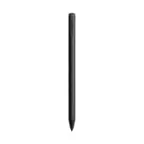
Amazon - Fire Max 11 Stylus Pen (2023 Release) | works with Fire Max 11 & Fire HD 10 (13th Gen, 2023 release) - Gray
Amazon - Fire Max 11 Stylus Pen (2023 Release) | works with Fire Max 11 & Fire HD 10 (13th Gen, 2023 release) - Gray
More Buying Options
Related Item

About This Item
- Key Specs
- Model Compatibility: Amazon Fire Max 11 (2023), Amazon Fire HD 10 (2023)
- General
- Brand: Amazon
- Model Number: B0BQ89FPSR
- Product Name: Fire Max 11 Stylus Pen (2023 Release) | works with Fire Max 11 & Fire HD 10 (13th Gen, 2023 release)
- Color: Gray
- Compatibility
- Brand Compatibility: Amazon
- Model Compatibility: Amazon Fire Max 11 (2023), Amazon Fire HD 10 (2023)
- Features
- Replaceable Stylus Tip: true
- Dimensions
- Product Length: 5.9 inches (The out of box length of the item. Length is measured as the longest dimension of the item.)
- Product Diameter: 0.37 inches (The out of box diameter of the item, measured as a straight line passing from side to side of the item, through its center.)
- Product Weight: 0.05 ounces (The out of box weight of the item.)
- Warranty
- Warranty - Parts: 1 year limited
- Warranty - Labor: 1 year limited
- Other
- UPC: 850047941152
Compatible with Amazon Fire Max 11 (2023 Release) & Amazon Fire HD 10, (13th Gen, 2023 release) Tablets. Perfect for drawing, sketching, coloring, taking notes, and marking up PDFs. No pairing involved, simply insert the provided battery and start using the stylus with your tablet. USI 2.0 certified stylus. Compatible with USI 2.0 supported devices.
- Compatibility: Compatible with Amazon Fire Max 11 (2023 Release) & Amazon Fire HD 10, (13th Gen, 2023 release) Tablets
- Perfect for drawing: Perfect for drawing, sketching, coloring, taking notes, and marking up PDFs.
- No pairing needed: No pairing involved, simply insert the provided battery and start using the stylus with your tablet.
- Secures magnetically: Conveniently attaches magnetically to the side of your Fire Max 11 tablet. (Does not magnetically attach to the Amazon Fire HD 10 tablet).
- USI 2.0 certified: USI 2.0 certified stylus. Compatible with USI 2.0 supported devices.
- Title support: Enables tilt support +/- 45 degrees
- Pressure sensitivity: 4096 pressure sensitivity
- 6 month battery life: Powered by AAAA battery. Up to 6 months of battery life. Sleep Mode feature helps preserve battery life.
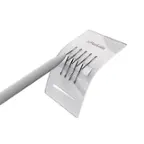
- In the box: Included in the box: Stylus with Tip, 1 AAAA Battery, Quick start Guide, Tip Puller, 1 Replacement Tip
Whats Included
- Stylus with tip
- 1 AAAA Battery
- Quick start guide
- Tip puller
- 1 replacement tip
Q: Does the stylus attach to the tablet?
A: It magnetically attaches to the Amazon Fire Max 11, but not the Amazon Fire HD 10 tablet.
Q: What is the pressure sensitivity of this stylus?
A: This stylus has 4096 levels of pressure sensitivity.
Q: Which tablets is this stylus compatible with?
A: This stylus is compatible with the Amazon Fire Max 11 (2023 Release) and the Amazon Fire HD 10 (13th Gen, 2023 release).
Q: Does this stylus require pairing to the tablet?
A: No, this stylus does not need to be paired. Just insert the battery and it's ready to use.
Q: How long does the battery last on this stylus?
A: The battery in the stylus can last up to 6 months.
Q: Will this work for a Google Pixel tablet?
A: I recently bought this stylus for my Pixel Tablet and confirm that it does work quite well. The only issue I have encountered is the side button cannot be assigned to perform a certain function. Depending on the app you are using, whatever default purpose the button is set for, will be your only option. The writing with it is smooth and responsive.
Q: What is the button on side for?
A: Hello Patrick, thank you for your question. The button on the side you are referring to is known as a "Shortcut button." If your stylus pen has a shortcut button, press and hold it to use a secondary tool. From the home screen, swipe down to open the Quick Actions menu. Select All Settings. Go to Pen.Open Pen Shortcuts and select one of the options under Shortcut tool. A checkmark appears to show which tool is active on the button. Hope this was helpful. Have a great day! To use the shortcut tool, press the button while touching the display with the pen.
Q: is this stylus compatible with the kindle scribe?
A: Hello Goeanusguy! Unfortunately, no the Amazon Fire Max 11 Stylus Pen is not compatible with the Kindle Scribe. The Fire Max 11 stylus is a battery-powered active stylus, while the Kindle Scribe stylus is battery free and uses a EMR technology. For your Kindle Scribe, you must use an official Kindle Scribe-specific stylus pen. I hope this information helps. Have a great day!
Reviews
Customers are saying
Customers appreciate the Fire Max 11 Stylus Pen for its ease of use, responsiveness, and compatibility with other USI2 tablets. The pen's weight and sleek design are also well-received, along with its magnetic attachment and the added functionality of a button. Users are satisfied with the expected battery life and find it offers good value for the price.
Customer Images
The vast majority of our reviews come from verified purchases. Reviews from customers may include My Best Buy members, employees, and Tech Insider Network members (as tagged). Select reviewers may receive discounted products, promotional considerations or entries into drawings for honest, helpful reviews.
Compare similar products

Compatible with Amazon Fire Max 11 (2023 Release) & Amazon Fire HD 10, (13th Gen, 2023 release) Tablets. Perfect for drawing, sketching, coloring, taking notes, and marking up PDFs. No pairing involved, simply insert the provided battery and start using the stylus with your tablet. USI 2.0 certified stylus. Compatible with USI 2.0 supported devices.

Maintain precise control over your iPad with the Insignia Active Stylus for iPad, iPad Pro, iPad Air and iPad mini. This stylus functions just like your Apple Pencil, using its precise tip to target individual pixels. Tilt to adjust your line thickness when drawing, just like an actual pencil. It also features magnetic support with compatible models, letting you easily locate your stylus each time. Double tap the tail end of the stylus to turn it on or off, helping you to conserve battery life. An included USB-C cable charges your stylus in as little as 30 minutes.

The Lenovo Digital Pen 2 is a testament to innovation and user-centric design. With an enhanced grip, elastomer pen tip for precision, extended battery life, and quick-access buttons, it provides an elevated creative experience. Whether you're a professional artist, a student, or simply someone who values seamless functionality, this pen is designed to transform your digital interactions into natural and fluid expressions. Unleash your creativity, sign documents with finesse, and sketch your imagination into reality with the Lenovo Digital Pen 2.

This ZAGG Pro Stylus 2 Active, Dual-Tip Stylus with Wireless Charging helps you do more with your iPad. Use the fine tip to draw and write, and use the round, capacitive end to swipe. Pro Stylus 2 helps you increase your accuracy, edit photos precisely, and avoid fingerprint smudges on your screen. Tilt recognition and palm rejection technology allow you to create nuanced, pixel-perfect artwork and mark-up documents quickly and efficiently with an Ergonomic Design. Pro Stylus 2 charges wirelessly and has a long-lasting battery. Compatible with all Apple iPads 2018 and newer. The Pro Stylus from ZAGG works with your favorite apps that support Apple Pencil.
| Pros for Amazon - Fire Max 11 Stylus Pen (2023 Release) | works with Fire Max 11 & Fire HD 10 (13th Gen, 2023 release) - Gray | |||
|---|---|---|---|
| Ease of use, Battery Life, Weight, Responsiveness, Compatibility | Overall Performance, Ease of use, Battery Life, Price, Connectivity | Overall Performance, Weight, Battery Life, Ease of Use, Button Functionality | Overall Performance, Ease of use, Price, Battery Life, Wireless Charging |
| Cons for Amazon - Fire Max 11 Stylus Pen (2023 Release) | works with Fire Max 11 & Fire HD 10 (13th Gen, 2023 release) - Gray | |||
| There were no cons for this product— | Pressure Sensitivity, Lag | Compatibility | There were no cons for this product— |