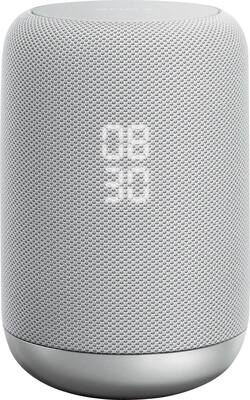
Sony - LF-S50G Smart Bluetooth Speaker - White
- Key Specs
- Speaker Pairing: true (Wirelessly connect the speaker to another compatible speaker for a more immersive sound experience or multi-room audio. Pairing may require use of an app or additional setup.)
- Voice Assistant Built-in: Google Assistant (A digital assistant built into the device that uses voice commands to answer questions and control smart devices.)
- Wireless: true
- Works With: Google Assistant, Hue, Nest, Ring, SmartThings, Wink (Compatible with or able to be connected to other smart devices or applications.)
- Rechargeable: false
- USB Device Charging: false
- General
- Product Name: LF-S50G Smart Bluetooth Speaker
- Brand: Sony
- Model Number: LFS50G/W
- Color: White
- Audio
- Number of Speakers: 1
- Wattage: 18 watts (Measurement of electrical power.)
- Peak Power Handling: 18 watts (The maximum amount of power an electronic device, like a speaker, can handle without damage. This refers to short bursts of power, while root mean square (RMS) power handling indicates the amount of continuous power a device can sustain. Higher levels of distortion can also occur at peak power levels when the device is powered beyond its recommended usage.)
- Speaker Pairing: true (Wirelessly connect the speaker to another compatible speaker for a more immersive sound experience or multi-room audio. Pairing may require use of an app or additional setup.)
- Radio Tuner: false
- Voice
- Voice Assistant Built-in: Google Assistant (A digital assistant built into the device that uses voice commands to answer questions and control smart devices.)
- Connectivity
- Wireless Multi-Room Audio: true (Technology that allows multiple speakers and/or soundbars to be connected wirelessly and play audio in separate rooms.)
- Wireless: true
- Maximum Wireless Range: 65.6 feet
- Wireless Connectivity: Bluetooth, Wi-Fi (The manner in which a device sends data to another device over a short distance without the use of wires or cables.)
- Headphone Jack: false (The device features an interface that allows for the connection of headphones.)
- Works With: Google Assistant, Hue, Nest, Ring, SmartThings, Wink (Compatible with or able to be connected to other smart devices or applications.)
- Auxiliary Input: true
- Features
- Protective Qualities: Water resistant
- Maximum Depth of Water Resistance: 0.1 feet (Measurement of the maximum depth of water in which the product is able to resist some degree of water penetration.)
- Controls: Touch-free gesture control|Auto volume control
- Remote Control Included: false
- Digital Display: true
- Clip-on: false
- Power
- Rechargeable: false
- USB Device Charging: false
- Warranty
- Manufacturer's Warranty - Parts: 1 year
- Manufacturer's Warranty - Labor: 1 year
- Other
- UPC: 027242908048
Use this splash-resistant Sony wireless speaker to skip a song with a wave of your hand. It comes with Google Assistant, so you can control it with voice commands, and its two-stage diffuser and bass port deliver rich, room-filling sound. This Sony wireless speaker has built-in Bluetooth for streaming audio from your smartphone.
- 360-degree omni-directional sound: Hear the same great, rich and clear sound from anywhere in the room.
- Touch-free gesture control: Want to control volume, pause, or play audio without being vocal? Just wave your hand over the top - no contact required.
- Google Assistant built-in: Play music. Get answers. Control your smart devices. Built-in Google Assistant can do just about anything you ask it to.
- Connect wirelessly from up to 30' away: Pair this speaker with virtually any smartphone, tablet or other Bluetooth-enabled device. NFC technology enables one-touch pairing. Built-in Wi-Fi for easy connection to your home network or devices.
- Splashproof: Your speaker can handle a little water, thanks to an IPX3-rated splashproof design. You can even take the cover off and rinse it under the tap.
- Enjoy high quality sound: Feel more from your music, thanks to a two-way facing speaker, two-stage diffuser, and bass reflex duct.
- Clock display: With an LED clock display, you never need to ask Google for the time. You can dim or turn it off to minimize electric light in your room.
Whats Included
- AC power adapter
- Sony LF-S50G Smart Speaker with Google Assistant Built-in
Q: How do I adjust bass and treble settings on ...?my SonyLF-S50G
A: You can't! I'm really disappointed with Sony.
Q: There is a way to dim the clock screen to very low?
A: Yes. There is a button on the bottom of the speaker.
Q: Can you use this device as just a wireless speaker without being plugged into the power?
A: No, must be plugged in.
A: This only works with Google Assistant. You need to stay with Amazon (Alexa) products since you are already committed. The Google version of the amazon dot is called Google Home mini. If you just bought the Dot you may want to to consider exchanging it for the mini. I think the Amazon product is also excellent but I like the idea that i can control my Chromecast devices with the Google assistant, other wise they both basically do the same thing. I hope this helps.
Q: What is the rated output power for this speaker?
A: This speaker has a peak rating of 18 watts.
A: Hi B, Yes, it can be used as a Bluetooth speaker. For more information about pairing and playing, please visit the link below. I hope it helps. Regards, ^Ron http://helpguide.sony.net/speaker/lf-s50g/v1/en/contents/TP0001551366.html
A: Hi Artur, please refer to the link below for possible troubleshooting steps to fix this issue. I hope it helps. Regards, ^Ron http://helpguide.sony.net/speaker/lf-s50g/v1/en/contents/TP0001551645.html
Q: Can I cancel google home alarm with only hand movement over the device? Peter
A: Hi Alarm, No, that's not possible. Please visit the link below for more information about the hand gesture feature. Thanks! ^Ron http://helpguide.sony.net/speaker/lf-s50g/v1/en/contents/TP0001551379.html



















