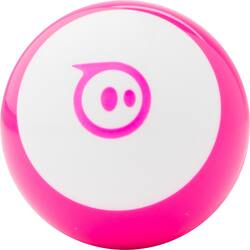
Sphero - Mini App Enabled Robotic Ball - Pink
- Key Specs
- Level Of Difficulty: Intermediate
- Control Type: App-controlled
- Robotic Function(s): Glows, Game Controller, Roll
- Rechargeable: true
- Effects: Lights
- General
- Product Name: Mini App Enabled Robotic Ball
- Brand: Sphero
- Recommended Minimum Age: 8 years
- Number Of Pieces Included: 1
- Assembly Required: No
- Material: Plastic
- Brand/Character: Sphero
- Model Number: M001PRW
- Color: Pink
- Features
- Control Range: 33 feet
- Directional Controls: Backward, Down, Forward, Left, Right, Stop
- Design: Ball
- Dimensions
- Assembled Height: 1.7 inches
- Assembled Length: 1.7 inches
- Assembled Width: 1.7 inches
- Assembled Weight: 0.3 pounds
- Power
- Battery Powered: true
- Battery Chemistry: Lithium-polymer
- Battery Size: Battery pack (The battery size required for operation.)
- Batteries Included: true (Indicates whether the product comes with the required batteries for its operation.)
- Battery Life: 45 minutes (Battery life will vary depending on the product configuration, product model, applications loaded on the product, power management setting of the product and the product features used by the customer. As with all batteries, the maximum capacity of this battery will decrease with time and usage.)
- Charging Time: 60 minutes
- Other
- UPC: 817961020523
Drive this Sphero Mini robot all over the place using your facial expressions alongside other controls. The tiny fun ball can play three games, letting you travel through tunnels or take down brick walls. Colorful LED lights on this Sphero Mini ball make it easy to see, and programming is simple with the Sphero Edu app.
- Mini App Enabled Robotic Ball: Includes micro-USB cable, 3 mini traffic cones and 6 mini bowling pins.
- Remote control: Add a wide range of remote-control functions to your machine.
- Bluetooth connection: Allows kids to program and control the robots from a tablet or smartphone. Compatible with Apple® iPhone®, iPad®, iPod® and Android phone.
- Designed for ages 8 and older: So your child can enjoy learning as they grow.
Whats Included
- Sphero Mini App Enabled Robotic Ball
Q: Does this work only with an apple phone or can you us it with other smart phones?
A: Sphero's website says the Special Edition uses the ITunes app as well as the Google App. Windows phones are pretty much dead, so i would not think an app with a Windows phone would be around very long. They were supposed to send me a file that worked with the Kindle Fire, they never did.
Q: Hi-do the bowling pins and cones come with it?
A: Yes ! It come with the cine and bowling pins
A: undefined
Q: About how long does the battery last under normal use and how long does it take to charge?
A: The battery life is 45 minutes and the charging time is 60 minutes.
Q: Can this be used with the Samsung Galaxy S9 or iPhone only
A: I’m sorry, but I have only an iPhone and don’t know anyone with an Android. I bet if you look at his specs, you’ll find with which operating system he is compatible.
Q: Is this the robot accesorie, like a toy to the robot?
A: The Sphero Mini is the toy. You can buy stationary objects like cones and pins around which the Sphero Mini, or, I suspect, any Sphero in the line of Sphero products can be moved.
Q: Why does it say app enable robitic ball
A: You have to connect it to your phone or tablet via bluetooth.You will need to download the Sphero app from the app store to make it work.
Q: Is this the Sphero mini 2.0 version?
A: No where can I find a version like 1.0 or 2.0. It’s just labeled Sphero Mini which makes it different than other Sphero products.






















