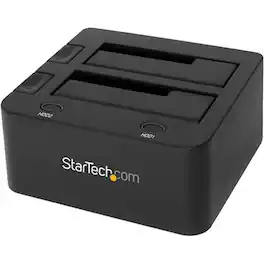
StarTech.com - Dual USB 3.0 Hard Drive Docking Station - Black
FREE shipping to
About This Item
- Key Specs
- Drive Form Factor: 3.5 in.
- General
- Brand: StarTech.com
- Model Number: SDOCK2U33
- Product Name: Dual USB 3.0 Hard Drive Docking Station
- Color: Black
- Compatibility
- Drive Form Factor: 3.5 in.
- Warranty
- Warranty - Parts: 2 years
- Warranty - Labor: 2 years
- Other
- UPC: 065030856928
Access multiple storage devices at once with this StarTech.com hard drive docking station. Its dual bay slots let you connect two 2.5-inch hard disk or solid-state drives to your computer with just one USB port, and each slot has an independent power button for efficient operation. This StarTech.com hard drive docking station is conveniently compatible with high-speed SATA III drives.
- Compatible with 2.5" and 3.5" SATA hard drives and solid state drives: For compatibility with a variety of drives.
- OS-independent: Supports all of the leading operating systems, including: Microsoft Windows (8/7/Vista/XP/Server 2008/Server 2003), Apple OSX (10.9/10.8/10.7/10.6), Linux, and Google Chrome OS.
- Dual bay: Lets you dock and swap drives from your desktop or laptop computer simultaneously, using a single USB port.
- USB 3.0 with UASP: Performs with a 70% faster read speed and 40% faster write speed over traditional USB 3.0 when paired with a UASP-enabled host controller.
- Independent power buttons: The dock features independent power buttons for each individual drive, so you can operate each hard drive separately, with the freedom to hot-swap one drive while transferring data to another.
- Top slot-loading design: Dissipates heat to prevent overheating.
- Compatible with 2.5" and 3.5" SATA hard drives and solid state drives: For compatibility with a variety of drives.
- OS-independent: Supports all of the leading operating systems, including: Microsoft Windows (8/7/Vista/XP/Server 2008/Server 2003), Apple OSX (10.9/10.8/10.7/10.6), Linux, and Google Chrome OS.
- Dual bay: Lets you dock and swap drives from your desktop or laptop computer simultaneously, using a single USB port.
- USB 3.0 with UASP: Performs with a 70% faster read speed and 40% faster write speed over traditional USB 3.0 when paired with a UASP-enabled host controller.
- Independent power buttons: The dock features independent power buttons for each individual drive, so you can operate each hard drive separately, with the freedom to hot-swap one drive while transferring data to another.
- Top slot-loading design: Dissipates heat to prevent overheating.
Whats Included
- 3 ft. USB 3.0 cable
- Instruction manual
- StarTech.com Dual USB 3.0 Hard Drive Docking Station
- Universal power adapter (NA/EU/UK)
- 3 ft. USB 3.0 cable
- Instruction manual
- StarTech.com Dual USB 3.0 Hard Drive Docking Station
- Universal power adapter (NA/EU/UK)
Q: Can an intel optane memory H10 with solid state storage be read using the docking station?
A: No. The SDOCK2U33 is for SATA based drives only. It will not work with PCIe/NVMe drives, like the Optane H10. Brandon, StarTech.com Support
Q: I need a docking station for ide hard drives any suggestions?
A: The SDOCK2U33 is compatible with our IDE addon adapter, part number SAT2IDEADP. This will allow you to use your IDE drives with the SDOCK2U33. Brandon, StarTech.com Support
Q: Will this clone a 3.5 NAS drive?
A: The SDOCK2U33 is a USB 3.0 hard drive docking station and will work with any standard 2.5/3.5in SATA SSD / HDD. As long as the connecting drives utilizes this connection type, the SDOCK2U33 will work. Atha, StarTech.com Support
A: The SDOCK2U33 is a USB 3.0 hard drive docking station and will work with any standard 2.5/3.5in SATA SSD / HDD. As long as the connecting drives utilizes this connection type, the SDOCK2U33 will work. Furthermore, the host computer must be able to support the drive's file system if you are looking to access information. Atha, StarTech.com Support
Q: Will this device work with Windows 10?
A: Yes, SDOCK2U33 is supported with any operating system including Windows 10. Atha, StarTech.com Support
Q: Will this unit work with my Dell Laptop Model N-1550 which only has USB 2 ?
A: USB3.0 is backwards compatible to usb 2.0 so it should work, obviously at the slower USB 2.0 speeds.
A: The SDOCK2U33 will work with standard 2.5/3.5in SATA SSDs / HDDs. However, the SDOCK2U33 does not support 4Kn drives so it may not work with drives that use 4Kn sectors and do not support 512e sectors. Atha, StarTech.com Support
Reviews
The vast majority of our reviews come from verified purchases. Reviews from customers may include My Best Buy members, employees, and Tech Insider Network members (as tagged). Select reviewers may receive discounted products, promotional considerations or entries into drawings for honest, helpful reviews.
Compare similar products
Access multiple storage devices at once with this StarTech.com hard drive docking station. Its dual bay slots let you connect two 2.5-inch hard disk or solid-state drives to your computer with just one USB port, and each slot has an independent power button for efficient operation. This StarTech.com hard drive docking station is conveniently compatible with high-speed SATA III drives.

Connect and store external hard drives on your desktop with this Insignia hard drive enclosure docking station. Two slots accept SSD and HDD drives for simultaneous reading, and a USB 3.0 port allows for fast data transfer. An eject button lets you safely remove each drive when not needed, and this Insignia hard drive enclosure docking station features an LED indicator light to show the working status of each device.

Mount drives in seconds with this Cremax drive bay. It converts two 2.5-inch drive bays into one 3.5-inch HDD/SSD bay to double your device's storage capacity and save space. The tool-free mechanism of this Cremax drive bay lets you remove the bracket easily for quick drive swaps and easy replacement.
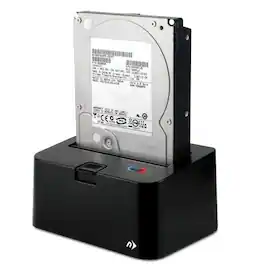
Whether you're on a data recovery mission or just want to check the contents of an older swapped out drive, Newer Technology Voyager is the easiest, most convenient way to access data from any Serial ATA (SATA) drive. Just insert any standard 2.5" or 3.5" SATA I/II/III drive with up to 4TB capacity into the compact docking base and select one of the four interfaces supported by your Mac or PC for the fastest data transfer performance. Then, start reading and/or writing data to the docked drive. There's nothing else to install or configure!
| Pros for StarTech.com - Dual USB 3.0 Hard Drive Docking Station - Black | |||
|---|---|---|---|
| There were no pros for this product— | Ease of use, Data Transfer, Overall Performance, Compatibility, USB | There were no pros for this product— | There were no pros for this product— |
| Cons for StarTech.com - Dual USB 3.0 Hard Drive Docking Station - Black | |||
| There were no cons for this product— | Size, Power, Connection | There were no cons for this product— | There were no cons for this product— |