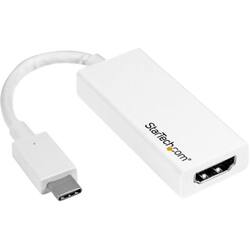
StarTech.com - USB Type-C to HDMI External Video Adapter - White
- Key Specs
- Connector Type (End 1): USB Type C
- Gender (End 1): Male
- Connector Type (End 2): HDMI Type A
- Gender (End 2): Female
- General
- Product Name: USB Type-C to HDMI External Video Adapter
- Brand: StarTech.com
- Quantity: 1
- Compatibility: Compatibile with PC
- Model Number: CDP2HDW
- Color: White
- Connectivity
- Cable Type: HDMI, USB
- Product Type: Adapter
- Connector Type (End 1): USB Type C
- Gender (End 1): Male
- Connector Type (End 2): HDMI Type A
- Gender (End 2): Female
- Other
- UPC: 065030862837
Screen high-definition multimedia content to an external display with this StarTech USB-C to HDMI adapter. It connects a computer to a projector, monitor or HDTV for streaming 4K movies or presenting dynamic reports and discussions. This plug-and-play StarTech USB-C to HDMI adapter is also compatible with Thunderbolt 3.0 ports and is easy to set up with its reversible connector.
- Compatible with PC: For use with your existing computer.
- Secure connection: Offers reliable signal transfer.
- Type-C port: Supports up to 60W pass through of power so you can charge your devices.
Whats Included
- StarTech.com USB Type-C to HDMI External Video Adapter
Product Manuals
A: Yessir...either get a long cable (assuming you need it long) with one end Type C USB and the other HDMI, or, get a type C to HDMI adapter along with an HDMI to HDMI cable length of your choice...once the adapter is plugged into your phone, plug one end of that HDMI cable into the adapter and the other into your HD tv's HDMI port. Your set if you do SOURCE on your tv selecting that HDMI port...yeeeeeehaaaaaw!
A: No, the CDP2HDW is a USB-C to HDMI adapter used to connect a USB-C source to an HDMI display. Atha, StarTech.com Support
Q: Will this work with my Lenovo ThinkPad T14 laptop USB C port?
A: The CDP2HDW will work on any USB-C device which supports DP Alt (video over USB-C). We recommend contacting the manufacturer of the computer to confirm this functionality. Atha, StarTech.com Support
Q: Will this work with my LG K51 phone to connect to my TV?
A: The CDP2HDW will work on any USB-C device which supports DP Alt (video over USB-C). We recommend contacting the manufacturer of the phone to confirm this functionality. Atha, StarTech.com Support
A: The CDP2HDW will work on any USB-C device which supports DP Alt (video over USB-C). We recommend contacting the manufacturer of the computer to confirm this functionality. Atha, StarTech.com Support
Q: Is this adapter compatable with samsung 10e
A: Yes, the CDP2HDW will work on any USB-C device which supports DP Alt including the Samsung Galaxy Galaxy S10e. Atha, StarTech.com Support
Q: Will this work for LG K30 phone?
A: No, the CDP2HDW is a USB-C to HDMI adapter and the LG K30 does not have a USB-C port. Atha, StarTech.com Support



















