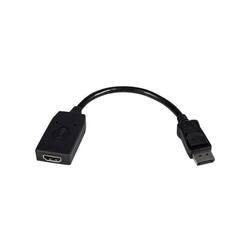
StarTech.com - Video / Audio Adapter - Black
- Key Specs
- HDMI Cable Type: High Speed HDMI Cable
- Connector Type (End 1): DisplayPort
- Connector Type (End 2): HDMI Type A
- General
- Product Name: Video / Audio Adapter
- Brand: StarTech.com
- Quantity: 1
- Compatibility: Compatibile with P/N: SV231DPUA, VS421DP, SV431DPUA, SV231DPU
- Model Number: DP2HDMI
- Color: Black
- Connectivity
- Cable Type: HDMI
- Product Type: Adapter
- HDMI Cable Type: High Speed HDMI Cable
- Connector Type (End 1): DisplayPort
- Connector Type (End 2): HDMI Type A
- Environmental
- Indoor Or Outdoor Use: Indoor (Indicates the appropriate environment product was designed to be used in.)
- Other
- UPC: 065030830799
Expand your entertainment options with this StarTech DisplayPort-to-HDMI cable. It lets you connect your HD television to any computer that supports DisplayPort video so you can stream content for the entire family to enjoy. This StarTech DisplayPort-to-HDMI cable is compact and fits easily in laptop bags, letting you bring added functionality to the office.
- 19 pin HDMI Type A connector: Promotes reliable signal transfer.
- 9.4" length: Allows flexible placement.
Whats Included
- StarTech.com Video / Audio Adapter
A: This cord is 9.4" long.
Q: is this active or passive adapter?
A: The DP2HDMI2 is a passive DisplayPort to HDMI adapter and will work with any DP++ enabled DisplayPort source. Atha, StarTech.com Support.
A: This just fits the available ports.
A: No, DP2HDMI supports a maximum resolution of 1920x1200 @60hz. Atha, StarTech.com Support
A: Hey, just so you know you should be using a PS4 pro if u want any added Benifits from messing around with a display port addaptor. Also you need a hdmi to display port adapter, not a DisplayPort TO hdmi.. and you want your monitor to support free sync technology but not G sync. If done properly when PS4 is set to "boost mode" it's graphics card will be able to communicate with each other giving you up to 50 percent higher frame rate speeds. They are very hard to find however













