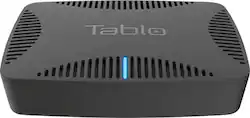
Tablo - QUAD OTA DVR - Black
- Key Specs
- Maximum Supported Resolution: 1080p
- Operating System Compatibility: Not Applicable
- Storage Type: Internal
- Storage Capacity: 0 gigabytes (Measured in megabytes (MB), gigabytes (GB) and terabytes (TB), this is the amount available for storing files, music, movies, photos and more. The total includes the capacity of the hard disk drive and solid state drive if both are included on the computer.)
- General
- Product Name: QUAD OTA DVR
- Brand: Tablo
- Model Number: TQNS4B-02-CN
- Color: Black
- Color Category: Black
- Compatibility
- Compatible Wireless Standard(s): Wireless AC (The wireless networking standard(s) the device is backwards compatible with. This includes networking protocols based on the IEEE 802.11 standard (alphabetically ascending) and the Wi-Fi Alliance standard (numerically ascending), both of which provide high-throughput wireless local area networks (WLANs). Devices designed to work with specific standard(s) will be backwards compatible with previous versions but may not run at optimal performance when using earlier iterations.)
- Playable Formats: H.264
- Interface(s): USB 2.0, USB Type A (Refers to the types of connections that devices use to interact and communicate with each other.)
- Warranty
- Manufacturer's Warranty - Parts: 1 year
- Manufacturer's Warranty - Labor: 1 year
- Other
- UPC: 696106000084
Stream free high-definition broadcast channels on up to four screens with this Tablo QUAD OTA DVR. Dual-band Wi-Fi connectivity supports live streaming and commercial-free recording for HDTVs and other network-connected devices via the Tablo app. Connect an antenna to this Tablo QUAD OTA digital DVR to receive local broadcast signals, and plug a USB hard drive for recording storage.
- The DVR for Free Live TV: Catch your favorite network TV shows without the cost or commitment of cable or satellite contracts. Browse upcoming shows, schedule and manage recordings by episode or series. (TV antenna required, sold separately)
- Four OTA TV Tuners: Watch, pause, and record up to four live broadcast TV channels (like ABC, CBS, Fox, NBC, the CW and PBS) simultaneously. (TV antenna required, sold separately)
- Automatic Commercial Skip: Tablo DVRs automatically skip commercials for you on completed recordings. No more annoying commercial breaks or using the remote to fast forward. (Subscription required, sold separately)
- Flexible USB/SATA storage options: Connect as much recording capacity as you want, up to 8TB (SATA or USB hard drive required to store recordings and play multiple live streams simultaneously. Sold separately)
- Whole-Home & Out-of-Home Live TV Streaming: Watch your favorite live and recorded TV shows on to up to six internet-connected devices including iOS and Android mobile devices, computers, Smart TVs, streaming media players and gaming systems.
- Dual-band AC WiFi included: Built-in 802.11ac dual-band Wi-Fi connects to your wireless home network allowing you to place the antenna where you get the best TV reception.
Whats Included
- Ethernet cable
- Power adapter
- Quick start guide
- Tablo QUAD OTA DVR
Q: what is the internal storage capacity?
A: The detailed answer to this question is available on Tablo's web site. In brief: The QUAD does not have any built-in storage for recordings. You need to add a hard disk, either an external USB drive or an internal 2.5" SATA drive. The maximum capacity supported by the Tablo is 8TB, but height restrictions for an internal drive limits the maximum is 4TB when an internal drive is installed. Each 1TB is enough for 250-300 hours of recording storage. Personally, I use my Tablo QUAD mostly for time shifting, not for retaining many movies or full seasons of TV series. I use the 1TB internal SATA drive recommended by Tablo. It has plenty of storage for me.
A: My understanding is that the Tablo Quad OTA DVR is for recording Over The Air channels, not streaming movies, etc.
A: I do not have my tablo quad directly wired to my router. As you have noticed it seems to be the preferred method. Mine is setup over wifi and it has been working without issue. I can only guess that if you have an old slow wifi router you will have issues. So in order to avoid having to educate customers about wifi routers they chose to tell you you need to wire it directly for best results. I have a Netgear Dual Band AC1900 wifi router in my basement which is connected to my tablo upstairs. Only the wife and I, so not many people using bandwidth. As I said I have had no issues.
A: First off, I'm not sure if I understand what you are asking. So let me just state you need a direct antenna connection in order to get the off air signal to the tuner in the unit. Wifi is needed if you do not or cannot have an eithernet connection (you need this connection in order to use the Tablo app). You need to add a hard drive (either internal or external usb) in order to record the off air signals and yes you can protect them (prevent automatic deletion due to using all space on the hard drive) I believe if you protect all your recording it will eventually prevent new recording once the hard drive is full, but of course you can get a lot of stuff recorded by using a large hard drive. You need a 1TB to 8TB for an external or a 1TB to 4TB for an internal one. Tablo does have units that do not require Wifi or any network connection, if you do not have a network you would need to get the Tablo HDMI Quad over the air unit (in which case you would not need the tablo app). You would still need a hard drive to record programing. I hope this helps answer your questions.
A: Yes you can, I just went through the same thing
Q: Why do I need WI-FI, is it for the guide only?
A: You need WIFI to connect to the TV. There is no way to connect with a cable or hdmi.
Q: Which TVs are compatible? I know ROKU is but can Samsung or Sony accommodate the Tablo Quad??
A: I have a Samsung TV and it works fine.
Q: which SATA hard drives does Best Buy sell that fit within this ?
A: I used my Western Digital ext. and it works fine.




















