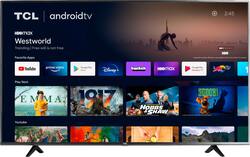
TCL - 43" Class 4-Series LED 4K UHD HDR Smart Android TV
- Key Specs
- Display Type: LED
- Resolution: 4K (2160p) (Refers to the number of pixels, both horizontally and vertically, used to capture video/images. The higher the resolution the finer the detail that can be seen.)
- Screen Size Class: 43 inches (The group size measurement of a screen. This differs from a screen size measured diagonally from corner to corner.)
- High Dynamic Range (HDR): true (An HDR-compatible 4K TV or other HDR-compatible product displays HDR video content when it's available from sources like 4K Ultra HD Blu-ray Discs and 4K streaming services.)
- High Dynamic Range Format: HDR 10, Hybrid Log-Gamma (HLG) (There are a few HDR formats that tell the TV or other HDR-compatible product how to best utilize its capabilities to display HDR content. HDR technology can support one or multiple formats, each with various benefits to picture quality.)
- LED Panel Type: Standard LED
- Backlight Type: Direct Lit (Edge-lit: lights are on the edges of the display with ~10 zones of vertical LEDs. Direct-lit: lights are on the edges and behind the screen for more light uniformity than Edge-lit. Full array: direct-lit with local dimming for greater contrast with up to 100 zones of LEDs.)
- Refresh Rate: 60Hz (The number of frames per second the device can produce natively without enhancement. Higher rates help produce smooth, seamless pictures.)
- Smart Platform: Android TV (Just like a computer, a smart TV needs an operating system (also called a smart platform) in order to access the Internet, connect with entertainment apps, and play streaming content. Some common TV smart platforms are; Roku TV, Android TV, and Chromecast.)
- Featured Streaming Services: Netflix, Prime Video, HBO Max, Peacock, Hulu, Disney+, Paramount+, YouTube, YouTube TV, Twitch, Vudu, Google Play Movies & TV, Sling TV, Tubi, Peloton (Streaming services and other programs are available on this device. Keep in mind, there may be more services supported than just those shown here.)
- Number of HDMI Inputs (Total): 3
- Works With: Google Assistant (Compatible with or able to be connected to other smart devices or applications.)
- Voice Assistant Built-in: Google Assistant (A digital assistant built into the device that uses voice commands to answer questions and control smart devices.)
- General
- Product Name: 43" Class 4-Series LED 4K UHD HDR Smart Android TV
- Brand: TCL
- Model Number: 43S434
- Series: 4 Series (Part of a group of the same product type with similar features.)
- Model Year: 2020
- Color: Black
- Dimensions
- Product Height With Stand: 24.6 inches
- Product Width: 38.2 inches (The out of box width of the item. Width is measured as the horizontal distance from one side of the item to the other as it would be primarily used or placed.)
- Product Depth With Stand: 9.9 inches
- Product Height Without Stand: 22.3 inches
- Product Depth Without Stand: 3.3 inches
- Product Weight With Stand: 15.6 pounds
- Product Weight Without Stand: 15.4 pounds
- Adjustable Stand Width: false (Whether the stand can adjust to have more than one measurement either between the legs or the base itself.)
- Display
- Display Type: LED
- Resolution: 4K (2160p) (Refers to the number of pixels, both horizontally and vertically, used to capture video/images. The higher the resolution the finer the detail that can be seen.)
- Screen Size: 42.5 inches (Size of the screen, measured diagonally from corner to corner.)
- Screen Size Class: 43 inches (The group size measurement of a screen. This differs from a screen size measured diagonally from corner to corner.)
- High Dynamic Range (HDR): true (An HDR-compatible 4K TV or other HDR-compatible product displays HDR video content when it's available from sources like 4K Ultra HD Blu-ray Discs and 4K streaming services.)
- High Dynamic Range Format: HDR 10, Hybrid Log-Gamma (HLG) (There are a few HDR formats that tell the TV or other HDR-compatible product how to best utilize its capabilities to display HDR content. HDR technology can support one or multiple formats, each with various benefits to picture quality.)
- Picture Quality Enhancement Technology: 4K HDR Pro
- LED Panel Type: Standard LED
- Backlight Type: Direct Lit (Edge-lit: lights are on the edges of the display with ~10 zones of vertical LEDs. Direct-lit: lights are on the edges and behind the screen for more light uniformity than Edge-lit. Full array: direct-lit with local dimming for greater contrast with up to 100 zones of LEDs.)
- Curved Screen: false
- Refresh Rate: 60Hz (The number of frames per second the device can produce natively without enhancement. Higher rates help produce smooth, seamless pictures.)
- Features
- Remote Control Type: Voice control
- Smart Capable: true (Smart, or smart-capable devices are able to connect directly to your home network in order to stream content from the Internet, run Internet-based apps, or connect to other smart devices.)
- Smart Platform: Android TV (Just like a computer, a smart TV needs an operating system (also called a smart platform) in order to access the Internet, connect with entertainment apps, and play streaming content. Some common TV smart platforms are; Roku TV, Android TV, and Chromecast.)
- Featured Streaming Services: Netflix, Prime Video, HBO Max, Peacock, Hulu, Disney+, Paramount+, YouTube, YouTube TV, Twitch, Vudu, Google Play Movies & TV, Sling TV, Tubi, Peloton (Streaming services and other programs are available on this device. Keep in mind, there may be more services supported than just those shown here.)
- Indoor Or Outdoor Use: Indoor (Indicates the appropriate environment product was designed to be used in.)
- TV Tuner: Digital (The ATSC TV Tuner is a component built into conventional TV sets or other devices for receiving over-the-air broadcast TV without a cable/satellite box. Digital tuners may be purchased separately and connected to a device if it does not have one built in.)
- Connectivity
- Number of HDMI Inputs (Total): 3
- RF Antenna Input: true (This input is used to connect devices such as antennas or cable boxes to a TV via a coaxial cable.)
- Number Of USB Port(s) (Total): 1 (The total number of USB ports including all generations and versions.)
- Headphone Jack: true (The device features an interface that allows for the connection of headphones.)
- Compatibility
- VESA Wall Mount Standard: 200mm x 200mm (VESA wall mount standards refer to the spacing of screw holes built into a TV in order to fit with standard TV wall mounts. These standards are implemented into most TVs and monitors.)
- Works With: Google Assistant (Compatible with or able to be connected to other smart devices or applications.)
- Voice Assistant Built-in: Google Assistant (A digital assistant built into the device that uses voice commands to answer questions and control smart devices.)
- Power
- ENERGY STAR Certified: false (Devices carrying the ENERGY STAR service mark, such as computer products and peripherals, kitchen appliances, and other products, generally use 20% to 30% less energy than required by federal standards.)
- EPEAT Qualified: false (The Electronic Product Environmental Assessment Tool (EPEAT) was designed to provide an environmental assessment tool for purchasers. In order to qualify for EPEAT, a product must meet all 23 required criteria.)
- Estimated Annual Operating Cost: 10 United States dollars (Predicted cost of operating the product under average conditions for one year.)
- Estimated Annual Electricity Use: 83 kilowatt hours (Predicted amount of electricity needed to operate the product under average conditions for one year.)
- Included
- Stand Included: true
- Box Dimension
- Height: 25.7 inches
- Width: 44.8 inches
- Depth: 5.1 inches
- CubicDimension: 5871.936 inches
- Other
- UPC: 846042016957
The 4-Series 4K TCL Android TV delivers stunning Ultra HD picture quality with four times the resolution of Full HD for enhanced clarity and detail, as well as endless entertainment with thousands of streaming apps. Watch your entertainment favorites in one place, with seamless access to over 700,000 movies and TV episodes, your cable box, gaming console, and other devices—all from a simple, speedy home screen. Enjoy entertainment, get answers, and control devices around your home using Google Assistant. Plus, with Chromecast built-in, you can easily cast movies, shows, and photos from your Android or iOS device to your TCL Android TV. Connect all your favorite devices with the multiple HDMI inputs. Cord cutters can access free, over-the-air HD content with the built-in tuner or watch live TV from popular cable-replacement services like YouTube TV, Sling, Hulu and more.
- 4K Ultra HD (2160p resolution): Enjoy breathtaking 4K movies and TV shows at 4 times the resolution of Full HD, and upscale your current content to Ultra HD-level picture quality.
- High Dynamic Range: HDR delivers bright and accurate colors for a lifelike viewing experience.
- Google Assistant Built-in: Search for movies and shows across thousands of available apps, get entertainment recommendations, access media playback controls, change the temperature, dim the lights, and so much more.
- Chromecast Built-in: Easily cast movies, shows, and photos from your Android or iOS device to your TCL Android TV.
- Thousands of streaming apps: Stream 700,000+ movies and shows, live sports and news, or your favorite music from Google Play, YouTube and your favorite apps.
- Voice Remote: The easy-to-use remote also features voice search and control, allowing you to find movie titles, launch or change apps, and more. Just push the button on the voice remote and say a command.
- 802.11ac Dual-band WiFi & Ethernet port: Get fast and easy access to your favorite content with the dual-band WiFi connection or plug into the Ethernet port.
- Bluetooth® wireless connectivity: Expand your entertainment options by wirelessly streaming music to your phone, headphones, or a sound bar with Bluetooth.
- Clear Motion Index 120: Displays fast motion sports and action scenes with clarity and smoothness.
Whats Included
- Warranty Info
- Quick Start Guide
- Power Cord
- Remote Control
- Remote Control Batteries
Documents
- Energy_Guide_PDF
A: For this 43 inch TCL Roku TV, the feet spacing to fit on a stand is 29.8 inches. Hope this helps! Thank you, TCL Customer Support
Q: Does this tv allow connecting headphones via Bluetooth?
A: Our TCL Android TVs do indeed support Bluetooth and can be paired with compatible audio devices that also support and pair via Bluetooth. You can also visit https://support.tcl.com/androidtv-setup-configuration/connecting-bluetooth-devices-to-my-android-tv-642 for more information. Hope this helps! Thank you, TCL Customer Support
Q: Can you cast from mobile phone
A: Our TCL Android TVs come with Chromecast built-in. Casting to your TV is a simple way to enjoy photos, videos, music, and other content on the big screen. You can watch entertainment from a laptop, tablet, or mobile device. Hope this helps! Thank you, TCL Customer Support
A: The composite connection for this TCL TV is a single input located between the coaxial input and the Headphone Jack. You would need to use an adapter to connect the traditional red/white/yellow cables you are used to seeing. The adapter would need to be purchased separately. Hope this helps! Thank you, TCL Customer Support
A: If headphones are connected to the TV, the TV speakers are automatically disabled. Hope this helps! Thank you, TCL Customer Support
Q: 1) Does this TV have a internet browser built in?
A: While we can not recommend a specific web browser, there are various web browsers that can be downloaded through the Play Store. Hope this helps! Thank you, TCL Customer Support
Q: Does it support Spectrum TV APP
A: The Spectrum TV app is not currently an available streaming app on this TCL Android TV. Hope this helps! Thank you, TCL Customer Support
Q: Does it support the HBO app? The Discovery+ app? The Disney app? And YouTube? Thanks
A: The HBO Max, Discovery+, Disney+, and YouTube streaming apps are indeed some of the many available streaming apps on this TCL Android TV. Hope this helps! Thank you, TCL Customer Support




















