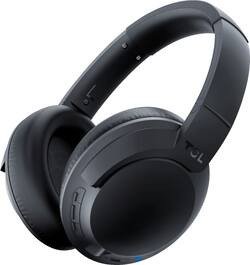
TCL - ELIT400NC Wireless Noise Cancelling Over-the-Ear Headphones - Midnight Blue
- Key Specs
- Noise Cancelling (Active): true
- Sound Mode: Stereo
- Connection Type: Wireless
- Wireless Connectivity: Bluetooth (The manner in which a device sends data to another device over a short distance without the use of wires or cables.)
- True Wireless: false (These headphones not only lack wires between the device and headphones, they also lack wires between the headphones themselves. (true wireless is really only possible with in-ear headphones))
- Maximum Wireless Range: 33 feet
- Built-In Microphone: true
- Headphone Fit: Over-the-Ear
- Adjustable Headband: false
- Battery Life: 22 hours (Battery life will vary depending on the product configuration, product model, applications loaded on the product, power management setting of the product and the product features used by the customer. As with all batteries, the maximum capacity of this battery will decrease with time and usage.)
- General
- Product Name: ELIT400NC Wireless Noise Cancelling Over-the-Ear Headphones
- Brand: TCL
- Model Number: ELIT400NCBLNA
- Color: Midnight Blue
- Audio
- Noise Cancelling (Active): true
- Sound Isolating: true
- Sound Mode: Stereo
- Driver Size: 40 millimeters
- Connectivity
- Connection Type: Wireless
- Wireless Connectivity: Bluetooth (The manner in which a device sends data to another device over a short distance without the use of wires or cables.)
- True Wireless: false (These headphones not only lack wires between the device and headphones, they also lack wires between the headphones themselves. (true wireless is really only possible with in-ear headphones))
- Bluetooth Version: 4.2 (The Bluetooth specification formalized by the Bluetooth Special Interest Group. All versions of the Bluetooth standard are backwards compatible with previous versions.)
- Maximum Wireless Range: 33 feet
- Features
- Built-In Microphone: true
- Controls: Call, Track selection
- Maximum Talk Time: 22 hours
- Stand-By Time: 25 days (Amount of time it takes for the device to deplete a single battery charge when powered on but not in active use. This length of time is dependent on the network environment the device is connected to, if applicable, and the applications running.)
- Design
- Headphone Fit: Over-the-Ear
- Adjustable Headband: false
- Foldable Design: true
- Power
- Rechargeable: true
- Battery Life: 22 hours (Battery life will vary depending on the product configuration, product model, applications loaded on the product, power management setting of the product and the product features used by the customer. As with all batteries, the maximum capacity of this battery will decrease with time and usage.)
- Charging Interface(s): USB (The connection for transmitting power to charge the device.)
- Warranty
- Manufacturer's Warranty - Parts: 1 year
- Manufacturer's Warranty - Labor: 1 year
- Other
- UPC: 846042011525
Enjoy the crisp, powerful sound of these midnight blue TCL on-ear noise-cancelling headphones. The lithium-polymer battery offers up to 22 hours of listening time on a single charge, while the soft, breathable memory foam ear cushions and headband conform to the shape of your head for a secure, comfortable fit. These TCL on-ear noise-cancelling headphones have a 30-foot Bluetooth connectivity range that lets you wander from your mobile device freely.
- Rechargeable battery: Offers up to 22 hours of use and lasts up to 600 hours on standby mode.
- Active noise cancellation: Actively cancels waveforms from outside the earcup to completely eliminate extraneous sounds.
- Built-in microphone: Enables simple hands-free chatting via a compatible device.
- Bluetooth 4.2 interface: Enables simple wireless pairing with your Bluetooth-enabled device. Supports HFP, HSP, A2DP and AVRCP Bluetooth profiles.
- Over-the-ear design: For a secure fit.
- Folding design: Along with an included carrying case enables easy portability.
- Headset controls: Include answer/end, play/pause and next/previous track.
- 40mm drivers: Deliver powerful sound.
- Stereo design: Delivers crisp tones.
Whats Included
- TCL ELIT400NCBL Wireless Noise Cancelling Over-the-Ear Headphones
Product Manuals
Q: How long do I need to charge it for?
A: Until the red light goes out. How long that takes depends upon how long you have used the headphones. If the battery is completely drained, they should recharge in less than two hours.
A: These specific headphones have the ability to connect to a device via Bluetooth or via the 3.5mm headphone jack. As long as your MP3 player has one of these connections you should be all set to go! Hope this helps! Thank you, TCL Customer Support
Q: Does tlhis headphone work with the TCL optical connection?
A: These TCL ELIT400 headphones can be connected to one of our TCL Roku TVs via the headphone jack on the TV or by utilizing the free Roku mobile app and using the private listening feature. Hope this helps! Thank you, TCL Customer Support
A: Hopefully you found it by now haha! If not, here's how to toggle between Chinese and English: (1) Power on the headphones by pressing and holding the power button for 2 seconds. (2) Find the three adjacent buttons, located just left of the headphone jack on the R headphone. Press and hold the outer two of these buttons simultaneously for 5 seconds. (3) Enjoy your English-speaking headphones.
A: The battery life typically lasts about 22 hours for constant play time. Additionally, 15 minutes of fast charging will give you 5 hours of play. The majority of our customers report a great experience with comfort. Hope this helps! Thank you, TCL Customer Support
Q: will it work with a desktop computer
A: Hello Danny, Yes, as long as the computer has a bluetooth connection or 3.5mm headphone jack for audio. Hope this helps, TCL Social Support
A: undefined
Q: Where can I find it’s manual
A: It's a small booklet in the box. Gives 5 instructions. When it's on a blue light comes on.














