Thrustmaster - T-Flight Hotas One Joystick for Xbox Series X|S, Xbox One, Windows - Black
More Buying Options
Related Item

Specifications
- WirelessNoCompatible Platform(s)Xbox One, Windows, Xbox Series S, Xbox Series X
- Key Specs
- Wireless: false
- Compatible Platform(s): Xbox One, Windows, Xbox Series S, Xbox Series X
- General
- Brand: Thrustmaster
- Model Number: 4460168
- Product Name: T-Flight Hotas One Joystick for Xbox Series X|S, Xbox One, Windows
- Color: Black
- Features
- Product Type: Joystick and throttle
- Analog Joysticks: true
- Connectivity
- Wireless: false
- Dimensions
- Product Height: 10.75 inches (The out of box height of the item. Height is measured as the vertical distance from the bottom of the item to the top as it would be primarily used or placed.)
- Product Width: 10.75 inches (The out of box width of the item. Width is measured as the horizontal distance from one side of the item to the other as it would be primarily used or placed.)
- Product Length: 9.38 inches (The out of box length of the item. Length is measured as the longest dimension of the item.)
- Product Weight: 4.47 pounds (The out of box weight of the item.)
- Compatibility
- Compatible Platform(s): Xbox One, Windows, Xbox Series S, Xbox Series X
- Warranty
- Warranty - Parts: 1 year
- Warranty - Labor: 1 year
- Other
- UPC: 663296421005
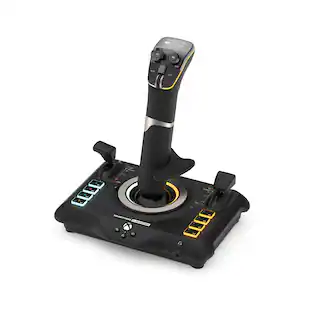
T.Flight Hotas One, a joystick for Xbox Series X|S, Xbox One, and PC, provides a high level of realism: the stick includes five axes, fourteen action buttons, a rapid-fire trigger and a multidirectional hat switch (navigation/panoramic view), all of which are easily accessible. The throttle - detachable and full-size for easy maneuverability, even in virtual reality - provides super-responsive power. The dual rudder system can be engaged by rotating the handle (with an integrated locking system) or via the progressive tilting lever. The T.Flight Hotas One includes official buttons for the Xbox One console (Guide/View/Menu): access social features, switch between the game and the console, navigate through the console's menus, etc.
Whats Included
- T-Flight Hotas One Joystick for Xbox Series X|S, Xbox One and PC
- Joystick
- Throttle
- Allen key
- Owner's manual
Product Manuals
Q: What type of hat switch does the Thrustmaster joystick have?
A: This joystick has a multidirectional hat switch for navigation and panoramic view.
Q: What kind of trigger does the Thrustmaster joystick have?
A: The Thrustmaster T-Flight Hotas One joystick features a rapid-fire trigger.
Q: Does the Thrustmaster joystick have a throttle lever?
A: Yes, the Thrustmaster joystick comes with a throttle lever.
Q: Is the Thrustmaster T-Flight Hotas One a wireless joystick?
A: No, this joystick is not wireless.
Q: How many axis does the Thrustmaster joystick have?
A: The Thrustmaster T-Flight Hotas One joystick has five axes.
A: The cord is not very long. We purchased a 16.4 ft. USB Extension cable, only cost $13.00. ( USB 3.0 Extender Male to Female cord with signal booster). Amongst other electronics it is for Xbox one also. For us it works great ! Didn't want to spend the money for a gaming chair, plus no room. Good Luck, you'll be happpy.
A: Simple answer is YES. It works perfectly for XBOX One Games. I use it all the time playing Ace Combat 7. It also works with games like HIND, and Tom Clancy's H.A.W.X. that is backward compatible from XBOX 360. It makes flying games just more fun.
Q: Does this work with Microsoft Flight Simulator 2020 on either Xbox 1 or a PC?
A: This does NOT work for flight simulator on xbox. The xbox series x doesn't even recognize it as a controller. Just go to settings and xbox accessories with it plugged it but your wireless controllers off and you'll see it's not there. In flight simulator that just launched it sees it as a keyboard.
Compare similar products

T.Flight Hotas One, a joystick for Xbox Series X|S, Xbox One, and PC, provides a high level of realism: the stick includes five axes, fourteen action buttons, a rapid-fire trigger and a multidirectional hat switch (navigation/panoramic view), all of which are easily accessible. The throttle - detachable and full-size for easy maneuverability, even in virtual reality - provides super-responsive power. The dual rudder system can be engaged by rotating the handle (with an integrated locking system) or via the progressive tilting lever. The T.Flight Hotas One includes official buttons for the Xbox One console (Guide/View/Menu): access social features, switch between the game and the console, navigate through the console's menus, etc.

Feel like a real pilot with this Thrustmaster T.Flight Hotas 4 joystick for the PlayStation 4, Playstation 5, and PC. The detachable full-size throttle lets you recreate your game’s cockpit setup, and it has a dual rudder system for versatile control options. Adjust the resistance of this PC-compatible Thrustmaster T.Flight Hotas 4 joystick to suit your preference.

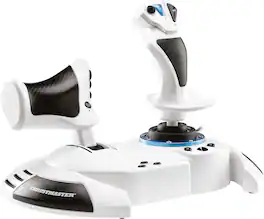
T.Flight Hotas One, an officially-licensed joystick for Xbox One and Windows, provides a high level of realism: the stick includes five axes, fourteen action buttons, a rapid-fire trigger and a multidirectional hat switch (navigation/panoramic view), all of which are easily accessible. The throttle – detachable and full-size for easy maneuverability, even in virtual reality – provides super-responsive power. The dual rudder system can be engaged by rotating the handle (with an integrated locking system) or via the progressive tilting lever. The T.Flight Hotas One includes official buttons for the Xbox One console (Guide/View/Menu): access social features, switch between the game and the console, navigate through the console’s menus, etc.
Specs



Reviews
Rating 4.5 out of 5 stars with 918 reviews
Customer Images
The vast majority of our reviews come from verified purchases. Reviews from customers may include My Best Buy members, employees, and Tech Insider Network members (as tagged). Select reviewers may receive discounted products, promotional considerations or entries into drawings for honest, helpful reviews.
Explore tech essentials Sponsored
 $262.49The price was $349.99