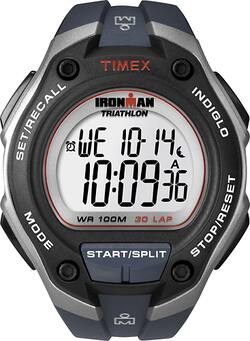
Timex - IRONMAN 30-Lap Oversize Sports Watch - Blue
- Key Specs
- Operating System Compatibility: Not Applicable
- Global Positioning: None (A system of satellites which enables a mobile receiver to determine its precise location based on signals received from satellites such as the US Global Positioning System (GPS), the Russian Global Navigation Satellite System (GLONASS), the European Global Navigation Satellite System (Galileo), or the Japanese Quasi-Zenith Satellite System (QZSS).)
- Metrics Measured: Other
- Maximum Depth of Water Resistance: 330 feet (Measurement of the maximum depth of water in which the product is able to resist some degree of water penetration.)
- General
- Product Name: IRONMAN 30-Lap Oversize Sports Watch
- Brand: Timex
- Product Type: Activity tracker
- Form Factor: Wristwatch (The size, arrangement, and physical configuration of the product.)
- Model Family: Timex Ironman
- Model Number: T5K416
- Display
- Display Screen: true
- Display Type: LCD
- Color Display: false
- Clock Display: true
- Backlit Display: true (Integrated lights allow for visibility of the display in low-light conditions.)
- Compatibility
- Operating System Compatibility: Not Applicable
- Features
- Global Positioning: None (A system of satellites which enables a mobile receiver to determine its precise location based on signals received from satellites such as the US Global Positioning System (GPS), the Russian Global Navigation Satellite System (GLONASS), the European Global Navigation Satellite System (Galileo), or the Japanese Quasi-Zenith Satellite System (QZSS).)
- Silent Alarm: false
- Activity
- Metrics Measured: Other
- Performance
- Maximum Depth of Water Resistance: 330 feet (Measurement of the maximum depth of water in which the product is able to resist some degree of water penetration.)
- Dimensions
- Product Width: 1.75 inches (The out of box width of the item. Width is measured as the horizontal distance from one side of the item to the other as it would be primarily used or placed.)
- Product Length: 0.5 inches (The out of box length of the item. Length is measured as the longest dimension of the item.)
- Power
- Rechargeable: false
- Battery Strength Indicator: false
- Other
- UPC: 753048342600
Timex IRONMAN 30-Lap Oversize Sports Watch - Men
Whats Included
- Timex Men's Ironman 30-Lap Watch
- Owner's manual
A: You set the time on your smart phone and smart watches pick up the time from your phone.
A: It should run in sync with your phone.
Q: how do I change the date on ironman triathlon
A: Use the following instructions to change the date of the watch. 1)With time and date showing, press and hold SET·RECALL. 2) Current time zone (1, 2, or 3) flashes. Press + or – to select time zone to set, if desired. 3) Press NEXT. Hour flashes. Press + or – to change hour (including AM/PM); hold button to scan values 4) Press NEXT. Minutes flash. Press + or – to change minutes 5) Press NEXT. Seconds flash. Press + or – to set seconds to zero. 6) Press NEXT. Month flashes. Press + or – to change month. 7) Press NEXT. Day flashes. Press + or – to change day. 8) Press NEXT. Year flashes. Press + or – to change year. 9) Press NEXT to set options. Press + or – to change value and then press NEXT to go to next option. Press DONE at any step to exit and save settings. Available options are 12- or 24-hour time format, MM-DD or DD.MM date format, hourly chime beep for button presses, mode customization set (Select “HIDE” for unwanted modes – they are removed from mode sequence).