Turtle Beach - VelocityOne Flightstick Universal Simulation Controller for Xbox Series X and Windows PCs - Black
More Buying Options
Specifications
- Compatible Platform(s)Xbox Series X, Xbox Series S, Xbox One, Windows
- Key Specs
- Compatible Platform(s): Xbox Series X, Xbox Series S, Xbox One, Windows
- General
- Brand: Turtle Beach
- Model Number: TBS-0722-05
- Product Name: VelocityOne Flightstick Universal Simulation Controller for Xbox Series X and Windows PCs
- Color: Black
- Features
- Product Type: Joystick
- Dimensions
- Product Height: 9.07 inches (The out of box height of the item. Height is measured as the vertical distance from the bottom of the item to the top as it would be primarily used or placed.)
- Product Width: 8.54 inches (The out of box width of the item. Width is measured as the horizontal distance from one side of the item to the other as it would be primarily used or placed.)
- Product Length: 6.46 inches (The out of box length of the item. Length is measured as the longest dimension of the item.)
- Product Weight: 1.81 pounds (The out of box weight of the item.)
- Compatibility
- Compatible Platform(s): Xbox Series X, Xbox Series S, Xbox One, Windows
- Warranty
- Warranty - Parts: 1 year
- Warranty - Labor: 1 year
- Other
- UPC: 731855007226
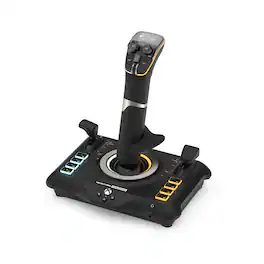
Take Flight with Turtle Beach. The Turtle Beach VelocityOne Flightstick for Xbox Series X|S, Xbox One & Windows PCs equips you with immersive, accurate controls for air and space flight simulation & combat games on Xbox and PC. Ultra-smooth main stick provides precise control, and two multi-function levers control main engine power and adjustment of control surfaces. A precise nano trim wheel allows for fine tuning of attitude and the OLED Flight Management Display makes for easy adjustments to control profiles. With 27 programmable buttons, a rapid-fire trigger and more, you’re well-armed with a multitude of controls.
- 8 High-Precision Axes: High resolution contactless sensors provide precise response and extended longevity to the main stick controls. A nano trim wheel allows for fine tuning of attitude, and an analog hat delivers finite adjustment to cockpit views or strafe thrusters in space sims.
- Multifunction Throttle & Flap Levers: Throttle levers control main engine power and flap levers let you quickly adjust secondary control surfaces. Plus, swappable throttle tops let you customize your controls for fighter jet, or airliners.
- Multiplatform: Connect via the supplied 10 ft/3m USB-C to USB-A cable and play your favorite titles on Xbox, or PC with an integrated input mode switch.
- 27 Programmable Buttons: Equipped with an 8-way digital hat, rapid fire trigger, stick mounted buttons, dual throttle lever detents, and 8 programmable base buttons, you’re well-armed with controls for your most critical flight functions.
- Flight Management Display: An integrated OLED flight management display enables you to tune its performance to suit the game you’re playing. Plus, you can adjust control profiles, trim wheel input mode, rudder lock and more.
- Flight Configuration Wheel: Navigate the flight management display and configure the flightstick using the intuitive rotary dial with click at base of the stick. Browse through the configuration options and update the product performance in real-time with all information stored in on-board memory.
- Touchpad Navigation Sensor: The touch sensor with button press gives full control of mouse cursor functionality, ideal for navigating simulation systems and can also be used for weapon control in popular air & space combat sim titles.
- Ambidextrous Design: Designed to control fighter jets, or airliners the main stick has an ergonomic, ambidextrous shape with reversible wrist rest. Plus, with eight programmable base buttons, you can set up the controls to your exact preference regardless of which hand is on the controls.
- Pro-Aim Focus Mode: Adjust main stick sensitivity for accurate enemy targeting and precise control of landings.
- Turtle Beach Audio Advantage: Connect any 3.5mm headset and take advantage of proven Turtle Beach audio functions like Superhuman Hearing, EQ modes, mic monitoring and game and chat balance.
- Xbox Navigation Controls: Effortlessly control your console with licensed Xbox buttons. An additional white LED indicates successful connection and operation.
- Bluetooth Companion App: Connect to your tablet or smartphone to adjust product performance and access additional buttons using the flightstick app available for iOS & Android devices. Additional buttons only available when playing on Windows 10/11 PCs
- Adjustable RGB Lighting: Set the color, brightness, and response of multiple RGB LED zones.
- 8 High-Precision Axes: High resolution contactless sensors provide precise response and extended longevity to the main stick controls. A nano trim wheel allows for fine tuning of attitude, and an analog hat delivers finite adjustment to cockpit views or strafe thrusters in space sims.
- Multifunction Throttle & Flap Levers: Throttle levers control main engine power and flap levers let you quickly adjust secondary control surfaces. Plus, swappable throttle tops let you customize your controls for fighter jet, or airliners.
- Multiplatform: Connect via the supplied 10 ft/3m USB-C to USB-A cable and play your favorite titles on Xbox, or PC with an integrated input mode switch.
- 27 Programmable Buttons: Equipped with an 8-way digital hat, rapid fire trigger, stick mounted buttons, dual throttle lever detents, and 8 programmable base buttons, you’re well-armed with controls for your most critical flight functions.
- Flight Management Display: An integrated OLED flight management display enables you to tune its performance to suit the game you’re playing. Plus, you can adjust control profiles, trim wheel input mode, rudder lock and more.
- Flight Configuration Wheel: Navigate the flight management display and configure the flightstick using the intuitive rotary dial with click at base of the stick. Browse through the configuration options and update the product performance in real-time with all information stored in on-board memory.
- Touchpad Navigation Sensor: The touch sensor with button press gives full control of mouse cursor functionality, ideal for navigating simulation systems and can also be used for weapon control in popular air & space combat sim titles.
- Ambidextrous Design: Designed to control fighter jets, or airliners the main stick has an ergonomic, ambidextrous shape with reversible wrist rest. Plus, with eight programmable base buttons, you can set up the controls to your exact preference regardless of which hand is on the controls.
- Pro-Aim Focus Mode: Adjust main stick sensitivity for accurate enemy targeting and precise control of landings.
- Turtle Beach Audio Advantage: Connect any 3.5mm headset and take advantage of proven Turtle Beach audio functions like Superhuman Hearing, EQ modes, mic monitoring and game and chat balance.
- Xbox Navigation Controls: Effortlessly control your console with licensed Xbox buttons. An additional white LED indicates successful connection and operation.
- Bluetooth Companion App: Connect to your tablet or smartphone to adjust product performance and access additional buttons using the flightstick app available for iOS & Android devices. Additional buttons only available when playing on Windows 10/11 PCs
- Adjustable RGB Lighting: Set the color, brightness, and response of multiple RGB LED zones.
Whats Included
- VelocityOne Flightstick
- 10ft USB-A to USB-C Cable
- M5 Screws
- Quick Flight Guide
- VelocityOne Flightstick
- 10ft USB-A to USB-C Cable
- M5 Screws
- Quick Flight Guide
Q: Can I customize the lighting on this flightstick?
A: Yes, the flightstick has adjustable RGB lighting. You can set the color, brightness, and response of multiple RGB LED zones.
Q: What is the purpose of the Pro-Aim Focus Mode on this flightstick?
A: The Pro-Aim Focus Mode allows you to adjust the main stick sensitivity, which is helpful for precise targeting of enemies and accurate landings in games.
Q: Is this flightstick compatible with both Xbox and PC?
A: Yes, the flightstick is multiplatform compatible. You can connect it to your Xbox or PC using the included USB-C to USB-A cable.
Q: How many programmable buttons does the flightstick have?
A: The flightstick is equipped with 27 programmable buttons for various flight functions.
Q: Can I use a companion app with this flightstick?
A: Yes, there's a Bluetooth companion app for iOS and Android devices. You can use it to adjust settings and access additional buttons when playing on Windows 10/11 PCs.
Q: Does the flightstick offer any audio features when connected to a headset?
A: Yes, when you connect a 3.5mm headset, you can utilize Turtle Beach audio functions like Superhuman Hearing, EQ modes, mic monitoring, and game and chat balance.
Q: What type of display does the flightstick use for managing settings?
A: The flightstick features an integrated OLED flight management display for adjusting settings and profiles.
Compare similar products
Take Flight with Turtle Beach. The Turtle Beach VelocityOne Flightstick for Xbox Series X|S, Xbox One & Windows PCs equips you with immersive, accurate controls for air and space flight simulation & combat games on Xbox and PC. Ultra-smooth main stick provides precise control, and two multi-function levers control main engine power and adjustment of control surfaces. A precise nano trim wheel allows for fine tuning of attitude and the OLED Flight Management Display makes for easy adjustments to control profiles. With 27 programmable buttons, a rapid-fire trigger and more, you’re well-armed with a multitude of controls.

The updated X56 HOTAS features a new stealthy black and gray finish. The changes go beyond cosmetic, with engineering updates to address the feedback from the community delivering a more amazing experience for all flight enthusiasts; from fun, plug-and-play gaming all the way to professional fine-tuned simulation. The X56 has a multitude of customizable options, including mini analog sticks to enable true 6 degrees of freedom control of your spacecraft. Featuring 16-bit non-contact sensors, the stick offers the most accurate level of control on the market today; control that you can enhance even further via adjustment of the response curves and deadzones. RGB lighting allows you to customize the appearance of the stick so that it becomes a fully integrated part of your simulation setup.

T.Flight Hotas One, a joystick for Xbox Series X|S, Xbox One, and PC, provides a high level of realism: the stick includes five axes, fourteen action buttons, a rapid-fire trigger and a multidirectional hat switch (navigation/panoramic view), all of which are easily accessible. The throttle - detachable and full-size for easy maneuverability, even in virtual reality - provides super-responsive power. The dual rudder system can be engaged by rotating the handle (with an integrated locking system) or via the progressive tilting lever. The T.Flight Hotas One includes official buttons for the Xbox One console (Guide/View/Menu): access social features, switch between the game and the console, navigate through the console's menus, etc.

The Turtle Beach VelocityOne Flightdeck is a premium simulation HOTAS system for Windows 10 & 11 PCs, designed for enthusiasts who demand the best. Inspired by advanced spacecraft and state of the art jet fighters to provide the ultimate HOTAS experience for all major combat simulation titles with the future in mind. Comprehensive controls including 15 axes and 139 programmable functions keep you immersed in the action, with your hands on the controls. World’s first Flight Touch Display, and an OLED Head Up Display deliver unprecedented levels of performance optimization, and product customization. Plus, the Flight Hangar app for desktop provides even more product customization and RGB lighting adjustment.
| Pros for Turtle Beach - VelocityOne Flightstick Universal Simulation Controller for Xbox Series X and Windows PCs - Black | |||
|---|---|---|---|
| Ease of use, Overall Performance, OLED Display, Button Layout, Control | There were no pros for this product— | Ease of use, Overall Performance, Price, Compatibility, Controls | OLED Display, Build Quality, Customization, Setup, Ergonomics |
| Cons for Turtle Beach - VelocityOne Flightstick Universal Simulation Controller for Xbox Series X and Windows PCs - Black | |||
| Stiffness, Base Stability, Compatibility | There were no cons for this product— | Throttle, Cord Length, Design | There were no cons for this product— |
Specs
Reviews
Customers are saying
Customers appreciate the VelocityOne Flightstick for its ease of use, overall performance, and well-designed button layout. The vivid OLED display and multiple controls are also well-received. However, some customers have noted the stick's stiffness and the base's lack of stability. Additionally, a few customers have reported compatibility issues.
Customer Images
The vast majority of our reviews come from verified purchases. Reviews from customers may include My Best Buy members, employees, and Tech Insider Network members (as tagged). Select reviewers may receive discounted products, promotional considerations or entries into drawings for honest, helpful reviews.
- Rated 5 out of 5 stars
Perfect for Flight Simulator 2024
As the title says, it has ran flawlessly with FS 2024. No setup needed; just plug, play, and assign custom actions for each button in game. Trim wheel comes in clutch!
Posted by TylerJP
- Rated 5 out of 5 stars
Much Better Than Expected
Very comfortable flight stick. I love the little display screen. I didn't know this, but you can twist it left and right to simulate rudder controls, which is a really nice feature, of course. I use it for MSFS2024 and it works well from everything from the Cessna 172 to the Boeing 747. There's about 18 different buttons, so you can really map anything to this flight stick.
Posted by MichaelM
- Rated 4 out of 5 stars
It’s a 50/50 overall
I’ll make it easy, I could truly only recommend this product to a person that’s beginning flight sims/games and are more compact than full out advanced tech flight games such as DCS and War Thunder. A game I’ve fallen even more in love with using this stick is Nuclear Option, it’s an amazing HOTAS to use on that game in my opinion, I have almost every button programmed to an action. Now, with that in mind, I HIGHLY recommend getting a HOTAS stand/desk mount that’s compatible with it. I got one off amazon for $40 and it’s amazingly strong (even amazons choice! Seller: JUYEER). The reason I recommend this strongly is because the flight stick itself can be a little stern to move around, the spring inside is almost to stiff (good and bad only for people who play for prolong periods and have no mount, like I once was) so with that being said, a stand practically keeps it in place for you at your desired whatever, and my god has it put a lot of relief on my hands and forearms (I’m being dramatic but it definitely helped out with comfortability. Given the right reasoning, I feel I could recommend this product.
Posted by Mase