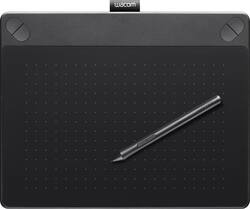
Wacom - Intuos Art Creative Small Pen and Touch Tablet - Black
- Key Specs
- Number of Buttons (Total): 4
- General
- Product Name: Intuos Art Creative Small Pen and Touch Tablet
- Brand: Wacom
- System Requirements: PC: Windows 7, 8 or 10; Mac: OS X 10.8.5 or later; USB port; CD-ROM or DVD-ROM drive; Internet connection (The software that a product must have for it to be able to integrate with another product.)
- Model Number: CTH490AK
- Features
- Mouse Type: Touchpad
- Performance
- Mouse Operation: Other
- Handedness: Ambidextrous
- Tracking Method: Touchpad (There are several types of computer mice, optical and laser being among the most common. Optical mice detect less detail and provide more precise and accurate movement. Laser mice detect more detail and can be used on a wider variety of surfaces, but are more sensitive to small movements.)
- Number of Buttons (Total): 4
- Connectivity
- Wired Connectivity: USB
- Operating System Compatibility: Mac, Windows
- Power
- Mouse Power Source: Wired
- Included
- Mouse Pad Included: false
- Dimensions
- Product Height: 0.43 inches (The out of box height of the item. Height is measured as the vertical distance from the bottom of the item to the top as it would be primarily used or placed.)
- Product Length: 6.65 inches (The out of box length of the item. Length is measured as the longest dimension of the item.)
- Product Width: 8.25 inches (The out of box width of the item. Width is measured as the horizontal distance from one side of the item to the other as it would be primarily used or placed.)
- Product Weight: 12.8 ounces (The out of box weight of the item.)
- Warranty
- Manufacturer's Warranty - Parts: 1 year
- Manufacturer's Warranty - Labor: 1 year
- Other
- UPC: 753218989369
Wacom Intuos Art Creative Small Pen and Touch Tablet: With ExpressKeys for quick access to important functions and the ability to create dynamic lines in a variety of styles, it's easy to create beautiful digital artwork. An ergonomic design keeps you comfortable.
- Take your artwork to the next level: Sketch, paint, design and edit with a pressure-sensitive pen on a digital canvas. Create with a natural line in paint, pastels, ink, charcoal and more.
- Battery-free, pressure-sensitive pen: Helps you draw thick and thin lines depending on how hard you push on the pen.
- Create stunning digital artwork: Multitouch tablet offers gesture support, so you can zoom, scroll and navigate your work.
- Comes with an art pack: With Corel Painter Essentials drawing and painting software, online tutorials and redeemable Shutterfly perks.
- Assign important functions for fast access: ExpressKeys allow easy customization, so you can quickly change tips or tools.
- Wired connection is quick and easy: Simply plug into 1 of your computer's USB ports. Supports wireless connectivity with optional accessory kit (not included).
- Stay comfortable while you work: The ergonomic design helps minimize strain and discomfort for right- and left-handed users during long sessions.
- Compatible with most Windows and Mac computers: Works across a wide array of computers.
Whats Included
- Intuos Art Creative Small Pen and Touch Tablet
- Software CD
- Owner's manual
A: There actually is a difference between the Intuos Art and the Intuos Draw, unlike what others said. The difference is that the Intuos Draw, unlike the Art, Comic, Photo, and 3D, does NOT support Multi-touch. Meaning you cannot zoom in and out, move the screen, etc using finger gestures. If you compare the Intuos Draw, Photo, Art, and Comic on Wacom's website, it will state this as well. I am not sure why Wacom decided to not include Multi-touch on the Intuos Draw, but I do find this to be a drawback, although not everyone does. The software that comes with the Art is Corel Painter Essentials, although I am not completely sure if it is the latest version as I have seen conflicting statements regarding the version. The software that comes with the Draw is ArtRage Lite and if you look on ArtRage's website, you can see the exact features compared with ArtRage 4 which has more features. I would personally recommend the Intuos Art, as I personally find the Multi-touch feature to be useful to me, and I would prefer to use the Corel Painter Essentials as I have ArtRage 4 (the full version, not the Lite) that came with a laptop I have, and therefore would prefer another software with more features (Corel Painter) as opposed to a lesser version (ArtRage Lite) of a software I already have. I hope my comment is helpful to everyone. I was quite surprised that I hadn't seen other mentions of the lack of Multi-touch on the Draw as opposed to the Photo, Comic, Art, and 3D.
A: No. This tablet is designed with a very specific open
Q: Eraser?
A: It may not have an eraser tip, but you can customize one of the pen buttons as an eraser.
Q: How big is it? I can't find this anywhere.
A: It's about the size of an iPad mini. 6x8 inches of actual drawing space.
Q: Does this work with ms paint
A: pretty much works with everything on your screen your whole screen is mapped to the tablet so it work like your mouse Hope this helped n_n
Q: Is age 10 too young to use this
A: Not at all if your child can use a pen or pencil they will be able to use thus
Q: can you send documents like emails
A: No, you can not send documents like emails with this touch tablet.
A: Yes, during a presentation you can right-click on your document and select from one of the pointer, pen, or highlighter options. These work great with the pen on the tablet to markup your slides.




















