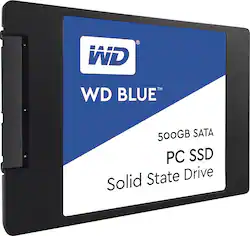
WD - Blue™ 500GB Internal SATA Solid State Drive
- Key Specs
- Storage Drive Type: SSD (Traditional, mechanical hard disk drives are the most common type of storage because they're relatively inexpensive and offer huge capacities. However, they also generate both noise and heat. Solid state drives, also known as SSDs, are many times faster than hard disk drives and have no moving parts to wear out, but typically offer less capacity for the same price.)
- Interface(s): SATA (Refers to the types of connections that devices use to interact and communicate with each other.)
- General
- Product Name: Blue™ 500GB Internal SATA Solid State Drive
- Brand: WD
- Model Number: WDS500G1B0A
- Performance
- Storage Drive Type: SSD (Traditional, mechanical hard disk drives are the most common type of storage because they're relatively inexpensive and offer huge capacities. However, they also generate both noise and heat. Solid state drives, also known as SSDs, are many times faster than hard disk drives and have no moving parts to wear out, but typically offer less capacity for the same price.)
- Compatibility
- Internal Or External: Internal
- Interface(s): SATA (Refers to the types of connections that devices use to interact and communicate with each other.)
- Features
- Security Features: None
- Memory
- NAND Flash Memory Type: TLC (Single Level Cell (SLC) stores 1 bit of data per memory cell; Multi Level Cell (MLC) stores 2 bits per cell, Triple Level Cell (TLC) 3 bits, and Quad Level Cell (QLC) 4 bits. Vertical NAND (V-NAND) or 3D NAND stores more data by layering cells vertically. Similarly, there are 3D MLC, 3D TLC and 3D QLC stacked cells.)
- Dimensions
- Product Height: 0.28 inches (The out of box height of the item. Height is measured as the vertical distance from the bottom of the item to the top as it would be primarily used or placed.)
- Product Width: 2.75 inches (The out of box width of the item. Width is measured as the horizontal distance from one side of the item to the other as it would be primarily used or placed.)
- Product Weight: 1.32 ounces (The out of box weight of the item.)
- Other
- UPC: 718037852898
Upgrade data speed with this 500GB Western Digital Blue solid-state drive. It delivers transfer speeds of up to 545MB/sec. and has an MTBF rating of over 1.75 million hours, ensuring a long service life. This Western Digital Blue solid state-drive comes in a compact 2.5-inch form factor to fit in computers or laptops.
- 500GB storage capacity: Provides ample storage space for your music, movies and other files.
- SATA lll interface: Offers simple connection to your computer.
- Data transfer rates up to 600 Mbps: For quick response when updating files.
Whats Included
- WD Blue™ 500GB Internal SATA Solid State Drive
- Owner's manual
Q: Is there cloning software or is there a download link for cloning software?
A: Yes, on the wd website you can download Aronis. The softare needs to see the wd drive to install the software. So use a external usb connection to connect your wd drive before you try to install the software if your external in not already a wd drive. If your internal hd is a seagate, you can download the same software frome seagates website. The software it lets you use it to creat a boot cd it is best to do this. Then install the ssd into your computer and Connect the original drive with an external usb connector and boot with the cd clone the drive disconect the external befor you reboot. DO NOT TRY TO DO THIS TO CREAT A DRIVE TO USE IN A DIFFERENT COMPUTER. To owners I am a cost effective IT and communications resource. To end users I am a patient problem solver, teacher, interpreter and often a trauma manager.
Q: Is it compatible with HP 840 laptop?
A: Yes.
A: Haven't used WD cloning software but there are many other way to clone a different size HDs. Make a partition of your larger source drive. Clone only that partition to your smaller destination HD. Any cloning software (eg. Macrium-Reflect) can be able to clone only selected partition.
Q: Is this SSD MAC laptop compatible?
A: It should be as long as your Mac takes a standard 2.5" SATA drive. Note that this is not the M2 physical profile that a lot of other SSDs are using, this takes a full 2.5" bay. It ships unpartitioned / unformatted but there is no particular reason it shouldn't work in a Mac.





















