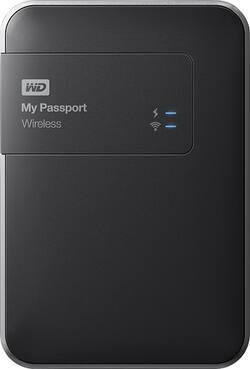
WD - My Passport 1TB External USB 3.0 Wireless Portable Hard Drive - Black
- Key Specs
- Storage Drive Type: HDD (Traditional, mechanical hard disk drives are the most common type of storage because they're relatively inexpensive and offer huge capacities. However, they also generate both noise and heat. Solid state drives, also known as SSDs, are many times faster than hard disk drives and have no moving parts to wear out, but typically offer less capacity for the same price.)
- Interface(s): USB 3.0 (Refers to the types of connections that devices use to interact and communicate with each other.)
- General
- Product Name: My Passport 1TB External USB 3.0 Wireless Portable Hard Drive
- Brand: WD
- Model Number: WDBK8Z0010BBK-NESN
- Performance
- Storage Drive Type: HDD (Traditional, mechanical hard disk drives are the most common type of storage because they're relatively inexpensive and offer huge capacities. However, they also generate both noise and heat. Solid state drives, also known as SSDs, are many times faster than hard disk drives and have no moving parts to wear out, but typically offer less capacity for the same price.)
- Compatibility
- Internal Or External: External
- External Hard Drive Type: Portable (Physical characteristics of the hard drive, including size, weight and how you connect to your device.)
- Interface(s): USB 3.0 (Refers to the types of connections that devices use to interact and communicate with each other.)
- Memory
- Cache Buffer Size: 256 megabytes (The data capacity of the cache buffer (or disk buffer) that acts as temporary memory for the drive. The cache holds the most recently and frequently used data to save the drive the extra step of pulling it from permanent storage every time it's needed, which helps increase the drive's overall speed.)
- Dimensions
- Product Height: 1 inches (The out of box height of the item. Height is measured as the vertical distance from the bottom of the item to the top as it would be primarily used or placed.)
- Product Width: 3.4 inches (The out of box width of the item. Width is measured as the horizontal distance from one side of the item to the other as it would be primarily used or placed.)
- Product Weight: 9.6 ounces (The out of box weight of the item.)
- Included
- Included Software: WD My Cloud, WD Quick View
- Other
- UPC: 718037824628
Back up your important data and stream content to up to 8 connected devices with this WD My Passport 1TB external USB 3.0 wireless portable hard drive that features Wireless-N compatibility and a rechargeable battery for portable use.
- 1TB storage capacity: Provides ample storage space for your music, movies and other files.
- USB 3.0 and Wireless-N interfaces: For wired and wireless connection to your devices.
- Transfer rates up to 5 Gbps via USB 3.0: As well as up to 480 Mbps via USB 2.0 and 25MB/sec. via SD 2.0 for speedy file updates. The 2x2 Wireless-N technology with MIMO offers reliable streaming.
- 256MB cache buffer: For rapid processing speed.
- Integrated card reader: Supports Secure Digital cards for simple data transfer between your devices.
- Rechargeable battery: Delivers power for up to 20 hours of standby use or 6 hours of streaming.
- WD My Cloud mobile app: Provides access for your tablet or smartphone.
A: No. You can simply insert SD into a slot. While I have not played with this feature, it says there is an option to auto load (and delete, if you want) photos anytime an SD is loaded. Otherwise, the drive is simple drag and drop. Very easy to move files and if you want to show files on iPAD, there is a app that let's you do that wirelessly too....also, the drive can also create its own wireless wifi cloud as an option, so you do not need access to any other wifi to transfer files between your device and the drive.
Q: Will this work with pdf files from an ipad?
A: Unless you have a lot of PDFs on your iPad, PDFs don't generally take up a lot of space. However, you can move these PDFs to the external drive. A PDF is a universal file format, so they would be fine to move to an external drive.
A: I think you should be able to do the backup to a cloud drive if you tether the Passport Hard Drive to a desktop or laptop to do the actual transfer of data. The faster your network the more likely the transfer will work.
Q: Well this hard drive work on my iPad
A: No, this will not work with your iPad.
Q: Is device compatible with Windows10
A: It is compatible.
A: This hard drive will work with MacBooks.
Q: Dose not recognize my e-mail
A: undefined