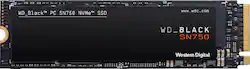
WD - BLACK SN750 500GB Internal Gaming SSD PCIe Gen 3 x4 NVMe
- Key Specs
- Storage Capacity: 500 gigabytes (Measured in megabytes (MB), gigabytes (GB) and terabytes (TB), this is the amount available for storing files, music, movies, photos and more. The total includes the capacity of the hard disk drive and solid state drive if both are included on the computer.)
- Storage Drive Type: SSD (Traditional, mechanical hard disk drives are the most common type of storage because they're relatively inexpensive and offer huge capacities. However, they also generate both noise and heat. Solid state drives, also known as SSDs, are many times faster than hard disk drives and have no moving parts to wear out, but typically offer less capacity for the same price.)
- Maximum Write Speed: 3000 megabytes per second (The greatest speed at which the device can write information; for example, saving files.)
- Interface(s): PCIe Gen 3 x4 (Refers to the types of connections that devices use to interact and communicate with each other.)
- General
- Product Name: BLACK SN750 500GB Internal Gaming SSD PCIe Gen 3 x4 NVMe
- Brand: WD
- Model Number: WDBRPG5000ANC-WRSN
- Capacity
- Storage Capacity: 500 gigabytes (Measured in megabytes (MB), gigabytes (GB) and terabytes (TB), this is the amount available for storing files, music, movies, photos and more. The total includes the capacity of the hard disk drive and solid state drive if both are included on the computer.)
- Performance
- Storage Drive Type: SSD (Traditional, mechanical hard disk drives are the most common type of storage because they're relatively inexpensive and offer huge capacities. However, they also generate both noise and heat. Solid state drives, also known as SSDs, are many times faster than hard disk drives and have no moving parts to wear out, but typically offer less capacity for the same price.)
- Maximum Write Speed: 3000 megabytes per second (The greatest speed at which the device can write information; for example, saving files.)
- Heatsink: false (Dissipates heat during intense operation for sustained peak performance.)
- Compatibility
- Internal Or External: Internal
- Product Compatibility: Desktop computers, Laptop computers
- Interface(s): PCIe Gen 3 x4 (Refers to the types of connections that devices use to interact and communicate with each other.)
- Minimum System Requirements: Microsoft Windows 7 / 8.1 / 10
- Features
- Security Features: None
- Usage: Everyday computing, Gaming
- Dimensions
- Product Height: 0.1 inches (The out of box height of the item. Height is measured as the vertical distance from the bottom of the item to the top as it would be primarily used or placed.)
- Product Width: 0.9 inches (The out of box width of the item. Width is measured as the horizontal distance from one side of the item to the other as it would be primarily used or placed.)
- Product Weight: 0.3 ounces (The out of box weight of the item.)
- Included
- Included Software: WD SSD Dashboard
- Other
- UPC: 718037866451
Upgrade compatible PC systems with the WD_Black SN750 internal SSD. Read speeds of up to 3,470MB/s offer improved load times, while the M.2 form factor means you can directly plug into the motherboard without extra cabling. Compared to typical 2.5-inch SSDs, this WD_Black SSD fits double the storage density on a single-sided drive, making it suitable for portable builds.
- PCIe Gen 3 x 4 (NVMe) Interface: Offers simple connection to your computer.
- 500GB storage capacity: Provides ample storage space for your music, movies and other files.
- Data transfer rates up to 3,470MB/s: For quick response when updating files.
- Performance matters: Live life in the fast lane, whether you're looking to boost your system's overall responsiveness or load games and levels quickly, the WD_BLACK™ drive cuts down on your wait time to get back into action and gets you ahead of the game.
- Space to play: At the core of the WD_BLACK drive is its revolutionary NAND technology. By doubling the storage density from its previous generation, our 3D NAND pushes the limitations of storage and showcases the amazing feat of NAND innovation.
- The WD_BLACK SSD Dashboard*: The WD_BLACK™ SSD Dashboard gives you the ability to optimize performance by enabling the gaming mode feature. This disables the low power mode function on the SSD, which keeps your drive firing on all cylinders during intense gaming sessions.
Whats Included
- WD WD_BLACK SN750 NVMe 500GB Internal PCI Express 3.0 x4 Solid State Drive for Laptops & Desktops
- Software
Product Manuals
A: What are you smoking. No cables needed my guy.
Q: Will this work in a desktop?
A: Yes! I use it as a boot drive. I have both the Samsung and the Western digital on my Asus TUF Gaming X570 mother board. I’ve bench marked both, and they both run at comparable speeds; both are super duper fast...way way faster than a standard HDD drive and quite a bit faster than a standard 2.5 inch solid state drive. I built my own desk top computer, and I decided I didn’t want any SATA drives and a lot of cables to hide and tuck away. My windows boot time with the Western Digital m.2 drive is fantastic...8 seconds or less. It would take my HDD drive 20 seconds to boot up and 40 to 50 seconds to shut down. Imagine! 8 seconds to boot up. When I double click on an icon to open a program, it just opens now. Opening internet explorer...double click, and its instantly open. It takes less than 15 seconds to defragment where as on the HDD it would take 3-5 minutes. Have fun with it. You likely won’t regret it. Also remember I have all new components...AMD Ryzen 7 3800X, GeForce RTX 2070 super, RAM is 3.2 ghz, and an ASUS TUF gaming X570 board which has two dedicated M.2 slots. I do game, and the M.2 hard drives make that a lot of fun.
Q: Will this work with Lenovo Thinkpad L380
A: From this sites disassembly of the L380, it appears as if it should work. https://www.laptopmain.com/lenovo-thinkpad-l380-disassembly-ssd-ram-upgrade-options/
A: Everything about those two model numbers seem to be the exact same. Just one only shows on 3rd party retailers while the 3X0C only on WD. From the box and firmware identification, mine was listed as the 3X0C number.
A: I see that laptop already has an NVMe drive installed so you wouldn't see faster boot times (assuming it's the $2k model I see on Best Buy's website). Though you could still buy this and make it a new drive for additional storage.
Q: Does this ssd come with a heatsink?
A: I don’t think so. If you have a motherboard with a heat spreader, that will do just fine. Honestly, mine doesn’t get hot enough to really warrant one. My case fans also provide a bit of a breeze on it, which I think is enough cooling.
A: The SN750 data can be found on this page. https://www.westerndigital.com/products/internal-drives/wd-black-sn750-nvme-ssd As with any piece of hardware, your power usage will have active and rest state averages. Notably, though, this drive isn't what's going to determine what power supply you should be using. It's minimal by comparison to a lot of other things going on. Your video card plays a much bigger variable in that question.