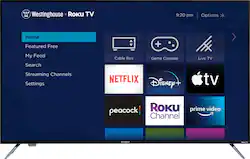
Westinghouse - 58" Class LED 4K UHD Smart Roku TV
- Key Specs
- Display Type: LED
- Resolution: 4K (2160p) (Refers to the number of pixels, both horizontally and vertically, used to capture video/images. The higher the resolution the finer the detail that can be seen.)
- Screen Size Class: 58 inches (The group size measurement of a screen. This differs from a screen size measured diagonally from corner to corner.)
- High Dynamic Range (HDR): true (An HDR-compatible 4K TV or other HDR-compatible product displays HDR video content when it's available from sources like 4K Ultra HD Blu-ray Discs and 4K streaming services.)
- High Dynamic Range Format: HDR 10 (There are a few HDR formats that tell the TV or other HDR-compatible product how to best utilize its capabilities to display HDR content. HDR technology can support one or multiple formats, each with various benefits to picture quality.)
- LED Panel Type: Standard LED
- Backlight Type: Direct Lit (Edge-lit: lights are on the edges of the display with ~10 zones of vertical LEDs. Direct-lit: lights are on the edges and behind the screen for more light uniformity than Edge-lit. Full array: direct-lit with local dimming for greater contrast with up to 100 zones of LEDs.)
- Refresh Rate: 60Hz (The number of frames per second the device can produce natively without enhancement. Higher rates help produce smooth, seamless pictures.)
- Motion Enhancement Technology: None (Proprietary technologies produced in addition to the Refresh Rate that smooth out faster moving pictures to reduce blur and pixelation.)
- Specific Manufacturer Technologies: 3D Adaptive Comb Filter (This is technology that's specific to a TV brand (sometimes called proprietary technology). Here you'll see terms related to picture quality, brightness, processors and more.)
- Smart Platform: Roku TV (Just like a computer, a smart TV needs an operating system (also called a smart platform) in order to access the Internet, connect with entertainment apps, and play streaming content. Some common TV smart platforms are; Roku TV, Android TV, and Chromecast.)
- Featured Streaming Services: Peacock, Disney+, Apple TV+, Netflix, YouTube, Peloton, Google Play Movies & TV, Paramount+, STARZ, ESPN+, Hulu, Prime Video, Pandora, Spotify, Sling TV, HBO Max, iHeartRadio, Tubi, Apple Music, Facebook, Crackle, Twitter, Fandango, Google Play Music (Streaming services and other programs are available on this device. Keep in mind, there may be more services supported than just those shown here.)
- Number of HDMI Inputs (Total): 3
- Works With: Amazon Alexa, Google Assistant (Compatible with or able to be connected to other smart devices or applications.)
- Voice Assistant Built-in: Not Applicable, Not Applicable (A digital assistant built into the device that uses voice commands to answer questions and control smart devices.)
- General
- Brand: Westinghouse
- Model Number: WR58UX4019
- Product Name: 58" Class LED 4K UHD Smart Roku TV
- Color: Black
- Series: UX Series (Part of a group of the same product type with similar features.)
- Model Year: 2020
- Dimensions
- Product Height With Stand: 32.1 inches
- Product Width: 51.1 inches (The out of box width of the item. Width is measured as the horizontal distance from one side of the item to the other as it would be primarily used or placed.)
- Product Depth With Stand: 10.6 inches
- Product Height Without Stand: 29.6 inches
- Product Depth Without Stand: 2.4 inches
- Product Weight With Stand: 29.1 pounds
- Product Weight Without Stand: 28.9 pounds
- Stand Width: 53.5 inches (The horizontal measurement of the stand/base, or the distance from the outside of one leg to the outside of the opposite leg, as it is attached to the product.)
- Stand Depth: 10.6 inches
- Adjustable Stand Width: false (Whether the stand can adjust to have more than one measurement either between the legs or the base itself.)
- Display
- Display Type: LED
- Resolution: 4K (2160p) (Refers to the number of pixels, both horizontally and vertically, used to capture video/images. The higher the resolution the finer the detail that can be seen.)
- Screen Size: 57.5 inches (Size of the screen, measured diagonally from corner to corner.)
- Screen Size Class: 58 inches (The group size measurement of a screen. This differs from a screen size measured diagonally from corner to corner.)
- High Dynamic Range (HDR): true (An HDR-compatible 4K TV or other HDR-compatible product displays HDR video content when it's available from sources like 4K Ultra HD Blu-ray Discs and 4K streaming services.)
- High Dynamic Range Format: HDR 10 (There are a few HDR formats that tell the TV or other HDR-compatible product how to best utilize its capabilities to display HDR content. HDR technology can support one or multiple formats, each with various benefits to picture quality.)
- Picture Quality Enhancement Technology: HDR Compatible
- LED Panel Type: Standard LED
- Backlight Type: Direct Lit (Edge-lit: lights are on the edges of the display with ~10 zones of vertical LEDs. Direct-lit: lights are on the edges and behind the screen for more light uniformity than Edge-lit. Full array: direct-lit with local dimming for greater contrast with up to 100 zones of LEDs.)
- Curved Screen: false
- Refresh Rate: 60Hz (The number of frames per second the device can produce natively without enhancement. Higher rates help produce smooth, seamless pictures.)
- Motion Enhancement Technology: None (Proprietary technologies produced in addition to the Refresh Rate that smooth out faster moving pictures to reduce blur and pixelation.)
- Brightness: 250 nits (A measure of the total light output.)
- Maximum Contrast Ratio (Native): 4000:1 (The difference between the brightest and the dimmest a screen panel can be. A higher contrast produces more in-depth images.)
- Language(s) Displayed: English, Spanish, French, German (The available language options for displayed text or captions.)
- Features
- Remote Control Type: Standard, Multifunction
- Specific Manufacturer Technologies: 3D Adaptive Comb Filter (This is technology that's specific to a TV brand (sometimes called proprietary technology). Here you'll see terms related to picture quality, brightness, processors and more.)
- Smart Capable: true (Smart, or smart-capable devices are able to connect directly to your home network in order to stream content from the Internet, run Internet-based apps, or connect to other smart devices.)
- Smart Platform: Roku TV (Just like a computer, a smart TV needs an operating system (also called a smart platform) in order to access the Internet, connect with entertainment apps, and play streaming content. Some common TV smart platforms are; Roku TV, Android TV, and Chromecast.)
- Featured Streaming Services: Peacock, Disney+, Apple TV+, Netflix, YouTube, Peloton, Google Play Movies & TV, Paramount+, STARZ, ESPN+, Hulu, Prime Video, Pandora, Spotify, Sling TV, HBO Max, iHeartRadio, Tubi, Apple Music, Facebook, Crackle, Twitter, Fandango, Google Play Music (Streaming services and other programs are available on this device. Keep in mind, there may be more services supported than just those shown here.)
- Screen Mirroring: true (Casts the screen of one device onto another wirelessly, using a common protocol (typically Bluetooth).)
- Screen Mirroring Technology: Apple AirPlay 2
- Content Sharing: Mobile to TV (The device is capable of connecting to another device in order to send or receive streaming content. Share content from your mobile device to your TV or vice versa.)
- Indoor Or Outdoor Use: Indoor (Indicates the appropriate environment product was designed to be used in.)
- V-Chip: true (Feature that blocks television programming if it has a content rating outside of the acceptable rating(s) configured by the user.)
- TV Tuner: Digital (The ATSC TV Tuner is a component built into conventional TV sets or other devices for receiving over-the-air broadcast TV without a cable/satellite box. Digital tuners may be purchased separately and connected to a device if it does not have one built in.)
- Connectivity
- Number of HDMI Inputs (Total): 3
- HDMI Audio Return Channel (ARC): true
- RF Antenna Input: true (This input is used to connect devices such as antennas or cable boxes to a TV via a coaxial cable.)
- Number Of USB Port(s) (Total): 1 (The total number of USB ports including all generations and versions.)
- Headphone Jack: true (The device features an interface that allows for the connection of headphones.)
- Compatibility
- VESA Wall Mount Standard: 400mm x 200mm (VESA wall mount standards refer to the spacing of screw holes built into a TV in order to fit with standard TV wall mounts. These standards are implemented into most TVs and monitors.)
- Works With: Amazon Alexa, Google Assistant (Compatible with or able to be connected to other smart devices or applications.)
- Voice Assistant Built-in: Not Applicable, Not Applicable (A digital assistant built into the device that uses voice commands to answer questions and control smart devices.)
- Audio
- Built-In Speakers: true
- Built-in Speaker Type: Downward firing, Downward firing (Backward, downward, and front-firing speakers direct sound into the room from those respective directions. A soundbar is typically long and rectangular, and designed to act as an all-in-one speaker with greater sound production than that of a TV alone. An acoustic surface is the result of small sound actuators embedded directly behind the screen, turning the entire screen's surface into a speaker.)
- Surround Sound Supported: Dolby Audio (Surround sound systems use multiple audio channels and speakers to create an immersive sound experience for the listener. There are also various proprietary technologies that imitate this kind of sound via a device's built-in speakers or soundbar.)
- Speaker Output: 16 watts
- Power
- ENERGY STAR Certified: false (Devices carrying the ENERGY STAR service mark, such as computer products and peripherals, kitchen appliances, and other products, generally use 20% to 30% less energy than required by federal standards.)
- EPEAT Qualified: false (The Electronic Product Environmental Assessment Tool (EPEAT) was designed to provide an environmental assessment tool for purchasers. In order to qualify for EPEAT, a product must meet all 23 required criteria.)
- Estimated Annual Operating Cost: 28 United States dollars (Predicted cost of operating the product under average conditions for one year.)
- Estimated Annual Electricity Use: 233 kilowatt hours (Predicted amount of electricity needed to operate the product under average conditions for one year.)
- Rechargeable Battery (Remote Control): false
- Battery Size (Remote Control): AAA (The battery size required for operation.)
- Number Of Batteries Required (Remote Control): 2
- Number of Batteries Included (Remote Control): 2
- Included
- Wall Mount Included: false
- Stand Included: true
- Box Dimension
- Height: 33.9 inches
- Width: 53.9 inches
- Depth: 6.1 inches
- CubicDimension: 11146 inches
- Other
- UPC: 813784021860
Westinghouse 58 inch 4K UHD Roku TV with HDR10 offers endless entertainment that fits your lifestyle. Watch exactly what you want, how you want, when you want it.
- 4K Ultra High Definition with HDR10 (4K UHD): Image resolution with unparalleled quality and clarity. Double the image resolution of traditional HD televisions.
- Access Top Streaming Channels: Stream top free or paid programming channels like Discovery +, Peacock, Disney +, Apple TV +, Netflix, Prime Video, Google Play, SHOWTIME, PBS, YouTube, CNN, Pandora, Spotify, Peloton, Sling TV, Hulu, Pluto TV, Paramount+, Bravo,
- Say “Adios” to Subtitles: Stream popular Spanish channels like Telemundo, Telemundo Deportes, Univision, UniMás, TUDN or Galavisión.
- International Channels: Armenia TV, MHz Choice, encoreTVB, Greek TV Lite US, Tagesschau, Euronews, Darya, Damai and more. Including news from all over the world in English, German, French, Spanish, Polish, Arabic, Italian, Greek, Indonesian, Russian, and Korean.
- All your entertainment in one place! : Simple set-up & interface allows you to stream your favorite show, connect your antenna, switch to your game console or discover new things to watch—all from the Roku home screen.
- Smart Home Technology: Compatible with your Amazon Alexa or Google Assistant-enabled devices.
- Voice Search & Control: Play your entertainment faster using the voice control and search feature on your free Roku Mobile App.
- Cast Your Content and Entertainment: Share your videos, music and photos from your device to your TV using your free Roku Mobile App, Apple AirPlay2, or SmartShare.
- Private Listening: Connect your headphones or earbuds to your free Roku Mobile App and listen as loud as you want without disturbing others!
- Dolby Audio: Provides crystal-clear audio with improved dialogue and enhanced loudness for a fuller audio mix.
- Connectivity: 3 HDMI (1 ARC), Composite Video connections, and Optical Digital out for connecting multi-channel audio to your AV system or soundbar
- Built-In Wi-Fi: Connect your Smart TV to the internet via built-in Wi-Fi.
- Automatic Software Updates: Get the newest features and latest channels without even thinking about it.
- 4K Ultra High Definition with HDR10 (4K UHD): Image resolution with unparalleled quality and clarity. Double the image resolution of traditional HD televisions.
- Access Top Streaming Channels: Stream top free or paid programming channels like Discovery +, Peacock, Disney +, Apple TV +, Netflix, Prime Video, Google Play, SHOWTIME, PBS, YouTube, CNN, Pandora, Spotify, Peloton, Sling TV, Hulu, Pluto TV, Paramount+, Bravo,
- Say “Adios” to Subtitles: Stream popular Spanish channels like Telemundo, Telemundo Deportes, Univision, UniMás, TUDN or Galavisión.
- International Channels: Armenia TV, MHz Choice, encoreTVB, Greek TV Lite US, Tagesschau, Euronews, Darya, Damai and more. Including news from all over the world in English, German, French, Spanish, Polish, Arabic, Italian, Greek, Indonesian, Russian, and Korean.
- All your entertainment in one place! : Simple set-up & interface allows you to stream your favorite show, connect your antenna, switch to your game console or discover new things to watch—all from the Roku home screen.
- Smart Home Technology: Compatible with your Amazon Alexa or Google Assistant-enabled devices.
- Voice Search & Control: Play your entertainment faster using the voice control and search feature on your free Roku Mobile App.
- Cast Your Content and Entertainment: Share your videos, music and photos from your device to your TV using your free Roku Mobile App, Apple AirPlay2, or SmartShare.
- Private Listening: Connect your headphones or earbuds to your free Roku Mobile App and listen as loud as you want without disturbing others!
- Dolby Audio: Provides crystal-clear audio with improved dialogue and enhanced loudness for a fuller audio mix.
- Connectivity: 3 HDMI (1 ARC), Composite Video connections, and Optical Digital out for connecting multi-channel audio to your AV system or soundbar
- Built-In Wi-Fi: Connect your Smart TV to the internet via built-in Wi-Fi.
- Automatic Software Updates: Get the newest features and latest channels without even thinking about it.
Whats Included
- Westinghouse Roku TV WR58UX4019
- Westinghouse Roku Remote Control
- Stand Legs
- Quick Start Guide
- Batteries
- Screws
- Westinghouse Roku TV WR58UX4019
- Westinghouse Roku Remote Control
- Stand Legs
- Quick Start Guide
- Batteries
- Screws
Documents
- Energy_Guide_PDF
- Energy_Guide_PDF
Q: Does the Westinghouse 58" tv have Bluetooth for headset? I've never bought Westinghouse, is it good?
A: No Bluetooth. Is it good? I can only give a partial answer to this as I've only have this tv for a little over a week...the picture is simply stunning. My last 1080P hi-def tv died on me, but even when fully functioning, when there were dark patches on the tv (think the beginning of Star Wars after the opening scroll and the camera panned down to the planet) there would be dark grey pixalation patches that would be where the black of space should have been. With this tv...when things should be black, they ARE black. Very sharp picture with beautiful color separation. Watching Avatar was like watching it again for the first time...mind blowing. I'm extremely satisfied with the purchase, and like you, I'm hoping it has a long life.
Q: Is this TV compatible with an iPhone? Can I use my iPhone with this TV. Thanks.
A: Everything on this TV is controlled via the ROKU App, and YES, you can download the Roku App to your iPhone or your Droid. I have both phones and have loaded the RoKu App on both and they control the TV completely, including voice remote.
Q: Does this TV come with two remotes? One for Roku & one for the TV or do you use the same one?
A: This TV only has one remote. Everything for the TV is accessed thru the Roku menu. No other remote is necessary.
A: Yes this does have mounting for wall brackets as in the spec list, but they are at the bottom instead of the middle.
A: "How do I integrate Alexa with my Roku device? To use the Roku skill for Amazon Alexa, you need to link your Roku account to your Amazon account using the following steps: 1. Open the Alexa mobile app. 2. Tap or select the Menu icon Alexa app menu icon in the top corner. 3. Tap Skills & Games. 4. Enter Roku in the search bar, and select the skill from the list. 5. Tap the Enable button." If you are still encountering issues please visit our Tech Support page at https://westinghouseelectronics.com/support/ or visit https://support.roku.com/article/360017961074-how-do-i-use-amazon-alexa-with-my-roku-streaming-device-
A: turn off the audio level equalizing setting. i turned mine on and got the crackling noise when i changed channels.
Q: Is some paid Roku subscription needed? Never use Roku before so not sure what it is or how it works.
A: No. Roku is a combination of free and paid. No fee to create an account. I have had an account for years. At that that time, you did not have to provide a payment method to get started. (I don't know if that is still true.) Cancel anytime. I do have a payment method set up, but the only time I have ever been charged for anything is if I decided to rent a movie or subscribe to a paid channel. If you already have services like Netflix, HBO, etc., there is no additional fee to use their app in Roku. Just sign in. If you have a cable service that is not available to you where the TV is located, you can add many of the channels to Roku with no additional fees. You will have to 'activate' the channels you want to add, which means verify that you actually subscribe to that channel through your cable company. Then you can view that channel in Roku. I have this TV on the East coast, and a cable subscription out West that is not available in the East. I activated channels such as History, CNBC, Bloomberg, and other 'premium' channels from my West subscription and watch them on this TV in the East.
A: M6. The length will depend on your mount. I used M6 x 1/2 inch


















![The text on the image reads:
17 F8 Home P End F10 PgUp it PgDn F12 Ies Del * 8 ( 9 ) 0 I I + = Backspace I o P : [ ] ] I / K L : : .. . Enter M V > . ? / Shift Alt <
The corrected text should be:
17 F8 Home PgUp it PgDn F10 F12 Ies Del * 8 ( 9 ) 0 I I + = Backspace I o P : [ ] ] I / K L : : .. . Enter M V > . ? / Shift Alt <
The corrected text groups the keys in a more organized manner, making it easier to read and understand.](https://pisces.bbystatic.com/image2/BestBuy_US/images/products/699c06f5-6aba-4ab2-bbf6-114986b58b2a.jpg;maxHeight=144;maxWidth=200?format=webp)

