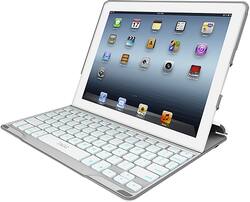
I did a lot of researching to find what would fit my needs and ultimately went with the Zaggkey Pro Plus and I am glad I did. Other products out there offer some of the same features of this one but very few offer all of what it does and Zagg once again brings a lot to the table and in a high quality manner. If you are considering keyboards in the $100 and over range I would definately start here first. If you want that MacBook Air look, you might want to check out The Brydge ($170 or $210). I did not want that look or that expense and we all know how quickly/easily those pretty aluminum surfaces can scratch. You will know very quickly if it the Zaggkey Pro Plus is for you or not. Just be aware of the return policy wherever you decide to buy. I am a Best Buy Premier Silver Reward Zone member which gives me a generous 60-day period to make up my mind.
I am still using an iPad 2. I plan on upgrading in the fall of 2013 when the rumored next gen comes out. Hopefully this will be compatible.
Pro's (for me): All to you have to do is pair the device (seconds) and you are ready to go, backlit keyboard (7 colors), easy to type with responsive and well spaced keys, short cut keys (lock,search,home screen,volume,etc), sturdy case with ample device protection, slim design, texture helps for griping while carrying, strong magnets ensure proper closure, iPad goes to sleep when you close the case and comes back instantly when opened, integrated slot to position the iPad for viewing (landscape only) which holds it in place nicely, on/off switch for keyboard, bluetooth pairing button, cut-outs for easy access to all ports including rear facing camera, easy to put iPad in the case and get it out, long battery life (I am still on initial charge after aound 2 months with moderate daily use), great design and feel overall. Check out Zagg's website for more details and video review. Also try YouTube.
Con's: Only one viewing angle which is perfect on a desk or table but when sitting it on my lap it takes a little positioning to get comfortable for typing/viewing. You can however lay the keyboard completely flat while the iPad is still attached should you wish to do so and the iPad is easly removed as well. This case only provides for landscape viewing which does not bother me but it is worth pointing out. The added weight and thickness of the case may be an issue for some but all the clamshell type keyboard cases will add to both of those factors that draw many to tablet design. If that is a deterent to you than look at options other than clamshell. That being said it is by no means too heavy or clunky. Nor does it do anything to compromise portability. Again, you are getting added protection (front/back) and a connected keyboard. You can always slip out the iPad for those times when you don't want to carry the keyboard (easy and no fumbling or worrying about breaking any tabs that hold it in place,...slide design). Lastly would be the cost. A keyboard of around $130 will turn a lot of people off especially when you have added the cost of what you have already spent on the iPad. However, the same point can be raised that you as a consumer made a decision to buy a high end tablet when there are plenlty of cheaper ones available. You are getting a great product for your money in both.