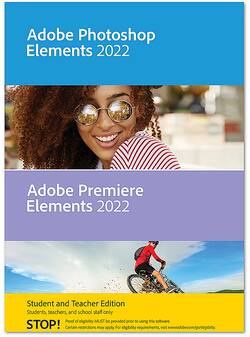
Adobe - Photoshop Elements 2022 & Premiere Elements 2022 - Student & Teacher Edition - Windows [Digital]
Model: ADO951800V538
SKU: 6475060
This item is no longer available in new condition. See similar items below
- Key Specs
- Operating System Compatibility: Windows
- Software Format: Digital (Physical software requires a disc, cartridge, etc. be inserted into the gaming console or computer to download and/or operate the software. Digital software allows for downloading and/or playing the software on the gaming console or computer without a physical disc, cartridge, etc. Physical (Download Code Only) software is purchased in physical form with a code that allows for downloading and/or playing the software on the gaming console or computer without a physical disc, cartridge, etc.)
- General
- Brand: Adobe
- Model Number: ADO951800V538
- Product Name: Photoshop Elements 2022 & Premiere Elements 2022 - Student & Teacher Edition
- Publisher: Adobe
- Features
- Software Subject: Photo editing, Video editing
- Compatibility
- Operating System Compatibility: Windows
- Bit Version: 64-bit
- Software Format: Digital (Physical software requires a disc, cartridge, etc. be inserted into the gaming console or computer to download and/or operate the software. Digital software allows for downloading and/or playing the software on the gaming console or computer without a physical disc, cartridge, etc. Physical (Download Code Only) software is purchased in physical form with a code that allows for downloading and/or playing the software on the gaming console or computer without a physical disc, cartridge, etc.)
- Requirements
- System Requirements: Microsoft Windows 10 version 2004 or later (version 21H1 recommended); Microsoft Windows 11 (version 21H2); 64-bit versions only; Windows 7, Windows 8.1 not supported (The software that a product must have for it to be able to integrate with another product.)
- Other
- UPC: 883919283258
Your photos and videos are a big part of every day, capturing moments with friends, documenting sports and club activities, and making your class projects and social posts look great. Elements is here to bring out your creativity so you can tell your stories and create in ways that reflect your unique personality. With Adobe Sensei AI technology*, automated editing options, and step-by-step guidance, it’s easy to create incredible photos and movies for Instagram, sociology class, and everything in between.
- Instantly turn photos into art: In one click, transform your photos with effects inspired by famous works of art or popular art styles. Choose from amazing artistic effects that you can apply to all or part of your photo, and easily adjust the results for exactly the look you want.
- Create not-so-still photos: Add moving overlays like snowflakes and sparkles, and create fun animated frames. Then save your photos as MP4s to share on social and more.
- Warp photos to fit any shape: Place one photo inside another by wrapping it around an object like a coffee mug or fitting it inside shapes like the lenses of your subject’s sunglasses. There's no limit to what you can create!
- Pick the perfect aspect ratio for videos: Edit and export your videos in social-friendly vertical or square aspect ratios without losing content. Add motion titles, mattes, and backgrounds designed for non-horizontal videos, too.
- Auto-reframe your video subject: Easily resize your videos for social media and more while keeping the most important part of the action in the frame. Works great for clips with a lot of movement, like a kid’s birthday party or a sporting event.
- Easily grow your skills with Guided Edits: Flawless photos and videos are just steps away. Simply follow along to make basic tweaks, artistic creations, and everything in between with 87 Guided Edits.
- Create perfect pet pics: Make your furry and feathered friends look their best. Frame them up just right, adjust color and lighting, select and refine detailed edges like fur, fix pet-eye, and remove collars, and leashes in a few simple steps.
- Extend photo backgrounds: Create a stunning landscape or reposition your subject for the perfect social post by easily extending your photo’s background. The magic of Content-Aware Fill technology makes it all possible.
- Add fun animated overlays to videos: Jazz up any video with flitting butterflies, encircling hearts, and other beautiful and whimsical animations. Create a whole new look in a few quick steps.
- Adjust shadows and highlights in videos: Easily reveal hidden details in the darkest or brightest areas of your videos so there’s more to see in every scene.
- Export moving photos as MP4s: Save your moving photos and quote graphics as MP4s for easy sharing to Instagram and other social sites.
- Explore new slideshow styles: Show off your photos and videos and tell your stories with new animated slideshow templates in a range of eye-catching styles.
- Instantly turn photos into art: In one click, transform your photos with effects inspired by famous works of art or popular art styles. Choose from amazing artistic effects that you can apply to all or part of your photo, and easily adjust the results for exactly the look you want.
- Create not-so-still photos: Add moving overlays like snowflakes and sparkles, and create fun animated frames. Then save your photos as MP4s to share on social and more.
- Warp photos to fit any shape: Place one photo inside another by wrapping it around an object like a coffee mug or fitting it inside shapes like the lenses of your subject’s sunglasses. There's no limit to what you can create!
- Pick the perfect aspect ratio for videos: Edit and export your videos in social-friendly vertical or square aspect ratios without losing content. Add motion titles, mattes, and backgrounds designed for non-horizontal videos, too.
- Auto-reframe your video subject: Easily resize your videos for social media and more while keeping the most important part of the action in the frame. Works great for clips with a lot of movement, like a kid’s birthday party or a sporting event.
- Easily grow your skills with Guided Edits: Flawless photos and videos are just steps away. Simply follow along to make basic tweaks, artistic creations, and everything in between with 87 Guided Edits.
- Create perfect pet pics: Make your furry and feathered friends look their best. Frame them up just right, adjust color and lighting, select and refine detailed edges like fur, fix pet-eye, and remove collars, and leashes in a few simple steps.
- Extend photo backgrounds: Create a stunning landscape or reposition your subject for the perfect social post by easily extending your photo’s background. The magic of Content-Aware Fill technology makes it all possible.
- Add fun animated overlays to videos: Jazz up any video with flitting butterflies, encircling hearts, and other beautiful and whimsical animations. Create a whole new look in a few quick steps.
- Adjust shadows and highlights in videos: Easily reveal hidden details in the darkest or brightest areas of your videos so there’s more to see in every scene.
- Export moving photos as MP4s: Save your moving photos and quote graphics as MP4s for easy sharing to Instagram and other social sites.
- Explore new slideshow styles: Show off your photos and videos and tell your stories with new animated slideshow templates in a range of eye-catching styles.