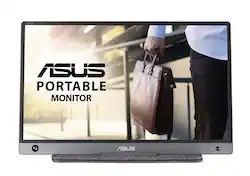
ASUS - ZenScreen 15.6” IPS LED FHD USB Type-C Portable Monitor with Foldable Smart Case - Dark Gray
- Key Specs
- Refresh Rate: 60Hz (The number of frames per second the device can produce natively without enhancement. Higher rates help produce smooth, seamless pictures.)
- Maximum Resolution: 1920 x 1080 (Maximum resolution refers to the highest number of pixels that a screen can process and display. Higher resolution signals produce more detailed images.)
- Response Time: 5 milliseconds (The speed at which pixels can change colors is called response time. It is measured in milliseconds (ms).)
- Panel Type: IPS (Technology that affects response time and image quality.)
- Synchronization Technology: Not Applicable (Generally, these technologies allow syncing between a computer/console game's frame rate and the device's refresh rate for a smoother display without tearing.)
- Screen Size: 15.6 inches (Size of the screen, measured diagonally from corner to corner.)
- General
- Product Name: ZenScreen 15.6” IPS LED FHD USB Type-C Portable Monitor with Foldable Smart Case
- Brand: ASUS
- Operating System Compatibility: Windows
- Model Number: MB16AH
- Display
- Refresh Rate: 60Hz (The number of frames per second the device can produce natively without enhancement. Higher rates help produce smooth, seamless pictures.)
- Maximum Resolution: 1920 x 1080 (Maximum resolution refers to the highest number of pixels that a screen can process and display. Higher resolution signals produce more detailed images.)
- Native Resolution: 1920 x 1080 (Native resolution of a screen refers to its single, fixed resolution. Sometimes screens must scale an image up or down in order to fit the native resolution. This can cause a loss of resolution or detail.)
- Contrast Ratio: 800:1 (Measured difference between a displayed image's brightest whites and darkest blacks. The larger the first number, the more detail and color that can be displayed.)
- Response Time: 5 milliseconds (The speed at which pixels can change colors is called response time. It is measured in milliseconds (ms).)
- Display Type: LED
- Panel Type: IPS (Technology that affects response time and image quality.)
- Synchronization Technology: Not Applicable (Generally, these technologies allow syncing between a computer/console game's frame rate and the device's refresh rate for a smoother display without tearing.)
- Aspect Ratio: 16:9 (The measurement of the width of a screen compared to the height of a screen, expressed as a ratio.)
- Curved Screen: false
- Brightness: 250 candela per square meter (A measure of the total light output.)
- Screen Size: 15.6 inches (Size of the screen, measured diagonally from corner to corner.)
- High Dynamic Range (HDR): false (An HDR-compatible 4K TV or other HDR-compatible product displays HDR video content when it's available from sources like 4K Ultra HD Blu-ray Discs and 4K streaming services.)
- Horizontal Viewing Angle: 178 degrees (The maximum angle at which the display can be viewed with acceptable visual performance from either side.)
- Vertical Viewing Angle: 178 degrees (The maximum angle at which the display can be viewed with acceptable visual performance from above or below.)
- Touch Screen: false (Touch-screen devices make navigating more intuitive. Using a touch-screen display, you can do things such as tap to select, hold and drag to move items, swipe to scroll, and pinch to zoom.)
- Connectivity
- Number of HDMI Inputs (Total): 0
- Compatibility
- Wall Mountable: false (The product is able to be secured to a wall. Some products are designed ready to mount, while others may require additional hardware/accessories for installation.)
- Voice Assistant Built-in: No (A digital assistant built into the device that uses voice commands to answer questions and control smart devices.)
- Features
- Anti-Glare: true (Product has features, such as a matte finish, that reduce the likelihood for screen glare.)
- Built-In Webcam: false
- Integrated Speaker(s): false
- Dimensions
- Product Height Without Stand: 8.9 inches
- Product Width: 14.13 inches (The out of box width of the item. Width is measured as the horizontal distance from one side of the item to the other as it would be primarily used or placed.)
- Product Depth Without Stand: 0.3 inches
- Product Weight: 1.57 pounds (The out of box weight of the item.)
- Stand Included: false
- Power
- Power Consumption: 8 watts
- Power Saving/Off Mode: 0 watts (This mode will turn the display and/or the device off, or into a standby mode, after a preset length of time with no activity to conserve power.)
- Certifications Listings & Approvals
- ENERGY STAR Certified: true (Devices carrying the ENERGY STAR service mark, such as computer products and peripherals, kitchen appliances, and other products, generally use 20% to 30% less energy than required by federal standards.)
- EPEAT Qualified: false (The Electronic Product Environmental Assessment Tool (EPEAT) was designed to provide an environmental assessment tool for purchasers. In order to qualify for EPEAT, a product must meet all 23 required criteria.)
- Other
- UPC: 195553404433
Boost your productivity with this ASUS 15.6-inch ZenScreen portable monitor. The 178-degree viewing angle provides consistent picture quality, while the anti-glare coating helps reduce eye strain and increase visibility. This flicker-free ASUS 15.6-inch ZenScreen portable monitor features a USB-C port that can connect to various devices, and the Full HD panel produces stunning visuals.
- Full HD 1920 x 1080 resolution: High resolutions that deliver a solid gaming or video experience without undue strain on your graphics card.
- 5 ms response time: Delivers solid performance for precise gaming and video work.
- 60 Hz refresh rate: Provides smooth video and good refresh rates for everyday use.
- 15.6" antiglare LCD monitor: Uses cold cathode fluorescent lamps to provide even backlighting across the entire screen.
- Hybrid-Signal Input: Quick connectivity with any laptop with a USB-C or USB-A port.
- 800:1 contrast ratio: Ensures images are crisp and clear with deep blacks and bright highlights.
- 250 cd/m² brightness: Ensures images are clear and can be seen across the room.
- ASUS Eye Care: Ensures a comfortable viewing experience.
- Portable: Ultra-slim and thin design for on-the-go client meetings.
- Foldable Smart Case: Can be turned into a stand to prop the monitor up in either portrait or landscape mode.
- Auto-rotation Display: Allows your screen to automatically sense its orientation and witch the monitor between portrait and landscape modes.
Whats Included
- ASUS ZenScreen MB16AH
- USB-C cable
- USB-C to USB-A adapter
- ASUS Smart Case
Product Manuals
Q: How does this differ from the MB16ACE?
A: Trying to figure out the same thing. Comparing the manuals though I saw this can be charged through USB-C and hooked up to the laptop via mini HDMI. the ACE only has a USB-C port. The back of this also has a 1/4" screw thread. https://www.asus.com/ca-en/Displays-Desktops/Monitors/ZenScreen/ZenScreen-MB16AH/
Q: What is the difference between MB16AH and MB16ACE? Thks.
A: The only differences are the power consumption and interface or connection, the MB16AH has USB-C and Micro-HDMI while the MB16ACE uses USB-C only.
Q: Is this compatible with the Mac operating system?
A: No it's not.
Q: Does this work with Lenovo Ideapad 3 15.6" laptop?
A: It should work "plug & play" style with any PC that has a USB-C port. I hooked it up to my Lenovo Legion 5 through the single USB-C port, and was immediately recognized as a second monitor. It also has a mini HDMI port, and with an HDMI-to-Mini HDMI adapter cable, and a USB 3.0 charger, you can hook this into literally any computer that has an HDMI output as a second display. It will work through a USB 3.0 port (there's an included adapter), but it will need a driver from Asus to display through that hookup. Whichever way you hook it to your computer, the monitor has to be hooked into USB 3.0 / USB-C because it pulls its power from the USB plug, and only ports designed for that version will supply sufficient voltage.
A: Computer model shouldn't matter - the available ports are what's important. This monitor model has two inputs: USB-C and Mini HDMI (BB's listing is incorrect). I hooked the AH (USB-C only) model up to my Lenovo Legion 5, through the laptop's solitary USB-C port, and it worked perfectly without further intervention. It draws power through the USB-C port that it also uses for video signal. You can also use an HDMI-to-Mini HDMI connector cable (purchased separately) to give it a video-only signal from literally any HDMI-out device, but you will still need to hook the USB-C into a USB 3.0 compatible charger for power to run the monitor.
Q: Can you purchase this foldable case separately?
A: undefined
A: Yes.
A: If it is a company-issued device, carry it to your IT personnel, who has admin privileges, and let them install any drived=s or the monitor. My SP8 is not a company issue, so I could plug and play without notification of needing any drivers. I am unsure why the connection asks for a driver because it should plug in and play.












