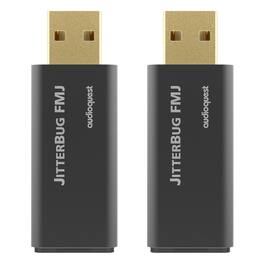
AudioQuest - JitterBug FMJ USB 2.0 Power & Noise-Filters - Pair - Black
AudioQuest - JitterBug FMJ USB 2.0 Power & Noise-Filters - Pair - Black
About This Item
- General
- Brand: AudioQuest
- Model Number: JITTRFMJPR
- Product Name: AudioQuest JitterBug FMJ USB 2.0 Power & Noise-Filters - Pair
- Color: Black
- Quantity: 1
- Compatibility: AudioQuest
- Connectivity
- Input(s): 3.5mm audio
- Output(s): 3.5mm audio
- Features
- Powered: false
- Warranty
- Warranty - Parts: No Applicable Warranty
- Warranty - Labor: None
- Other
- UPC: 709081999820
AudioQuest JitterBug FMJ (Full Metal Jacket) USB 2.0 Noise Filter uses Dual Discrete Noise-Dissipation Circuits to reduce the radio-frequency noise and resonances that are inherent to all digital electronics. The result is more spacious and compelling sound music dialog etc. for a better audio experience.JitterBug FMJ features a shielded metal case to protect against external noise. An included USB plug is perfect for when JitterBug FMJ’s USB output port is unoccupied or when using a second JitterBug in parallel to the first further preventing high-frequency noise from contaminating the audio signal.Many tens of thousands of music lovers are already enjoying better audio enabled by the original AudioQuest JitterBug USB Noise Filter—plugged into cars’ USB jacks laptop computers USB “service-only” jacks on Ethernet Streamers and more.Now JitterBug FMJ with its Full Metal Jacket raises the stakes. Whether used in series (in-line) or in parallel JitterBug significantly reduces contamination from RF generated by a computer car or other devices—JitterBug FMJ also thoroughly addresses environmental RF Noise taking advantage of this vulnerable interface.The new metal case is the most obvious change though even the seemingly innocuous hinged “rubber” piece covering JitterBug’s output is crucial to JitterBug’s improved performance. That little black “door” is RF-proof thanks to the material being substantially RF-absorbing Carbon.Employ one JitterBug in series between any computer smartphone NAS streamer or car audio system and a USB input. For an additional sonic improvement use a second JitterBug in another unoccupied USB port—in parallel to the first—except with JitterBug FMJ’s front door closed. A JitterBug in series with AudioQuest DragonFlys Black or Red always helps those wonderful creatures fly higher and faster. However it’s best to experiment when putting a JitterBug in
- Premium Audio & Video Accessory: Dual-Discrete Noise-Dissipation Circuits reduce internally generated radio-frequency noise for improved streaming-audio performance
- Premium Audio & Video Accessory: Dual-Discrete Noise-Dissipation Circuits reduce internally generated radio-frequency noise for improved streaming-audio performance
- Premium Audio & Video Accessory: Dual-Discrete Noise-Dissipation Circuits reduce internally generated radio-frequency noise for improved streaming-audio performance
Whats Included
- AudioQuest JITTRFMJPR with product manual
- AudioQuest JITTRFMJPR with product manual
- AudioQuest JITTRFMJPR with product manual
Reviews
This product doesn't have any reviews yet.
Compare similar products
AudioQuest JitterBug FMJ (Full Metal Jacket) USB 2.0 Noise Filter uses Dual Discrete Noise-Dissipation Circuits to reduce the radio-frequency noise and resonances that are inherent to all digital electronics. The result is more spacious and compelling sound music dialog etc. for a better audio experience.JitterBug FMJ features a shielded metal case to protect against external noise. An included USB plug is perfect for when JitterBug FMJ’s USB output port is unoccupied or when using a second JitterBug in parallel to the first further preventing high-frequency noise from contaminating the audio signal.Many tens of thousands of music lovers are already enjoying better audio enabled by the original AudioQuest JitterBug USB Noise Filter—plugged into cars’ USB jacks laptop computers USB “service-only” jacks on Ethernet Streamers and more.Now JitterBug FMJ with its Full Metal Jacket raises the stakes. Whether used in series (in-line) or in parallel JitterBug significantly reduces contamination from RF generated by a computer car or other devices—JitterBug FMJ also thoroughly addresses environmental RF Noise taking advantage of this vulnerable interface.The new metal case is the most obvious change though even the seemingly innocuous hinged “rubber” piece covering JitterBug’s output is crucial to JitterBug’s improved performance. That little black “door” is RF-proof thanks to the material being substantially RF-absorbing Carbon.Employ one JitterBug in series between any computer smartphone NAS streamer or car audio system and a USB input. For an additional sonic improvement use a second JitterBug in another unoccupied USB port—in parallel to the first—except with JitterBug FMJ’s front door closed. A JitterBug in series with AudioQuest DragonFlys Black or Red always helps those wonderful creatures fly higher and faster. However it’s best to experiment when putting a JitterBug in
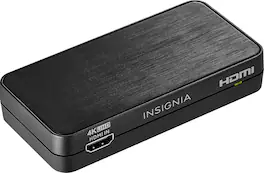
Convert the sound signals from HDMI to analog or optical output with this Insignia HDMI audio extractor. The 3.5mm jack makes connecting headphones or a speaker system as needed simple. This Insignia HDMI audio extractor lets you choose between stereo sound or 5.1 channels with the flip of a switch, providing a variety of audio options for different media.

Only @ Best BuyEasily link audio devices with digital audio outputs to devices with analog audio inputs using this Insignia NS-HZ313 digital-to-analog converter, which is optical or coaxial input selectable to accommodate a wide range of audio devices.

This one-way adapter allows you to connect HDMI devices to Legacy devices with this Insignia HDMI to RCA converter. Its HDMI inputs let you connect any newer devices to older TV’s and devices that use RCA connectors. This Insignia HDMI to RCA converter comes with an AC power supply that is needed for proper operation.
| Pros for AudioQuest - JitterBug FMJ USB 2.0 Power & Noise-Filters - Pair - Black | |||
|---|---|---|---|
| There were no pros for this product— | Ease of use, Compatibility, Price, Audio Quality, HDR Support | Ease of use, Compatibility, Price, Sound Quality, Connectivity | Ease of use, Compatibility, Performance, HDMI, Picture Quality |
| Cons for AudioQuest - JitterBug FMJ USB 2.0 Power & Noise-Filters - Pair - Black | |||
| There were no cons for this product— | Resolution | Volume Control | There were no cons for this product— |