Aura - Ambient Bias Lighting - White
- Key Specs
- Indoor or Outdoor Use: Indoor
- General
- Brand: Aura
- Model Number: A65C50
- Product Name: Ambient Bias Lighting
- Color: White
- Lighting
- Bulb Technology: LED
- Compatibility
- App Compatible: false (The product can be connected to a program or software application on a mobile device, which then receives collected data from the product.)
- Features
- Pre Programmed Modes: false
- Performance
- Indoor or Outdoor Use: Indoor
- Other
- UPC: 860436001121
Only at Best Buy
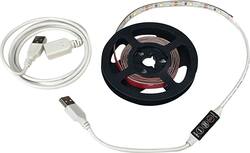
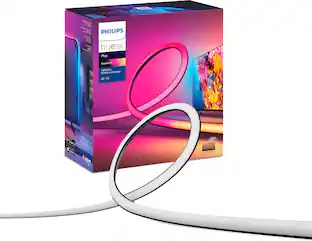
Ensure better contrast when gaming with this AURA bias lighting. The LED light strip simply fits behind your monitor in one continuous form, and you can use the included in-line controller to change colors and cycle through various modes. Use with almost any screen thanks to the one-size-fits-all nature of this AURA bias lighting.
- Transcendent gaming experience: Aura lighting is easy to install with its one-size-fits-all design.
- White LED bias lighting: Increases contrast for a better picture. Reduces eye fatigue and headaches for longer playing sessions
- USB-powered: The lighting can be powered by your computer's USB port or a standard wall adapter.
- In-line controller: Features an on/off switch and different modes.
Whats Included
- Aura Ambient Bias Lighting
Product Manuals
A: The light strip is 4 feet with another foot of cable, the USB extension cable is about 4 feet.
Q: how many feet of actual lightning is it?
A: 4 ft
Q: i can see that it is sold out but what is it? i'm curious.
A: A cheapo LED strip with a couple small buttons to control color and power. Seriously overpriced ... I suggest hitting Ebay or Amazon instead.
Q: Does it come up with an extension can I connect another set to those 4 feet so I can make it 8 feet
A: No
Q: Are you able to connect two of these together to extend the length?
A: No; you can start the non-USB end for one at the same end of the other, but there is no way to connect them together. A USB hub might work to centralize them for the power and you can split off the strips in different directions from there.
Q: Will the different colors adjust and change to match with what is being displayed on the screen?
A: No, You can set it to a color or set it to cycle through but it does not sync with what is displayed.
A: No!
People also viewed
 $52.99The price was $69.99
Today's top picks
 $499.99The price was $749.99
 $199.99The price was $249.99
 $789.99The price was $1,049.99