BenQ - GW2486TC 24" Class Full HD LED Monitor - 16:9 - 23.8" Viewable - In-plane Switching (IPS) Technology - LED - Black
BenQ - GW2486TC 24" Class Full HD LED Monitor - 16:9 - 23.8" Viewable - In-plane Switching (IPS) Technology - LED - Black
Related Item

Highlights
- Key Specs
- Refresh Rate: 144Hz (The number of frames per second the device can produce natively without enhancement. Higher rates help produce smooth, seamless pictures.)
- Maximum Resolution: 1920 x 1080 (Maximum resolution refers to the highest number of pixels that a screen can process and display. Higher resolution signals produce more detailed images.)
- Screen Size: 15.6 inches (Size of the screen, measured diagonally from corner to corner.)
- Display Connector(s): 1 x DisplayPort 1.2, 1 x HDMI 2.0, 1 x VGA (The number and type of connectors used to connect to an external display.)
- General
- Brand: BenQ
- Product Name: BenQ GW2486TC 24" Class Full HD LED Monitor - 16:9 - 23.8" Viewable - In-plane Switching (IPS) Technology - LED
- Color: Black
- Display
- Refresh Rate: 144Hz (The number of frames per second the device can produce natively without enhancement. Higher rates help produce smooth, seamless pictures.)
- Maximum Resolution: 1920 x 1080 (Maximum resolution refers to the highest number of pixels that a screen can process and display. Higher resolution signals produce more detailed images.)
- Contrast Ratio: 1000:1 (Measured difference between a displayed image's brightest whites and darkest blacks. The larger the first number, the more detail and color that can be displayed.)
- Display Type: LED
- Aspect Ratio: 16:9 (The measurement of the width of a screen compared to the height of a screen, expressed as a ratio.)
- Curved Screen: false
- Brightness: 250.0 candela per square meter (A measure of the total light output.)
- Screen Size: 15.6 inches (Size of the screen, measured diagonally from corner to corner.)
- Connectivity
- Number of HDMI Inputs (Total): 1
- Display Connector(s): 1 x DisplayPort 1.2, 1 x HDMI 2.0, 1 x VGA (The number and type of connectors used to connect to an external display.)
- Features
- Adjustable Stand Height: true
- Dimensions
- Product Width: 21.3 inches (The out of box width of the item. Width is measured as the horizontal distance from one side of the item to the other as it would be primarily used or placed.)
- Product Weight: 17.5 pounds (The out of box weight of the item.)
- Stand Included: true
- Certifications Listings & Approvals
- ENERGY STAR Certified: true (Devices carrying the ENERGY STAR service mark, such as computer products and peripherals, kitchen appliances, and other products, generally use 20% to 30% less energy than required by federal standards.)
- Warranty
- Warranty - Parts: 1 year
- Warranty - Labor: 1 year
- Other
- UPC: 840046050474
BenQ GW2486TC 24" Class Full HD LED Monitor - 16:9 - 23.8" Viewable - In-plane Switching (IPS) Technology - LED Backlight - 1920 x 1080 - 16.7 Million Colors - 250 Nit - 5 ms - Speakers - USB Type-C - HDMI - DisplayPort - VESA Mount Compatible - USB Hub
- Adapted to your needs | For Agile Setup: Simply connect and charge devices with USB-C or extend to one more GW2486TC for the best flexibility.
- For Productivity: Pivot, tilt, and swivel the monitor to adjust it to the optimal height ensuring productivity throughout the day.
- For Eye Comfort: Low blue light protection, flicker-free, and Eye-Care technology for comfortable viewing all day.
- Versatile Connectivity Directs Your Workflow: Perfect ports reduce cable clutter. One single USB-C cable simultaneously provides fast data transfer and 65W power delivery for your laptop and various personal devices. There are two extra USB-A ports make it easy to connect your peripherals.
- Expand to Multiple Displays: Connect your computer to create a multi-monitor setup for extra screen real estate and a decluttered workspace by daisy-chaining. Utilize pivot rotation to customize views on multiple displays.
Whats Included
- MAG 275UPD E14 monitor, DisplayPort cable (1.4a), power cord (C13), quick guide
Compare similar products

BenQ GW2486TC 24" Class Full HD LED Monitor - 16:9 - 23.8" Viewable - In-plane Switching (IPS) Technology - LED Backlight - 1920 x 1080 - 16.7 Million Colors - 250 Nit - 5 ms - Speakers - USB Type-C - HDMI - DisplayPort - VESA Mount Compatible - USB Hub

The GW2486TC is the best monitor for overall working and learning. It features industry-leading eye care technology to ensure eye comfort during prolonged use, a 100Hz refresh rate for smooth browsing and casual gaming, and an ergonomic design for ultimate comfort. With a USB-C connection for versatile setup and plug-and-go efficiency, this monitor also boasts an IPS panel and 99% sRGB coverage for excellent visual quality.

Experience gaming immersion with the 1500R subtle curve, mirroring your peripheral vision. 32-inch display aligns with the human eye's natural curvature, ensuring complete immersion.
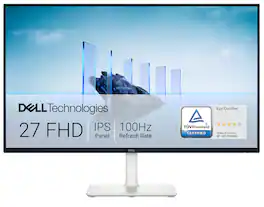
Dell 27 Monitor - S2725H. Made to be seen. And heard. With clear FHD resolution, high 100Hz refresh rate, integrated dual 5W speakers and subtle texture on the back inspired by Japanese sand raking, any activity becomes an immersive experience.
| Pros for BenQ - GW2486TC 24" Class Full HD LED Monitor - 16:9 - 23.8" Viewable - In-plane Switching (IPS) Technology - LED - Black | |||
|---|---|---|---|
| There were no pros for this product— | There were no pros for this product— | There were no pros for this product— | Sound Quality, Screen Size, Ease of Use, Refresh Rate, Cable Management |
Specs
Reviews
This product doesn't have any reviews yet.