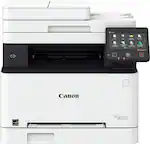
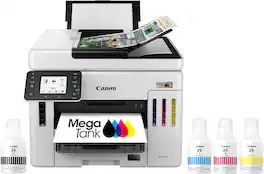
Canon - MAXIFY Megatank GX4020 Wireless All-In-One Supertank Inkjet Printer with Fax - White
Canon - MAXIFY Megatank GX4020 Wireless All-In-One Supertank Inkjet Printer with Fax - White
- Insignia™ - Multipurpose 8.5" x 11" 500-Count Paper - White$9.29
More Buying Options
Related Item

Specifications
- NetworkingWireless, WiredENERGY STAR CertifiedYesPrinter TypePrinter, Copier, Scanner, FaxISO Color Print Speed13 pages per minuteISO Mono Print Speed18 pages per minuteTouch ScreenYes
- Key Specs
- Networking: Wireless, Wired
- ENERGY STAR Certified: true (Devices carrying the ENERGY STAR service mark, such as computer products and peripherals, kitchen appliances, and other products, generally use 20% to 30% less energy than required by federal standards.)
- Printer Type: Printer, Copier, Scanner, Fax
- ISO Color Print Speed: 13 pages per minute (The number of color pages able to be printed per minute in the device's default single-side mode, as tested by the International Standards Organization (ISO).)
- ISO Mono Print Speed: 18 pages per minute (The number of black ink (grayscale) pages able to be printed per minute in the device's default single-side mode, as tested by the International Standards Organization (ISO).)
- Touch Screen: true (Touch-screen devices make navigating more intuitive. Using a touch-screen display, you can do things such as tap to select, hold and drag to move items, swipe to scroll, and pinch to zoom.)
- General
- Brand: Canon
- Model Number: 5779C002
- Product Name: MAXIFY Megatank GX4020 Wireless All-In-One Supertank Inkjet Printer with Fax
- Color: White
- Display Screen: true
- Display Screen Size: 2.7 inches
- Dimensions
- Product Height: 9.9 inches (The out of box height of the item. Height is measured as the vertical distance from the bottom of the item to the top as it would be primarily used or placed.)
- Product Width: 15.8 inches (The out of box width of the item. Width is measured as the horizontal distance from one side of the item to the other as it would be primarily used or placed.)
- Product Depth: 16.4 inches (The out of box depth of the item. Depth is measured as the distance from the front of the item to the back as it would be primarily used or placed.)
- Product Weight: 20.9 pounds (The out of box weight of the item.)
- Features
- Automatic Document Feeder: true
- Photo Printing: true
- Wide Format Printing: false (Machines with this function support printing on media with widths between 18 and 100 inches, such as posters, banners, canvases, and more.)
- Wide Format Scanning: false
- Monochromatic/Color: Color
- Automatic Two-Sided Printing: true
- Tray Capacity: 351
- Duty Cycle: Up to 30,000 (The maximum number of pages per month that the device can produce without failing, as specified by the manufacturer.)
- Connectivity
- Wired Connectivity: USB-A
- Wireless Connectivity: Wi-Fi (The manner in which a device sends data to another device over a short distance without the use of wires or cables.)
- Minimum System Requirements: Windows: Windows 7 SP1 – Windows 11. Windows Server: Windows Server 2008 R2 SP1 – Windows Server 2022. Mac: macOS Mojave 10.14.6 - macOS Monterey 12. Chromebook Compatible. Mobile Operating Systems: iOS, iPadOS, Android
- Certifications Listings & Approvals
- EPEAT Qualified: true (The Electronic Product Environmental Assessment Tool (EPEAT) was designed to provide an environmental assessment tool for purchasers. In order to qualify for EPEAT, a product must meet all 23 required criteria.)
- EPEAT Level: Gold (The Electronic Product Environmental Assessment Tool (EPEAT) was designed to provide an environmental assessment tool for purchasers. In order to qualify for EPEAT, a product must meet all 23 required criteria. Products are rated Bronze, Silver or Gold based on how many of 28 optional criteria they meet (below 50%, 50%, 75%).)
- Scanner Info
- Scanner Type: Flatbed, Sheetfed
- Duplex Scan Function: true
- Scanner Resolution: Up to 1200 x 2400 (Refers to the number of pixels/dots, both horizontally and vertically, of the image produced by the scanner. Generally, the higher the resolution, the sharper and cleaner the produced image.)
- Fax Info
- Integrated Fax: true
- Ink
- Compatible Cartridges: Canon GI-26
- Ink Subscription Service Available: false (The printer monitors ink usage and alerts the subscription provider when levels are low. A purchased subscription provides refills of ink based on usage.)
- Ink Cartridges Required: None (The quantity and color of ink cartridges required for the printer to operate.)
- Ink Cartridges Included: None (The quantity and color of ink cartridges included.)
- Ink Bags/Bottles Required: 1 x Black, 1 x Cyan, 1 x Magenta, 1 x Yellow (The quantity and color of ink bags/bottles required for the printer to operate.)
- Ink Bags/Bottles Included: 1 x Black, 1 x Cyan, 1 x Magenta, 1 x Yellow (The quantity and color of ink bags/bottles included.)
- Memory
- Memory Card Slot: false
- Paper Info
- Automatic Document Feeder Capacity: 35 sheets
- Maximum Document Length: 47 inches
- Maximum Document Width: 8.5 inches
- Supported Paper Sizes: 4” x 6”, 5” x 5” (Square), 5” x 7”, 7” x 10”, 8” x 10”, Letter (8.5” x 11”), Legal (8.5” x 14”), U.S. #10 Custom Size: 3.5” - 8.5” / Length: 5” x 47”
- Paper Feeder: Tray loader, Cassette
- Paper Handling: 1 cassette: 250 sheets; 1 rear paper tray: 100 sheets or 20 sheets 4 x 6; 1 rear flat tray: 1 sheet
- Compatible Media Types: [Plain: Plain Paper, Canon High Resolution Paper;, Glossy: Photo Paper Plus Glossy II, Photo Paper Glossy, Semi-Gloss: Photo Paper Plus Semi-Gloss, Photo Paper Pro Luster, Matte: Matte Photo Paper, Double-sided Matte Paper, Other (Canon): Magnetic Photo Paper, Restickable Photo Paper; Other (non-Canon): Cardstock, Greeting Card, U.S. #10 Envelopes, Recycled paper and Chlorine-free paper can be used]
- Performance
- First Page Out Time: 8 seconds (The time it takes the printer to print and deliver the first page in the output tray. May depend on the complexity of the copy being printed.)
- Printer Resolution (Black): Up to 600 x 1200 (Refers to the number of pixels/dots, both horizontally and vertically, of the image produced by the printer in black ink. Generally, the higher the resolution, the sharper and cleaner the produced image.)
- Printer Resolution (Color): Up to 600 x 1200 (Refers to the number of pixels/dots, both horizontally and vertically, of the image produced by the printer in colored ink. Generally, the higher the resolution, the sharper and cleaner the produced image.)
- Warranty
- Warranty - Parts: 3-Year or 80,000 Page Limited Warranty
- Warranty - Labor: 3-Year or 80,000 Page Limited Warranty
- Compatibility
- Works With: Amazon Alexa, Google Home (Compatible with or able to be connected to other smart devices or applications.)
- Other
- UPC: 013803350999
Designed for home offices and small businesses, the Canon MAXIFY GX4020 delivers high-quality, low-cost printing, and outstanding wireless connectivity in a compact size. Get serious print productivity with a high page yield of up to 6,000 Black / 14,000 Color pages per full ink bottle set and a low cost per print of less than 2 cents per page1. The MAXIFY GX4020 comes with a full set of ink and a 3-year or 80,000 pages2 limited warranty so you can print with confidence. The MAXIFY GX4020 is easy to set up and maintain and offers great media versatility to print on a variety of media types and sizes, including business cards, envelopes, banners and more. Produce crisp, colorful documents quickly and cost-effectively with fast print speeds and a high quality 4-color pigment-based ink system. Keep printing with a large combined plain paper capacity of up to 350 sheets. Easily connect and print through high-speed USB, Ethernet, or wirelessly3 from computers or mobile devices. This model is backed by Canon's Service and Support network.
- 2.7" LCD Screen: Get the job done easy with an intuitive and easy to use 2.7” LCD touch screen.
- High page yield: Print up to 6,000 black pages / 14000 color pages with just a single set of inks.6
- Up to 600 X 1200 DPI9: Medium resolution for producing sharp text, even at 6 points or smaller, and graphics with thin lines and curves.
- Ethernet connectivity: Built-In Ethernet connection for Wired LAN support.
- Wireless connect: Easy Wi-Fi setup in minutes. Connect to Wi-Fi without the need for a computer.
- Mobile device printing: Print from your favorite mobile devices using the free Canon PRINT app, Apple AirPrint and Mopria Print Service.
- Built-in duplex printing: Print on both sides of the page without turning it over manually, to minimize your printing costs and help the environment.
- More print, copy and scan solutions: Automatically print 2-sided documents, scan documents to your computer or directly to e-mail, send quick faxes and more.
- Inkjet printers are best for home or small business use: They offer excellent print quality for photos and documents and accept a variety of paper types and sizes.
- Easy to refill: The ink bottles have a "keyed nozzle" design to only fit and fill the correct colo ink tank.
- Easy setup: Get running in just a few minutes thanks to a streamlined and easy setup process out of the box.
- Compact size: Not only are the MAXIFY GX series printers packed with features, they're also designed small to fit your workspace.
- Auto Document Feeder: Copy multi-page documents with ease with the 35-sheet ADF.
- Disclaimers: Page yield is the estimated value based on Canon individual testing method using ISO/IEC 24712 test chart and continuous printing simulation with full set of replacement ink bottles after initial setup.
Whats Included
- MAXIFY GX4020 Wireless MegaTank Small Office All-in-One Printer
- Set Up of Ink Bottles (GI-26: BK, C, M, Y)
- Documentation
- Power Cord
- Fax Modular Cable
Product Manuals
Disclaimers
- *Requires a high-speed Internet connection.
Q: Can I print on both sides of the paper with this printer?
A: Yes, the printer has a built-in duplex printing feature that allows you to print on both sides without manually flipping the paper.
Q: What is the maximum number of sheets the automatic document feeder can hold?
A: The automatic document feeder has a capacity of 35 sheets.
Q: How do I refill the ink in this printer?
A: The ink bottles are designed with a "keyed nozzle" to ensure you fill the correct color ink tank.
Q: What is the page yield of this Canon printer?
A: This printer can print up to 6,000 black pages and 14,000 color pages with a single set of ink bottles.
Q: What is the resolution of the scanner on this Canon printer?
A: The scanner has a resolution of up to 1200 x 2400.
Q: Does this printer have wireless connectivity?
A: Yes, you can easily connect to Wi-Fi without needing a computer.
Q: Can you disable the auto shut off or at least extend it for several hours?
A: Yes, you can disable auto shut off. 1. From the main " Copy Scan MyPresets" panel, select the gear at the bottom. 2. On the next panel, select Printer Settings. 3. On the Printer Settings panel select Other printer settings. 4. On the Other printer settings panel, scroll down and select Power Control. 5. On the Change Power Control panel, select Do not use power control. 6. You will be notified of the change and then use the return arrow button on the left of the panel a number of times to return to the mail panel.
Q: How much space do you need between the back of the printer and a wall?
A: You need about 2 1/2 inches for a paper tray that sticks out of the back of the printer.
Compare similar products
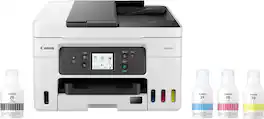
Designed for home offices and small businesses, the Canon MAXIFY GX4020 delivers high-quality, low-cost printing, and outstanding wireless connectivity in a compact size. Get serious print productivity with a high page yield of up to 6,000 Black / 14,000 Color pages per full ink bottle set and a low cost per print of less than 2 cents per page1. The MAXIFY GX4020 comes with a full set of ink and a 3-year or 80,000 pages2 limited warranty so you can print with confidence. The MAXIFY GX4020 is easy to set up and maintain and offers great media versatility to print on a variety of media types and sizes, including business cards, envelopes, banners and more. Produce crisp, colorful documents quickly and cost-effectively with fast print speeds and a high quality 4-color pigment-based ink system. Keep printing with a large combined plain paper capacity of up to 350 sheets. Easily connect and print through high-speed USB, Ethernet, or wirelessly3 from computers or mobile devices. This model is backed by Canon's Service and Support network.
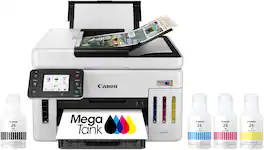
The Canon MegaTank GX6120 Wireless Small Office All-In-One Printer is designed to meet the needs of small offices by delivering high-quality, low-cost printing, and outstanding wireless connectivity. Get serious print productivity with a high page yield of up to 6,000 Black / 14,000 Color pages per full ink bottle set and a combined 350 sheet plain paper capacity. Each printer comes with a full set of ink, plus 2 bonus black ink bottles, and a 3-year or 80,000 pages* limited warranty so you can print with confidence. The MegaTank GX6120 is easy to setup and maintain and delivers superior versatility thanks to an auto document feeder for scanning and copying - plus, print on a variety of media types and sizes, including labels, envelopes, and banners. Produce crisp, colorful documents quickly and cost-effectively thanks to fast print speeds and a 4-color pigment-based ink system. Easily connect and print through high-speed USB, Ethernet, or wirelessly from computers or mobile devices.
The Canon MegaTank GX7120 Wireless Home & Office All-In-One Printer is designed to meet the needs of small offices by delivering high-quality, low-cost printing, and outstanding wireless connectivity. Get serious print productivity with a high page yield of up to 6,000 Black / 14,000 Color pages per full ink bottle set and a combined 600 sheet plain paper capacity. Each printer comes with a full set of ink, and a 3-year or 80,000 pages* limited warranty so you can print with confidence. The MegaTank GX7120 is easy to setup and maintain and delivers superior versatility thanks to an auto document feeder for scanning, copying, and faxing— plus, print on a variety of media types and sizes, including labels, envelopes, and banners. Produce crisp, colorful documents quickly and cost-effectively thanks to fast print speeds and a 4-color pigment-based ink system. Connectivity is paramount with the GX7120, easily connect and print through high-speed USB, Ethernet, or wirelessly from computers or mobile devices.

Business quality printing from the comfort of home: Canon MegaTank printers are a great choice for high quality printing, value, and performance to help you get the job done. Great for hybrid working environments, the GX2020 has plenty of features to keep you productive from home or office, with office-like print quality. The GX2020 MegaTank All-in-One inkjet printer delivers high-quality, low-cost printing, and outstanding wireless connectivity in a compact size. Get serious print productivity with a high page yield of up to 3,000 Black / 3,000 Color pages with just a single set of inks. Plus, the GX2020 comes with a 3-year limited warranty or 60,000 pages (whichever comes first)* and is backed by Canon’s friendly and knowledgeable Service and Support network, so you can have peace of mind and focus on the business at hand. You’ll get a stable, reliable connection with dual band WiFi,¹ fast print speeds and generous paper capacity of up to 250 sheets. The GX2020 also has a built in 35-sheet automatic document feeder, so you can copy multi-page documents with ease. The adjustable 2.7-inch touchscreen makes it easy to view and navigate through functions. The GX2020 is easy to set up and maintain and offers great media versatility to print on a variety of media types and sizes, including photo paper, envelopes, banners and more. Create beautiful and professional posters, banners and signage with Poster Artist Online.⁶ Print both documents and photos on a variety of paper types using a 4-color pigment-based ink system for sharp black text and dye-based colors for vivid photos up to 8.5” x 14”. Setting up the GX2020 is easy. You can connect through high-speed USB or wirelessly¹ from computers or mobile devices. The GX2020 is also Chromebook compatible.
| Pros for Canon - MAXIFY Megatank GX4020 Wireless All-In-One Supertank Inkjet Printer with Fax - White | |||
|---|---|---|---|
| Print Quality, Setup, Size, Ease of use, Overall Performance | Print Speed, Ease of Use | There were no pros for this product— | Print Quality, Setup, Size |
| Cons for Canon - MAXIFY Megatank GX4020 Wireless All-In-One Supertank Inkjet Printer with Fax - White | |||
| Connectivity, Noise Level | There were no cons for this product— | There were no cons for this product— | There were no cons for this product— |
Specs
Reviews
Customers are saying
Customers are satisfied with the MAXIFY Megatank GX4020 Wireless Printer's print quality, ease of use, and simple setup. Many find its overall performance amazing and appreciate its size. However, some customers have noted issues with connectivity and the printer's noise level.
Customer Images
The vast majority of our reviews come from verified purchases. Reviews from customers may include My Best Buy members, employees, and Tech Insider Network members (as tagged). Select reviewers may receive discounted products, promotional considerations or entries into drawings for honest, helpful reviews.
- Rated 5 out of 5 stars
In Store Availability
It really does have the best pictures & documents!! I am a lover of making pictures & Very very Happy that I chose this Printer, & was able to buy it in person at Best Buy!!!! Can’t go wrong with what you are happiest with!! The whole process was very easy, & the young man that was working with me & what I wanted “by name of the product. He actually knew about the product and asked me if I really needed that much of a printer. And he explained why he asked me, He just wanted to make sure that I really needed everything involved (picture making, fax, copy, scan, all wirelessly, in this printer (if I didn’t need to, there were other styles that was cheaper, with the same Company & Product, just a less items on the other printers. I really appreciated that he DIDN’T try to Over-Sell me!!!! I told him that I had investigated them online and this was the only one that had everything that I wanted, He helped me to get it paid for. I was so happy with this purchase from an associate that knew how to listen, and, he helped me eagerly “without earning a commission!! He would’ve been worth the commission!!!! Good hunting (for whatever you actually want)!!
dianeishome2 Posted
- Rated 4 out of 5 stars
Beautiful SF
Easy to use, setting up was a pain in the rear end. I didn't know the machine needed a maintenance cartridge.
SFChaseCenter Posted
- Rated 1 out of 5 stars
Not Canon's best quality.
Randomly disappears from our home Wi-Fi network at home. Sometimes cycling the printer off/on restores availability. Other times cycling the network is required. Very annoying. After just over 2 weeks of use, foam on scanned lid is falling off. Not an encouraging sign for durability. I scan frequently, wrestling the foam down with out moving the document is a pain.
MichaelL Posted