Save up to 50% on 3-Day Sale deals.Ends 12/7.Shop now

Skip to content
Main Content

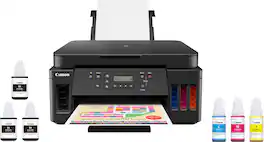
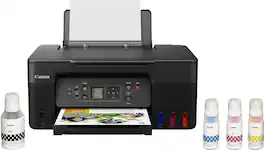
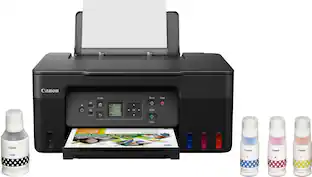
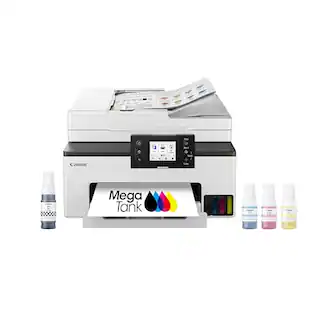
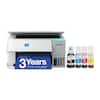
Canon - PIXMA Megatank G6020 Wireless All-In-One Supertank Inkjet Printer - Black

Model: 3113C002
SKU: 6356231
$199.00
Save $124
Comp. Value: $323.00
or
Finance OptionsView your offers
Standard Geek Squad Protection
Availability
Fulfillment Options
Pickup at
Act fast - Only 3 left at your store!
Sold by Best Buy

More Buying Options

Specifications
  • Networking
    Wireless, Wired
    ENERGY STAR Certified
    Yes
    Printer Type
    All In One, Copier, Printer, Scanner
    ISO Color Print Speed
    6.8 pages per minute
    ISO Mono Print Speed
    13 pages per minute
    Touch Screen
    No
  • Key Specs
    • Networking: Wireless, Wired
    • ENERGY STAR Certified: true (Devices carrying the ENERGY STAR service mark, such as computer products and peripherals, kitchen appliances, and other products, generally use 20% to 30% less energy than required by federal standards.)
    • Printer Type: All In One, Copier, Printer, Scanner
    • ISO Color Print Speed: 6.8 pages per minute (The number of color pages able to be printed per minute in the device's default single-side mode, as tested by the International Standards Organization (ISO).)
    • ISO Mono Print Speed: 13 pages per minute (The number of black ink (grayscale) pages able to be printed per minute in the device's default single-side mode, as tested by the International Standards Organization (ISO).)
    • Touch Screen: false (Touch-screen devices make navigating more intuitive. Using a touch-screen display, you can do things such as tap to select, hold and drag to move items, swipe to scroll, and pinch to zoom.)
  • General
    • Brand: Canon
    • Model Number: 3113C002
    • Product Name: PIXMA Megatank G6020 Wireless All-In-One Supertank Inkjet Printer
    • Color: Black
    • Display Screen: true
    • Display Screen Size: 2 inches
  • Dimensions
    • Product Height: 7.7 inches (The out of box height of the item. Height is measured as the vertical distance from the bottom of the item to the top as it would be primarily used or placed.)
    • Product Width: 15.9 inches (The out of box width of the item. Width is measured as the horizontal distance from one side of the item to the other as it would be primarily used or placed.)
    • Product Depth: 14.6 inches (The out of box depth of the item. Depth is measured as the distance from the front of the item to the back as it would be primarily used or placed.)
    • Product Weight: 17.8 pounds (The out of box weight of the item.)
  • Features
    • Automatic Document Feeder: false
    • Photo Printing: true
    • Wide Format Printing: false (Machines with this function support printing on media with widths between 18 and 100 inches, such as posters, banners, canvases, and more.)
    • Wide Format Scanning: false
    • Monochromatic/Color: Color
    • Automatic Two-Sided Printing: true
    • Tray Capacity: 350
    • Duty Cycle: Up to 5,000 (The maximum number of pages per month that the device can produce without failing, as specified by the manufacturer.)
  • Connectivity
    • Wired Connectivity: USB-A, Ethernet
    • Wireless Connectivity: Wi-Fi (The manner in which a device sends data to another device over a short distance without the use of wires or cables.)
  • Certifications Listings & Approvals
    • EPEAT Qualified: false (The Electronic Product Environmental Assessment Tool (EPEAT) was designed to provide an environmental assessment tool for purchasers. In order to qualify for EPEAT, a product must meet all 23 required criteria.)
  • Scanner Info
    • Scanner Type: Flatbed
    • Duplex Scan Function: false
    • Scanner Resolution: Up to 1200 x 2400 (Refers to the number of pixels/dots, both horizontally and vertically, of the image produced by the scanner. Generally, the higher the resolution, the sharper and cleaner the produced image.)
  • Fax Info
    • Integrated Fax: false
  • Ink
    • Compatible Cartridges: Canon GI-20
    • Ink Subscription Service Available: false (The printer monitors ink usage and alerts the subscription provider when levels are low. A purchased subscription provides refills of ink based on usage.)
    • Ink Cartridges Required: None (The quantity and color of ink cartridges required for the printer to operate.)
    • Ink Cartridges Included: None (The quantity and color of ink cartridges included.)
    • Ink Bags/Bottles Required: 1 x Black, 1 x Cyan, 1 x Magenta, 1 x Yellow (The quantity and color of ink bags/bottles required for the printer to operate.)
    • Ink Bags/Bottles Included: 1 x Black, 1 x Cyan, 1 x Magenta, 1 x Yellow (The quantity and color of ink bags/bottles included.)
  • Memory
    • Memory Card Slot: false
  • Paper Info
    • Maximum Document Length: 26 inches
    • Maximum Document Width: 8.5 inches
    • Supported Paper Sizes: 3.5 x 3.5, 4 x 4, 4 x 6, 5 x 5, 5 x 7, 7 x 10, 8 x 10, Letter, Legal, U.S. #10 Envelopes
    • Paper Feeder: Tray loader, Cassette
    • Paper Handling: Front paper cassette: 250 sheets of plain paper; rear paper tray: 100 sheets of plain paper or 20 sheets of 4 x 6 / 10 sheets of 5 x 7 photo paper
    • Compatible Media Types: [Plain Paper, Canon High Resolution Paper, Photo Paper Pro Platinum, Photo Paper Glossy II, Photo Paper Pro Luster, Matte Photo Paper]
  • Copier Info
    • Maximum Number Of Copies: 99
  • Performance
    • First Page Out Time: 9 seconds (The time it takes the printer to print and deliver the first page in the output tray. May depend on the complexity of the copy being printed.)
    • Printer Resolution (Black): Up to 4800 x 1200 (Refers to the number of pixels/dots, both horizontally and vertically, of the image produced by the printer in black ink. Generally, the higher the resolution, the sharper and cleaner the produced image.)
    • Printer Resolution (Color): Up to 4800 x 1200 (Refers to the number of pixels/dots, both horizontally and vertically, of the image produced by the printer in colored ink. Generally, the higher the resolution, the sharper and cleaner the produced image.)
  • Warranty
    • Warranty - Parts: 1 year limited
    • Warranty - Labor: 1 year limited
  • Compatibility
    • Works With: Amazon Alexa, Google Home (Compatible with or able to be connected to other smart devices or applications.)
  • Other
    • UPC: 013803317824

Canon PIXMA MegaTank G6020 Wireless All-In-One Printer: Save big on ink with this Canon PIXMA MegaTank inkjet printer. The MegaTank ink storage container can be easily refilled to offer over 30 times as much ink compared to standard cartridges. Tackle big print jobs with a page yield of up to 6,000 black or 7,700 color sheets from this Canon PIXMA MegaTank inkjet printer.

Printer Buying Guide

Prints up to 13 ISO ipm* in black, up to 6.8 ISO ipm* in color

  • Prints up to 13 ISO ipm* in black and up to 6.8 ISO ipm* in color: Produces a 4" x 6" borderless photo-quality print in 45 seconds.*
  • Works with Amazon Alexa for voice control: Ask a compatible voice assistant (device required) to help you print shopping and to-do lists, various crossword puzzles and games, coloring activities, comics and more.
  • Compatible with Google Assistant: Use the Google Assistant (device required) to print your Google Calendar, various crossword puzzles and games, comics and more.
  • Ideal for home or small business use: This inkjet printer offers excellent print quality for photos and documents and accepts a variety of paper types and sizes.
  • Wireless and mobile printing capability: Connect this printer to your home or office network with built-in Ethernet or wireless LAN. You can also print from your mobile device with the free Canon PRINT app or Apple AirPrint.
  • Apple AirPrint enabled: You can use it for Apple iPad and iPhone printing.
  • Up to 4800 x 1200 dpi (dots per inch) color resolution: High resolution allows producing incredible quality and detail in documents and photos.
  • Four economical individual ink tanks: Only replace the ink tank you need when a color runs out. Three dye-based inks produce vivid color in photos, and the pigment-based black ink provides crisp text.
  • Large paper trays for high-volume printing: Reload less often with 250-sheet front and 100-sheet rear input trays.
  • Monochrome two-line full dot-matrix display: Easily input commands for printing, copying, and scanning directly from the printer.
  • USB port for simple connectivity: The high-speed USB 2.0 port offers a standard connection to your PC.
  • More print, copy, and scan solutions: Automatically print two-sided documents, scan documents to your computer or directly to e-mail.
Whats Included
  • 2x Bonus Black (PGBK) Ink Bottles
  • 4" x 6" Photo Paper Sample Pack
  • Black Print Head
  • Canon PIXMA MegaTank G6020 Wireless All-In-One Inkjet Printer
  • Color Print Head
  • Full Set of Ink Bottles (PGBK, C, M, Y)
  • Owner's manual
  • Power Cord
  • Setup CD
Disclaimers
  • *Requires a high-speed Internet connection.

Q: What is the resolution of the scanner on this Canon printer?

A: The scanner on this Canon printer offers a resolution up to 1200 x 2400.

Q: What is the paper tray capacity of this Canon printer?

A: This Canon inkjet printer has a 250-sheet front and a 100-sheet rear input tray, giving it a total capacity of 350 sheets.

Q: Can I connect this Canon printer to my computer using a USB port?

A: Yes, this Canon printer has a high-speed USB 2.0 port for a standard connection to your PC.

Q: How fast can this Canon printer print in black?

A: This Canon printer can print up to 13 ISO ipm* in black.

Q: Does this Canon printer come with ink cartridges?

A: No, this Canon printer uses a refillable ink tank system and does not use traditional ink cartridges.

Q: Does this Canon printer offer wireless connectivity?

A: Yes, this Canon printer can connect to your home or office network using built-in Ethernet or wireless LAN.

Q: Can I print double-sided documents with this Canon printer?

A: Yes, this Canon inkjet printer allows you to automatically print two-sided documents.

Q: comes with ink

A: This Canon G6020 All-in-One Printer comes with one bottle (70 ml) each of Cyan, Yellow and Magenta ink which will fill the color ink tanks. It also includes three bottles (170 ml each) of black ink. That will fill the black ink tank and give you two refills. You have enough ink for 18,000 pages of black ink and 7,700 pages of color documents included with the printer!

Sponsored

Compare similar products

Canon - PIXMA Megatank G6020 Wireless All-In-One Supertank Inkjet Printer - Black

Canon PIXMA MegaTank G6020 Wireless All-In-One Printer: Save big on ink with this Canon PIXMA MegaTank inkjet printer. The MegaTank ink storage container can be easily refilled to offer over 30 times as much ink compared to standard cartridges. Tackle big print jobs with a page yield of up to 6,000 black or 7,700 color sheets from this Canon PIXMA MegaTank inkjet printer. Prints up to 13 ISO ipm* in black, up to 6.8 ISO ipm* in color

Canon - PIXMA Megatank G620 Wireless All-In-One Supertank Inkjet Printer - Black
4.4(86)

Print more stunning photos for less with the Canon PIXMA G620 MegaTank Photo Printer. On just one full set of ink bottles, you can print up to 3,800 4” x 6” color photos1 — just 2.5 cents per print2! With a 6-Color Dye-based Ink system, including Red and Gray inks, you will get beautiful vivid photos with an expanded color gamut. Designed for high volume, high quality photo printing, the PIXMA G620 is perfect for memory makers & keepers for photo albums, scrapbooks, and more. Plus, setup out of the box is a breeze and printing is easy through high-speed USB or wirelessly5 from a computer or mobile devices.

Canon - PIXMA Megatank G3270 Wireless All-In-One Supertank Inkjet Printer - Black

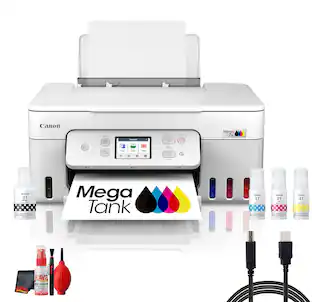
Designed for home and home offices, the Canon PIXMA G3270 MegaTank All-in-One inkjet printer delivers high-quality, low-cost printing, and outstanding wireless connectivity in a compact size. Get serious print productivity with a high page yield of up to 6,000 Black / 7,700 Color pages per full ink bottle1 set and a low cost per print - MegaTank means Mega Savings. The PIXMA G3270 comes with a full set of ink, so you can print with confidence. The PIXMA G3270 is easy to set up and maintain and offers great media versatility to print on a variety of media types and sizes, including photo paper, envelopes, banners and more. Use Poster Artist Online to create professional-posters, banners and signage. Print both documents and photos on a variety of paper types using a hybrid ink system with pigment black for sharp black text and dye-based colors for vivid borderless2 photos up to 8.5” x 11”. Produce crisp, colorful documents quickly and cost-effectively with fast print speeds and a high quality 4-color pigment-based ink system. Keep printing with a plain paper capacity of up to 100 sheets or 20 photo sheets (4”x6”). Easily connect and print through high-speed USB or wirelessly2 from computers or mobile devices. This comes with a 1-year limited warranty3 and is backed by Canon's Service and Support network.

Canon - PIXMA Megatank G3290 Wireless All-In-One Supertank Inkjet Printer - White
4.5(11)

Designed for home and home offices, the Canon PIXMA G3290 MegaTank All-in-One inkjet printer delivers high-quality, low-cost printing, and outstanding wireless connectivity in a compact size. Get serious print productivity with a high page yield of up to 6,000 Black / 7,700 Color pages per full ink bottle ¹ set and a low cost per print - MegaTank means Mega Savings. The PIXMA G3290 comes with a full set of ink, so you can print with confidence. The PIXMA G3290 is easy to set up and maintain and offers great media versatility to print on a variety of media types and sizes, including photo paper, envelopes, banners and more. Use Poster Artist Online ⁷ to create professional-posters, banners and signage. Print both documents and photos on a variety of paper types using a hybrid ink system with pigment black for sharp black text and dye-based colors for vivid borderless ² photos up to 8.5” x 11”. Produce crisp, colorful documents quickly and cost-effectively with fast print speeds and a high quality 4-color pigment-based ink system. Keep printing with a plain paper capacity of up to 100 sheets or 20 photo sheets (4”x6”). Easily connect and print through high-speed USB or wirelessly³ from computers or mobile devices. Print on the go using Canon PRINT ⁴ and more using your compatible mobile device. This comes with a 1-year limited warranty ⁵ and is backed by Canon's Service and Support network.

Pros for Canon - PIXMA Megatank G6020 Wireless All-In-One Supertank Inkjet Printer - Black
Print Quality, Ease of use, Overall Performance, SetupPrint Quality, Ease of use, Overall PerformancePrint Quality, Ease of use, Overall Performance, Setup, ConnectivityPrint Quality, Setup Ease
Cons for Canon - PIXMA Megatank G6020 Wireless All-In-One Supertank Inkjet Printer - Black
Display, Noise Level, Connectivity, Control PanelDisplayNoise Level, Automatic Document FeederThere were no cons for this product

Specs

Reviews

Customers are saying

Customers are pleased with the PIXMA MegaTank G6020's exceptional print quality and ease of use, finding it easy to set up and compact in size. However, some users experienced issues with the printer's reliability and found the display and control panel difficult to use in low-light conditions. The wireless functionality was also appreciated by many users.

This summary was generated by AI based on customer reviews.

Customer Images

The vast majority of our reviews come from verified purchases. Reviews from customers may include My Best Buy members, employees, and Tech Insider Network members (as tagged). Select reviewers may receive discounted products, promotional considerations or entries into drawings for honest, helpful reviews.

  • Rated 5 out of 5 stars

    Highly recommend

    Way yo set up, easy to use, and the output is FAST and CRISP. i love that i can see the ink levels in each tank. The paper tray holds a generous number of sheets and it is simple to load. The control panel buttons are a good size snd the scren, although small, is easy to read with the tilting feature. Highly recommend.

    Posted by IsabelleS

  • Rated 5 out of 5 stars

    Best Printer option for the Price

    I did a lot of research for the ideal home printer. I didn't need anything TOO fancy or for large projects, but did want the ability to use various card stocks, refill my ink instead of buying cartridges, and the ability to print to it using my wifi network from my desktop/phones. It works with my PC, from iPad, iPhone, my Samsung (so far). The only time it had issues, I just had to reinstall drivers. The printer quality is excellent and there is a lot of information online if you run into an issue. Canon is helpful to reach out to, too. This is going to last you for a long time if you do not mistreat it. Always turn it off if you are going to attempt any repairs. I highly recommend this printer to anyone for the pricepoint. Comes with a good warranty.

    This review is from Canon - PIXMA Megatank G6020 Wireless All-In-One Supertank Inkjet Printer - Black

    Posted by LisaT

  • Rated 4 out of 5 stars

    Canon, it prints.

    I would like to say it’s 100% the best printer ever, but it’s not. It’s not bad, but it’s not the best. We were forced into buying a new printer when our 2005 HP software quit updating and was found to be useless. So I put on my investigative had to find a print as good if not better then the HP. I came to the conclusion that this Canon would fit the bill. I like the color tanks for ink and I pray they don’t dry out like many tank types do. The Canon prints very well but we have had trouble just pressing print on the computer and the Canon just printing. For some reason our Imac/Crome Internet search engine don’t print on the Canon. But when I print from the same page on Safari it will print??? I am a simple man and just want my devices to work seamlessly, that’s why I by Apple products, I just want it to work and don’t want reboot every time I need to work on the computer. It has double sided print ability that works well but I really don’t need it. I haven’t printed any color pictures yet to see it’s quality, so far this printer has done just that, print. Here is hoping for 15 yrs or more or happy printing.

    Posted by RRGOULD

No content
Sponsored

Similar products from outside of Best Buy

sponsored

Finance Options

My Best Buy® Credit Card
10% back in rewardson your first day of purchases when approved for the My Best Buy® Credit Card.
Buy Now, Pay Later
4 payments starting at $49.75
Lease to own
Apply today with no credit needed and enjoy flexible payment options.